

Programming Tips
12 Ways to Apply a Function to Each Row in Pandas DataFrame
How to efficiently iterate over rows in a Pandas DataFrame and apply a function to each row.
Applying a function to all rows in a Pandas DataFrame is one of the most common operations during data wrangling. Pandas DataFrame apply function is the most obvious choice for doing it. It takes a function as an argument and applies it along an axis of the DataFrame. However, it is not always the best choice.
In this article, you will measure the performance of 12 alternatives. With a companion Code Lab, you can try it all in your browser. No need to install anything on your machine.
Problem
Recently, I was analyzing user behavior data for an e-commerce app. Depending on the number of times a user did text and voice searches, I assigned each user to one of four cohorts:
- No Search: Users who did no search at all
- Text Only: Users who did text searches only
- Voice Only: Users who did voice searches only
- Both: Users who did both text and voice search
It was a huge data set with 100k to a million users depending upon the chosen time slice. Computing it with Pandas apply function was excruciatingly slow, so I evaluated alternatives. This article is the distilled lessons from that.
I can’t share that dataset. So I am picking another similar problem to show the solutions: the Eisenhower method.
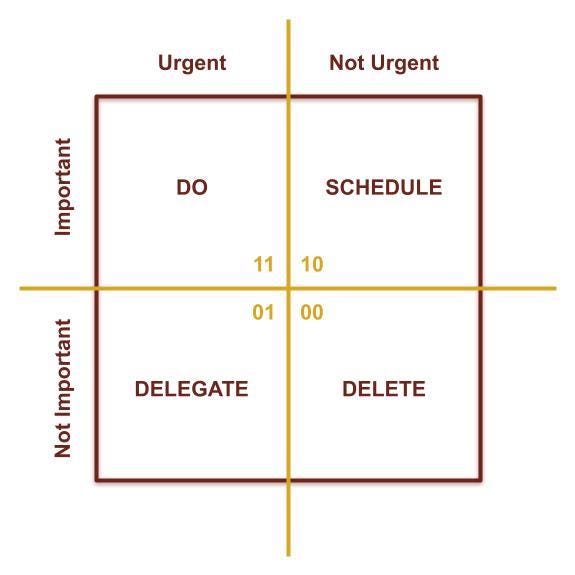
Based on a task’s importance and urgency, the Eisenhower Method assigns it into one of 4 bins. Each bin has an associated action:
- Important and Urgent: Do right away
- Important but not Urgent: Schedule for later
- Not Important but Urgent: Delegate to someone else
- Neither Important nor Urgent: Delete time wasters.
We will use the boolean matrix shown in the adjacent figure. Importance and urgency booleans make the binary integer value for each action: DO(3), SCHEDULE(2), DELEGATE(1), DELETE(0).
We will profile the performance of mapping tasks to one of the actions. We will measure which of the 12 alternatives take the least amount of time. And we will plot the performance for up to a million tasks.
It is a good time to open the companion notebook at Google Colab or Kaggle. If you want to see the code in action, you can execute the cells in the Code Lab as you read along. Go ahead and execute all the cells in the Setup section.
Test Data
Faker is a handy library to generate data. In the Code Lab, it is used for generating a DataFrame with a million tasks. Each task is a row in the DataFrame. It consists of task_name (str), due_date (datetime.date), and priority (str). Priority can be one of the three values: LOW, MEDIUM, HIGH.

Optimize DataFrame Storage
We will minimize the storage size to eliminate its effect on any of the alternatives. The DataFrame with ~2 million rows is taking 48MB:
>>> test_data_set.info()<class 'pandas.core.frame.DataFrame'>
RangeIndex: 2097153 entries, 0 to 2097152
Data columns (total 3 columns):
# Column Dtype
--- ------ -----
0 task_name object
1 due_date object
2 priority object
dtypes: object(3)
memory usage: 48.0+ MBInstead of str, priority can be stored as Pandas categorical type:
priority_dtype = pd.api.types.CategoricalDtype(
  categories=['LOW', 'MEDIUM', 'HIGH'],
  ordered=True
)test_data_set['priority'] = test_data_set['priority'].astype(priority_dtype)Let’s check out the DataFrame size now:
>>> test_data_set.info()<class 'pandas.core.frame.DataFrame'>
RangeIndex: 2097153 entries, 0 to 2097152
Data columns (total 3 columns):
# Column Dtype
--- ------ -----
0 task_name object
1 due_date object
2 priority category
dtypes: category(1), object(2)
memory usage: 34.0+MBSize is reduced to 34MB.
Eisenhower Action Function
Given importance and urgency, eisenhower_action computes an integer value between 0 and 3.
def eisenhower_action(is_important: bool, is_urgent: bool) -> int:
  return 2 * is_important + is_urgent
For this exercise, we will assume that a task with HIGH priority is important. If the due date is in the next two days, then the task is urgent.
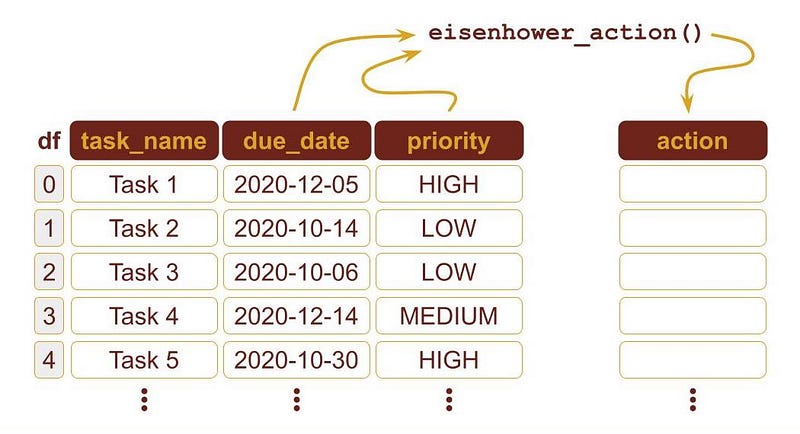
The Eisenhower Action for a task (i.e. a row in the DataFrame) is computed by using the due_date and priority columns:
>>> cutoff_date = datetime.date.today() + datetime.timedelta(days=2)>>> eisenhower_action(
test_data_set.loc[0].priority == 'HIGH',
test_data_set.loc[0].due_date <= cutoff_date
)2
The integer 2 means that the needed action is to SCHEDULE.
In the rest of the article, we will evaluate 12 alternatives for applying eisenhower_action function to DataFrame rows. First, we will measure the time for a sample of 100k rows. Then, we will measure and plot the time for up to a million rows.
Method 1. Loop Over All Rows of a DataFrame
The simplest method to process each row in the good old Python loop. This is obviously the worst way, and nobody in the right mind will ever do it.
def loop_impl(df):
  cutoff_date = datetime.date.today() + datetime.timedelta(days=2)
result = []
for i in range(len(df)):
row = df.iloc[i]
result.append(
eisenhower_action(
row.priority == 'HIGH', row.due_date <= cutoff_date)
) return pd.Series(result)As expected, it takes a horrendous amount of time: 56.6 seconds.
%timeit data_sample['action_loop'] = loop_impl(data_sample)1 loop, best of 5: 56.6 s per loopIt establishes the worst-case performance upper bound. Since its cost is linear, i.e. O(n), it provides a good baseline to compare other alternatives.
Line Level Profiling
Let’s find out what is taking so long using the line_profiler, but for a smaller sample of 100 rows:
%lprun -f loop_impl loop_impl(test_data_sample(100))Its output is shown in the following figure:

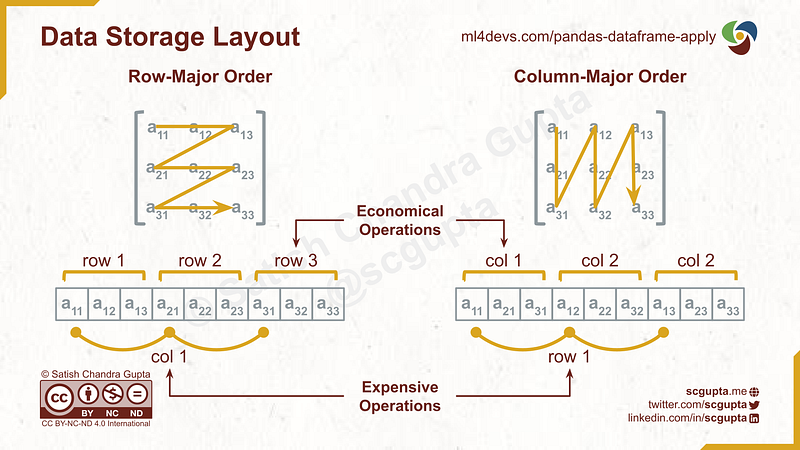
Extracting a row from DataFrame (line #6) takes 90% of the time. That is understandable because Pandas DataFrame storage is column-major: consecutive elements in a column are stored sequentially in memory. So pulling together elements of a row is expensive.
Even if we take out that 90% cost from 56.6s for 100k rows, it would take 5.66s. That is still a lot.
Method 2. Iterate over rows with iterrows Function
Instead of processing each row in a Python loop, let’s try Pandas iterrows function.
def iterrows_impl(df):
  cutoff_date = datetime.date.today() + datetime.timedelta(days=2)
return pd.Series(
eisenhower_action(
row.priority == 'HIGH', row.due_date <= cutoff_date)
for index, row in df.iterrows()
)It takes 9.04 seconds, approx. one-fourth of the time taken by the loop:
%timeit data_sample['action_iterrow'] = iterrows_impl(data_sample)1 loop, best of 5: 9.04 s per loopMethod 3. Iterate over rows with itertuples Function
Pandas has another method, itertuples, that processes rows as tuples.
def itertuples_impl(df):
  cutoff_date = datetime.date.today() + datetime.timedelta(days=2)
return pd.Series(
eisenhower_action(
row.priority == 'HIGH', row.due_date <= cutoff_date)
for row in df.itertuples()
)Its performance threw a surprise, it took only 211 milliseconds.
%timeit data_sample['action_itertuples'] = itertuples_impl(data_sample)1 loops, best of 5: 211 ms per loopMethod 4. Pandas apply Function to every row
Pandas DataFrame apply function is quite versatile and is a popular choice. To make it process the rows, you have to pass axis=1 argument.
def apply_impl(df):
  cutoff_date = datetime.date.today() + datetime.timedelta(days=2)
  return df.apply(
      lambda row:
        eisenhower_action(
          row.priority == 'HIGH', row.due_date <= cutoff_date),
      axis=1
  )
This also threw a surprise for me. It took 1.85 seconds. 10x worse than itertuples!
%timeit data_sample['action_impl'] = apply_impl(data_sample)1 loop, best of 5: 1.85 s per loopMethod 5. Python List Comprehension
A column in DataFrame is a Series that can be used as a list in a list comprehension expression:
[ foo(x) for x in df['x'] ]If multiple columns are needed, then zip can be used to make a list of tuples.
def list_impl(df):
  cutoff_date = datetime.date.today() + datetime.timedelta(days=2)
  return pd.Series([
    eisenhower_action(priority == 'HIGH', due_date <= cutoff_date)
    for (priority, due_date) in zip(df['priority'], df['due_date'])
  ])
This also threw a surprise. It took only 78.4 milliseconds, even better than itertuples!
%timeit data_sample['action_list'] = list_impl(data_sample)10 loops, best of 5: 78.4 ms per loopMethod 6. Python map Function
Python’s map function that takes in function and iterables of parameters, and yields results.
def map_impl(df):
  cutoff_date = datetime.date.today() + datetime.timedelta(days=2)
  return pd.Series(
    map(eisenhower_action,
      df['priority'] == 'HIGH',
      df['due_date'] <= cutoff_date)
  )
This performed slightly better than list comprehension.
%timeit data_sample['action_map'] = map_impl(data_sample)10 loops, best of 5: 71.5 ms per loopMethod 7. Vectorization
The real power of Pandas shows up in vectorization. But it requires unpacking the function as a vector expression.
def vec_impl(df):
  cutoff_date = datetime.date.today() + datetime.timedelta(days=2)
  return (
    2*(df['priority'] == 'HIGH') + (df['due_date'] <= cutoff_date))
It gives the best performance: only 20 milliseconds.
%timeit data_sample['action_vec'] = vec_impl(data_sample)10 loops, best of 5: 20 ms per loopVectorizing, depending upon the complexity of the function, can take significant effort. Sometimes, it may not even be feasible.
Method 8. NumPy vectorize Function
NumPy offers alternatives for migrating from Python to Numpy through vectorization. For example, it has a vectorize() function that vectorzie any scalar function to accept and return NumPy arrays.
def np_vec_impl(df):
  cutoff_date = datetime.date.today() + datetime.timedelta(days=2)
  return np.vectorize(eisenhower_action)(
    df['priority'] == 'HIGH',
    df['due_date'] <= cutoff_date
  )
Not surprisingly, its performance is second to only Pandas vectorization: 35.7 milliseconds.
%timeit data_sample['action_np_vec'] = np_vec_impl(data_sample)10 loops, best of 5: 35.7 ms per loopMethod 9. Numba Decorators
So far, only Pandas and NumPy packages were used. But there are more alternatives if you are open to having additional package dependencies.
Numba is commonly used to speed up applying mathematical functions. It has various decorators for JIT compilation and vectorization.
import numba@numba.vectorize
def eisenhower_action(is_important: bool, is_urgent: bool) -> int:
return 2 * is_important + is_urgentdef numba_impl(df):
cutoff_date = datetime.date.today() + datetime.timedelta(days=2)
return eisenhower_action(
(df['priority'] == 'HIGH').to_numpy(),
(df['due_date'] <= cutoff_date).to_numpy()
)Its vectorize decorator is similar to NumPy vectorize function but offers better performance: 18.9 milliseconds (similar to Pandas vectorization). But it also gives cache warning.
%timeit data_sample['action_numba'] = numba_impl(data_sample)The slowest run took 11.66 times longer than the fastest. This could mean that an intermediate result is being cached.
1 loop, best of 5: 18.9 ms per loopMethod 10. Multiprocessing with pandarallel
The pandarallel package utilizes multiple CPUs and split the work into multiple threads.
from pandarallel import pandarallelpandarallel.initialize()def pandarallel_impl(df):
cutoff_date = datetime.date.today() + datetime.timedelta(days=2)
return df.parallel_apply(
lambda row: eisenhower_action(
row.priority == 'HIGH', row.due_date <= cutoff_date),
axis=1
)In 2-CPU machine, it took 2.27 seconds. The splitting and bookkeeping overheads don’t seem to pay off for 100k records and 2-CPU.
%timeit data_sample['action_pandarallel'] = pandarallel_impl(data_sample)1 loop, best of 5: 2.27 s per loopMethod 11. Parallelize with Dask
Dask is a parallel computing library that supports scaling up NumPy, Pandas, Scikit-learn, and many other Python libraries. It offers efficient infra for processing a massive amount of data on multi-node clusters.
import dask.dataframe as dddef dask_impl(df):
cutoff_date = datetime.date.today() + datetime.timedelta(days=2)
return dd.from_pandas(df, npartitions=CPU_COUNT).apply(
lambda row: eisenhower_action(
row.priority == 'HIGH', row.due_date <= cutoff_date),
axis=1,
meta=(int)
).compute()In 2-CPU machine, it took 2.13 seconds. Like pandarallel, payoffs are meaningful only when processing a large amount of data on many machines.
%timeit data_sample['action_dask'] = dask_impl(data_sample)1 loop, best of 5: 2.13 s per loopMethod 12. Opportunistic Parallelization with Swifter
Swifter automatically decides which is faster: to use Dask parallel processing or a simple Pandas apply. It is very simple to use: just all one word to how one uses Pandas apply function: df.swifter.apply.
import swifterdef swifter_impl(df):
cutoff_date = datetime.date.today() + datetime.timedelta(days=2)
return df.swifter.apply(
lambda row: eisenhower_action(
row.priority == 'HIGH', row.due_date <= cutoff_date),
axis=1
)Its performance for this use case is expectedly quite close to Pandas vectorization.
%timeit data_sample['action_swifter'] = swifter_impl(data_sample)10 loops, best of 5: 22.9 ms per loop+Performance Comparison of Iterating over Pandas DataFrame rows
Plotting is helpful in understanding the relative performance of alternatives over input size. Perfplot is a handy tool for that. It requires a setup to generate input of a given size and a list of implementations to compare.
kernels = [
  loop_impl,
  iterrows_impl,
  itertuples_impl,
  apply_impl,
  list_impl,
  vec_impl,
  np_vec_impl,
  numba_impl,
  pandarallel_impl,
  dask_impl,
  swifter_impl
]
labels = [str(k.__name__)[:-5] for k in kernels]perfplot.show(
setup=lambda n: test_data_sample(n),
kernels=kernels,
labels=labels,
n_range=[2**k for k in range(K_MAX)],
xlabel='N',
logx=True,
logy=True,
#equality_check=None
)It generates a plot like the one shown below.

Here are some observations from the plot:
- For this use case, the asymptotic performance order stabilizes at about 10k rows in the DataFrame.
- Since all lines in the plot become parallel, the perf difference might not be apparent in the log-log scale plot.
- The
itertuplesis as simple to use asapplybut with 10x better performance. - List Comprehension is ~2.5x better than
itertuples, though it can be verbose to write for a complex function. - NumPy
vectorizeis 2x better than the List comprehension, and is as simple to use asitertuplesandapplyfunctions. - Pandas vectorization is ~2x better than NumPy
vectorize. - Overheads of parallel processing pay off only when a huge amount of data is processed on many machines.
Recommendations for Efficiently Iterating Over Pandas DataFrame Rows
Performing an operation independently to all Pandas rows is a common need. Here are my recommendations:
- Vectorize DataFrame expression: Go for this whenever possible.
- NumPy
vectorize: Its API is not very complicated. It does not require additional packages. It offers almost the best performance. Choose this if vectorizing DataFrame isn’t infeasible. - List Comprehension: Opt for this alternative when needing only 2–3 DataFrame columns, and DataFrame vectorization and NumPy vectorize not infeasible for some reason.
- Pandas
itertuplesfunction: Its API is likeapplyfunction, but offers 10x better performance thanapply. It is the easiest and most readable option. It offers reasonable performance. Do this if the previous three do not work out. - Numba or Swift: Use this to exploit parallelization without code complexity.
Understanding the cost of various alternatives is critical for making an informed choice. Use timeit, line_profiler, and perfplot to measure the performance of these alternatives. Balance performance with ease of use for deciding the best alternative for your use case.
If you enjoyed this, please:


Share it with this infographic:

Originally published on ML4Devs.com.


