avatarAnthony (Tony/Pcunix) Lawrence

Free AI web copilot to create summaries, insights and extended knowledge, download it at here

1716

Abstract

ng into our network!</p><p id="9f92">But if my iPhone, my iPad, my Mac, my whatever is set with Private IP on, Apple does things to keep the network from figuring out that I’ve been connected previously. You can read their blurb for the details:</p><div id="dad8" class="link-block"> <a href="https://support.apple.com/en-us/HT211227"> <div> <div> <h2>Use private Wi-Fi addresses on iPhone, iPad, iPod touch, and Apple Watch</h2> <div><h3>To improve privacy, your device uses a different MAC address with each Wi-Fi network.</h3></div> <div><p>support.apple.com</p></div> </div> <div> <div style="background-image: url(https://miro.readmedium.com/v2/resize:fit:320/)"></div> </div> </div> </a> </div><p id="c136">I didn’t read that until my Eero started showing me new devices joining my network. Except those devices were not new at all, they were things I and my wife have used since we bought them!</p><figure id="7798"><img src="https://cdn-images-1.readmedium.com/v2/resize:fit:800/1*9Donm0c29ZKx-OA2RiVZ-Q.jpeg"><figcaption>Screenshot showing supposedly new devices on my network</figcaption></figure><p id="f53d">That happened because I had Private IP turned on for my home network. Once I read that Apple link above, I realized that I should have shut it Off on my home network.</p><p id="34b3">But wait, doesn’t that expose me to tracking risk when I’m out and about, joining other wi-fi networks?</p><p id="7b71">No, because this setting is specific to each network and that link explains that it will be turned on by default. Tracker

Options

s will have a harder time knowing who I am. As I also have Private Relay turned on, nobody knows much of anything about who I am and what I’m doing.</p><h2 id="fe9d">Was Apple sloppy?</h2><p id="4c1a">I think so, yes. Admittedly millions of people, probably most people, do not have a home router that can tell them about intruding devices. They’ll never know or care, so this is not a problem.</p><p id="566c">But their blurb could have said something like this:</p><p id="68b5"><i>Using a private address helps reduce tracking of your iPad across different Wi-Fi networks. It will be turned on automatically unless you turn it off. It’s most important when you are not on your home network.</i></p><p id="9cd6">Or, they could add an iCloud setting that lets you say that what you are connected to now is your home network and does not need Private IP. It should be global because devices like Apple TV do not currently have any way to turn Private IP off. Because of that, I still see my “new” Apple TV joining my network frequently. That’s annoying.</p><div id="68fe" class="link-block"> <a href="https://pcunix.medium.com/subscribe"> <div> <div> <h2>Get an email whenever Anthony Lawrence publishes.</h2> <div><h3>Get an email whenever Anthony Lawrence publishes. You can unsubscribe if I become annoying. By signing up, you will…</h3></div> <div><p>pcunix.medium.com</p></div> </div> <div> <div style="background-image: url(https://miro.readmedium.com/v2/resize:fit:320/0*7YiJt6aHz7k1d11e)"></div> </div> </div> </a> </div></article></body>

TECHNOLOGY

Apple’s Private IP Can Be Quite Annoying

I think Apple dropped some eggs on this one

Photo by Sergiu Nista on Unsplash

Apple’s “Private IP” setting is found in Settings->Wi-Fi. Click on the little “i” in the circle to find it.
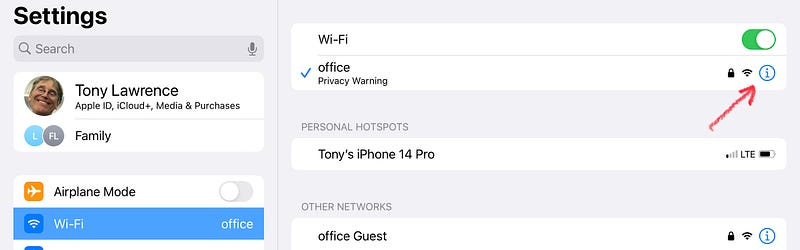
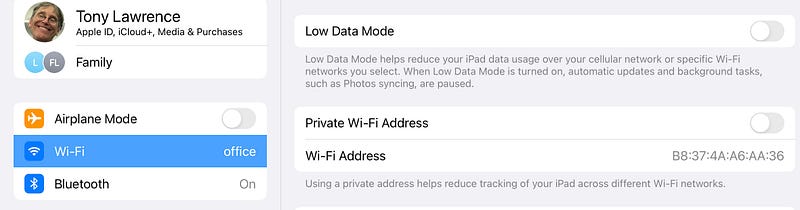
Screenshot showing how to get to Private IP settings
Screenshot showing Private IP settings for my network

Apple has a little note about it there that says “Using a private address helps reduce tracking of your iPad across different Wi-Fi networks.

So that’s a good thing, yeah? Let’s turn that sucker on! Well, it probably already was on, so you might have thought, “Great, thanks Apple!”

Take a closer look at my setup. Private IP is not on. Why?

It drives my Eero router nuts

Well, not exactly. Something it causes my Eero router to do drives me nuts. It’s a feature that tells me if any unknown piece of equipment has joined my network. Great! You’d want that, wouldn’t you? We don’t want James Bond hacking into our network!

But if my iPhone, my iPad, my Mac, my whatever is set with Private IP on, Apple does things to keep the network from figuring out that I’ve been connected previously. You can read their blurb for the details:

I didn’t read that until my Eero started showing me new devices joining my network. Except those devices were not new at all, they were things I and my wife have used since we bought them!
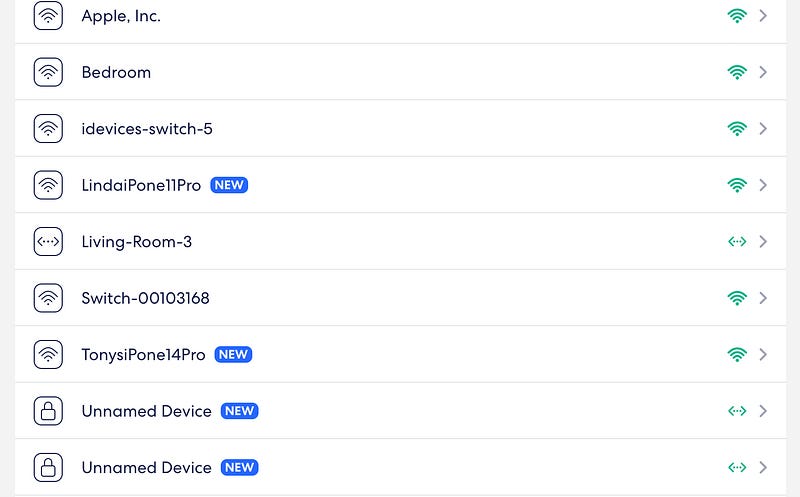
Screenshot showing supposedly new devices on my network

That happened because I had Private IP turned on for my home network. Once I read that Apple link above, I realized that I should have shut it Off on my home network.

But wait, doesn’t that expose me to tracking risk when I’m out and about, joining other wi-fi networks?

No, because this setting is specific to each network and that link explains that it will be turned on by default. Trackers will have a harder time knowing who I am. As I also have Private Relay turned on, nobody knows much of anything about who I am and what I’m doing.

Was Apple sloppy?

I think so, yes. Admittedly millions of people, probably most people, do not have a home router that can tell them about intruding devices. They’ll never know or care, so this is not a problem.

But their blurb could have said something like this:

Using a private address helps reduce tracking of your iPad across different Wi-Fi networks. It will be turned on automatically unless you turn it off. It’s most important when you are not on your home network.

Or, they could add an iCloud setting that lets you say that what you are connected to now is your home network and does not need Private IP. It should be global because devices like Apple TV do not currently have any way to turn Private IP off. Because of that, I still see my “new” Apple TV joining my network frequently. That’s annoying.

Tracking
Security
Private Ip
Private Relay
Apple
Recommended from ReadMedium