
Apple Studio Display — is it still AWESOME 6 months on
It still causes a lot of interest — and with good reason — it’s a fantastic panel!
Peek Performance cost me dear
The Studio Display from, Apple, is expensive, but is it worth it?
March is the month of my birthday. That usually means, I like receiving a few pressies. This year, though, March, ended up costing me dear. Apple held their first event of the year on 8th March.
Early on, the event didn’t have too much with which to tempt me. There were a few new colours for the 13 Pro iPhones, a new iPhone SE, and a new iPad Air. But, suddenly, things then took a costly turn for me.
About halfway through the event, John Ternus, Apple’s senior vice president of Hardware Engineering, was given the stage and told us all about the Mac Studio. A beast of a Mac, that showcased just how powerful the M1 Max and Ultra chips could be. With prices ranging from £1999 in its basic config, through to £7999 in it’s fully spec’d trim, it was a Mac aimed at creatives and professionals. But, of course, it needed a panel to truly get the most from it.
And Apple were not about to sit back, and let this new Mac be hooked up to any old monitor. Nope, they were about to dip their toes back in to the display market.
A long wait
Apple last made an Apple badged, stand-alone monitor in 2016. Even though it was a popular display, it was discontinued, and the only option for a while, was to buy the LG 5K Ultrafine monitor through Apple. For high-end users, in 2019, the Pro Display XDR was released, but the price point meant it was beyond most.
At Peek Performance, launched alongside the Mac Studio, was the Studio Display — which meant, for me, March was about to get costly.
I had been considering a new Mac for some while at this point. My ‘go-to’ Mac, a 2015, 5K Intel 27-inch iMac, was starting to struggle on some projects. The Mac Studio tempted me for a while, but eventually, I went for a 16-inch M1 Max MacBook Pro.
The nature of the work I carry out, meant, I would need a panel to go with the MacBook. Even though it has a gorgeous Liquid Retina XDR display, it was still only a 16-inch display. It was far smaller than I had been used to, and I knew I’d need to hook it up to a larger, external display.
Apple had just made my shopping choices very, very, easy! Where I had been delaying over the MacBook as I couldn’t find a display that I was happy to marry it to, now the MacBook Pro, and Apple Studio Display seemed like a match made in heaven.
My mind was set, and the orders placed.
Supply & demand
To some extent, supply is still an issue for Apple, even today. I wrote in most recent Appleviews, that it looks unlikely that you’ll be able to buy an iPhone 14 Pro, this side of Christmas, for instance.
Back in the spring though, as we were coming out of COVID, the new products that Apple had released, were as rare as a hens tooth. I placed my orders at the end of March, directly with Apple. As it worked out, though, both items were cancelled, and I ended up buying through third-party retailers.
Crazy as it seemed, Apple were unable to deliver either item until June — that meant I’d have to wait between 10–12 weeks. Luckily though, with a little snooping around, I was able to get both the Studio Display, and MacBook delivered in under a month.
The MacBook I’ll discuss more another time, but today, I want to talk about the Studio Display.
Daily use
Since late April, I have, on average, spent between 10–12 hours a day in front of the Studio Display, so it probably puts me in a pretty good position to give you my long-term thoughts on it.
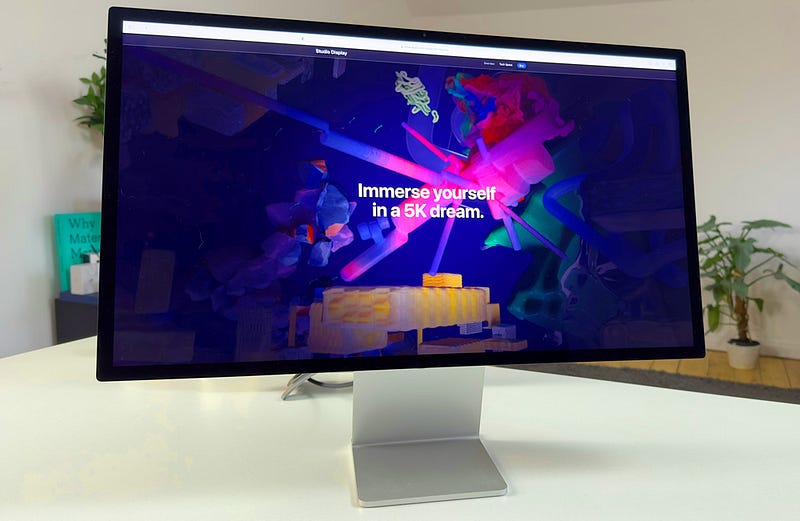
As I enter the studio, it is, pretty-much, the first thing I see each morning. It still gives me a buzz, and a want to work, feeling. Its design is robust, strong, and utilitarian. It has a ‘butch’ look to it — if it were a film star, consider it to be a Clint Eastwood! There is not a single curve to it. Everything is squared-off, and angular.
The back aspect-ratio, is dominated by a large, black, glossy Apple logo. It is from the rear, that one of the issues is apparent as well. At the time, much was said about the fact that the power cord was a permanent fixture. In other words, you can’t remove it from the back of the Studio Display.
There has only been one occasion, in the six or seven months of daily use of the Studio Display, that the power cord caused me any consternation. By the design of the panel, it is clear that it was not made with mobility, or portability in mind. Generally, this display will live in just one place, so the cord presents no problems. The one time I decided to relocate the Studio Display from home to the new studio space, was the only time I found myself cussing (getting the three-pin plug out of a small access point). Other than that, honestly, it is not even a consideration.
The port array, of three USB-C ports and a singular Thunderbolt 3 port, have been more than enough for me. The one upstream, Thunderbolt port, is only ever used to connect the screen to my MacBook. It has meant I have never had need for the power brick that came with the MacBook, as this connection, also charges the Mac, making it a complete workstation.
The other three ports connect at a speed of up to 10Gb/s. I typically have a lightning cable in one for my iPhone, one is now used for the MagSafe charger for my Apple Watch, and the final USB-C port, generally charges the MacBook Air.
The business side
So, around the front, is obviously what we are really here for.
Bezels — until this year, and starting to write and create content on Apple gear, I had never given any consideration to the bezels around the screen. Honestly, in seven years with the iMac, and several other iMacs as well, the black edges never caused me a second thought.
But, I will concede, that the far narrower bezels to the Studio Display are more contemporary, chic, and make for a better place to work. They tend to blend pretty seamlessly with the background of my space.
Having worked on a 5K display for so long, it makes it almost impossible to work on anything else. I work with the brightness fully cranked up, and use all of those available 600 nits. I work with the automatic brightness switched off, and in the P3 colour space most of the time. The lack of ProMotion is not unduly noticeable, when working alongside the 120Hz, XDR display of the MacBook. I have found that it is on the smaller displays of iPhones and iPads that ProMotion (or lack of), is more noticeable.
The standard glass, without the £300 extra Nano-textured option, has not proven an issue. I don’t work in direct sunlight, and generally, those working on colour critical work wouldn’t either.
If I had my time over, perhaps one box I would have ticked, would have been the option to go with the VESA mount adapter, rather than the standard stand. It is marginally lower than I’d ideally like, but not to the point of becoming uncomfortable. I felt Apple let themselves down, though, in expecting us to pay £400 more for the height adjustable choice. This 27-inch panel is already at the higher end when it comes to cost. I clearly don’t know what extra goes in to engineering the height adjustable version, but at £1500, I’d have thought that could have been included.
Working with the Studio Display daily, though, is a joy — but then again, Apple’s 5K Retina panels always are. Text is razor sharp, the blacks are rich, and the colours vibrant and punchy.
The extra bits
So, outside what the Studio Display has been put on earth to do, work as a display, you get two extras thrown in. A webcam and speakers. Let’s go gently, and start off with the good first…the audio set-up.
The MacBook Pro speakers have been regarded as class leaders for laptops. And, that is true enough. But the six speaker config of the Studio Display is far the superior sound. Given the extra space and air around the speakers, that is not altogether surprising, I guess. There is a clearer bass to the sound. Being picky, I would say the mids are not quite as clear as I’d wish for and, the highs don’t quite go where I want them. But …these are inbuilt speakers. I am not testing a pair of stand-alone, studio monitors here.
There is plenty of good audio going on here, though. Listening to them, for hours at a time, is no chore. They are easily loud enough for any office or workplace environment, and offer a good audio solution. Put it this way, they are good enough to not even think about cluttering up your desk with any after market speakers.
The mics work well for online Zoom, or FaceTime calls. Given the nature of what I do, I tend to have good mics lying around, so will use those on most calls. But recently, and knowing I was going to be writing this, I used the onboard mics. Those at the other end were happy with the call/voice quality. I recorded the calls and listened back to the results, and yeah, again, the inbuilt option is more than useable and passable.
The elephant in the room
That camera. It’s really not good — not good at all.
It didn’t take long after the Studio Display was out in the wild, that the reviews started to come in, and Camera-gate was born. Early on, it was even worse than it is now. Back then, and the cause for the wide-spread criticism, was awful framing and the colour. In good light it was awful, in low-light, diabolical.
Many of Apple’s devices have a wide-angled, front facing camera, but the Studio Display has an ultra-wide camera, to facilitate the Centre Stage feature. The 12-megapixel camera in the display, would probably have been up to the task, had it not been for their misplaced desire to add centre stage to the mix.
This camera has no optical zoom, which means that Center Stage cameras capture images at 12 megapixels using the ultra-wide lens and then digitally crop them to look like a regular video.
Firmware updates have helped, but about the best thing they could have done, is let us have the ability to turn Centre Stage on or off — much as you can now do using your iPhone and Continuity Camera.
In short, if you are only a casual, or infrequent user of your webcam, then you may be able to consider using the Studio Display camera. But, for any more professional requirements, definitely look in to using Continuity Camera.
Wrapping up
Although I baulked at spending £1500 on a 27-inch display, it turned out to very much being the right decision. Crisp, clear, colourful and reliable. You might want to think about my idea of the VESA mount choice if you are about to place your order, but apart from that, this display is checking every box for me.
There are no visible signs of wear, such as dim zones are flat-spots. If your work relies on a colourful, accurate monitor, you could honestly do far worse than consider Apple’s Studio Display as an option. With Continuity Camera now a very real consideration, it very neatly side-steps the camera misgivings as well.
Getting involved
Guess what — if you look forward to my articles & blogs landing each day, you can help that happen! By clicking via this link, you can join Medium, and get my blogs every day, the moment I publish them. And, you can even get email notifications about them too. Go on — one little click of the Magic Mouse, will make a big difference to both you and me! 😋
Get in the vibe and listen along to today’s chosen soundtrack. I wrote this whilst listening to get in the vibe and listen along to today’s chosen soundtrack. I wrote this whilst listening tohttps://music.apple.com/gb/album/love-byrd/276967981
Fancy receiving my weekly video newsletter?
It’s free, and simple to join. Just leave me your details here, and every Sunday lunchtime, I will drop in to your inbox, catching up on the last week.
And Finally…
I am now on Vero — follow me here https://www.vero.co/dtalkingtech
Originally published at https://talkingtechandaudio.com on November 21, 2022.


