
Apple and Photography
Apple Has Hidden Away the Best Way to Organise Your Photos
I had a list of 84 albums. Why didn’t anyone say I could organise them with folders?
Over the last 16 years, I’ve accumulated 84 photo albums in Apple Photos, not counting what’s in the shared library. I’m certain most of them are there for a reason, even if some of those reasons are lost in time.
My biggest gripe? It’s not that I’ve forgotten why many of them exist. It’s not even that some were created by apps I downloaded, used once, and deleted. Although, that’s irritating.
What punctures my tire is that they are all on one level. You have to scroll through them all to discover what’s there. Why? Because you can’t create albums within albums using Apple photos.
You can use Apple’s search to find photos and usually, I do. It’s great. But there are times I want to find photos that aren’t conveniently identified by location or subject.
For example, most of my article diagrams/illustrations are in Apple Photos. Mainly created at the same location, on who knows what date, it’s difficult to find them using search.
Imagine my feelings when I discovered that you can create a hierarchy of albums. Apple Photos could do it all the time, and it was hiding in plain sight. Well, sort of.
If you already know about Folders in the Photos app, you’re probably rolling your eyes. If you didn’t, let me show you how to (find and) use them.
Organising the chaos
It’s not rocket science once you know where to look. You can’t create a photo album within another photo album, but you create them in Folders.
Guess what, you can also create a folder within another folder, and as a result, organise your albums. I can kiss my flat list of 84 photo albums, goodbye.
Here’s how to do it.
Creating folders of albums on the iPhone
Launch the Photos app and pretend you’ve been on holiday in London.
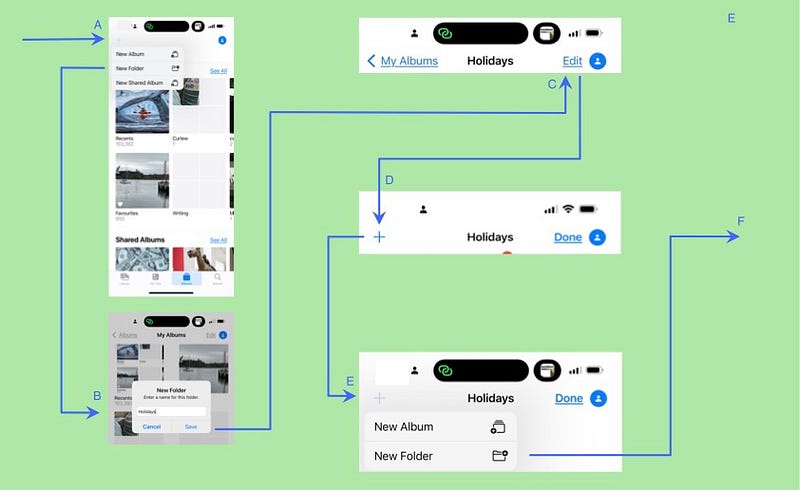
A — Tap on Albums and then the plus sign in the top-left corner.
B — Create a new folder called, “Holidays”.
C — Tap on Edit in the top right-hand corner
D — A plus symbol appears in the left-hand corner. Tap on it.
E — Tap on New Folder.
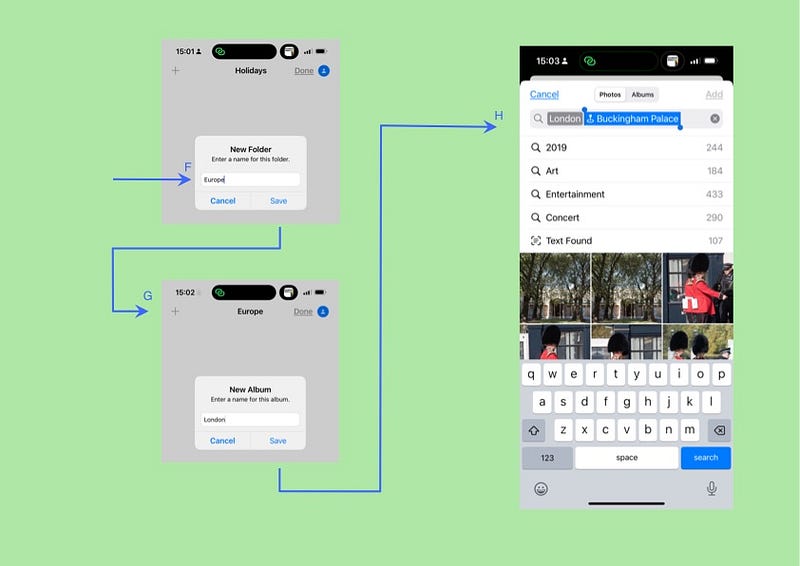
F — Create an album called, “Europe”.
G — Tap on the plus sign and create a new album.
H — A search dialog appears, allowing you to add photos. Search (for example) for photos associated with “London”.
What does a folder contain?
The contents of folders are confusing at first glance.
- A virtual album holds all the photos in that folder and the albums beneath it (All Photos)
- The albums at that level.
- Folders at that level, which will lead to further albums, photos, and folders.
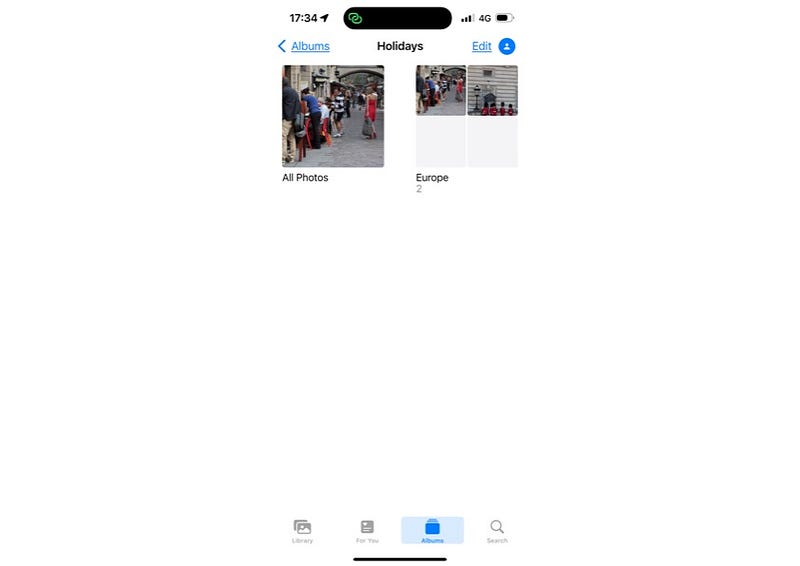
Apple could improve this view if it made the icons identifying albums and folders more distinct. Once you know, however, you know.
Adding new photos, folders, and albums
You add a photo to an album in your hierarchy in the same way as you’d add one to any other album.
— Select the photos you want in the album.
— Tap on the Share menu and scroll down to Add To Album.
— You’ll find your new folders of albums sitting in the albums list.
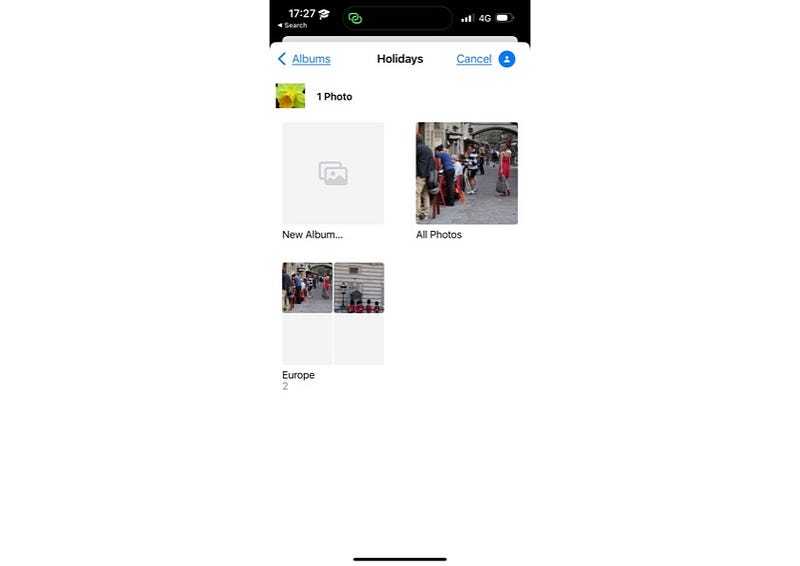
I find the dialog a bit off-putting. There should be more visual cues to distinguish folders from albums (say), but it works.
Migrating existing albums
Great, you say. Finally. I’ll just copy my albums into the new folder structure. That would be far too easy. This is Apple’s UX team we’re dealing with. (I suspect they’re bitter about the hardware team’s success.)
You can’t copy a folder and paste it into a folder. The best I could do was create an album with the same name in the folder hierarchy, and then move the photos from the original album.
How about on the iPad? Why not just drag and drop a legacy album into the folder hierarchy? I tried it several times and the app won’t let you do it.
Why Apple? Why? For the love of cute koalas, why?
On the iPad and the Mac
All versions of the Apple Photos app can see these folders and albums. As far as I could tell, however, there is no extra functionality. At least Apple is consistent. No need to say what they’re consistent about.
Unfinished Business
As is so often the case with its software, Apple doesn’t finish the job. It bakes the cake but doesn’t ice it, and there’s no filling.
While I’m in complaint mode, why can’t you add keywords to photos? You can add them to Apple Notes and Reminders, so why not Photos? I’d have started there.
Anyway, enjoy finally being able to organise your albums.


