
💎 [Rust] Appflowy — Your Fantastic Task List, JIRA, Calendar, Word And AI Safely In One
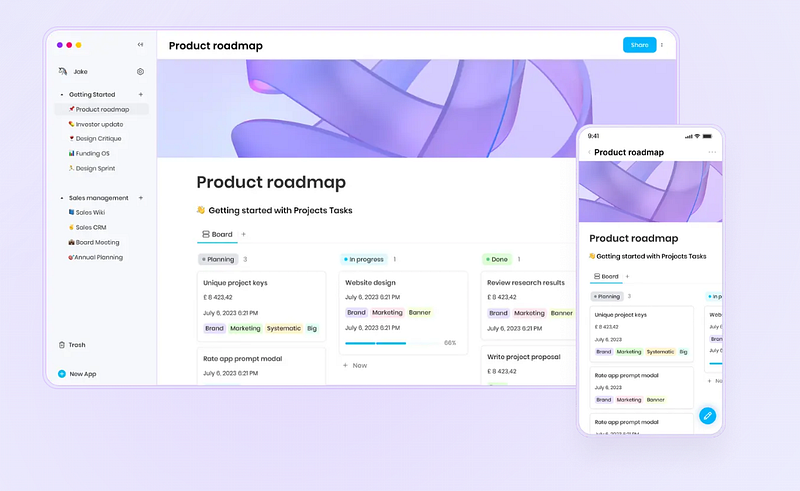
You need to write down notes, mark stuff in calendar, manage projects like in JIRA, use AI, and do all of this safely? Check out Appflowy. It’s open source, written in Rust, works locally, in cloud, supports end-to-end encryption, and is easy to use and relaxing!
This article is part of the open source series. A non-sponsored initiative to promote interesting open source projects.
Today, I wanted to test one of the open source project’s I’ve mentioned in the first edition of 25 awesome open source end user apps summary.
My car is not supported by OpenPilot, and it would need some investment to test it. I’d have to buy a suitable car and also OpenPilot hardware. I’d love to do it some day, so you can always donate for that cause.
But before we’ll be there, I can’t test Home Assistant now that reached the second place, because well… I have a home, but I don’t have any automation as for now. So it needs to wait a while. But the project is quite exciting.
The third place is occupied by RustDesk. I’ve tried to test it today, but I have some security concerns. So that test needs to wait until things will be settled.
So we’re moving to the fourth place that belongs to AppFlowy. I’ve installed it without a problem, except the setup file is not signed. But the antivirus tests went well, and the executable is clear.
Appflowy is described as a free, open source, cross-platform, offline mode, and cloud secure workspace for your wikis and projects that’s also AI-powered but keeps you in control of your data. What’s important it’s written in Rust.
This is how the app looks like after I’ve started it. It didn’t create a start menu shortcut, so I had to go to program files to run it:
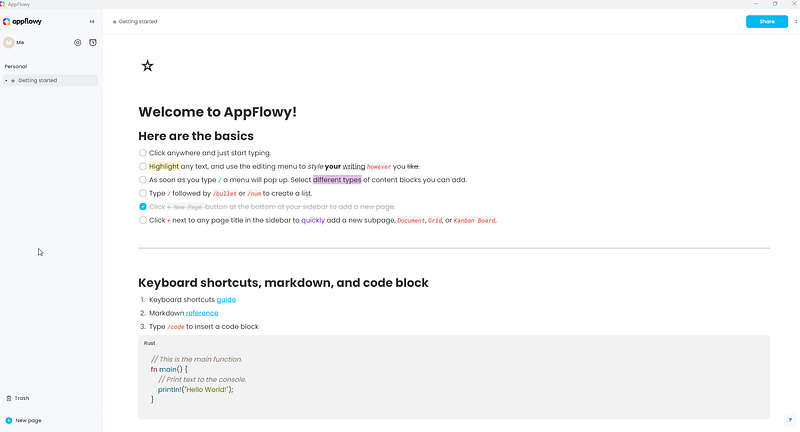
The main section looks like a static text, but actually I can edit it. After highlighting a text, I can apply many styles:

What I like is that you can strike through a text, it’s a useful feature. The range of formatting options is pretty good, I imagine even writing my articles in it. Well, Medium editor is great, but for stuff I don’t use it for, like my book. Compared to text editors, it’s relaxing and not confusing.
Another interesting feature is that when you write slash: “/”, it shows a list of additional features:
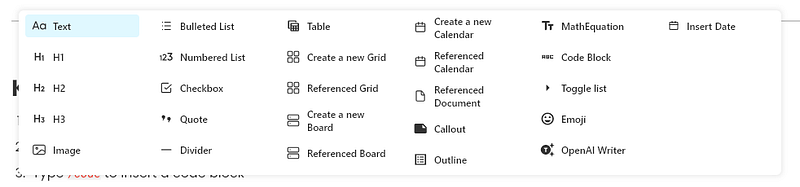
Where you can add an image, make a bulleted list and more.
So let’s start with images. I wonder if it supports copy and paste:

I’ve copied the image from the internet and pasted it into the document. It worked. I can even scale the image and change its alignment. So that’s pretty nice. It instantly looks amazing.
It even supports exotic formats like WebP. Furthermore, it’s nice because some websites use that format.
From the slash option, you can also choose a checklist:

It’s nice, I see it replacing the terrible Google Keep app, if it will support sync between devices and mobile devices as well.
You can also access the slash menu with the plus button next to the indicated text line.
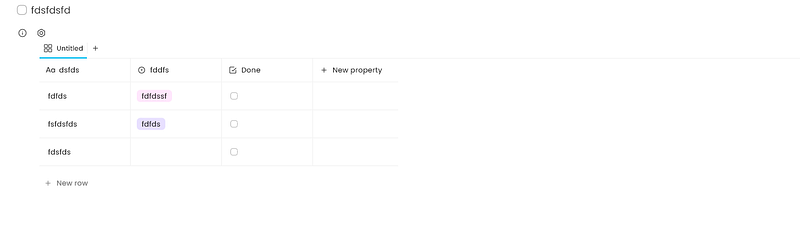
What’s also awesome is the grid option. It’s a table but with more features. You can limit a value of a column to a selection of options, and have a checkbox column. Didn’t go deeper, because it’s really a lot compared to my needs. It’s pretty easy to use as well:
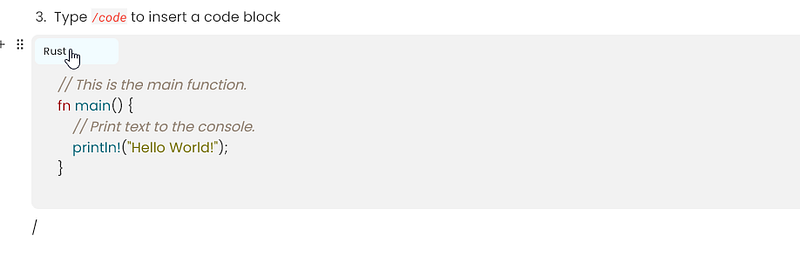
I’ve noticed that in the slash menu, there is a /code option to add code block. It should look better with language selection and coloring:
Another absolutely brilliant feature is the board. It actually is like you’d have a JIRA in your document but without all the trouble:
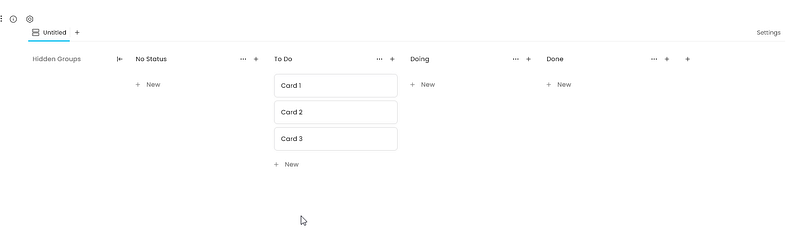
You can move stuff around with drag and drop, and add columns. It’s fantastic. For me that’s it, I love Appflowy ATP.
But that’s not all. You can add a calendar, so you don’t need Google Calendar anymore:

Add items to days and tag them. Another “take all my money” moment.
From minor stuff, callout is nice to indicate some important stuff:

An outline of the document? Done with one click:
For the mathematicians out there, the equation rendering will surely be a selling point:

It looks nice.
You can also create a toggle list:

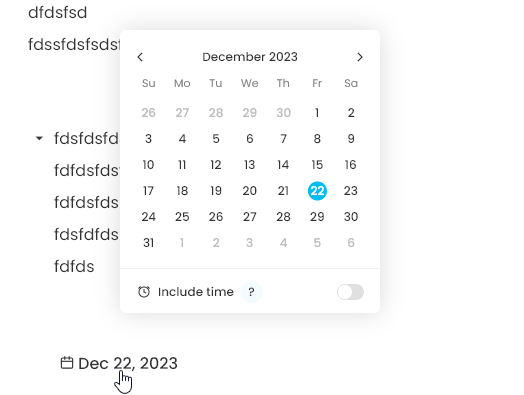
And date, but compared to regular date, when you click it, you can choose a date from a calendar. What a useful feature!
A lot of apps nowadays contain AI, so Appflowy also has AI. To set it up, you have to get an API key from OpenAI or Stability:
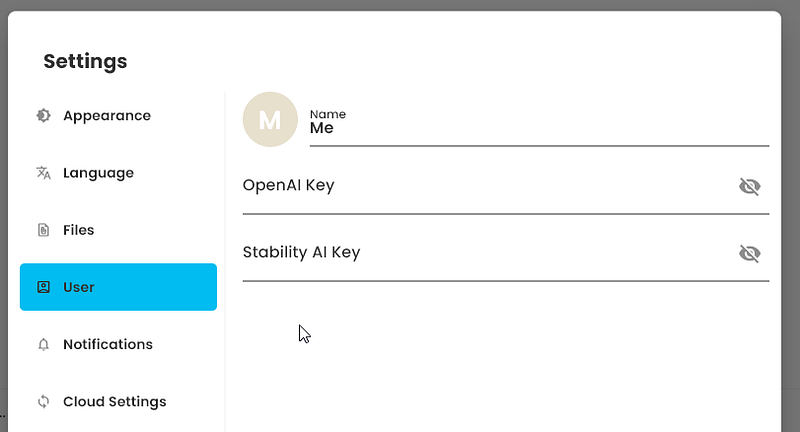
It’s quite easy, so just go to these vendors.
If it comes to the sharing feature. On default, the app works locally. I like it very much. You can also connect it to a Supabase instance or enable AppFlowy Cloud:

Supabase an open source database, you can kick off on your own server or locally. I very much like I don’t have to use one cloud.
The data can be encrypted, so it’s nice too. The data between your local instance and the database are synced, so that’s also useful.
You can also connect to the Appflowy Cloud. It also provides end-to-end encryption. I love that.
I can’t wait until the Android version will be available too.
As you can see, Appflowy is very powerful. It’s light, easy to use, and allows you to create documents for your private and professional needs without technical knowledge.
It’s great for project management, tasks, even for professional writing. The high level of security and AI support makes it a perfect fit for problems we face today.
I strongly recommend Appflowy!
💎 Bonus
Check out previous episodes of the Rust open source series:
Only 1% of people read such long articles to the end. Congrats! It must be a pleasure to talk with you about coding. You are my favorite people, I hope you will connect by subscribing!
BTW. WOW. You are really interested in Rust! I’ve designed Rust card game called Summon The JSON: Rust. What a coincidence! You can order them now!
Do you like Rust? Clap, subscribe, like and share in your social media!
Join 11 000 developers who follow Tom Smykowski! For $5 per month you will have access to all Medium articles and Tom will get a part of it, so he will write more about Rust! Become a member now!


