
Apache Spark >> Column and Row
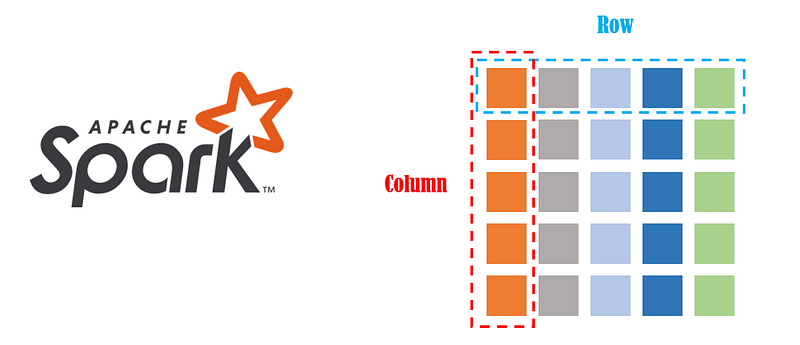
In this article, we will talk about the Column and Row of Apache Spark. ※Based on Apache Spark 3.2.1
- Prepare data
- About Column
- About Row
- Conclusion
Prepare data
We need to prepare some sample data first for demonstration.
Download the CSV file below
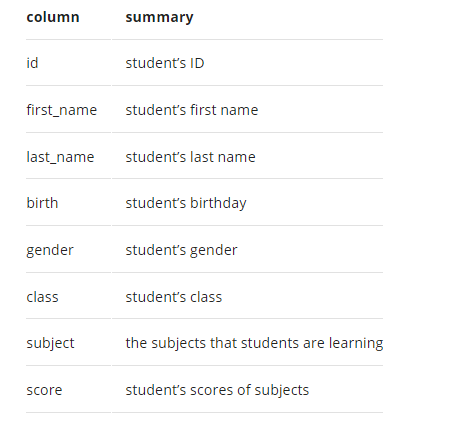
The detailed data structure is as follows.
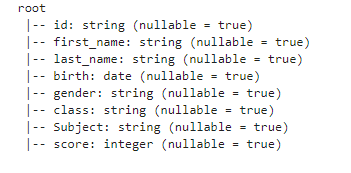
Read the CSV file
About Column
Reference a Column We can use the col() and column() method in pyspark.sql.functions to construct a Column of Spark. The two methods both return a pyspark.sql.Column instance.
import pyspark.sql.functions as F
F.col("first_name")
>> Result: Column<‘first_name’>F.column("first_name")>> Result: Column<‘first_name’>We can also use bracket syntax to reference a column of Dataframe as follows.
df["first_name"]>> Result: Column<‘first_name’>Or we can reference a column by using the attribute of the Dataframe object.
df.first_name
>> Result: Column<‘first_name’>Get the column name list of Dataframe We can get the names of all columns using the columns attribute of Dataframe.
df.columns[‘id’, ‘first_name’, ‘last_name’, ‘birth’, ‘gender’, ‘class’, ‘Subject’, ‘score’]
Add a Column There are many ways to add columns to Dataframe.
- Add a column with the same constant value We can use lit() function in pyspark.sql.functions to construct a constant/literal value.
df.withColumn("school", F.lit("ABC SCHOOL")).show()
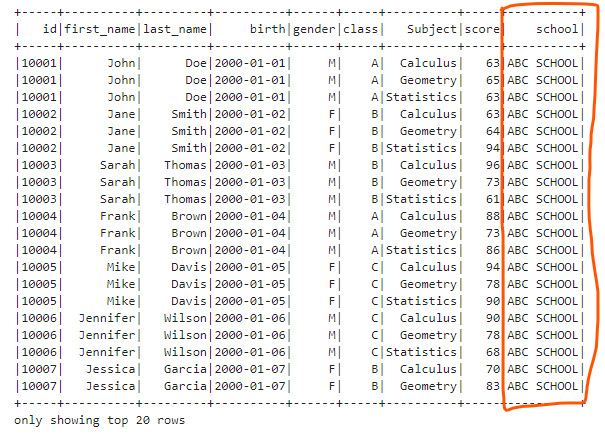
We can also add an empty(all the values are null) column.
df.withColumn("empty", F.lit(None)).show()
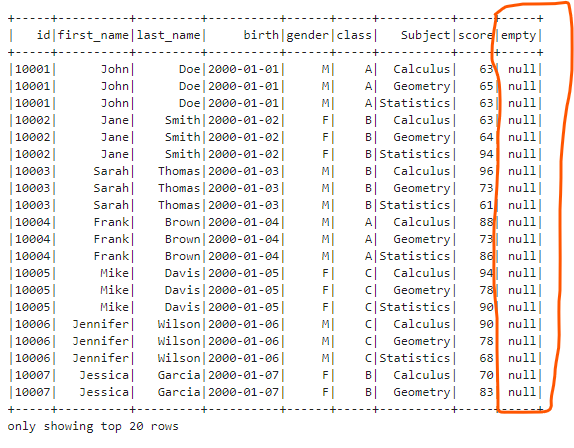
- Add a column based on an existing column We can use concat() function to concatenate a literal and the existing last_name column.
df.withColumn("greeting", F.concat(F.lit("Hello, "), F.col("last_name"))).show()
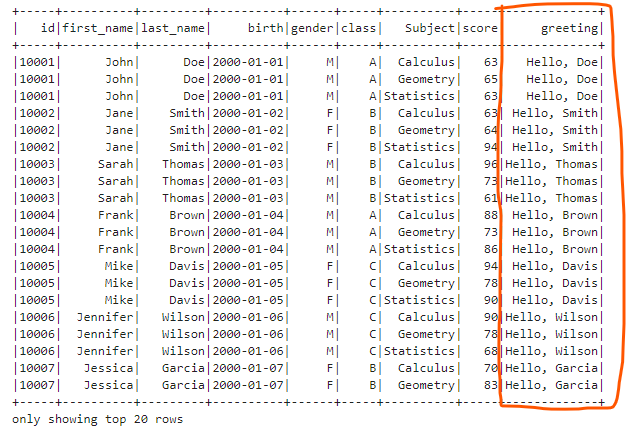
We can also add the boolean flag column which indicates a student’s class is A (true) or not (false). We can use expr() method to evaluate two columns or one column and whether a value is equal or not.
df.withColumn("isClassA", F.expr("class == 'A'")).show()
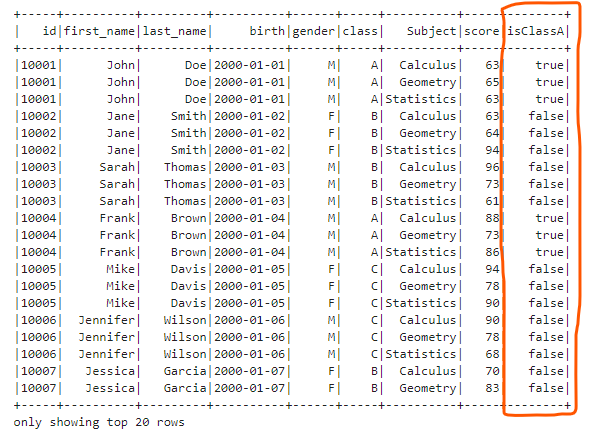
- Add a Column Based on Condition We can generate new columns based on existing columns and certain conditions. We can use the when() and otherwise() method to define different condition branches.
df.withColumn("level",  F.when(df.score >= 90, F.lit("A")) \
              .when((df.score >=75) & (df.score < 90), F.lit("B")) \
              .when((df.score>=60) & (df.score<75), F.lit("C")) \
              .otherwise(F.lit("D"))).show()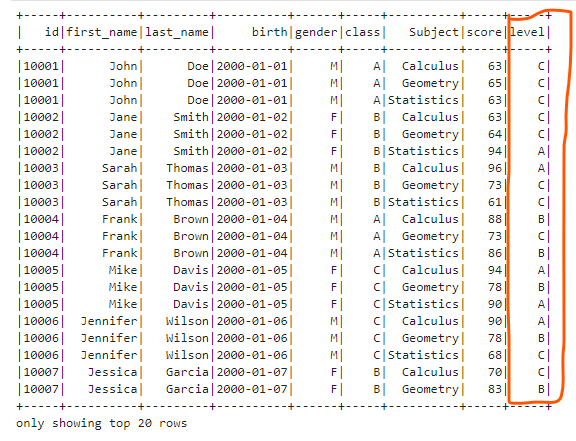
Renaming Column name We can use the withColumnReanmed() method of Dataframe to rename column names.
df.withColumnRenamed("id", "student_id").show()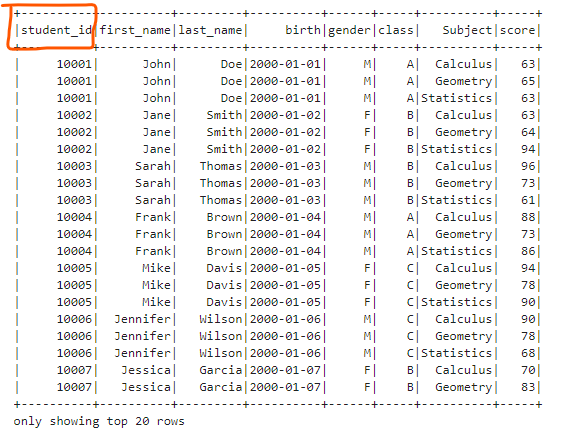
Select a Column We can select a column by using the select() method.
df.select("score").show()
# OR
df.select(F.col("score")).show()
# OR
df.select(F.expr("score")).show()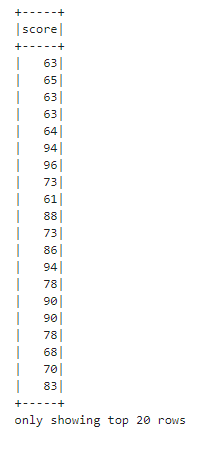
Change the column’s type We can use the cast() method to change the type of the column.
df.withColumn("score2", F.col("score").cast("long")).printSchema()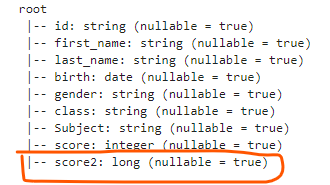
Remove a column We can use the drop() method of Dataframe to remove a column from a Dataframe.
df.drop("class").show()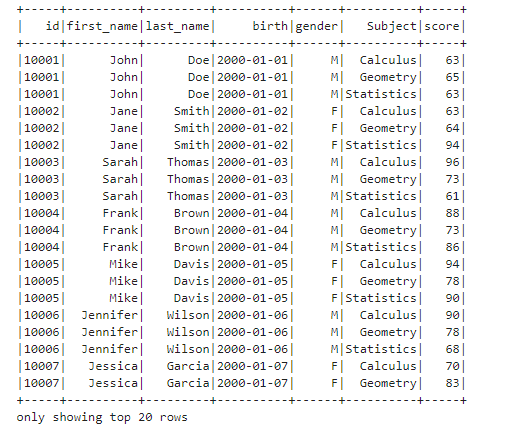
About Row
In Spark, each record is represented as a Row type. For example, we can define a Row as follows.
Create a row
from pyspark.sql import Row
from datetime import date
newRow = Row("10007", "Jessica", "Garcia", date(2000,1,7), "F", "B", "Music", 85)
newRow>> Result: <Row(‘10007’, ‘Jessica’, ‘Garcia’, datetime.date(2000, 1, 7), ‘F’, ‘B’, ‘Music’, 85)>Create Dataframe from the row list We can use some rows to create a Spark Dataframe. Firstly, we can use the createDataFrame() method of sparkSession to create the DataFrame. The first parameter can be the list of rows or generated RDD object from the row list. The schema can be get by the schema property of DataFrame.
df2 = spark.createDataFrame([newRow], df.schema)
# OR
df2=spark.createDataFrame(spark.sparkContext.parallelize([newRow]), df.schema) df2.show()
Append rows to existing DataFrame We need to create a new DataFrame from appending rows and concatenate the new DataFrame with the existing DataFrame because DataFrames are immutable.
Firstly, let’s show all the rows of the existing DataFrame.
df.show(100)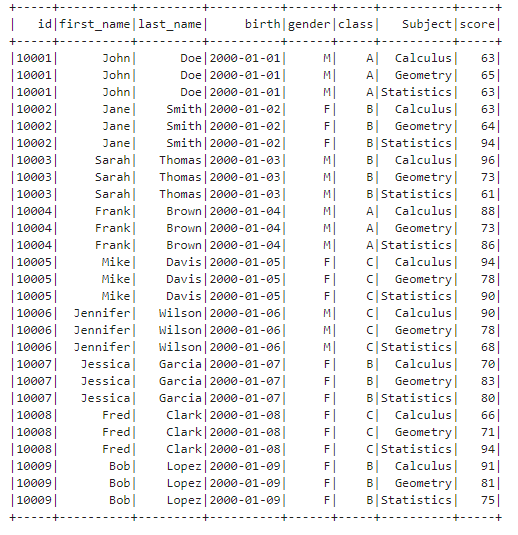
Next, let’s create a new DataFrame of the same schema with the existing DataFrame. We will find the new records are appended at the end of the concatenated DataFrame.
append_rows = [
   Row("10010", "John", "Robert", date(2001,3,1), "M", "C", "Calculus", 80),
    Row("10010", "John", "Robert", date(2001,3,1), "M", "C", "Geometry", 78),
    Row("10010", "John", "Robert", date(2001,3,1), "M", "C", "Statistics", 66)
]
newDF = spark.createDataFrame(append_rows, df.schema)
# Concatenate the two DataFrames
df.union(newDF).show(100)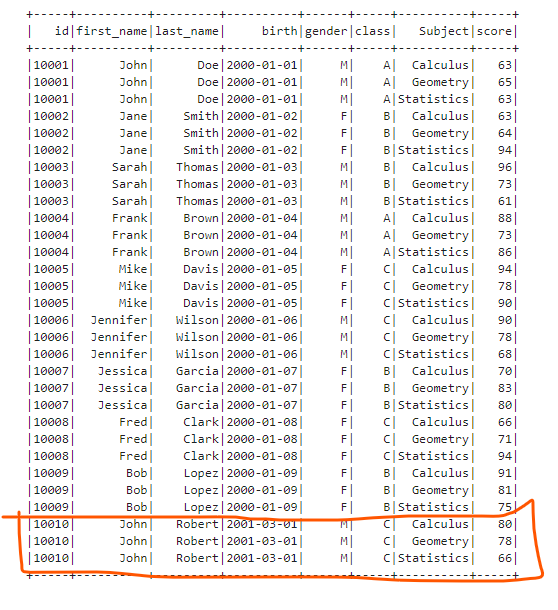
Sort rows Sometimes we need to sort the rows in the DataFrame in a certain order to achieve our goals. We can use the sort() method of DataFrame to sort one column or multiple columns. If you want to sort multiple columns and specify the ascending order for each other, you can give the column list and specify ascending flag list.
df.sort(["class", "birth"], ascending=[True, False]).show(100)Or you can use the orderBy() method of DataFrame and specify each column and its ascending order.
df.orderBy(F.col("class").asc(), F.col("birth").desc()).show(100)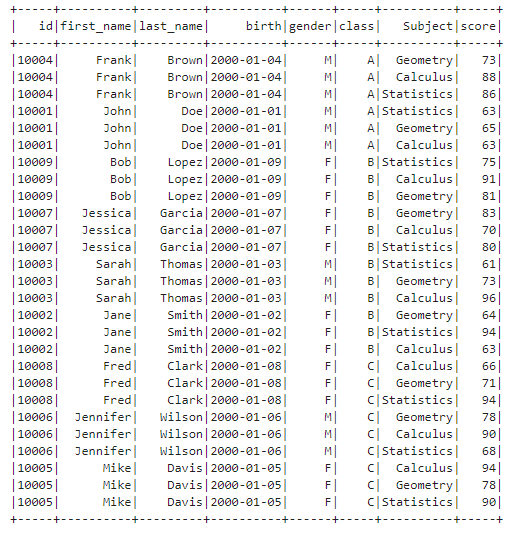
Limit row number Sometimes, we need to restrict the row number. We can use the limit() method of DataFrame.
df.limit(10).show()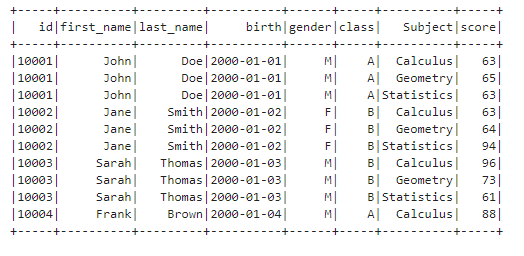
Filter Rows Sometimes, we need to extract some rows based on some conditions. We can use the filter() or where() method of DataFrame to filter rows.
df.filter("score > 75").show()
# OR
df.filter(F.col("score") > 75).show()df.where("score > 75").show()
# OR
df.where(F.col("score") > 75).show()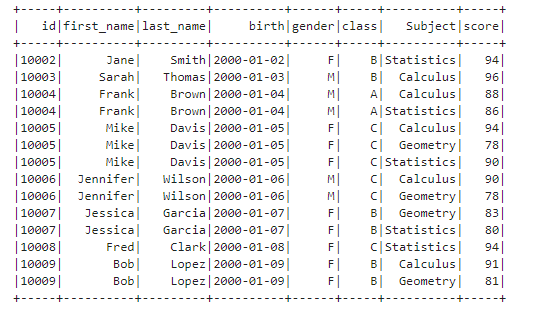
We can also chain multiple filter functions to filter rows step by step based on multiple conditions.
df.filter("score > 75").filter(F.col("Subject") == "Statistics").show()
# OR
df.filter("score > 75").where(F.col("Subject") == "Statistics").show()
# OR
df.where("score > 75").filter(F.col("Subject") == "Statistics").show()
# OR
df.where("score > 75").where(F.col("Subject") == "Statistics").show()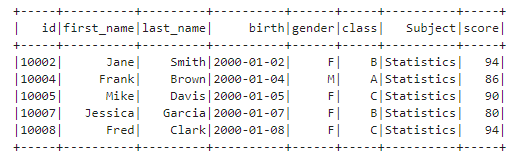
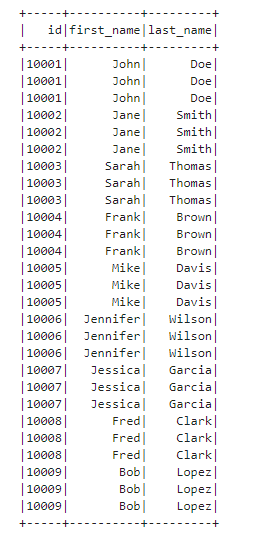
Get unique rows We can use the distinct() method of DataFrame to get the unique rows. For example, if we don’t use the distinct() method, let’s try to show the id, first_name, and last_name columns.
df.select("id", "first_name", "last_name").show(100)As you can see, there are many duplicated records.
Next, let’s apply the distinct() method to the selected DataFrame.
df.select("id", "first_name", "last_name").distinct().show(100)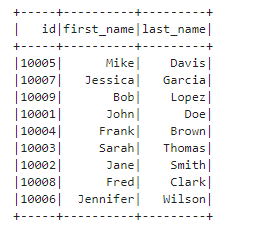
Conclusion
About Column, we talked about how to reference a column, add a column, get the list of column names, rename column names, select a column, change a column’s data type and delete a column.
About Row, we talked about how to create a row, create a new DataFrame from a row list, append rows to an existing DataFrame, sort rows, limit row number, filter rows, and get unique rows.
If you don’t have a local Spark development environment, you can read the article below.
Apache Spark “ Create a Local Apache Spark Development Environment on Windows With Just Two Commands
Originally published at https://thats-it-code.com on April 9, 2022.


