
Apache Spark : A comparative overview of UDF, pandas-UDF and arrow-optimized UDF

What does UDF mean and why do they exist ?
UDF stands for User Defined Function. Those functions can be written in Python, R, Java and Scala, enabling more personalized and complex data manipulation.
Indeed, they are designed to make Spark framework more accessible and flexible for a wider range of users. This encourages broader adoption by providing the flexibility needed for various data processing tasks.
1. Standard UDF
UDFs in Apache Spark can be written using various programming languages such as Python, Scala, Java, and R. Each language offers a distinct implementation approach with differences in performance and functionality.
When executed, UDFs are crafted from the driver node to the executors nodes and this regardless the programming language used.
1.1 Java and Scala UDF
UDFs ran within the Java Virtual Machine (JVM) with minor performance penalties. In fact, they do not capitalize on Spark’s advanced optimization features such as Whole-Stage Code Generation and Just-In-Time (JIT) compilation, which are designed to enhance performance.
1.2 Python UDF
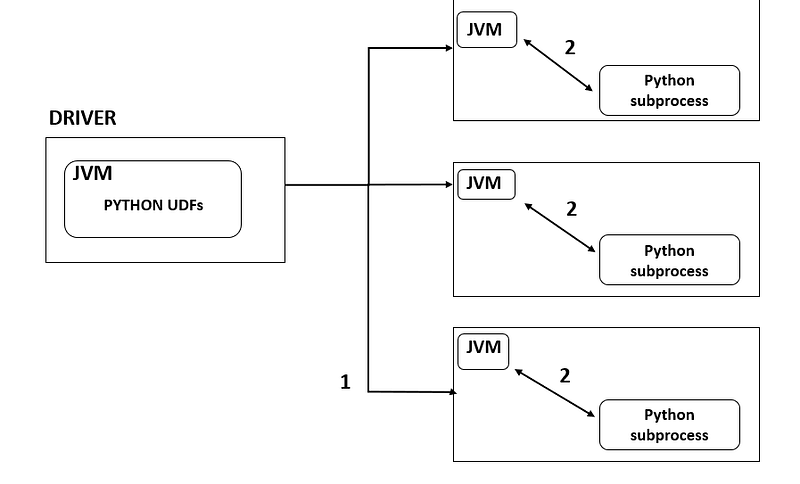
1- Python UDF function is sent to each executors [1]
2- Unlike Java and Scala UDF, the function is not executed within the JVM. Actually, a python worker process is opened on each executor and data is serialized using pickle and send to the python function. The response of the UDF is then deserialized back to the JVM. [1]
1.3 Notes and considerations on classic UDFs
- Starting a python process on each executor is expensive given data serialization and deserialization.
- Once the data serialized to the python UDF , spark does not manage the memory which can lead to serious OOM (Out Of Memory) issues.
- If the column used as input for UDF contains Null, you should manage them in your UDF to avoid unexpected results.
- A better practice is to always specify the return type of your UDF to avoid types mismatches.
from pyspark.sql.types import StringType()
def str_enriched(col_):
  return f"{col_}_hello"

udf_str_enriched = udf(str_enriched, StringType())
# suppose welc_str does not contains null and is contains only string
df = df.withColumn("new_word", udf_str_enriched(welc_str))
2. Pandas UDF
Pandas-UDFs were introduced in Spark 2.3 with the aim to speed-up the serialization/deserialization part of the UDF process by using vectorized batches with Apache Arrow (up to 100x speed increase). Apart this it shares the same characteristics as traditional UDFs.
Let’s deep dive into some of its available transformations
- pandas series to pandas series
- Iterator of pandas series to Iterator of pandas series
- Iterator of Multiple pandas series to Iterator of pandas series
- Pandas series to Scalar (a single value)
2.1 Series to series
This type of UDF operates on a Series and returns a Series of the same length
from pyspark.sql.functions import pandas_udf
from pyspark.sql.types import DoubleType

# UDF to apply state sales tax to the price column
@pandas_udf(DoubleType())
def apply_sales_tax(price_series: pd.Series) -> pd.Series:
    sales_tax_rate = 0.07  # 7% sales tax
    return price_series * (1 + sales_tax_rate)

# Usage in Spark DataFrame
df = spark.createDataFrame([(1, 19.99), (2, 15.99), (3, 23.99)], ["id", "price"])
df_with_tax = df.withColumn("price_with_tax", apply_sales_tax(df["price"]))
2.1 Iterator of Series to Iterator of Series
The Iterator[Series] to Iterator[Series] Pandas UDF is particularly useful for transformations where retaining state or context across different rows is needed.
@pandas_udf('long')
def pandas_cumulative_sum(iterator: Iterator[pd.Series]) -> Iterator[pd.Series]:
    # Compute the cumulative sum for each partition (series) in the iterator
    return (series.cumsum() for series in iterator)

# Create a DataFrame with a sequence of numbers
df = spark.range(10)

# Apply the cumulative sum UDF to the DataFrame
df_with_cumsum = df.withColumn("cumulative_sum", pandas_cumulative_sum("id"))

df_with_cumsum.show()
In this example, we define a pandas_cumulative_sum UDF that computes the cumulative sum on the id column. The resulting DataFrame will have a new column cumulative_sum with the cumulative sum ofid .
2.3 Iterator of Multiple Series to Iterator of Series
Here, we process multiple columns of the spark Dataframe at once. The UDF operates on these series element-wise and yields a single Series as output.
from pyspark.sql import SparkSession
from pyspark.sql.functions import pandas_udf
from pyspark.sql.types import DoubleType
from typing import Iterator, Tuple
import pandas as pd


# Pandas UDF definition
@pandas_udf("double")
def calculate_total_sales(
        iterator: Iterator[Tuple[pd.Series, pd.Series]]) -> Iterator[pd.Series]:
    return (quantity * price for quantity, price in iterator)

# Create a dataframe for testing purpose
df = spark.createDataFrame([
    (1, 4, 10.0),
    (2, 2, 20.0),
    (3, 1, 30.0),
    (4, 5, 40.0),
], ["item_id", "quantity", "price_per_item"])

# Apply the UDF on total_sales
df_with_total_sales = df.withColumn("total_sales", calculate_total_sales(df["quantity"], df["price_per_item"]))

df_with_total_sales.show()
The UDF defined as calculate_total_sales is applied to each pair of Series in the iterator. Within the UDF, a generator expression (quantity * price for quantity, price in iterator) is used to perform an element-wise multiplication of the two Series.
2.4 Series to Scalar (a single value)
An aggregation of a pandas series to a scalar is performed here.
import pandas as pd
from pyspark.sql.functions import pandas_udf
from pyspark.sql import Window

df = spark.createDataFrame(
    [(1, 1.0), (1, 2.0), (2, 3.0), (2, 5.0), (2, 10.0)], ("id", "v"))

@pandas_udf("double")
def pandas_mean(v: pd.Series) -> float:
    return v.sum()

df.select(pandas_mean(df['v'])).show()
2.5 Notes and considerations on pandas-udf
- Data transmission from the JVM to the Python process in Apache Spark is expedited through batch processing using Apache Arrow, enhancing efficiency . Nonetheless, the serialization and deserialization process involved in this operation may still introduce some overhead.
- The UDF incorporated in the query is still a black box in the query’s physical plan and is not subject to optimization by Spark’s Catalyst optimizer.
- A good understanding of both Pandas API and Spark API is required to leverage this functionnality
- The data types supported by Pandas UDFs might be limited especially for complex types like arrays or maps.
- Arrow efficient data representation help here reducing the footprint of data being transfered between JVM and function.
3. Arrow optimized UDF
Arrow-optimized UDFs were introduced in Spark 3.5 to tackle the limitations of Pandas UDFs and UDFs by
- Better serialization/deserialization : Apache Arrow is used here for data serialization/deserialization as Pandas-udf. However, the limitation of only interacting with pandas API is broken.
- Consistent Type Handling: Apache Arrow provides a consistent and rich set of data types that are well-integrated with both Python and the JVM ecosystem.
- Type Coercion and Conversion: Arrow’s type system helps in better managing type coercion and conversion. In traditional Pandas UDFs, mismatches between the defined types in UDFs and the actual returned data types could lead to errors or unexpected behavior. Arrow’s robust type system reduces such issues by providing clear and well-defined type conversions.
- Enhanced Performance for Complex Types: Arrow’s efficient representation of complex data types (like structs, lists, and maps) can lead to performance improvements especially for operations that involve these types. This is because Arrow can handle these types natively in its columnar format efficiently.
Arrow-optimized Python UDFs can be enabled by setting the spark.sql.execution.pythonUDF.arrow.enabled configuration at the notebook/cluster level or by setting to True the keyword useArrow on the UDF decorator.
@udf(returnType="string", useArrow=True)
def plus_one(col_):
  return col_+1

df = spark.createDataFrame(
    [(1, 1.0), (1, 2.0), (2, 3.0), (2, 5.0), (2, 10.0)], ("id", "v"))

df = df.withColumn("v_plus_un", plus_one("v"))
4. Comparison with a dataset
Let’s compare performance of pySpark UDFs, Pandas UDFs and Arrow-Optimized UDFs in using a dataset with 40 millions rows.
4.1 Cluster Configuration
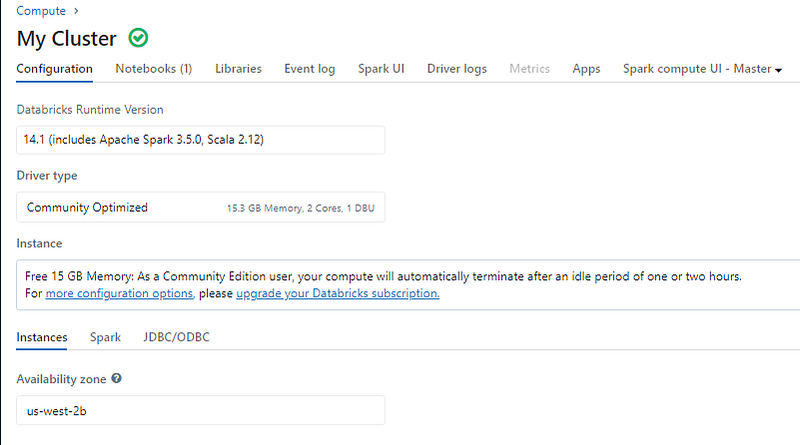
A standard cluster configuration for databricks community edition with runtime 14.1 and 15.3 GB RAM.
4.2 Dataset
from pyspark.sql import SparkSession
from pyspark.sql.functions import col, udf, pandas_udf
from pyspark.sql.types import IntegerType
import pandas as pd

# Customized spark object
spark = SparkSession.builder.appName("udf_comparison").getOrCreate()

# Create a pyspark dataFrame with 40.000.000 rows
df = spark.range(40000000).toDF("value")
4.3 UDFs
4.3.1 Standard UDF
def add_one(x):
    return x + 1

add_one_udf = udf(add_one, IntegerType())

# Apply traditional UDF
df_traditional_udf = df.withColumn("new_value", add_one_udf("value"))
4.3.2 Pandas UDF
@pandas_udf(IntegerType())
def pandas_add_one(series: pd.Series) -> pd.Series:
    return series + 1

# Apply Pandas UDF
df_pandas_udf = df.withColumn("new_value", pandas_add_one("value"))
4.3 Arrow-optimized UDF
@udf(returnType="int", useArrow=True)
def add_one_udf(x):
    return x + 1

# Apply traditional UDF
df_traditional_udf = df.withColumn("new_value", add_one_udf("value"))
4.4 Test results and notes
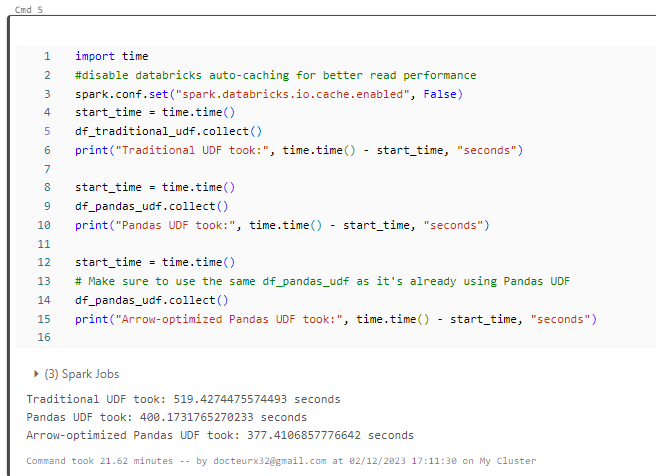
- Pandas-udf has approximatively 22% gain compared to UDF
- Arrow-optimized has 27% gain compared to UDF, slightly better than pandas-udf.
CONCLUSION
By introducing Arrow-Optimized UDFs, Spark addressed a number of inherent issues that were not yet resolved with Pandas UDFs such as the support for a wider range of data types and extension beyond the pandas API. Given its ease of use and configuration, I highly recommend to switch your spark UDF to arrow-optimized UDF (runtime 14 and above on Databricks).
However, it’s important to remember that UDF aren’t optimized by Spark’s Catalyst optimizer. Therefore, whenever feasible, use Spark native transformations functions available in spark.sql.functions .
For more articles and insights around Data engineering and Spark, feel free to follow me on Linkedin.
#dataengineering #spark #databricks
References
[1] B. Chambers and M. Zaharia, Spark: The Definitive Guide (2018), O’Reilly Media, Inc.


