
Apache Kafka mirror maker 2.0

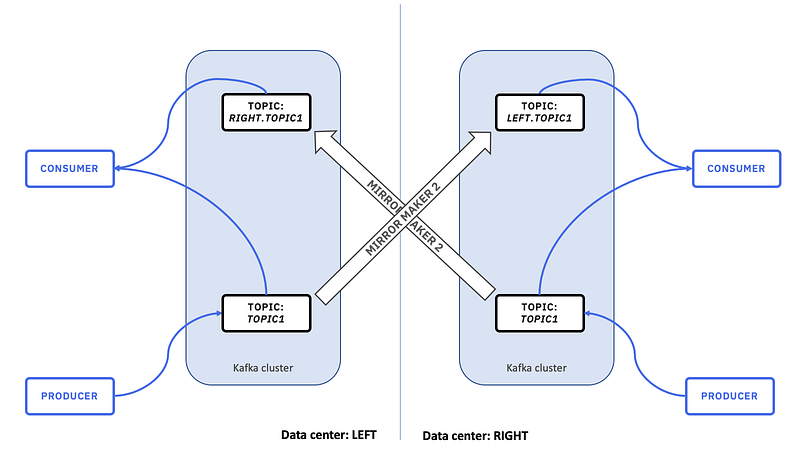
Apache Kafka MirrorMaker 2 is a tool that enables the replication of data between Kafka clusters. It’s commonly used for scenarios where you need to replicate data across different Kafka clusters, potentially in different data centers or regions. This replication helps with data backup, disaster recovery, data migration, and distribution of data to different environments (e.g., development, testing, production). It’s an improved version of the original MirrorMaker with better performance and reliability.
Use Cases:
- Data Replication and Backup: MirrorMaker 2 can be used to replicate data from a primary Kafka cluster to a secondary cluster for backup and data recovery purposes. If the primary cluster goes down, the secondary cluster can take over and continue processing data.
- Disaster Recovery: In case of data center failures or other disasters, MirrorMaker 2 can ensure that your data is available in a separate location or cloud region, reducing downtime and data loss.
- Data Migration: When you’re transitioning from an older Kafka cluster to a newer one or migrating to a different infrastructure provider, MirrorMaker 2 can help move your data seamlessly.
- Geographical Distribution: If you have Kafka clusters in different regions or data centers, you can use MirrorMaker 2 to replicate data across these clusters, ensuring data availability and reducing latency for consumers in different geographic areas.
Implementation:
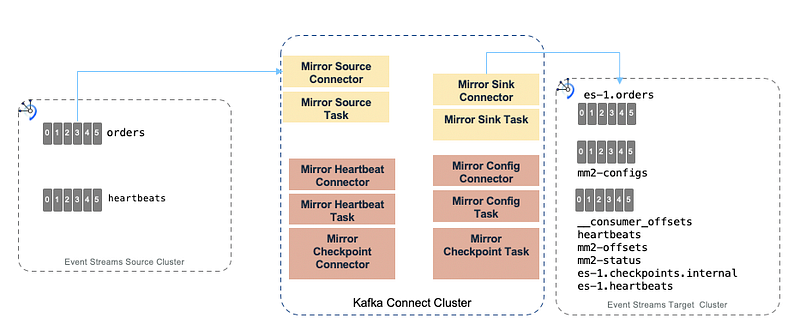
MirrorMaker 2 is more flexible and efficient than its predecessor. It uses Kafka Connect to manage source and destination connectors, which makes it easier to configure and manage replication tasks. Here’s a high-level overview of the implementation process:
- Configure Kafka Connect: Set up Kafka Connect on both the source and target clusters. Kafka Connect is the framework that handles connectors and tasks. You need to configure the appropriate connector plugins for your source and destination Kafka clusters.
- Create Connector Configs: Configure connector properties for both source and destination clusters. You’ll need to specify topics to replicate, consumer and producer configurations, and other parameters.
- Start MirrorMaker 2: Once the connector configurations are in place, start the MirrorMaker 2 process. It will start replicating data from the source cluster to the destination cluster.
- Monitoring and Management: Monitor the replication process using Kafka Connect’s built-in monitoring tools or third-party monitoring solutions. You can also manage the connectors and tasks using Kafka Connect’s REST API.
- Error Handling and Retries: Configure error handling and retries to ensure that data replication is robust and reliable. MirrorMaker 2 provides better error handling and guarantees compared to the original MirrorMaker.
The figure below illustrates the MirrorMaker 2.0 internal components running within Kafka Connect.
# specify any number of cluster aliases
clusters = source, destination

# connection information for each cluster
# This is a comma separated host:port pairs for each cluster
# for example. "A_host1:9092, A_host2:9092, A_host3:9092"  and you can see the exact host name on Ambari > Hosts
source.bootstrap.servers = localhost:9092,localhost:9092
destination.bootstrap.servers = eu-west-1-kafka.bx.internal:9092,eu-west-1-kafka.bx.internal:9092

#you can set authentication params also

# enable and configure individual replication flows
source->destination.enabled = true

# regex which defines which topics gets replicated. For eg "foo-.*"
source->destination.topics = toa.evehicles-latest-dev
groups=.*
topics.blacklist="*.internal,__.*"

# Setting replication factor of newly created remote topics
replication.factor=3

checkpoints.topic.replication.factor=1
heartbeats.topic.replication.factor=1
offset-syncs.topic.replication.factor=1

offset.storage.replication.factor=1
status.storage.replication.factor=1
config.storage.replication.factor=1 - …-configs.source.internal: This topic is used to store the connector and task configuration.
- …-offsets.source.internal: This topic is used to store offsets for Kafka Connect.
- …-status.source.internal: This topic is used to store status updates of connectors and tasks.
- source.heartbeats: to check that the remote cluster is available and the clusters are connected
It’s worth noting that while MirrorMaker 2 provides many benefits, it’s not suitable for scenarios requiring exactly-once delivery guarantees due to the inherent challenges of cross-cluster replication.
If you need stronger delivery guarantees, you might need to consider other Kafka features like Kafka Streams or specific application-level approaches.
Happy Learning.. !!


