avatarSayan Mondal

Free AI web copilot to create summaries, insights and extended knowledge, download it at here

2070

Abstract

urces on the node.</p><h1 id="2726">EFFICIENT ARCHITECTURE</h1><p id="5719">Ansible works by connecting to your nodes and pushing out small programs, called “Ansible Modules” to them. These programs are written to be resource models of the desired state of the system. Ansible then executes these modules (over SSH by default), and removes them when finished.</p><p id="981b">Your library of modules can reside on any machine, and there are no servers, daemons, or databases required. Typically you’ll work with your favorite terminal program, a text editor, and probably a version control system to keep track of changes to your content. To use Ansible, We need the help of Ansible Master and add master ssh to all clients. Here we’ll discuss the ansible set up.</p><h1 id="5d31">The architecture of the System</h1><figure id="1af9"><img src="https://cdn-images-1.readmedium.com/v2/resize:fit:800/1*Lgsq0oZPwD2Pap7eom7fEA.png"><figcaption>The master will contain all the systems setup</figcaption></figure><h1 id="56e9">The master setup</h1><p id="e95b">All Node must have a login for the Ansible

  • For Ubuntu</p><div id="fe08"><pre>sudo apt-<span class="hljs-built_in">get</span> install ansible</pre></div><p id="3eea">- Set an SSH</p><div id="1020"><pre><span class="hljs-attribute">ssh</span> ansible<span class="hljs-variable">@master_host_address</span></pre></div><p id="4ed3">— Copy the ssh id and add it to the known host</p><div id="b324"><pre>ssh-<span class="hljs-keyword">copy</span>-<span class="hljs-built_in">id</span> ansible@node_host_address </pre></div><ul><li>Copy the RSA to the Client Node using SCP( Secure Copy Paste)</li></ul><div id="4e35"><pre><span class="hljs-attribute">scp</span> id_rsa.pub clientName<span class="hljs-variable">@IP_ADDRESS</span>:.ssh/id_rsa.pub</pre></div><ul><li>Add all the hosts in the Ansible — go to the Ansible folder — The Ansible folder directory is (/etc/ansible) — Edit the host's folder</li></ul><div id="0927"><pre>[linux] Linux <span class="hljs-keyword">Node</span> <span class="hljs-title">Address</

Options

span> <span class="hljs-number">1</span> Linux <span class="hljs-keyword">Node</span> <span class="hljs-title">Address</span> <span class="hljs-number">2</span> …… Linux <span class="hljs-keyword">Node</span> <span class="hljs-title">Address</span> N</pre></div><ul><li>Run ansible code to run the ping all</li></ul><div id="6427"><pre>ansible <span class="hljs-attribute">all</span> -<span class="hljs-selector-tag">i</span> hosts -m ping</pre></div><p id="05a6">Or to run from any other folder</p><div id="d302"><pre>ansible <span class="hljs-keyword">all</span> -m ping</pre></div><h1 id="27b6">Client Setup Process :</h1><ul><li>Enable SSH</li><li>Log in to the System</li><li>Add user ansible</li></ul><div id="b549"><pre><span class="hljs-attribute">sudo adduser ansible</span></pre></div><h1 id="c25a">Some Ansible Commands</h1><p id="3fae"><b>Gather All Information</b> It will show all the information</p><div id="a19e"><pre> ansible <span class="hljs-keyword">all</span> -m gather_facts</pre></div><p id="425d"><b>Limit Gather All Information</b></p><p id="9fa9">It will show all the information</p><div id="19d9"><pre>ansible <span class="hljs-literal">all</span> -m gather_facts — <span class="hljs-keyword">limit</span> IP_ADDRESS</pre></div><p id="2902"><b>Ping the Nodes</b></p><div id="00b4"><pre>ansible <span class="hljs-keyword">all</span> -m ping</pre></div><p id="b7be"><b>Get System Name and Uptime Details</b></p><div id="62bb"><pre>ansible <span class="hljs-attribute">all</span> -m shell -<span class="hljs-selector-tag">a</span> “uname -<span class="hljs-selector-tag">a</span>; uptime”</pre></div><p id="2310"><b>Get System Process Details</b></p><div id="0bf2"><pre>ansible <span class="hljs-keyword">all</span> -<span class="hljs-keyword">m</span> <span class="hljs-keyword">shell</span> -<span class="hljs-keyword">a</span><span class="hljs-keyword">ps</span> -eaf | <span class="hljs-keyword">grep</span> http”</pre></div><p id="299c">Hope this helps you. Now your system is ready to do/ perform any automation task.</p></article></body>

Ansible Setup for Easy Automation

Photo by Lenny Kuhne on Unsplash

What is Ansible

Ansible is an open-source software provisioning, configuration management, and application-deployment tool enabling infrastructure as code. It runs on many Unix-like systems and can configure both Unix-like systems as well as Microsoft Windows. It includes its own declarative language to describe system configuration. Ansible was written by Michael DeHaan and acquired by Red Hat in 2015. Ansible is agentless, temporarily connecting remotely via SSH or Windows Remote Management (allowing remote PowerShell execution) to do its tasks.

Ansible helps you manage multiple machines by selecting a portion of Ansible’s inventory stored in a simple ASCII text file. Inventory is configurable and the target machine inventory can be obtained dynamically or from cloud-based sources in various formats (YAML, INI). Ansible Vault has been able to store sensitive data in encrypted files since 2014. In contrast to other popular configuration management software such as Chef, Puppet, and CFEngine, Ansible uses an agentless architecture. This causes the Ansible software to not run normally or to be installed on the controlled node. Instead, Ansible tunes the node by temporarily installing and running the module on the node via SSH. During the orchestration task, the process running the module communicates with the control machine using JSON-based protocols over standard inputs and outputs. If Ansible does not manage the node, it does not run daemons or install software and therefore does not consume resources on the node.

EFFICIENT ARCHITECTURE

Ansible works by connecting to your nodes and pushing out small programs, called “Ansible Modules” to them. These programs are written to be resource models of the desired state of the system. Ansible then executes these modules (over SSH by default), and removes them when finished.

Your library of modules can reside on any machine, and there are no servers, daemons, or databases required. Typically you’ll work with your favorite terminal program, a text editor, and probably a version control system to keep track of changes to your content. To use Ansible, We need the help of Ansible Master and add master ssh to all clients. Here we’ll discuss the ansible set up.

The architecture of the System
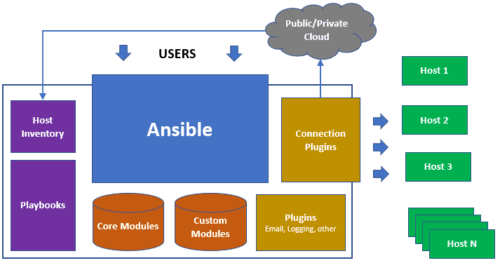
The master will contain all the systems setup

The master setup

All Node must have a login for the Ansible - For Ubuntu

sudo apt-get install ansible

- Set an SSH

ssh ansible@master_host_address

— Copy the ssh id and add it to the known host

ssh-copy-id ansible@node_host_address 
  • Copy the RSA to the Client Node using SCP( Secure Copy Paste)
scp id_rsa.pub clientName@IP_ADDRESS:.ssh/id_rsa.pub
  • Add all the hosts in the Ansible — go to the Ansible folder — The Ansible folder directory is (/etc/ansible) — Edit the host's folder
[linux]
Linux Node Address 1
Linux Node Address 2
……
Linux Node Address N
  • Run ansible code to run the ping all
ansible all -i hosts -m ping

Or to run from any other folder

ansible all -m ping

Client Setup Process :

  • Enable SSH
  • Log in to the System
  • Add user ansible
sudo adduser ansible

Some Ansible Commands

Gather All Information It will show all the information

 ansible all -m gather_facts

Limit Gather All Information

It will show all the information

ansible all -m gather_facts — limit IP_ADDRESS

Ping the Nodes

ansible all -m ping

Get System Name and Uptime Details

ansible all -m shell -a “uname -a; uptime”

Get System Process Details

ansible all -m shell -aps -eaf | grep http”

Hope this helps you. Now your system is ready to do/ perform any automation task.

Automation
Ansible
Software Development
Software Engineering
DevOps
Recommended from ReadMedium