avatarPauline Evanosky: writer, psychic, channel

Free AI web copilot to create summaries, insights and extended knowledge, download it at here

1787

Abstract

page where you can record things like their birthday, the last time you met with them, and the last things you talked about. I can see where all of that can be extremely useful in business settings.</p><p id="66f5">You could also create a column or field with the date of the last time you had anything to do with the person and then sort on that column. That way, you could see the last time you’d collected money from them or talked to them about something or, if you were a salesperson, the last time you’d called them. It’s your database. You decide what is the most important. What I like about this is that I can change my mind three months down the road if something else becomes more important than a little note on the page of general info about the person. You could create a new column and either begin populating it with info from that point forward or, if this is something you’ve been sort of tracking all along, update your contacts list and put that info into the new field. What the person likes to eat, how they like their coffee or tea, what their shoe size is. Who knows what you would use? It’s all customizable and all up to you.</p><figure id="6594"><img src="https://cdn-images-1.readmedium.com/v2/resize:fit:800/1*KqXhwzLiQMz9TgGUh-ymqA.png"><figcaption>Screen Print with my To-Do List by the author</figcaption></figure><p id="7542">Another important thing I learned today has to do with my To-Do List of check-off boxes. Many of them are associated with writing. I wanted a nested To-Do List under the category of Writing. So, with the first item on my To-Do list, I went to the six dots on the left side of the item and clicked on that. It gave me the option of turning it into something. I turned the top Writing To-Do item into a toggle and then created al

Options

l the different writing things I wanted to do during the course of any day. I also added Chores, which includes Clutter, Cleaning, Windows, and Finding Things. Now, my To-Do list doesn’t look as cluttered as it did before. I suppose I could add Laundry to it too.</p><p id="cd9b">I think the best practice for me is to read through my notes periodically, at least in the beginning, to better remember all these tips and tricks to use.</p><p id="d6dd"><b><i>Links in the Article:</i></b></p><p id="733c"><a href="https://www.notion.so/">Notion</a> — An online productivity and planning program that is free to use. <a href="https://www.skillshare.com/en/classes/Notion-Masterclass-Maximise-Your-Productivity-Organisation/1533502361/projects?via=watch-history">Skillshare</a> — The class I’m taking to learn how to use Notion. <a href="https://www.notion.so/Keeping-Me-Organized-7694ffc3386f4ee9aeedccfa14b1836d?pvs=4">What my Notion page looks like</a>.</p><p id="d643">Please clap, comment, follow, and <a href="https://pmevanosky.medium.com/subscribe"><b><i>subscribe</i></b></a>.</p><div id="ba9f" class="link-block"> <a href="https://pmevanosky.medium.com/list/effd4c15374f"> <div> <div> <h2>Notion — Learning Productivity - Taming Chaos</h2> <div><h3>A series of articles as I learn a new program called Notion. This will be a handy tool for planning and productivity.</h3></div> <div><p>pmevanosky.medium.com</p></div> </div> <div> <div style="background-image: url(https://miro.readmedium.com/v2/resize:fit:320/0*dea1a2fd0ec3d33d33e73ca68e8441497fcc6a4c.jpeg)"></div> </div> </div> </a> </div></article></body>

Another Notion Article #3

Data Bases and Nested To-Do Lists
Image by rawpixel.com

I am currently on the 9th lesson of the 24 lessons in the course I’m taking on Skillshare about how to learn Notion. It’s a build-as-you-go course, and the teacher just announced that we are in the intermediate section of the course. He said that with what we know now, we can go ahead and use Notion. At this point, I have a To-Do list for everyday use. I also have an inspirational bit of writing for the day. I know how to make reminders. I know how to create covers and emojis.

Evidently, even though Notion has a reputation as being a difficult program to learn, you really don’t need to know much to effectively use it. I like that. I have a philosophy I have held for many years, and that is a learn-as-you-go sort of attitude. I’ve done that with Word and Excel. I’ve also done it with a lot of other programs, but those two are the best examples in my own life.

Our instructor, who has many people on his own Notion team with his businesses, is what I would consider to be an expert, a power user. He said he only uses about 5% of the program. That little bit is enough to hit all my boxes when he said that, I was encouraged.

Today, I am learning about Databases. Ali, our teacher, said the most commonly used database in Notion would be for contacts. What is neat is with each person in the database, you can associate them with a page where you can record things like their birthday, the last time you met with them, and the last things you talked about. I can see where all of that can be extremely useful in business settings.

You could also create a column or field with the date of the last time you had anything to do with the person and then sort on that column. That way, you could see the last time you’d collected money from them or talked to them about something or, if you were a salesperson, the last time you’d called them. It’s your database. You decide what is the most important. What I like about this is that I can change my mind three months down the road if something else becomes more important than a little note on the page of general info about the person. You could create a new column and either begin populating it with info from that point forward or, if this is something you’ve been sort of tracking all along, update your contacts list and put that info into the new field. What the person likes to eat, how they like their coffee or tea, what their shoe size is. Who knows what you would use? It’s all customizable and all up to you.
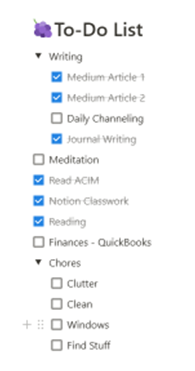
Screen Print with my To-Do List by the author

Another important thing I learned today has to do with my To-Do List of check-off boxes. Many of them are associated with writing. I wanted a nested To-Do List under the category of Writing. So, with the first item on my To-Do list, I went to the six dots on the left side of the item and clicked on that. It gave me the option of turning it into something. I turned the top Writing To-Do item into a toggle and then created all the different writing things I wanted to do during the course of any day. I also added Chores, which includes Clutter, Cleaning, Windows, and Finding Things. Now, my To-Do list doesn’t look as cluttered as it did before. I suppose I could add Laundry to it too.

I think the best practice for me is to read through my notes periodically, at least in the beginning, to better remember all these tips and tricks to use.

Links in the Article:

Notion — An online productivity and planning program that is free to use. Skillshare — The class I’m taking to learn how to use Notion. What my Notion page looks like.

Please clap, comment, follow, and subscribe.

Notion
Learning
Productivity
Organizing
Pauline Evanosky
Recommended from ReadMedium