
Unsupervised Anomaly Detection in Logs with BERT
Leveraging Transformers and Hugging Face for Anomaly Detection

There are many ways to analize computer logs, but the state-of-the-art in 2023 is to use deep learning techniques involving neural networks. In this case we are dealing with computer logs which often have structured patterns, but they also contain natural language-like messages.
That makes our problem suited to be approached with transformers, which are a type of neural network architecture designed to handle sequential data using self-attention mechanisms, enabling them to weigh input elements differently based on context.
In this case, we are going to use BERT (Bidirectional Encoder Representations from Transformers) which is a pre-trained NLP model that can learn information from text sequences using bidirectional Transformer architectures. It achieves state-of-the-art performance in text classification tasks, therefore it is suited for anomaly detection in logs.
Thanks to the transformers library of hugginface, it is actually very easy to use BERT, so let’s get hands on and see how to code this:
First of all we are going to install the transformers library and create a pandas dataframe with our log templates:
!pip install transformers
import pandas as pd
csv_file = "/content/templates.csv"  # Replace with the path to your CSV file
log_data = pd.read_csv(csv_file)
log_data
You could also work with the content of the logs itself but if there is a common template structure in your logs it is preferreble to work with it. In this case, we have a column with templates and another with the type of error:
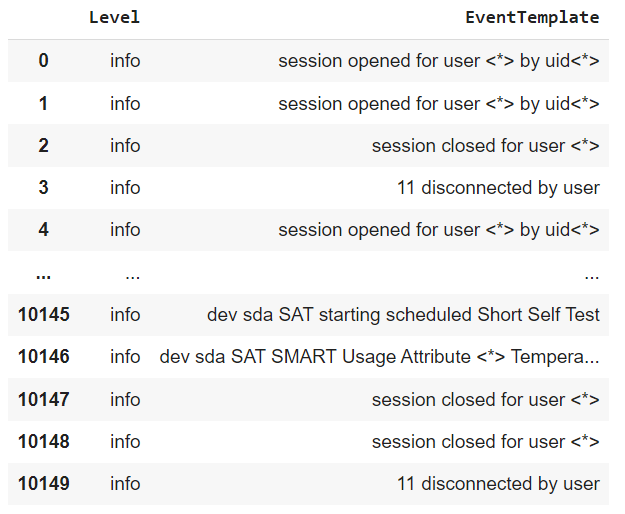
Normally, the logs classified under critical level are the most serious one, followed by warnings and then notice, therefore anomalies should be related with these ones.
In our case, we are going to work only with the “EventTemplate” column, as if the problem was unsupervised, and then we will compare the results with the “Level” column, to see if we can spot the serious issues.
Now, we are going to import BertModel and BertTokenizer from our transformers library, and it will allow us to tokenize our logs, just like this:
import torch
from transformers import BertTokenizer, BertModel
from sklearn.metrics.pairwise import cosine_similarity
import numpy as np

# Initialize the BERT tokenizer and model
model_name = "bert-base-uncased"  # Choose the BERT model you prefer
tokenizer = BertTokenizer.from_pretrained(model_name)
model = BertModel.from_pretrained(model_name)

# Step 1: Tokenize and preprocess the log data
tokenized_logs = []
attention_masks = []
lng=[]
for log_text in log_data["EventTemplate"]:

    # Tokenize the log message
    tokens = tokenizer.tokenize(log_text)
    print(tokens)
    lng.append(tokens)
    # Add special tokens and apply padding
    input_ids = tokenizer.convert_tokens_to_ids(tokens)
    input_ids = tokenizer.build_inputs_with_special_tokens(input_ids)

    # Optionally, truncate or pad to a fixed length
    max_length = 100  # Set your desired maximum length
    input_ids = input_ids[:max_length] + [tokenizer.pad_token_id] * (max_length - len(input_ids))

    tokenized_logs.append(input_ids)

    # Create attention mask
    attn_mask = [1] * len(input_ids) + [0] * (max_length - len(input_ids))
    attention_masks.append(attn_mask)

# Convert tokenized logs to PyTorch tensors
log_tensors = torch.tensor(tokenized_logs)
attention_masks = torch.tensor(attention_masks)
So here we have converted logs into separated tokens, so they look like this:
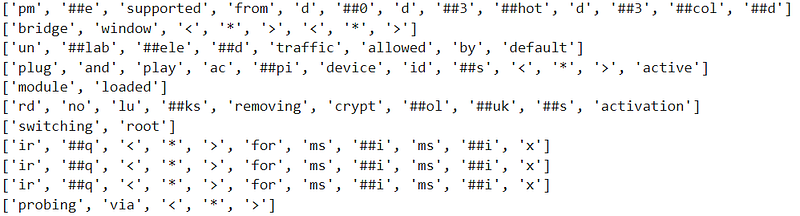
Depending on your type of data you might want to clean it before creating your tokens if you consider that there are many irrelevant characters that don’t provide information.
Also note hat we are using max_length = 100 as the maximum number of tokens allowed on each log, if you have very long logs with many words, your maximum number of tokens will be larger, but you can play this number as you wish (the gaps in your tokens shorter than the maximum length will be filled with zeros, this is call padding) to improve your results but keep in mind that it will also take much longer to train.
That’s why we have also created attention masks, which are binary arrays used to specify which positions should be attended to (usually with a value of 1) and which should be ignored (usually with a value of 0). They are used here to help us differentiate real tokens from padding tokens, ensuring that the model does not consider padding when computing self-attention scores.
Now, after tokenizing logs we create Pytorch tensors to work with them, actually we are going to create a loop to iterate over our tokenized logs and masks to create an embedding for each one of them, just like this:
log_embeddings = []
count=0

for log_tensor, attn_mask in zip(log_tensors, attention_masks):
    # Convert log tensor and attention mask to PyTorch
    count+=1
    log_tensor = log_tensor.unsqueeze(0)
    attn_mask = attn_mask.unsqueeze(0)

    # Pass the log tensor and attention mask through the BERT model to obtain embeddings
    with torch.no_grad():
        outputs = model(log_tensor, attention_mask=attn_mask)

    # Extract the embedding for [CLS] token (outputs[0][:, 0, :])
    log_embedding = torch.mean(outputs[0][:, 0, :], dim=0).numpy()
    log_embeddings.append(log_embedding)
    print(count)
Ok, now we have our embeddings so each log is a vector not a sentence anymore, and we can try to detect anomalies measuring the distance of each vector to a mean centroid, thus the larger the distance the more different the log is to the mean, therefore the more likely it is an anomaly.
We can call “similarity” to the cosine of the distance of each log to the centroid and set a threshold, above which we consider it to be an anomaly, just like this:
# Step 3: Anomaly Detection
# Calculate the mean (centroid) of all log embeddings
if len(log_embeddings) > 0:
    all_logs_centroid = np.mean(log_embeddings, axis=0)
else:
    # Handle the case where there are no logs
    all_logs_centroid = None

threshold = 0.977 # Adjust the threshold as needed
logs_anomal=[]
# Compare each log with the mean log centroid using cosine similarity
for i, log_embedding in enumerate(log_embeddings):
    if all_logs_centroid is not None:
        similarity_score = cosine_similarity([log_embedding], [all_logs_centroid])[0][0]
        # Compare similarity score with the threshold
        if similarity_score < threshold:
            #print(f"Anomaly detected: Log {i}")
            logs_anomal.append(i)
After running that code, we can print the variable logs_anomal and we can see how our anomalies look like:

Now, to measure how well the algorithm has performed, if you have labels with the level of errors, you can grab the critical, warnings or notices and compare them with your results.
You can use precission (true anomalies detected divided by all anomalies detected) and recall (true anomalies detected divided by all true anomalies) to measure the quality of your results.
If you increase your threshold you will get more anomalies: your recall will be better and your precission will be worse). If you decrease your threshold you will detect less anomalies: your precission will increase but your recall will.
For example, in this case I looked for a threshold that balanced both precission and recall around the same value, and found that with the threshold in 0.977 I can spot 190 anomalies and achieve precission and recall of around 0,68.
You can play with these values and get better results depending on what you consider more important for your task.
Ok, that’s all for today, hope you enjoyed and happy coding!


