avatarKagklis Vasileios

Free AI web copilot to create summaries, insights and extended knowledge, download it at here

2665

Abstract

that modules handle dependencies themselves.</p><p id="be60">The problem is when a module doesn’t do anything like that. It’s only exporting a declared component, directive, pipe, etc. Then we just deliver a useless class that provides no additional value.</p><p id="32d8">We don’t even need an <code>AppModule</code> anymore — we can bootstrap the application directly with a component.</p><figure id="97b8"><img src="https://cdn-images-1.readmedium.com/v2/resize:fit:800/1*TCC_ujubBTuxKN9VjwSyLA.png"><figcaption></figcaption></figure><p id="7136">We just provide the required providers (as if this was a module). Think of <a href="https://angular.io/api/core/importProvidersFrom"><code>importProvidersF</code>rom</a> as a bridging function.</p><p id="5b78">We will see this less often as libraries start to adapt and provide helper functions. For example, with Angular v14.2 we already got this (line 4):</p><figure id="9bba"><img src="https://cdn-images-1.readmedium.com/v2/resize:fit:800/1*De-fPuw8vgRfQZwr8dyH-A.png"><figcaption></figcaption></figure><p id="89cb">However, to play the devil’s advocate here — there’s still work that needs to be done.</p><figure id="c2ff"><img src="https://cdn-images-1.readmedium.com/v2/resize:fit:800/1*mVPtDGVYYaHWkeV2K39WDg.png"><figcaption></figcaption></figure><p id="883c">The list of imports can grow fast. It would be nice if we could somehow avoid this duplication.</p><p id="16e6">The Angular team must already be aware of this. Hopefully, we’ll see some mechanism that deals with this in an upcoming version.</p><h2 id="66eb">3. Direct and more tree-shakable routing</h2><p id="3ff8">Remember how we had to point to another module that then pointed to a routed component or route configuration?</p><p id="b5a9">That belongs to the past!</p><p id="256c">Now we can point directly to a routed component (line 10) or route configuration (line 14). Because of standalone components routing became more tree-shakable.</p><figure id="612f"><img src="https://cdn-images-1.readmedium.com/v2/resize:fit:800/1*UfisS7trbk11kLu90uQ_6w.png"><figcaption></figcaption></figure><h2 id="ddd3">4. Fine-grained lazy loading</h2><p id="1941">It goes without saying that if you can route to a component, then you can also lazy load a component.</p><p id="11ad">No need to load an entire module when you only need to load a specific component.</p><h2 id="9855">5. Less confusing scope declaration</h2><p id="31bb">Did you know?</p><p id="54ce">Every time you lazy-loaded a module, you got a new scope. And when you eager-loaded a module, you didn’t.</p><p id="2fc5">This is quite confusing. It’s like trying to hit two birds with a ston

Options

e, but instead shooting your own foot.</p><p id="9090">Luckily, route configuration now has a providers section (line 5). This is optional, but we can use it to provide some providers for that specific route and all its child routes.</p><figure id="583d"><img src="https://cdn-images-1.readmedium.com/v2/resize:fit:800/1*rzMWn8engexPnGi4RBPp8g.png"><figcaption></figcaption></figure><p id="1399">These are the providers we would normally put in our lazy-loaded module.</p><p id="753d">This is more explicit. We put something there? We know we’ll get a new scope, regardless of whether we use lazy loading.</p><h2 id="a9e4">6. Project structure remains intact</h2><p id="7b22">Structuring the application without modules is not affected by any means. We can simply use folders to organize our project.</p><figure id="c11b"><img src="https://cdn-images-1.readmedium.com/v2/resize:fit:800/1*VgLXk8iP5zlpVPjW4LSRSw.png"><figcaption></figcaption></figure><p id="d128">A better way to do this is to use barrels. It’s like creating a public API. Whatever we export from our <code>index.ts</code> means that is backward compatible and won’t break by future changes.</p><h2 id="fa4e">BONUS: There is a migration schematic!</h2><p id="d0a1">As of Angular v15.2, there is an Angular schematic to automate the migration from NgModules to the standalone API.</p><p id="450c">Getting into the details goes way out of the scope of this article. But you can <a href="https://github.com/angular/angular/blob/main/packages/core/schematics/ng-generate/standalone-migration/README.md">read how to use it here</a>.</p><p id="1f16">The screenshots are from <a href="https://github.com/kagklis/ng-route-parameters">this GitHub repository</a>, which is a demo from a <a href="https://javascript.plainenglish.io/angular-route-parameters-a-simple-guide-88c69d54102c">previous article</a>. This repository contains two branches — the before and after migration to standalone.</p><h1 id="427f">Conclusions</h1><p id="0b98">Standalone components certainly made an entrance. 😅</p><p id="54be">We talked about how to create them, the changes they brought to several features of Angular, and the benefits of using them.</p><p id="9649"><a href="https://angulargems.beehiiv.com/subscribe"><b>Subscribe to my newsletter</b></a> and stay tuned for more content like this.</p><p id="7369">Thank you for reading!</p><p id="f2b3">My first e-book is out!<b> <a href="https://vkagklis.ck.page/ng-perf-cookbook">Get it for FREE</a>.</b></p><figure id="20b9"><img src="https://cdn-images-1.readmedium.com/v2/resize:fit:800/1*Gd-GE6BtBJhOV5A8LvSZ4A.jpeg"><figcaption></figcaption></figure></article></body>

Angular | Standalone Components

Why Migrate to Angular Standalone Components

A few good reasons to migrate to standalone components in Angular (if you haven’t already)
Angular and Forms logo by Angular PressKit / CC BY 4.0

It’s been a while since Angular v14 has been released — the version that introduced standalone components.

How many of you have already migrated to Angular v14 and to standalone components — raise your hand.

If you did, good for you!

If you didn’t, I’d say “I understand”.

I know from experience the struggles of the job. Sometimes so many things are going on — you’re overwhelmed! Migrating to the latest version and catching up with updates just has to wait.

Anyhow!

This article aims to answer questions like:

  • how to create a standalone component in Angular?
  • what changes did they bring to the Angular world?
  • why should you care about them?

Hopefully, this will motivate you to put them higher on your priorities and to-do list.

Let’s get started!

1. Creating them is super easy

Creating standalone components, directives, or pipes is as simple as marking their class with standalone: true.

Standalone classes don’t need to be declared in an NgModule. In fact, you’ll get an error if you try to. Instead, you specify their dependencies directly in their imports array.
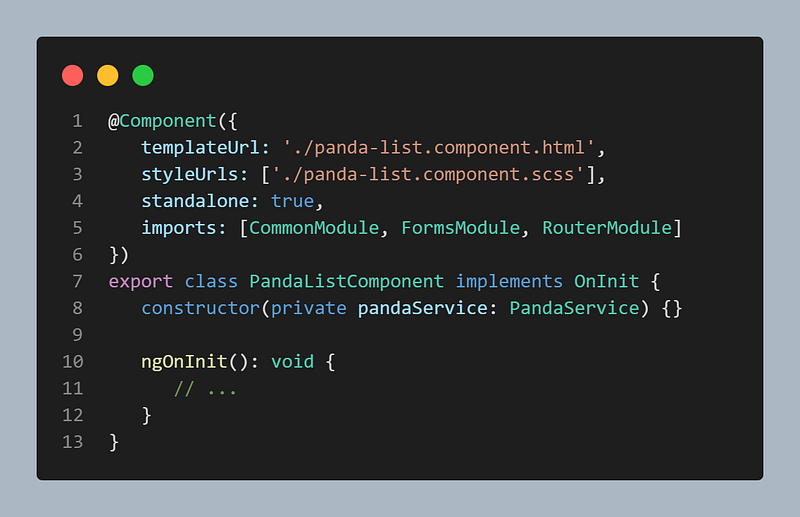
This means that NgModules are completely optional — which brings us to our next point.

2. Less boilerplate code

Once you get to know standalone components, you’ll realize that in many cases modules were just boilerplate code.

An NgModule is a “context holder” for declarations and providers. This means that modules handle dependencies themselves.

The problem is when a module doesn’t do anything like that. It’s only exporting a declared component, directive, pipe, etc. Then we just deliver a useless class that provides no additional value.

We don’t even need an AppModule anymore — we can bootstrap the application directly with a component.
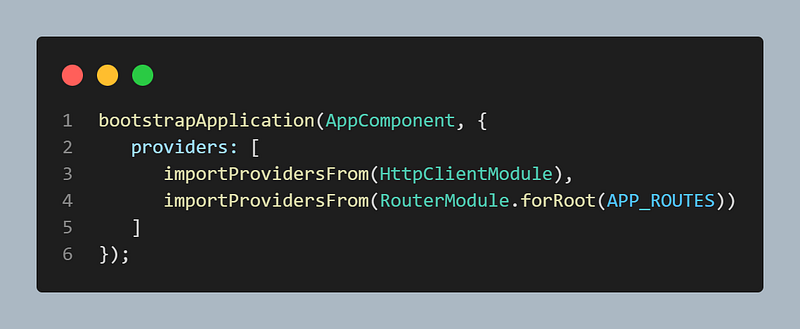
We just provide the required providers (as if this was a module). Think of importProvidersFrom as a bridging function.

We will see this less often as libraries start to adapt and provide helper functions. For example, with Angular v14.2 we already got this (line 4):
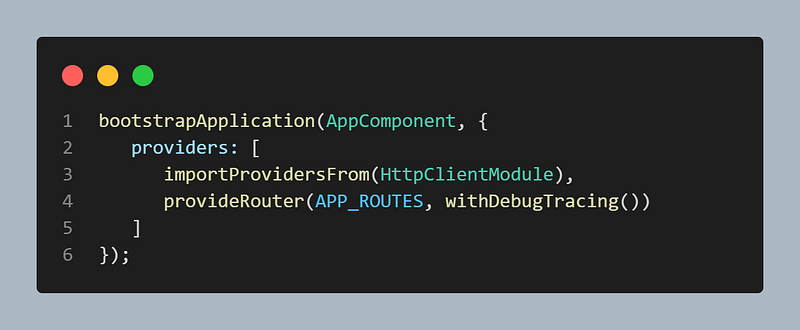
However, to play the devil’s advocate here — there’s still work that needs to be done.
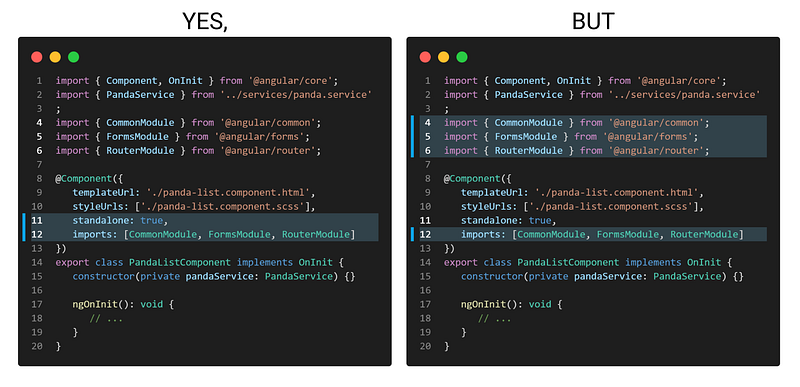
The list of imports can grow fast. It would be nice if we could somehow avoid this duplication.

The Angular team must already be aware of this. Hopefully, we’ll see some mechanism that deals with this in an upcoming version.

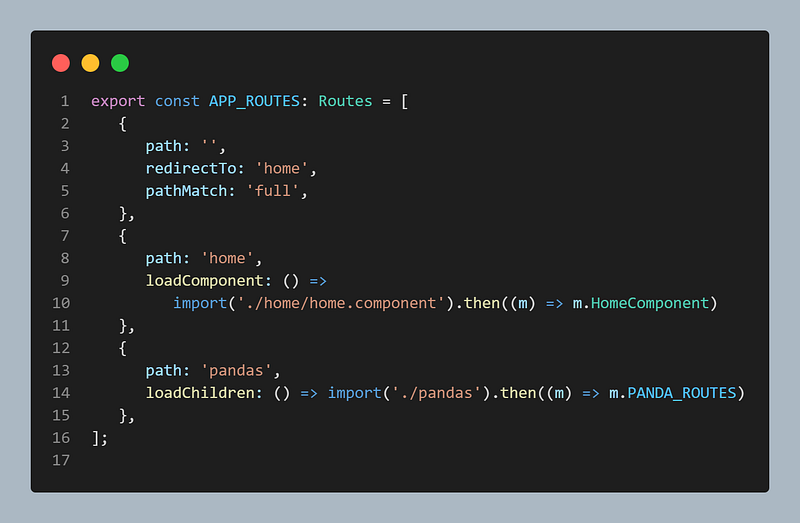
3. Direct and more tree-shakable routing

Remember how we had to point to another module that then pointed to a routed component or route configuration?

That belongs to the past!

Now we can point directly to a routed component (line 10) or route configuration (line 14). Because of standalone components routing became more tree-shakable.
4. Fine-grained lazy loading

It goes without saying that if you can route to a component, then you can also lazy load a component.

No need to load an entire module when you only need to load a specific component.

5. Less confusing scope declaration

Did you know?

Every time you lazy-loaded a module, you got a new scope. And when you eager-loaded a module, you didn’t.

This is quite confusing. It’s like trying to hit two birds with a stone, but instead shooting your own foot.

Luckily, route configuration now has a providers section (line 5). This is optional, but we can use it to provide some providers for that specific route and all its child routes.
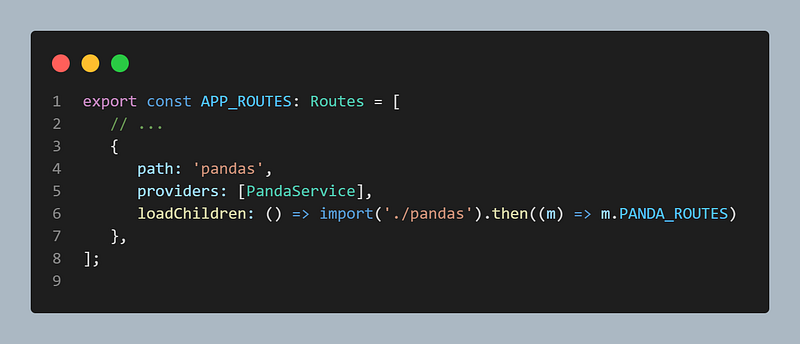
These are the providers we would normally put in our lazy-loaded module.

This is more explicit. We put something there? We know we’ll get a new scope, regardless of whether we use lazy loading.

6. Project structure remains intact

Structuring the application without modules is not affected by any means. We can simply use folders to organize our project.
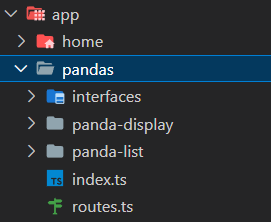
A better way to do this is to use barrels. It’s like creating a public API. Whatever we export from our index.ts means that is backward compatible and won’t break by future changes.

*BONUS*: There is a migration schematic!

As of Angular v15.2, there is an Angular schematic to automate the migration from NgModules to the standalone API.

Getting into the details goes way out of the scope of this article. But you can read how to use it here.

The screenshots are from this GitHub repository, which is a demo from a previous article. This repository contains two branches — the before and after migration to standalone.

Conclusions

Standalone components certainly made an entrance. 😅

We talked about how to create them, the changes they brought to several features of Angular, and the benefits of using them.

Subscribe to my newsletter and stay tuned for more content like this.

Thank you for reading!

My first e-book is out! Get it for FREE.
Angular
Angular2
JavaScript
Front End Development
Programming
Recommended from ReadMedium