avatarKagklis Vasileios

Free AI web copilot to create summaries, insights and extended knowledge, download it at here

3469

Abstract

</p><p id="db09">Below is a small example of what the tree looks like.</p><figure id="8788"><img src="https://cdn-images-1.readmedium.com/v2/resize:fit:800/1*WgJnLEhPceSb85v3eUYE6g.jpeg"><figcaption></figcaption></figure><p id="ba17">Some event triggers a change in a leaf component (say <code>ProductItem</code>). The default strategy is to run change detection for all components in the tree (marked with red color in the image below).</p><figure id="5767"><img src="https://cdn-images-1.readmedium.com/v2/resize:fit:800/1*BoXrmZ1bMSCg4DlREkqmsg.jpeg"><figcaption></figcaption></figure><p id="f8e9">Of course, we can use the <code>OnPush</code> strategy to reduce the number of components on which Angular has to run change detection.</p><figure id="11e3"><img src="https://cdn-images-1.readmedium.com/v2/resize:fit:800/1*PAvJry-IvzN6t9nmXMfV4w.jpeg"><figcaption></figcaption></figure><p id="c02c">This may seem like a small improvement, but trust me — it’s not! In real applications, the tree is never as shallow and small as in this example.</p><p id="fec9">This is far from ideal. Wouldn’t it be nice if the component could somehow notify Angular that something has changed?</p><p id="3a91"><b>Enter Angular signals!</b></p><p id="3ea2">Change detection will run only on the component in which the change happened.</p><figure id="d50b"><img src="https://cdn-images-1.readmedium.com/v2/resize:fit:800/1*O5mYB8_q_uvjTDLuL6vglQ.jpeg"><figcaption></figcaption></figure><h1 id="1390">How do we use them?</h1><p id="8475">We will build a simple VAT calculator.</p><p id="82db">The user types a price and the application calculates the VAT (fixed 15%) and the total (price + vat).</p><p id="b181">The user can also click the “Save” button to save the current results as a history entry.</p><p id="4cbe">All data are saved in the local storage so the application doesn’t start blank after refreshing the page.</p><p id="3d31">Here is what the application looks like.</p><figure id="46fe"><img src="https://cdn-images-1.readmedium.com/v2/resize:fit:800/1*GPrTitbRJz1kOzZ7DOC-vw.png"><figcaption></figcaption></figure><p id="e1db">Let’s see how we can build this with Angular’s signal API, which includes functions like <code>signal</code>, <code>computed</code>, <code>update</code>, and <code>effect</code>.</p><p id="bede">We create a signal for the price and history with the <code>signal</code> function. For the VAT and total, we create a computed signal with the <code>computed</code> function.</p><figure id="c4e8"><img src="https://cdn-images-1.readmedium.com/v2/resize:fit:800/1*rI3yiiZdYMn3SJHSpLwLqw.png"><figcaption></figcaption></figure><p id="96c8">A computed signal cannot be changed directly. Instead, it’s derived from the values of other signals.</p><p id="766a">The <code>computed</code> function receives a callback. This callback will be executed every time the value of any signal in the callback changes.</p><p id="dbf6">This is like declaring that VAT and total are dependent on price. Each time the price changes, the value of the VAT and total will be recalculated to be up-to-date with the latest change.</p><p id="95a7">We use event binding in the template to call <code>onInputUpdate</code> when the user types something.</p><figure id="b65e"><img src="https://cdn-images-1.readmedium.com/v2/resize:fit:800/1*MUdsEdXqU7iqxTOwZG4Khg.png"><figcaption></figcaption></figure><p id="04e1">In the <code>onInputUpdate()</code>, we <code>set</code> the # Options new value to the price signal.</p><figure id="6e4b"><img src="https://cdn-images-1.readmedium.com/v2/resize:fit:800/1*nBBY9O62vvvw96nyHC85tg.png"><figcaption></figcaption></figure><p id="5d89">Because VAT and total are <code>computed</code> signals, they are recalculated as soon as the value of the price changes.</p><p id="5173">The user can also save the results by pressing the “Save” button.</p><figure id="f41c"><img src="https://cdn-images-1.readmedium.com/v2/resize:fit:800/1*QMRVoU9Zxusd_pg-CMH46Q.png"><figcaption></figcaption></figure><p id="7070">In the <code>save()</code>, we use the <code>update</code> function to update the signal in an immutable way.</p><figure id="7e8f"><img src="https://cdn-images-1.readmedium.com/v2/resize:fit:800/1*6cczGFKyq35MR99N-3yH0Q.png"><figcaption></figcaption></figure><p id="ae8f">Observe that accessing the value of a signal (lines 4–6) is done differently compared to variables. It’s basically a function call.</p><p id="8cdf">Respectively, there is a <code>mutate</code> function to change the value of a signal in place.</p><p id="9d98">Note, however, that all three methods (<code>set</code>, <code>update</code>, <code>mutate</code>) notify dependents and according to the official RFC:</p><blockquote id="9470"><p>While the API surface has 3 different methods (set, update, mutate) of changing signal’s value, the <code>.set(newValue)</code> is the only fundamental operation that we need in the library. The other 2 methods <b>are just syntactic sugar</b>, convenience methods that could be expressed as <code>.set</code>.</p></blockquote><p id="92f1"><b>UPDATE: </b>Starting from Angular v17, <a href="https://github.com/angular/angular/commit/5b88d136affdaa35e7015c00281b86cae040321b">the mutate function has been dropped from the signal API</a>.</p><p id="7d2a">Finally, there is the <code>effect</code> function to handle side effects. We use this function to store the current price value that the user typed along with the history of saved results in the local storage.</p><figure id="9adb"><img src="https://cdn-images-1.readmedium.com/v2/resize:fit:800/1*NaYa3K00ndvULSU6g9SPdg.png"><figcaption></figcaption></figure><p id="7182">The <code>effect</code> function receives a callback. This callback will be executed every time the value of any signal in the callback changes.</p><p id="ae67">If we want to use a signal in a <code>computed</code> or <code>effect</code> callback without getting notified of its changes, we can use <code>untracked</code> like this:</p><figure id="cddb"><img src="https://cdn-images-1.readmedium.com/v2/resize:fit:800/1*P0xidUaWqsnyxRzaVZkfvw.png"><figcaption></figcaption></figure><p id="0d07">You can find the complete source code <a href="https://github.com/kagklis/ng-signals">in this GitHub repository</a>.</p><h1 id="09ad">Conclusions</h1><p id="38c2">Angular signals look very promising!</p><p id="92bb">They will provide a way for fine-grained reactivity, leading to more efficient change detection and, as a result, more performant applications.</p><p id="153e">Additionally, this is the first step towards Angular not relying on Zone.js for change detection.</p><p id="6850">Maybe in the near future, we’ll see completely zone-less Angular applications.</p><p id="c833"><a href="https://angulargems.beehiiv.com/subscribe"><b>Subscribe to my newsletter</b></a> and stay tuned for more content like this.</p><p id="7369">Thank you for reading!</p></article></body>

ANGULAR | SIGNALS

Angular Signals in a Nutshell

Everything you need to know about the upcoming reactive primitive in Angular — also known as Angular signals.
Original photo by Max Bender on Unsplash, Angular logo by Angular PressKit / CC BY 4.0

It’s been a month since the RFC for Angular Reactivity with Signals has been announced and the hype holds well (and for good reason).

If you are on Twitter, you know it! (hint: 🚦)

But the concept of “signals” isn’t something new — Solid and Vue already employ some version of this mechanism.

So, the Angular team started working towards adding signals in Angular in the form of a reactive primitive.

This article aims to answer questions like:

  • what are signals?
  • why are they introduced in Angular?
  • what benefits do they bring?
  • how do we use them?

Let’s get started!

What are signals?

Signals! Signals everywhere! 🚦🚦🚦

But what are signals?

A signal is a wrapper around a value, which is capable of notifying interested consumers when that value changes.

Think of them as values that react to changes and notify their “users”.

Unlike observables that emit their values (either synchronously or asynchronously), signals don’t emit anything. Hence, they don’t require a subscription.

Signals are reactive and synchronous and always have an initial value. You can access only their latest value directly through a getter (e.g. value()).

See where this is going?

If you thought change detection, you are on the right track!

Why signals in Angular?

Signals will be used as a signaling mechanism for change detection.

But Angular already has such a mechanism — Zone.js! Why the need for a new one?

The main reason is performance!

If you are not familiar with Zone.js, you can read about it and how Angular currently relies on it for change detection in this article.

Go on, I’ll wait!

Ok, welcome back!

The bigger the application, the more likely it is for Zone.js to introduce a bottleneck to its performance.

The problem is in the dirty checking process. Zone.js can’t tell Angular which component exactly changed and needs to be updated. It can only tell that one or more components changed in the tree.

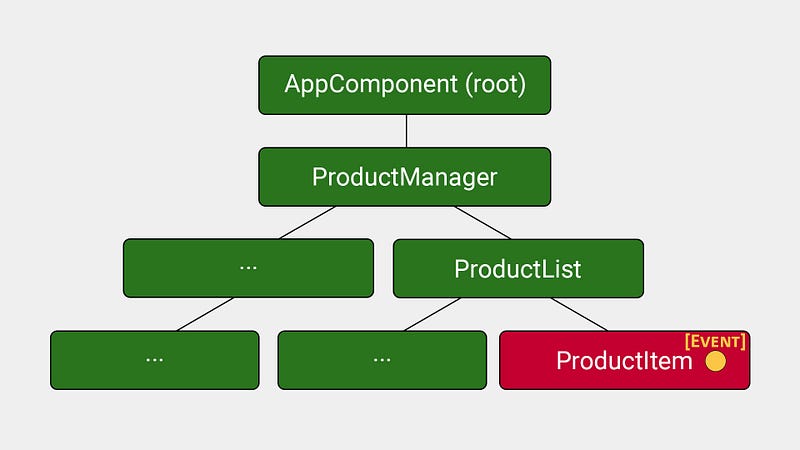
Below is a small example of what the tree looks like.
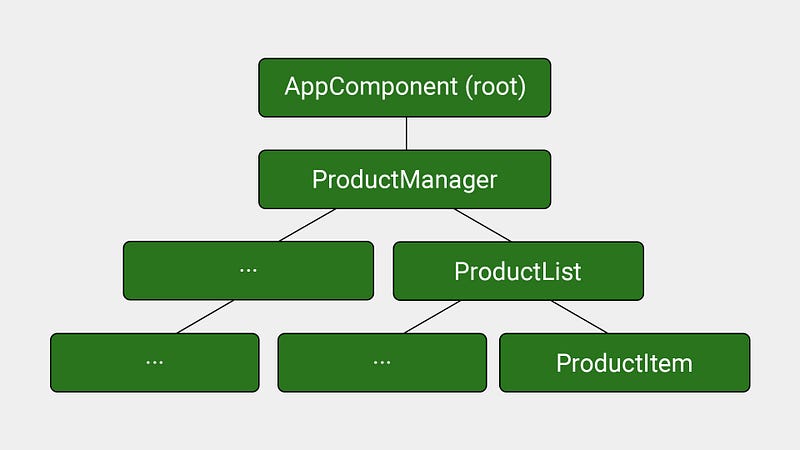
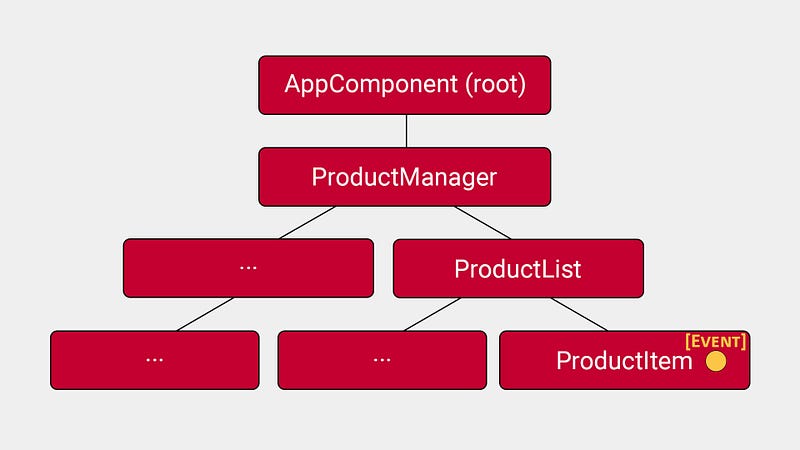
Some event triggers a change in a leaf component (say ProductItem). The default strategy is to run change detection for all components in the tree (marked with red color in the image below).
Of course, we can use the OnPush strategy to reduce the number of components on which Angular has to run change detection.
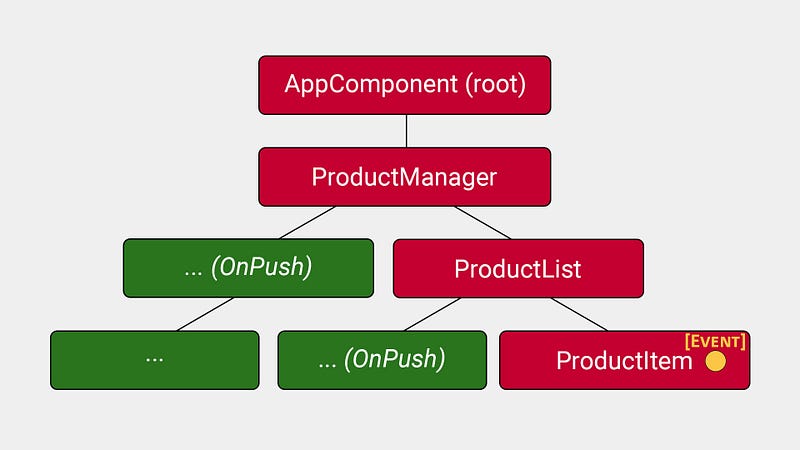
This may seem like a small improvement, but trust me — it’s not! In real applications, the tree is never as shallow and small as in this example.

This is far from ideal. Wouldn’t it be nice if the component could somehow notify Angular that something has changed?

Enter Angular signals!

Change detection will run only on the component in which the change happened.
How do we use them?

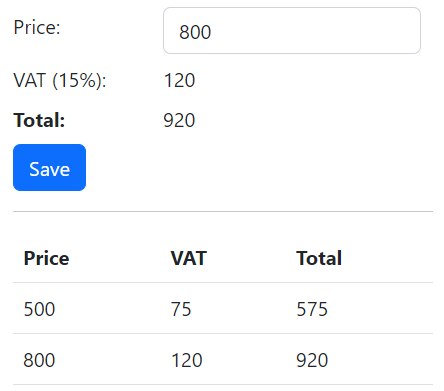
We will build a simple VAT calculator.

The user types a price and the application calculates the VAT (fixed 15%) and the total (price + vat).

The user can also click the “Save” button to save the current results as a history entry.

All data are saved in the local storage so the application doesn’t start blank after refreshing the page.

Here is what the application looks like.
Let’s see how we can build this with Angular’s signal API, which includes functions like signal, computed, update, and effect.

We create a signal for the price and history with the signal function. For the VAT and total, we create a computed signal with the computed function.
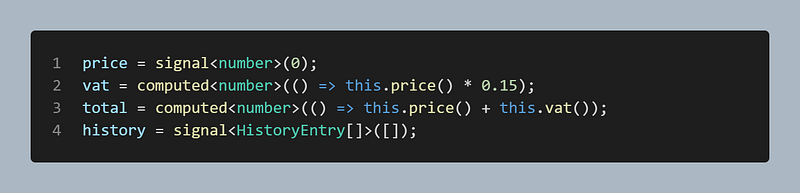
A computed signal cannot be changed directly. Instead, it’s derived from the values of other signals.

The computed function receives a callback. This callback will be executed every time the value of any signal in the callback changes.

This is like declaring that VAT and total are dependent on price. Each time the price changes, the value of the VAT and total will be recalculated to be up-to-date with the latest change.

We use event binding in the template to call onInputUpdate when the user types something.

In the onInputUpdate(), we set the new value to the price signal.
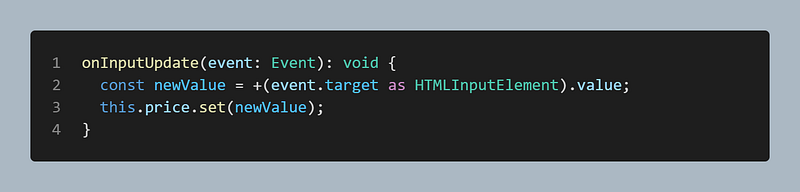
Because VAT and total are computed signals, they are recalculated as soon as the value of the price changes.

The user can also save the results by pressing the “Save” button.

In the save(), we use the update function to update the signal in an immutable way.
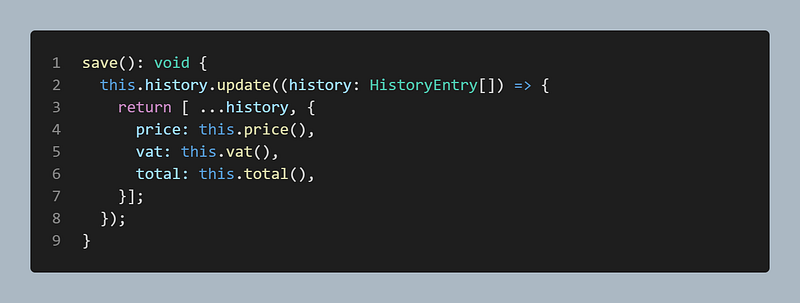
Observe that accessing the value of a signal (lines 4–6) is done differently compared to variables. It’s basically a function call.

Respectively, there is a mutate function to change the value of a signal in place.

Note, however, that all three methods (set, update, mutate) notify dependents and according to the official RFC:

While the API surface has 3 different methods (set, update, mutate) of changing signal’s value, the .set(newValue) is the only fundamental operation that we need in the library. The other 2 methods are just syntactic sugar, convenience methods that could be expressed as .set.

UPDATE: Starting from Angular v17, the mutate function has been dropped from the signal API.

Finally, there is the effect function to handle side effects. We use this function to store the current price value that the user typed along with the history of saved results in the local storage.
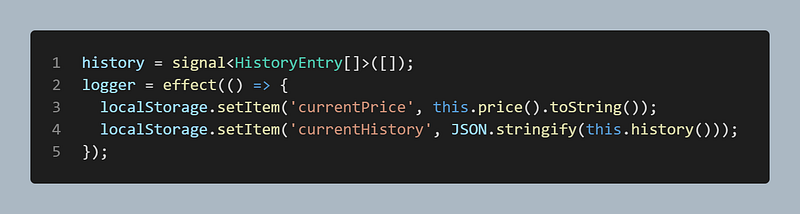
The effect function receives a callback. This callback will be executed every time the value of any signal in the callback changes.

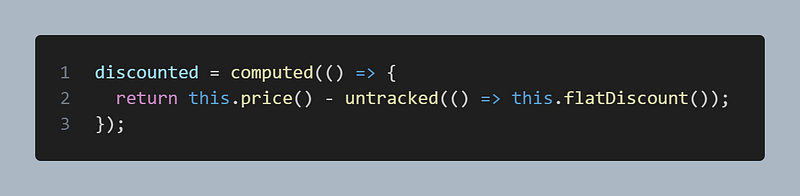
If we want to use a signal in a computed or effect callback without getting notified of its changes, we can use untracked like this:
You can find the complete source code in this GitHub repository.

Conclusions

Angular signals look very promising!

They will provide a way for fine-grained reactivity, leading to more efficient change detection and, as a result, more performant applications.

Additionally, this is the first step towards Angular not relying on Zone.js for change detection.

Maybe in the near future, we’ll see completely zone-less Angular applications.

Subscribe to my newsletter and stay tuned for more content like this.

Thank you for reading!

Angular
Angular2
JavaScript
Front End Development
Programming
Recommended from ReadMedium
