
Angular 18 vs Angular 19: 7 Standout Features Every Developer Must Explore
Angular has been a cornerstone for web application development. With Angular 19, it the developer experience, performance, and feature set introduced in Angular 18 continue to be refined. Below is a comprehensive comparison highlighting the key differences and advancements

Some of the Key Differences Between Angular 18 and 19
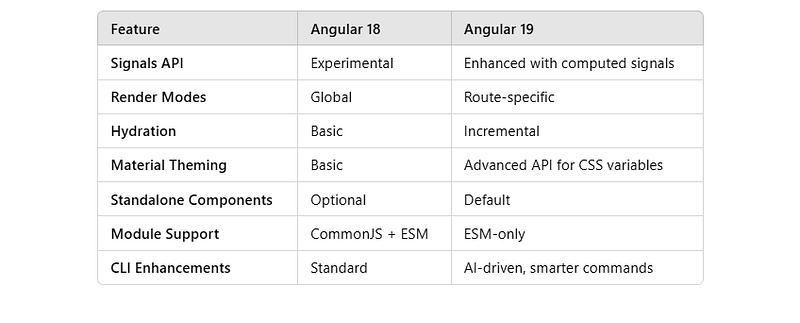
1. Signals API Enhancements
Angular 18: Introduced the experimental Signals API to manage reactive programming.
Angular 19: Expanded the Signals API with derived and computed signals, allowing developers to manage more complex state dependencies with fewer lines of code.
Example:
import { signal, computed } from '@angular/core';

// Base signal
const count = signal(0);

// Derived signal
const doubleCount = computed(() => count() * 2);

console.log(doubleCount()); // Output: 0
count.set(5);
console.log(doubleCount()); // Output: 10
Benefits:
- Simplifies state management.
- Reduces boilerplate code for reactive programming.
2. Route-Level Render Modes
Angular 18: Relied on global render settings for SSR and client-side rendering.
Angular 19: Introduces route-specific render modes, allowing routes to be server-side rendered, pre-rendered, or client-side rendered as needed.
Example:
const routes: Routes = [
  {
    path: '',
    component: HomeComponent,
    data: { renderMode: 'server' },
  },
  {
    path: 'about',
    component: AboutComponent,
    data: { renderMode: 'client' },
  },
];
Benefits:
- Optimized performance for SEO-critical routes.
- Flexibility in balancing rendering strategies.
3. Incremental Hydration
Angular 18: Offered basic hydration capabilities for SSR.
Angular 19: Features incremental hydration, which hydrates server-rendered content only when it becomes interactive.
Example:
@Component({
  selector: 'app-interactive',
  template: `
    <button (click)="clickHandler()">Click Me</button>
  `,
})
export class InteractiveComponent {
  clickHandler() {
    console.log('Button clicked!');
  }
}
Benefits:
- Faster page loads.
- Improved user experience for complex applications.
4. Enhanced Angular Material Theming
Angular 18: Provided basic theming capabilities.
Angular 19: Includes advanced theming APIs, such as
mat.themeand dynamic CSS variables for global and per-component styling.
Example:
@use '@angular/material' as mat;

$primary: mat.define-palette(mat.$indigo-palette);
$theme: mat.define-light-theme((color: (primary: $primary)));

@include mat.all-component-themes($theme);
Benefits:
- Simplifies custom theme creation.
- Ensures consistency across components.
5. Standalone Components
Angular 18: Laid the foundation for standalone components to reduce dependency on
NgModule.
Angular 19: Fully supports standalone components, making them the default option for new projects.
Example:
import { Component } from '@angular/core';

@Component({
  selector: 'app-hello',
  template: `<h1>Hello, World!</h1>`,
  standalone: true,
})
export class HelloComponent {}
Benefits:
- Simplifies project structure.
- Reduces boilerplate code.
6. ECMAScript Modules (ESM-Only Builds)
Angular 18: Supported both CommonJS and ESM.
Angular 19: Drops CommonJS support, focusing entirely on ESM for smaller bundle sizes and better tree-shaking.
Benefits:
- Faster loading times.
- Cleaner dependency graph.
7. Improved Angular CLI
Angular 18: Provided standard scaffolding and build tools.
Angular 19: Enhances CLI with AI-driven suggestions, smarter code refactoring, and better integration with IDEs.
Example:
ng generate component new-feature --standalone
Benefits:
- Boosts developer productivity.
- Reduces manual errors.
👉 Ready to upgrade or explore Angular 19? Check out our detailed Angular course and stay ahead of the curve!
Conclusion
Angular 19 builds on the solid foundation of Angular 18, introducing cutting-edge features and optimizations that enhance both developer experience and application performance. Whether working with standalone components or leveraging new render modes, Angular 19 ensures your applications remain modern, scalable, and efficient.


