
Android Side Sheet Dialog
Side sheets are surfaces containing supplementary content that are anchored to the left or right edge of the screen.
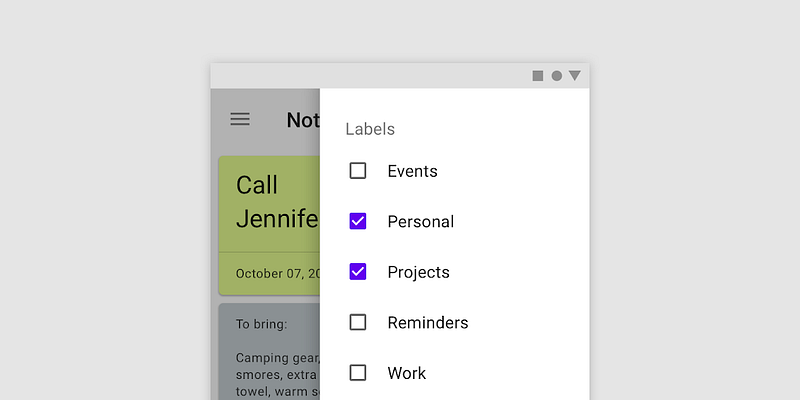
Common usage: Standard Side Sheet display content that complements the screen’s primary content. They remain visible while users interact with primary content. Modal side sheets are used on mobile instead of standard side sheets, due to limited screen size. They can display the same types of content as standard side sheets, but must be dismissed in order to interact with the underlying content.
Dependency : Add these library to BuildGradle app implementation ‘com.google.android.material:material:1.8.0’
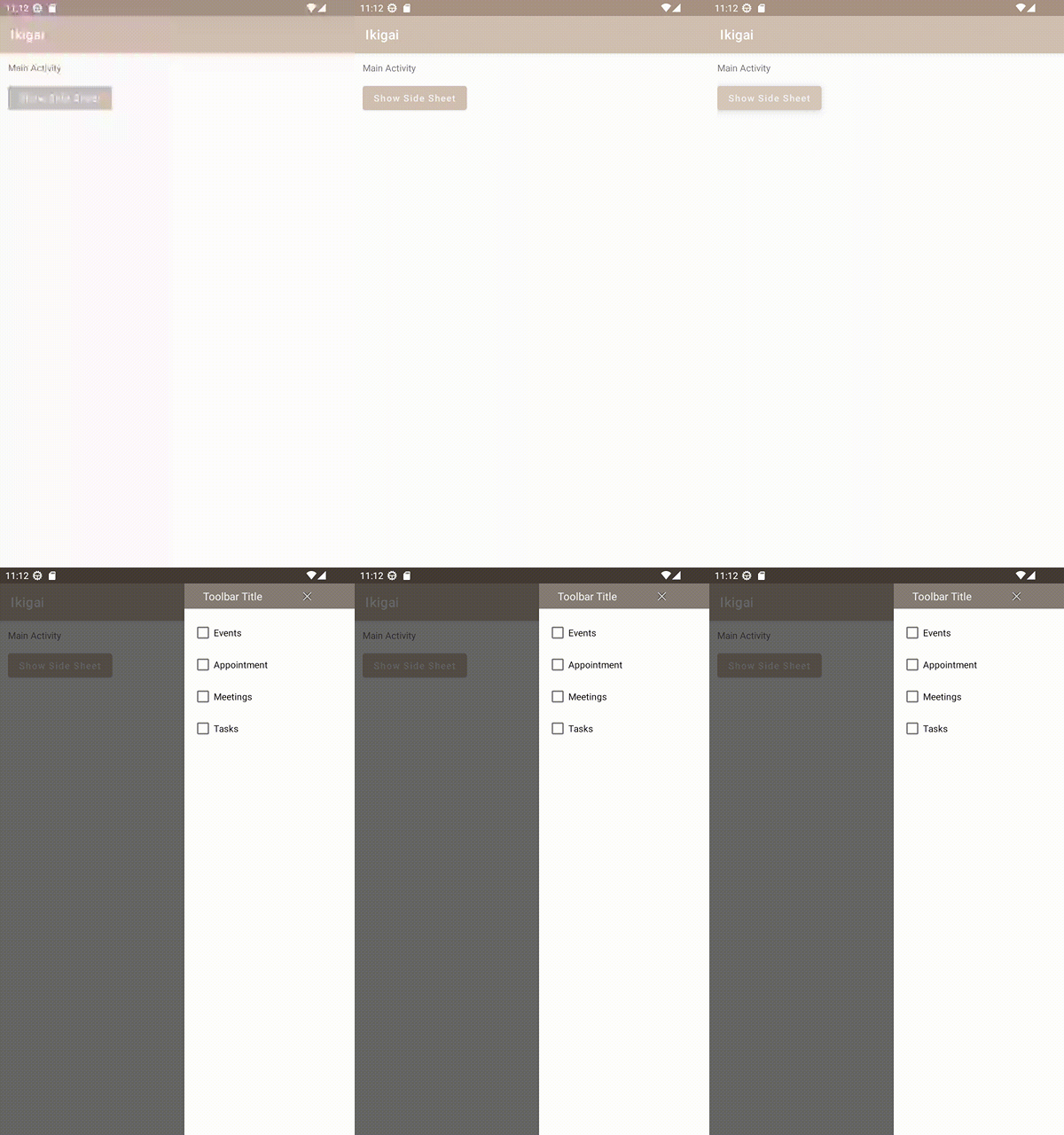
Create SideSheet layout. I am creating simple layout to show the Side Sheet which will contains list of shcekbox. The side sheet will slide from right side app when button is clicked
<androidx.constraintlayout.widget.ConstraintLayout xmlns:android="http://schemas.android.com/apk/res/android"
    xmlns:app="http://schemas.android.com/apk/res-auto"
    xmlns:tools="http://schemas.android.com/tools"
    android:id="@+id/cl_layout_container"
    style="@style/Widget.Material3.SideSheet.Modal"
    android:layout_width="wrap_content"
    android:layout_height="match_parent"
    app:layout_behavior="com.google.android.material.sidesheet.SideSheetBehavior">

    <androidx.constraintlayout.widget.ConstraintLayout
        android:id="@+id/toolbar"
        android:layout_width="wrap_content"
        android:layout_height="wrap_content"
        android:background="@color/dark_gray"
        android:paddingStart="20dp"
        android:paddingEnd="12dp"
        app:layout_constraintEnd_toEndOf="parent"
        app:layout_constraintStart_toStartOf="parent"
        app:layout_constraintTop_toTopOf="parent">

        <TextView
            android:id="@+id/tv_title"
            android:layout_width="wrap_content"
            android:layout_height="wrap_content"
            android:padding="8dp"
            android:text="Toolbar Title"
            android:textSize="16sp"
            android:textColor="@color/white"
            app:layout_constraintBottom_toBottomOf="parent"
            app:layout_constraintStart_toStartOf="parent"
            app:layout_constraintTop_toTopOf="parent" />

        <ImageButton
            android:id="@+id/btn_close"
            android:layout_width="12dp"
            android:layout_height="12dp"
            android:padding="6dp"
            android:background="@android:color/transparent"
            android:src="@android:drawable/ic_menu_close_clear_cancel"
            app:layout_constraintBottom_toBottomOf="parent"
            app:layout_constraintEnd_toEndOf="parent"
            app:layout_constraintStart_toEndOf="@id/tv_title"
            app:layout_constraintTop_toTopOf="parent" />
    </androidx.constraintlayout.widget.ConstraintLayout>


    <LinearLayout
        android:id="@+id/ll_checklist"
        android:layout_width="match_parent"
        android:layout_height="wrap_content"
        android:padding="12dp"
        android:orientation="vertical"
        app:layout_constraintTop_toBottomOf="@id/toolbar"
        app:layout_constraintStart_toStartOf="parent">

        <CheckBox
            android:layout_width="wrap_content"
            android:layout_height="wrap_content"
            android:text="Events"
            android:textSize="14sp"/>

        <CheckBox
            android:layout_width="wrap_content"
            android:layout_height="wrap_content"
            android:text="Appointment"
            android:textSize="14sp"/>

        <CheckBox
            android:layout_width="wrap_content"
            android:layout_height="wrap_content"
            android:text="Meetings"
            android:textSize="14sp"/>

        <CheckBox
            android:layout_width="wrap_content"
            android:layout_height="wrap_content"
            android:text="Tasks"
            android:textSize="14sp"/>
    </LinearLayout>
</androidx.constraintlayout.widget.ConstraintLayout>
Inside Main Activity, set function for button that will show Side Sheet when user click.
override fun onCreate(savedInstanceState: Bundle?) {
    super.onCreate(savedInstanceState)
    binding = ActivityMainBinding.inflate(layoutInflater)
    setContentView(binding.root)

    binding.btnShowSidesheet.setOnClickListener {
        showSideSheet()
    }
}
Set the showSideSheet() function to show the Side Sheet
We show the side sheet with sideSheetDialog.show() and dismiss it with sideSheetDialog.hide(). SideSheetDialog has built in functionality to automatically cancel the dialog after it is swiped off the screen.
private fun showSideSheet() {
    val sideSheetDialog = SideSheetDialog(this)

// Standard side sheets have the following states:
// STATE_EXPANDED: The side sheet is visible at its maximum height
// and it is neither dragging nor settling (see below).
// STATE_HIDDEN: The side sheet is no longer visible and
// can only be re-shown programmatically.
// STATE_DRAGGING: The user is actively dragging the side sheet.
// STATE_SETTLING: The side sheet is settling to a specific height
// after a drag/swipe gesture. This will be the peek height, expanded height,
// or 0, in case the user action caused the side sheet to hide.

sideSheetDialog.behavior.addCallback(object : SideSheetCallback() {
        override fun onStateChanged(sheet: View, newState: Int) {
            if (newState == SideSheetBehavior.STATE_DRAGGING) {
                sideSheetDialog.behavior.state = SideSheetBehavior.STATE_EXPANDED
            }
        }

        override fun onSlide(sheet: View, slideOffset: Float) {
}
    })

    val inflater = layoutInflater.inflate(R.layout.sidesheet, null)
    val btnClose = inflater.findViewById<ImageButton>(R.id.btn_close)

    btnClose.setOnClickListener {
        sideSheetDialog.dismiss()
    }

    sideSheetDialog.setCancelable(false)
    sideSheetDialog.setCanceledOnTouchOutside(true)
    sideSheetDialog.setContentView(inflater)
    sideSheetDialog.show()
}
Source : Material Design Android Developer


