avatarNhan Cao

Free AI web copilot to create summaries, insights and extended knowledge, download it at here

3908

Abstract

span class="hljs-type">name</span> <span class="hljs-keyword">of</span> the <span class="hljs-built_in">public</span> NDK library

you want <span class="hljs-keyword">to</span> <span class="hljs-keyword">add</span>. CMake verifies that the library <span class="hljs-keyword">exists</span> <span class="hljs-keyword">before</span>

completing its build.</pre></div><div id="cb81"><pre>find_library( <span class="hljs-comment"># Sets the name of the path variable.</span>

    <span class="hljs-built_in">log</span>-lib</pre></div><div id="6042"><pre><span class="hljs-comment"># Specifies the name of the NDK library that</span>
    <span class="hljs-comment"># you want CMake to locate.</span>
    <span class="hljs-attribute">log</span>)</pre></div><div id="7d50"><pre><span class="hljs-comment"># Specifies libraries CMake should link to your target library. You</span>

<span class="hljs-comment"># can link multiple libraries, such as libraries you define in this</span> <span class="hljs-comment"># build script, prebuilt third-party libraries, or system libraries.</span></pre></div><div id="8f8a"><pre><span class="hljs-keyword">target_link_libraries</span>( <span class="hljs-comment"># Specifies the target library.</span> native-lib</pre></div><div id="fdcc"><pre><span class="hljs-comment"># Links the target library to the log library</span> <span class="hljs-comment"># included in the NDK.</span> <span class="hljs-variable">${</span>log-<span class="hljs-class"><span class="hljs-keyword">lib</span>})</span></pre></div><p id="3712">New app/src/main/cpp/native-lib.cpp file</p><div id="b9a3"><pre><span class="hljs-meta">#<span class="hljs-keyword">include</span> <span class="hljs-string"><jni.h></span></span> <span class="hljs-meta">#<span class="hljs-keyword">include</span> <span class="hljs-string"><string></span></span></pre></div><div id="c2a9"><pre><span class="hljs-keyword">extern </span><span class="hljs-string">"C"</span> <span class="hljs-keyword">JNIEXPORT </span><span class="hljs-keyword">jstring </span><span class="hljs-keyword">JNICALL </span><span class="hljs-keyword">Java_com_nhancv_myapplication_MainActivity_stringFromJNI( </span> <span class="hljs-keyword">JNIEnv </span>env, <span class="hljs-keyword">jobject </span><span class="hljs-comment">/ this */</span>) { <span class="hljs-symbol"> std:</span>:string hello = <span class="hljs-string">"Hello from C++"</span>; return env->NewStringUTF(hello.c_str()); }</pre></div><figure id="fe5f"><img src="https://cdn-images-1.readmedium.com/v2/resize:fit:800/1*2vd4q7NYqFeSEoo99ZPoNQ.png"><figcaption></figcaption></figure><p id="2192">Update app/src/main/java/com/nhancv/myapplication/MainActivity.java</p><div id="f83f"><pre><span class="hljs-keyword">package</span> <span class="hljs-title">com.nhancv.myapplication;</span></pre></div><div id="9992"><pre><span class="hljs-keyword">import</span> android.support.v7.app.AppCompatActivity; <span class="hljs-keyword">import</span> android.<span class="hljs-built_in">os</span>.Bundle; <span class="hljs-keyword">import</span> android.widget.TextView;</pre></div><div id="0120"><pre>public <span class="hljs-class"><span class="hljs-keyword">class</span> <span class="hljs-title">MainActivity</span> <span class="hljs-keyword">extends</span> <span class="hljs-title">AppCompatActivity</span> </span>{</pre></div><div id="547d"><pre> // Used <span class="hljs-keyword">to</span> <span class="hljs-keyword">load</span> the <span class="hljs-string">'native-lib'</span> library <span class="hljs-keyword">on</span> application startup. static { <span class="hljs-keyword">System</span>.loadLibrary("native-lib"); }</pre></div><div id="8928"><pre> <span class="hljs-keyword">@Override</span> protected void onCreate(Bundle savedInstanceState) { super<span class="

Options

hljs-selector-class">.onCreate</span>(savedInstanceState); <span class="hljs-built_in">setContentView</span>(R.layout.activity_main);</pre></div><div id="fb34"><pre> <span class="hljs-comment">// Example of a call to a native method</span> <span class="hljs-variable">TextView</span> <span class="hljs-variable">tv</span> = <span class="hljs-function"><span class="hljs-title">findViewById</span>(<span class="hljs-variable">R.id.sample_text</span>); <span class="hljs-variable">tv.setText</span>(<span class="hljs-title">stringFromJNI</span>()); }</span></pre></div><div id="9735"><pre> /** * A native method <span class="hljs-keyword">that</span> <span class="hljs-keyword">is</span> implemented <span class="hljs-keyword">by</span> <span class="hljs-keyword">the</span> 'native-lib' native library, * which <span class="hljs-keyword">is</span> packaged <span class="hljs-keyword">with</span> this <span class="hljs-built_in">application</span>. */ public native String stringFromJNI(); }</pre></div><p id="22ae">Update app/src/main/res/layout/activity_main.xml</p><div id="c10e"><pre><span class="hljs-meta"><?xml version=<span class="hljs-string">"1.0"</span> encoding=<span class="hljs-string">"utf-8"</span>?></span> <span class="hljs-tag"><<span class="hljs-name">android.support.constraint.ConstraintLayout</span> <span class="hljs-attr">xmlns:android</span>=<span class="hljs-string">"http://schemas.android.com/apk/res/android"</span> <span class="hljs-attr">xmlns:app</span>=<span class="hljs-string">"http://schemas.android.com/apk/res-auto"</span> <span class="hljs-attr">xmlns:tools</span>=<span class="hljs-string">"http://schemas.android.com/tools"</span> <span class="hljs-attr">android:layout_width</span>=<span class="hljs-string">"match_parent"</span> <span class="hljs-attr">android:layout_height</span>=<span class="hljs-string">"match_parent"</span> <span class="hljs-attr">tools:context</span>=<span class="hljs-string">".MainActivity"</span> ></span></pre></div><div id="4ca6"><pre><TextView android:id=<span class="hljs-string">"@+id/sample_text"</span> android:layout_width=<span class="hljs-string">"wrap_content"</span> android:layout_height=<span class="hljs-string">"wrap_content"</span> android:text=<span class="hljs-string">"Hello World!"</span> <span class="hljs-keyword">app</span>:layout_constraintBottom_toBottomOf=<span class="hljs-string">"parent"</span> <span class="hljs-keyword">app</span>:layout_constraintLeft_toLeftOf=<span class="hljs-string">"parent"</span> <span class="hljs-keyword">app</span>:layout_constraintRight_toRightOf=<span class="hljs-string">"parent"</span> <span class="hljs-keyword">app</span>:layout_constraintTop_toTopOf=<span class="hljs-string">"parent"</span> /> </android.support.<span class="hljs-keyword">constraint</span>.ConstraintLayout></pre></div><figure id="169b"><img src="https://cdn-images-1.readmedium.com/v2/resize:fit:800/1*RXYSmrewhjVudO2VAUZFQQ.png"><figcaption></figcaption></figure><p id="f404">To get full .so files, you need to build apk. In Android Studio, select Build -> Build Bundles / APK (s) -> Build Bundles</p><p id="113f">The built .so files located at:</p><div id="39c8"><pre>app<span class="hljs-regexp">/build/i</span>ntermediates<span class="hljs-regexp">/cmake/</span>debug<span class="hljs-regexp">/obj/</span></pre></div><figure id="3e70"><img src="https://cdn-images-1.readmedium.com/v2/resize:fit:800/1*I6wabWpBO2oQscxVa5OxDQ.png"><figcaption></figcaption></figure><p id="245b">Related post: <a href="https://readmedium.com/android-how-to-use-the-prebuilt-so-lib-files-ndk-native-c-36781e790dda">https://readmedium.com/android-how-to-use-the-prebuilt-so-lib-files-ndk-native-c-36781e790dda</a></p></article></body>

[Android] Set up an environment for C++ native ndk18

Ref: https://developer.android.com/studio/projects/add-native-code

Update app/build.gradle file

defaultConfig {
        applicationId "com.nhancv.myapplication"
        minSdkVersion 21
        targetSdkVersion 28
        versionCode 1
        versionName "1.0"
        testInstrumentationRunner "android.support.test.runner.AndroidJUnitRunner"
        externalNativeBuild {
            cmake {
                cppFlags ""
            }
        }
    }
    buildTypes {
        release {
            minifyEnabled false
            proguardFiles getDefaultProguardFile('proguard-android-optimize.txt'), 'proguard-rules.pro'
        }
    }
    externalNativeBuild {
        cmake {
            path "src/main/cpp/CMakeLists.txt"
        }
    }

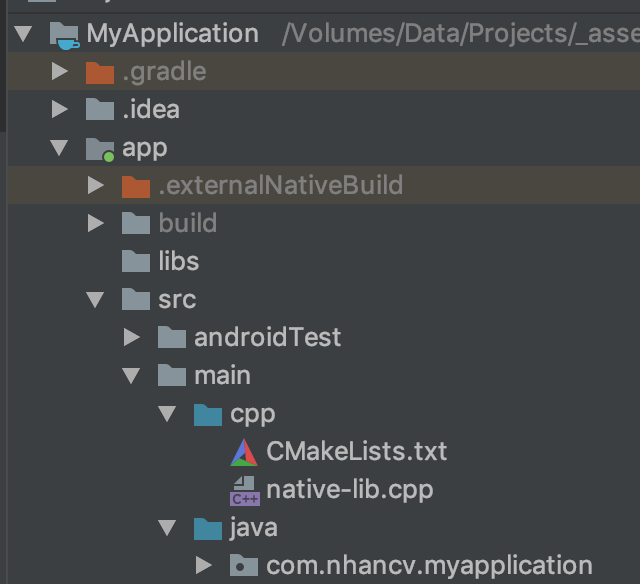
New app/src/main/cpp/CMakeLists.txt file

# For more information about using CMake with Android Studio, read the
# documentation: https://d.android.com/studio/projects/add-native-code.html
# Sets the minimum version of CMake required to build the native library.
cmake_minimum_required(VERSION 3.4.1)
# Creates and names a library, sets it as either STATIC
# or SHARED, and provides the relative paths to its source code.
# You can define multiple libraries, and CMake builds them for you.
# Gradle automatically packages shared libraries with your APK.
add_library( # Sets the name of the library.
        native-lib
# Sets the library as a shared library.
        SHARED
# Provides a relative path to your source file(s).
        native-lib.cpp)
# Searches for a specified prebuilt library and stores the path as a
# variable. Because CMake includes system libraries in the search path by
# default, you only need to specify the name of the public NDK library
# you want to add. CMake verifies that the library exists before
# completing its build.
find_library( # Sets the name of the path variable.
        log-lib
# Specifies the name of the NDK library that
        # you want CMake to locate.
        log)
# Specifies libraries CMake should link to your target library. You
# can link multiple libraries, such as libraries you define in this
# build script, prebuilt third-party libraries, or system libraries.
target_link_libraries( # Specifies the target library.
        native-lib
# Links the target library to the log library
        # included in the NDK.
        ${log-lib})

New app/src/main/cpp/native-lib.cpp file

#include <jni.h>
#include <string>
extern "C" JNIEXPORT jstring JNICALL
Java_com_nhancv_myapplication_MainActivity_stringFromJNI(
        JNIEnv *env,
        jobject /* this */) {
    std::string hello = "Hello from C++";
    return env->NewStringUTF(hello.c_str());
}
Update app/src/main/java/com/nhancv/myapplication/MainActivity.java

package com.nhancv.myapplication;
import android.support.v7.app.AppCompatActivity;
import android.os.Bundle;
import android.widget.TextView;
public class MainActivity extends AppCompatActivity {
    // Used to load the 'native-lib' library on application startup.
    static {
        System.loadLibrary("native-lib");
    }
    @Override
    protected void onCreate(Bundle savedInstanceState) {
        super.onCreate(savedInstanceState);
        setContentView(R.layout.activity_main);
        // Example of a call to a native method
        TextView tv = findViewById(R.id.sample_text);
        tv.setText(stringFromJNI());
    }
    /**
     * A native method that is implemented by the 'native-lib' native library,
     * which is packaged with this application.
     */
    public native String stringFromJNI();
}

Update app/src/main/res/layout/activity_main.xml

<?xml version="1.0" encoding="utf-8"?>
<android.support.constraint.ConstraintLayout
    xmlns:android="http://schemas.android.com/apk/res/android"
    xmlns:app="http://schemas.android.com/apk/res-auto"
    xmlns:tools="http://schemas.android.com/tools"
    android:layout_width="match_parent"
    android:layout_height="match_parent"
    tools:context=".MainActivity"
    >
<TextView
        android:id="@+id/sample_text"
        android:layout_width="wrap_content"
        android:layout_height="wrap_content"
        android:text="Hello World!"
        app:layout_constraintBottom_toBottomOf="parent"
        app:layout_constraintLeft_toLeftOf="parent"
        app:layout_constraintRight_toRightOf="parent"
        app:layout_constraintTop_toTopOf="parent"
        />
</android.support.constraint.ConstraintLayout>

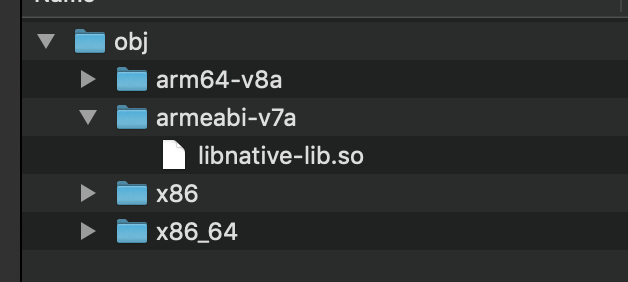
To get full .so files, you need to build apk. In Android Studio, select Build -> Build Bundles / APK (s) -> Build Bundles

The built .so files located at:

app/build/intermediates/cmake/debug/obj/
Related post: https://readmedium.com/android-how-to-use-the-prebuilt-so-lib-files-ndk-native-c-36781e790dda

Android
Android Ndk
Recommended from ReadMedium