
android.os.TransactionTooLargeException on Nougat solved

Recently i was just working in a wallpaper application. In this application i have to maintain lot’s of data almost 1M in diffident category. For UI i am using sliding tab let 6 tabs.

So when i sweep from one tab to another tab and came to my previous tab. I was wondering my previous data was missing so i think why not i save data in my savedInstanceState using Parcelable ArrayList . So i write code for
this just implement Parcelable into my pojo class. Then i started to save data in my savedInstanceState. Like
@Override
public void onSaveInstanceState(@NonNull Bundle outState) {
    super.onSaveInstanceState(outState);
    Bridge.saveInstanceState(this, outState);
    ArrayList<WallpaperItem> wallpaperItems = adapter.getAllWallpaper();
    if (wallpaperItems!=null){
        outState.putParcelableArrayList(Constant.SAVE_INTO_ALL_WALLPAPER , wallpaperItems);
    }
}
and i was retrieving data like..
if (savedInstanceState!=null){
    if (savedInstanceState.containsKey(Constant.SAVE_INTO_ALL_WALLPAPER)){
        ArrayList<WallpaperItem> newList = savedInstanceState.getParcelableArrayList(Constant.SAVE_INTO_ALL_WALLPAPER);
        adapter.add(newList);
        recyclerView.setAdapter(adapter);
        progressBar.hide();
    }
}
Now i don’t lose my data when i sweep one tab to another tab and when i came to my previous tab everything was file. But after some time i was wondering my application are getting little bit slow and their response are slower bit now. Then thinking thinking after searching in google i found a tools which can show which Parcelable ArrayList getting how much size.
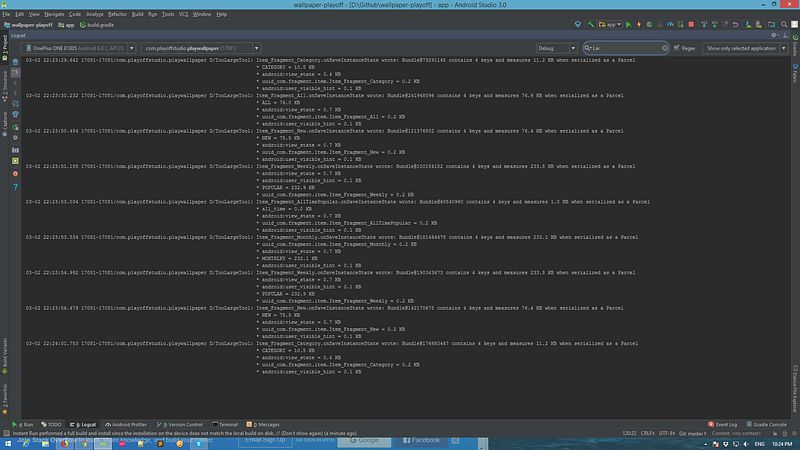
After using this i was just shocked. My Parcelable ArrayList getting big and bigger. When i scroll my list it goes more bigger. Ok i have no problem with this but when a Parcelable ArrayList takes 1MB memory then my app crashed.
java.lang.RuntimeException: android.os.TransactionTooLargeException: data parcel size 592196 bytes
   at android.app.ActivityThread$StopInfo.run(ActivityThread.java:3752)
   at android.os.Handler.handleCallback(Handler.java:751)
   at android.os.Handler.dispatchMessage(Handler.java:95)
   at android.os.Looper.loop(Looper.java:154)
   at android.app.ActivityThread.main(ActivityThread.java:6077)
   at java.lang.reflect.Method.invoke(Native Method)
   at com.android.internal.os.ZygoteInit$MethodAndArgsCaller.run(ZygoteInit.java:865)
   at com.android.internal.os.ZygoteInit.main(ZygoteInit.java:755)
Caused by: android.os.TransactionTooLargeException: data parcel size 592196 bytes
   at android.os.BinderProxy.transactNative(Native Method)
   at android.os.BinderProxy.transact(Binder.java:615)
   at android.app.ActivityManagerProxy.activityStopped(ActivityManagerNative.java:3606)
   at android.app.ActivityThread$StopInfo.run(ActivityThread.java:3744)
   at android.os.Handler.handleCallback(Handler.java:751)
   at android.os.Handler.dispatchMessage(Handler.java:95)
   at android.os.Looper.loop(Looper.java:154)
   at android.app.ActivityThread.main(ActivityThread.java:6077)
   at java.lang.reflect.Method.invoke(Native Method)
   at com.android.internal.os.ZygoteInit$MethodAndArgsCaller.run(ZygoteInit.java:865)
   at com.android.internal.os.ZygoteInit.main(ZygoteInit.java:755)
Now it’s a little bit problem. The error was..
“ The Binder transaction failed because it was too large.”
After searching stack-overflow i found something really impotent
“Whenever you see TransactionTooLargeException happening when an Activity is in the process of stopping, that means that the Activity was trying to send its saved state Bundles to the system OS for safe keeping for restoration later (after a config change or process death) but that one or more of the Bundles it sent were too large. There is a maximum limit of about 1MB for all such transactions occurring at once and that limit can be reached even if no single Bundle exceeds that limit.”
So now i have to solve this issue searching in google for that and found something
Solve 1:
What was happening was we are using a FragmentStatePagerAdapter in a ViewPager. The user would page through and create 100+ fragments (its a reading application).
Although we manage the fragments properly in destroyItem(), in Androids implementation of FragmentStatePagerAdapter there is a bug, where it kept a reference to the following list:
@Override
public Parcelable saveState() {
    Bundle state = null;
    if (mSavedState.size() > 0) {
        state = new Bundle();
        Fragment.SavedState[] fss = new Fragment.SavedState[mSavedState.size()];
        mSavedState.toArray(fss);
        state.putParcelableArray("states", fss);
    }
    for (int i=0; i<mFragments.size(); i++) {
        Fragment f = mFragments.get(i);
        if (f != null && f.isAdded()) {
            if (state == null) {
                state = new Bundle();
            }
            String key = "f" + i;
            mFragmentManager.putFragment(state, key, f);
        }
    }
    return state;
}
As you can see, even if you properly manage the fragments in the FragmentStatePagerAdapter subclass, the base class will still store an Fragment.SavedState for every single fragment ever created. The TransactionTooLargeException would occur when that array was dumped to a parcelableArray and the OS wouldn’t like it 100+ items.
Therefore the fix for us was to override the saveState() method and not store anything for “states”.
@Override
public Parcelable saveState() {
    Bundle bundle = (Bundle) super.saveState();
    bundle.putParcelableArray("states", null); // Never maintain any states from the base class, just null it out
    return bundle;
}
So now it can’t save any fragment data into the onSaveInstance. Got one solution ya hu!!!
Solve 2:
To preserve big chunks of data, Google is suggesting to do it with Fragment that retains instance. Idea is to create empty Fragment without a view with all necessary fields, that would otherwise be saved in Bundle. Add setRetainInstance(true); to Fragment's onCreate method. And then save data in Fragment on Activity's onDestroy and load them onCreate. Here is an example of Activity:
public class MyActivity extends Activity {

    private DataFragment dataFragment;

    @Override
    public void onCreate(Bundle savedInstanceState) {
        super.onCreate(savedInstanceState);
        setContentView(R.layout.main);

        // find the retained fragment on activity restarts
        FragmentManager fm = getFragmentManager();
        dataFragment = (DataFragment) fm.findFragmentByTag(“data”);

        // create the fragment and data the first time
        if (dataFragment == null) {
            // add the fragment
            dataFragment = new DataFragment();
            fm.beginTransaction().add(dataFragment, “data”).commit();
            // load the data from the web
            dataFragment.setData(loadMyData());
        }

        // the data is available in dataFragment.getData()
        ...
    }

    @Override
    public void onDestroy() {
        super.onDestroy();
        // store the data in the fragment
        dataFragment.setData(collectMyLoadedData());
    }
}
public class DataFragment extends Fragment {
// data object we want to retain
private MyDataObject data;
// this method is only called once for this fragment
@Override
public void onCreate(Bundle savedInstanceState) {
super.onCreate(savedInstanceState);
// retain this fragment
setRetainInstance(true);
}
public void setData(MyDataObject data) {
this.data = data;
}
public MyDataObject getData() {
return data;
}
}This was another solution but i was not happy with this. So i was trying something more ….
Solve 3:
On compile/targetSdkVersion <= 23 we have only internal warning about large size of saved state, but nothing is crashed:
Solve 4: You can use Android Architecture Components to solve this issue. But it will give you lot’s of pain if you want to implement it in your previous project. I will suggest you to use this in your recent project or upcoming project.
Now last one and i love this solution.
Solve 5: Now i will not save any data in savedInstanceState ya seriously!!
I was shocked when i was reading this library.
How Does It Work:
Bridge uses the SavedStateHandler to load your object's state into the given Bundle, but rather than send that Bundle to the main process of the OS (where it is subject to the TransactionTooLargeException) it saves it to memory and disk in a way that can restored to the same objects later.
There is one main caveat here : in order to ensure that as little of your app’s code needs to change as possible, Bridge will read its data from disk on the main thread. This is currently done in a way that may add a small amount of time to your app's startup process. Fortunately, Bridge leverages the compact nature of Bundle to store data as efficiently as possible, and even extremely large amounts of data well in excess of the 1MB limit leading to TransactionTooLargeException should only add something on the order of 100ms to the startup time.”
After using this tools i test again using Largetoools. Now my app don’t save any data in Bundle so i don’t care about data saving limit.
You can check my Wallpaper application: https://play.google.com/store/apps/details?id=com.playoffstudio.playwallpaper


