
Android Interview Questions and Answers — Part 1
Lifecycle, Launch modes, Configuration changes and more

Android is one of the leading platforms in mobile development. If you want to reach millions of potential users, defiantly android would be at the top of your list. With this increasing hype, many software engineers choosing android development as their carrier choice.
I’m an android developer for more than five years now, and I’ve been on both sides of the table when it comes to android interviews. So I decided to write a series of articles about android interview Q&A.
Android interviews are a mix of many concepts like android basic to advanced concepts, Kotlin, coroutines, RxJava, Architectures, Design patterns, solid principles, and more. It’s highly impossible to include all of them in a single article. So we’re starting with android basics to advanced Q&A in this part and cover the remaining concepts in the upcoming parts of this series.
I leave a link to an article for most of the questions from which I learned the things that I wrote here, so make sure to read those articles for in-depth knowledge.
- “Android Interview Questions and Answers — Part 2” — Dagger2, Proguard, Threads, Architecture and Security
- “Android Interview Questions and Answers — Part 3” — Kotlin, and Coroutines
Without any further delay, let’s get started:
Lifecycle
Android components lifecycle is the very basic requirement for any android developer. In the early days, we’ve used activities extensively, as time passes developers switched to fragments for various reasons. So it’s vital to be very thorough with the basics:
Activity Lifecycle
Android activity life cycle starts from onCreate and ends with onDestroy. Have a look at the following for the order of methods invocation:
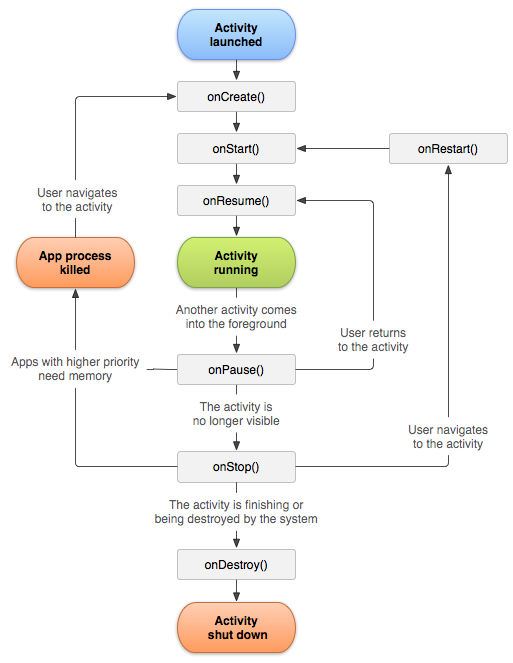
As described in the image, it’s important to know what happens at every stage. Following are a few questions that you might face:
What are the activity lifecycle methods that trigger when the user clicks the home button?
OnPauseOnStopWhat are the activity lifecycle methods that trigger when the user clicks the back button and then again brings back the app to the foreground?
//When click back button
OnPauseOnStop//When bring back the app to foreground
OnRestartonStartOnResumeWhat are the activity lifecycle methods that trigger when the user clicks the back button?
OnPauseOnStopOnDestroyWhat are the activity lifecycle methods that trigger when user navigate from ActivityA to ActivityB?
A — onPauseB — onCreateB — onStartB — onResumeA — onStopWhat happens if the user clicks the back button in ActivityB?
B — onPauseA — onRestartA — onStartA — onResumeB — onStopB — onDestroyFragment Lifecycle
Fragment lifecycle is a bit more complicated when compared to activity. It’s also the most focused component in the interviews. First, let’s see the lifecycle of a fragment:
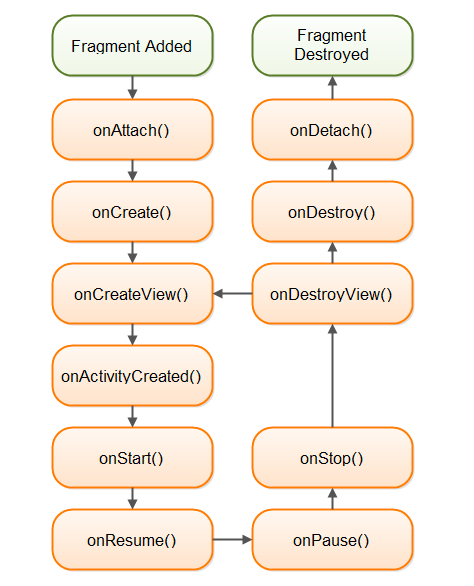
What lifecycle methods will trigger when FragmentB is added on top of FragmentA?
FragmentA is not affected when we inflate FragmentB with add
B-> onAttach
B-> onCreate
B-> onCreateView
B-> onActivityCreated
B-> onStart
B-> onResume
What lifecycle methods will trigger when FragmentB is pop-backed? Since fragment B was added on top of A, fragment A is not affected by the removal of B.
B-> onPause
B-> onStop
B-> onDestroyView
B-> onDestroy
B-> onDetach
What lifecycle methods will trigger when FragmentB replaces FragmentA?
When Fragment B replaces Fragment A, Fragment A is destroyed and Fragment B is created. However, in case the transaction that had added Fragment A was saved using the addToBackStack method, then the backstack is holding a reference to that fragment from the previous transaction and hence only its view is destroyed. i.e. onDestroy and onDetach method of Fragment A will not be invoked.
B-> onAttach
B-> onCreate
A-> onPause
A-> onStop
A-> onDestroyView
A-> onDestroy
A-> onDetach
B-> onCreateView
B-> onActivityCreated
B-> onStart
B-> onResume
What happens if FrgametnB is pop-backed?
B -> onPauseB -> onStopB -> onDestroyB -> onDestroyViewB -> onDetachA-> onAttach
A-> onCreate
A-> onCreateView
A-> onActivityCreated
A-> onStart
A-> onResume
To learn more about fragment lifecycle, read the following post:
View Lifecycle
Activity and Fragment lifecycles are the most frequently asked for any level of developer. But when it comes to view lifecycle, senior android developers must learn about it, for juniors it’s optional but it’s good to know. When compared to the above two view life cycle a bit simple, have a look:
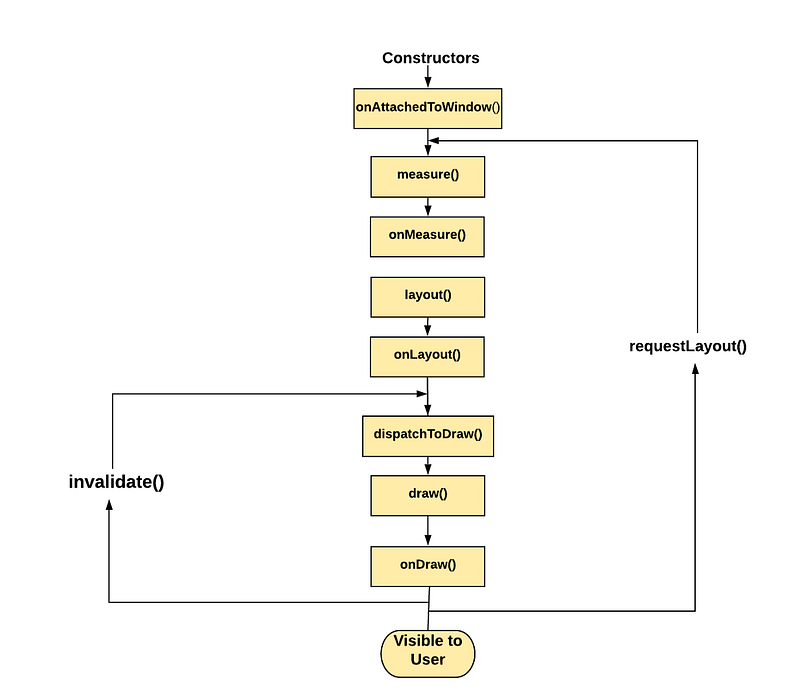
- onAttachedToWindow() Called when the view is attached to a window. View class have its opposite method onDettachToWindow()
- onMeasure(int, int) Called to determine the size requirements for this view and all of its children. But we don’t use it. we use setMeasuredDimension(800, 300);
- onLayout( int, int, int, int) Called when this view should assign a size and position to all of its children.
- onDraw(android.graphics.Canvas) Called when the view should render its content. It provides canvas as an argument, we draw anything on canvas using Paint class Instance.
To learn more about view-lifecycle, read the following post:
What is the difference between invalidate & request layout?
Invalidate says something in your visuals has changed so you need to be redrawn; requestLayout() says something structural has changed so it needs to recalculate the measure and implement the layout phase which involves measure->layout->draw stages.
What are different launch modes in android?
Out of the box android has four launch modes:
Standard
Standard is the default launch mode. This will always create a new instance of the Activity every time in a Target Task.
SingleTop
If an instance of the activity is already created and it’s at the top of the stack then the android system transfer the data to the newIntetnt() method. If the activity is already created but not at the top of the stack a new instance of the activity will be created.
SingleTask
It creates a new instance of the activity not in the task. It can have only one instance throughout the system. So next time it will route to the same activity from any Task by onNewIntent() method by destroying all the activities between them.
SingleInstance
SingleInstance can have only one instance throughout the system. It’ll create a new instance when triggered for the first time in a new task. Then every time you call this SingleInstance activity it will route to the same activity of a separate task by onNewIntent().
To learn more about launch modes read the following article:
Explain about Parcelable and Serializable?
Parcelable
The Parcelable interface adds methods to all classes you want to be able to transfer between activities. These methods are how parcelable deconstructs the object in one activity and reconstructs it in another.
Serializable
Serializable is a markable interface or we can call as an empty interface without any implementation methods. It’ll convert the object into byte array so that we can pass it between android components. The main advantage is that it is simple to implement but relatively slow in performance when compared to parcellable.
Learn more about parcelable here.
Configuration changes
During configuration changes, activities and fragments will recreate. Following are a few real-time use-case questions regarding this concept:
How to work with activity rotation?
If you don’t want an activity to be recreated or fix it to a particular orientation then we can use the screenOrientation flag in the manifest file and assign desired orientation type.
On-screen orientation- activity should recreate but not fragment?
We should include the setRetainInstance flag to true in the fragment.
Difference between apply() and commit() when saving any value in shared preference?
Both are used to save a value in the preference.
Commit, returns a boolean, true on success, and false on failure. It works synchronously. commit() is synchronous, you should avoid calling it from your main thread because it could pause your UI rendering.
Apply, commits without returning a boolean indicating success or failure. It works asynchronously. This was introduced in V2.3 when the android team observed most of the developers are not using the return type from the commit.
What is double taxation in android?
Typically, the android framework executes the layout or measure stage in a single pass and quite quickly. However, with some more complicated layout cases, the framework may have to iterate multiple times on parts of the hierarchy that require multiple passes to resolve before ultimately positioning the elements. Having to perform more than one layout-and-measure iteration is referred to as double taxation.
Which library do you prefer to load images: Picasso or Glide?
Unlike Picasso, Glide only loads the image into the cache or imageview with respect to the size of the imageview so it’s faster than Picasso. Although we can achieve this with Picasso I prefer to use Glide. Glide can also load Gifs, which is not present in Picasso when I last used it.
If you’re interested in image loading, I recommend reading the following article:
Have you used Constraint Layout?
What are Barriers?
A Barrier references multiple widgets as input and creates a virtual guideline based on the most extreme widget on the specified side. For example, a left barrier will align to the left of all the referenced views.
What is a GuideLine?
Guidelines are invisible lines that you can place at particular positions in your layout. You can then constrain your views to those guidelines. Essentially, they are invisible views that you can place wherever you need by defining some properties.
Explain about chain concept?
Chains concept in ConstraintLayout is more similar to the weight concept in LinearLayout. A chain is a set of views that are linked together with bi-directional connections.
To learn more about these concepts read the following article:
Explain about LRU cache?
LRU cache holds strong references to a limited number of values. Each time a value is accessed, it is moved to the head of a queue. When a value is added to a full cache, the value at the end of that queue is evicted and may become eligible for garbage collection.
The basic analogy behind this cache format is to remove the least recently used object from the cache when it reached maximum size.
Bonus
To learn more about Android advanced development read the following articles:
- “Android Interview Questions and Answers — Part 2”
- “8 Common Mistakes in Android Development”
- “Android RecyclerView With Kotlin Sealed Classes”
- “How to Integrate Google Pay Into Your Existing Android App”
- “How to create and publish an Android Library”
That is all for now, hope you learned something useful, thanks for reading.


