
Android Interview Questions: 18 | Why does an Android App lag?
This story is a part of the series I have written on Android Interview Questions. Crack any interview with confidence, mastering key concepts and best practices. Elevate your Android skills effortlessly. Click on the below link to check the full series.
Why does an Android App lag?
In this story post, we’ll delve into the reasons behind the lag in Android apps — a crucial understanding for every Android developer seeking optimal performance.
Let’s kick off with a bold statement:
Garbage Collector: The TAX on Android App Performance
The main reason for the Android App lag or the low performance of the Android app is that it runs GC very frequently.
So in simple wording, we can say that the time for which GC is running the actual app is not running.
When the Android App runs, it allocates many objects based on your code, and when the objects are no longer referred to, the system calls GC when there is memory pressure to deallocate those objects.
You can read about the Garbage Collection in the below story in full detail.
Let’s come back to the topic.
So, if the object allocation and deallocation occur regularly, it means that the GC will run regularly to release memory.
Here, the important point is that the time for which the GC runs, your app does not run for that time. So, it seems that the app is lagging. And hence, a bad experience for the user of the application. Let’s understand it deeply.
The Android app updates its UI every 16ms (considering 60FPS -> 1000ms/60 = 16.67ms ~ 16ms) for smooth UI rendering.
Frame per second (FPS) is the measurement of the number of frames that appear within a second.
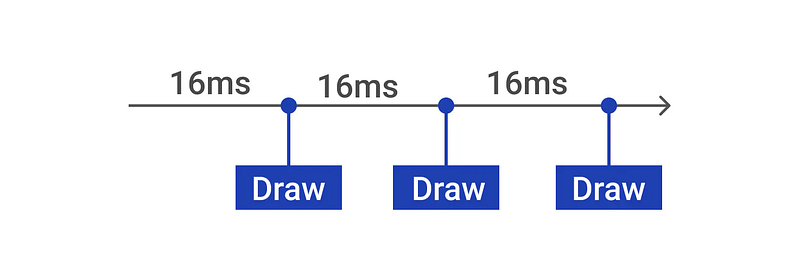
So, if the GC runs for more time, the app will be unable to update the UI and it will skip a few frames, so it will seem that the app is lagging. That is one of the reasons for the app lag.
Another reason is that the app is doing too much on the main thread. For example, at that time if any method/task is taking more time than 16ms, the app will be unable to update the UI, which means lag will be there in the app for that time.
The system tries to redraw the UI every 16ms, and what if our task on the main thread takes more than 16ms? For example, if our task takes 26ms. The system tried to update the UI, but it wasn't ready. In that case, it will not refresh anything. And, that caused the UI to be refreshed after 32ms instead of 16ms. Ultimately, there will be a frame drop.
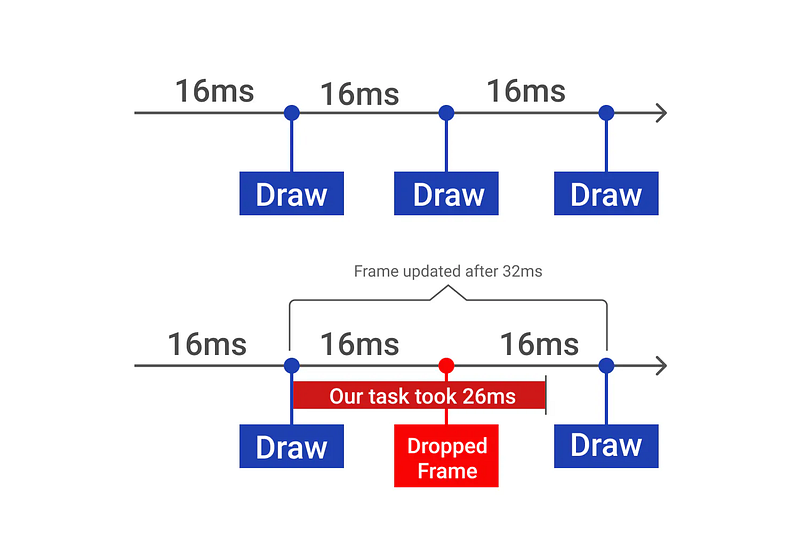
So, due to the frame drop, the user finds the app laggy. Even if there is one dropped frame, the animation will not be smooth. The user will find it laggy.
Now, we have understood the two most important reasons because of why Android Apps lag which are as follows:
- GC running frequently
- Doing too much work on the main thread
To fix this lag issue, we need to focus on the following:
- Reduce GC running time
- Do not do too much on the main thread
How to fix or prevent an Android App lag?
- Minimize Object Allocation: Avoid unnecessary object allocation. Allocate objects only when required, utilizing lazy initialization where applicable.
- Beware of Auto-Boxing:
Prefer primitive types over their boxed counterparts (e.g., use
intinstead ofInteger). Auto-boxing can lead to increased memory usage. - Utilize Efficient Data Structures:
Explore the use of
ArrayMapandSparseArrayfor optimized data storage. Refer to relevant articles for insights on when and why to use these structures. - Implement Object Pools: Embrace the concept of object pools to minimize memory churn. Learn about bitmap pools to efficiently manage bitmap resources.
- Offload Heavy Work to Background Threads: Keep resource-intensive tasks away from the main thread. Utilize background threads to maintain a responsive UI.
- Constants Optimization:
Use
static finalfor constants in Java orconst valin Kotlin. This ensures that constant values are efficiently handled by the compiler. - Avoid Internal Getters/Setters: Where not necessary, prefer direct field access over internal getters and setters. Direct access can be significantly faster.
- Context Leak Prevention: Avoid leaking contexts in inner classes. Be mindful of context references to prevent memory leaks.
- Static Inner Classes: Prefer static inner classes over non-static ones. This helps in avoiding unnecessary references and potential memory leaks.
- LRU Cache for Bitmaps: Implement LRU (Least Recently Used) cache for bitmaps. This strategy helps in preventing redundant decoding, reducing the frequency of Garbage Collection.
- Utilize StrictMode: Leverage StrictMode to detect unintentional disk, network access, or database queries on the main thread. This tool helps identify potential performance bottlenecks.
- Profile GPU Rendering: Enable Profile GPU Rendering through Developer Options to visually assess the time taken to render UI frames. This feature aids in optimizing UI performance relative to the 16ms benchmark.
- Mindful Object Allocation: Avoid allocating a large number of unnecessary objects. Efficiently manage object creation to minimize the load on the Garbage Collector.
- Proguard for Code Shrinkage: Utilize Proguard to shrink, optimize, and obfuscate your code. This can significantly reduce the size of your APK, leading to faster download and installation times.
- Optimize Resource Files: Compress and optimize resource files, such as images and other assets, to reduce the overall size of your app.
- Network Requests Optimization: Optimize network requests by minimizing the number of calls, using caching strategies, and employing efficient data formats (e.g., JSON over XML).
- Background Services Efficiency: Ensure that background services are used judiciously and are optimized for efficiency. Periodically review and refactor background tasks to prevent unnecessary resource consumption.
- Memory Leaks Detection: Regularly check for memory leaks using tools like LeakCanary. Identify and fix leaks promptly to prevent gradual performance degradation.
- Asynchronous Loading of Resources: Implement asynchronous loading for resources like images to ensure that UI responsiveness is maintained, especially when dealing with large files.
- Reduce Overdraw: Minimize overdraw by optimizing your app’s layout. Overdraw occurs when multiple layers of a view are drawn on top of each other, causing redundant rendering.
- Dynamic UI Rendering: Implement dynamic UI rendering, where components are loaded based on user interaction, rather than rendering everything upfront. This approach can enhance perceived app performance.
- User Feedback for Long Operations: Provide feedback to users during lengthy operations, such as loading or processing, to prevent the perception of app lag. Use progress indicators or other visual cues.
- Battery Consumption Considerations: Optimize your app to minimize battery consumption. Excessive background processing or frequent wake-ups can negatively impact both performance and user experience.
Here are some questions that can be asked in an interview about this topic:
- Why does frequent Garbage Collection (GC) lead to Android app lag? During GC, the app is paused, impacting real-time updates and causing a laggy experience.
- How can auto-boxing affect app performance, and what’s the recommended alternative?
Auto-boxing can increase memory usage; prefer primitive types like
intover their boxed counterparts likeInteger. - Why use ArrayMap and SparseArray for optimized data storage in Android? These data structures are more memory-efficient than traditional collections, improving app performance.
- How does offloading heavy work to background threads improve app performance? It keeps the main thread responsive, preventing UI lag during resource-intensive tasks.
- Why is it recommended to use static final for constants in Java or const val in Kotlin? Using static final or const val ensures efficient handling of constant values by the compiler.
- In Android development, why should one avoid internal getters/setters where not necessary? Direct field access is approximately three times faster, enhancing code performance.
- What is the significance of using LRU cache for bitmaps in Android? LRU cache prevents redundant decoding of bitmaps, reducing the frequency of Garbage Collection.
- How can StrictMode be beneficial in Android development? StrictMode helps detect unintentional disk, network, or database operations on the main thread, improving app performance.
- Why enable Profile GPU Rendering in Android development? It provides a visual representation of UI rendering time, aiding in optimizing performance relative to the 16ms benchmark.
- Why is minimizing object allocation crucial for preventing Android app lag? Reducing unnecessary object allocation minimizes the workload on the Garbage Collector, enhancing overall app responsiveness.
- Why should developers optimize resource files, such as images and assets, in Android apps? Optimized resource files reduce the overall size of the app, improving performance and user experience.
- How can dynamic UI rendering contribute to better app performance? Loading components dynamically based on user interaction reduces the initial rendering load, improving perceived performance.
Feel free to contact me ☎️ if you have any questions or need further clarification. Also don’t forget to give it multiple claps 👏 and share 🤝 it with others who might benefit from it. Your support is greatly appreciated and encourages me to continue sharing what I learn.
👉 Click here to become a Medium member and directly support my content and other writers content!
If you enjoyed this story and would like to show your support, I kindly invite you to consider making a donation 🎁. Your contribution, no matter the size, would mean the world to me. Thank you 🥰 for considering and for being a part of this journey!
Wanna show some LOVE 💝? 👉 Click Here
Lastly, follow 👥 Dawinder Singh Gill for more posts like this, where we delve into the world of coding, one line at a time. Happy coding!


