
Android Interview Questions: 14 | Importance of Activity Lifecycle
This story is a part of the series I have written on Android Interview Questions. Crack any interview with confidence, mastering key concepts and best practices. Elevate your Android skills effortlessly. Click on the below link to check the full series.
Introduction
Activity lifecycle might sound familiar, but in interviews, many hit a snag with basic questions. Join us as we simplify things, digging into common queries. Let’s explore the ins and outs, making sure we not only know but really get what activity lifecycle is all about. Together, we’ll unravel the interview puzzle and grasp the importance of this key element in app development.
What is Activity Lifecycle?
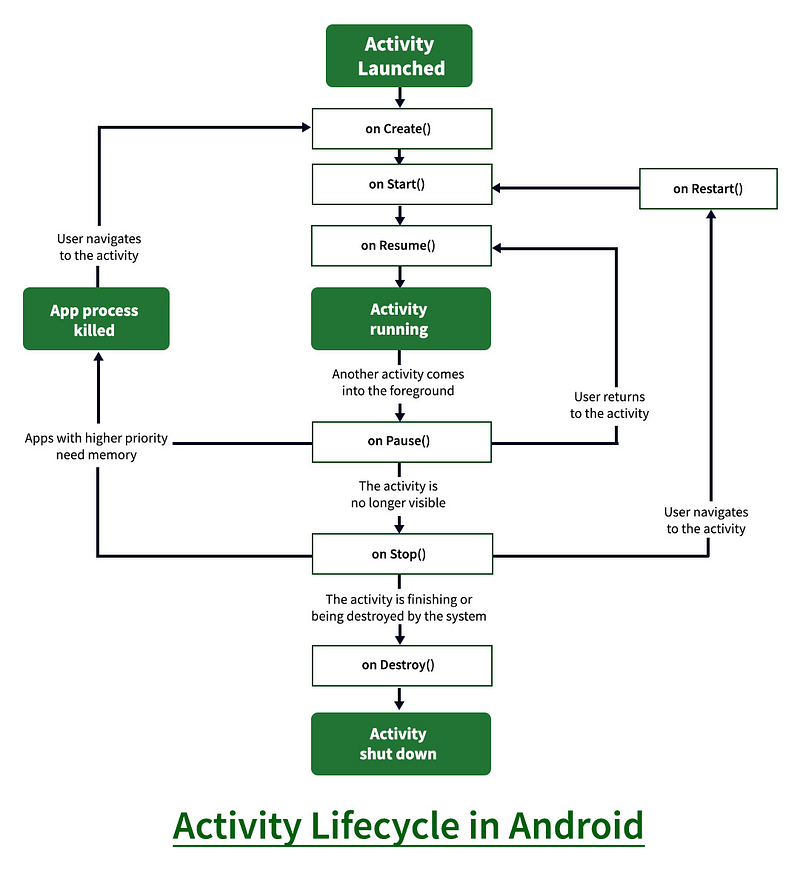
The Android Activity Lifecycle is a crucial concept for developers working on Android applications. An activity represents a single screen with a user interface, and the lifecycle defines the various stages an activity goes through from its creation to its destruction. Understanding the activity lifecycle is essential for properly managing resources, handling user interactions, and ensuring a smooth user experience. Below is a detailed explanation of each stage in the Android Activity Lifecycle, including methods and minor details:
onCreate(Bundle savedInstanceState)
- Called when the activity is first created.
- Initialization of essential components, setting up the user interface, and performing one-time setup tasks.
savedInstanceStateis a Bundle object that allows you to save and restore the activity's state during configuration changes.
onStart()
- Called when the activity becomes visible to the user.
- The activity is now in the foreground, but it might not yet be in an interactive state (e.g., the user might still be looking at a dialog).
onResume()
- Called when the activity starts interacting with the user.
- This is the point where the activity is fully visible and in the foreground.
- Acquire resources that were released during
onPause().
onPause()
- Called when the activity is no longer in the foreground but still visible.
- Typically used for releasing resources that are unnecessary when the activity is not in the user’s focus.
- Should be used to save data that needs to persist between user interactions.
onStop()
- Called when the activity is no longer visible to the user.
- This happens when another activity comes into the foreground or when the activity is being destroyed.
- Release resources that are not needed while the activity is not visible.
onDestroy()
- Called when the activity is being destroyed.
- This can happen either because the user finished the activity or because the system is freeing up resources.
- Release all resources, unregister listeners, and perform cleanup.
onRestart()
- Called when the activity is restarting after being stopped.
- Follows
onStop()when the activity is stopped but not destroyed, and then the user navigates back to it.
onSaveInstanceState(Bundle outState)
- Called before the activity is temporarily destroyed.
- Allows you to save any dynamic instance state (user data) to the
outStateBundle. - The system uses this Bundle to restore the state if the activity needs to be recreated.
onRestoreInstanceState(Bundle savedInstanceState)
- Called after
onStart()when the activity is being re-initialized from a previously saved state. - The
savedInstanceStateBundle contains the data saved inonSaveInstanceState().
Importance of Activity Lifecycle
- Resource Management: Efficiently allocate and release system resources as an activity transitions through different states.
- State Preservation: Save and restore crucial data to maintain a consistent user experience during configuration changes.
- User Interaction Handling: Initialize and set up the user interface, respond to user input, and manage tasks as the activity becomes visible or goes into the background.
- Activity Transition and Visibility: Manage the visibility of activities to optimize resources and responsiveness based on user interactions.
- System Optimization: Contribute to overall device performance by stopping or destroying activities that are not currently in use.
- Handling Background Tasks: Pause or adjust background tasks appropriately based on the activity’s visibility.
- Lifecycle-aware Components: Utilize architecture components that automatically adapt to the activity’s lifecycle, enhancing the management of UI-related data.
- Data Persistence: Use lifecycle methods to save and restore data, ensuring important information is retained during various activity states.
In essence, the activity lifecycle ensures proper handling of resources, responsiveness to user interactions, and seamless transitions between different states, contributing to the reliability and efficiency of Android applications.
Here are some questions that can be asked in an interview about this topic:
- Why do we need to call setContentView() in onCreate() of the Activity class?
setContentView()is used to set the layout for the activity, defining its user interface. It should be called to provide the visual structure for the activity. - When only onDestroy is called for an activity without onPause() and onStop()? This can happen when the system forcefully destroys an activity to reclaim resources, bypassing the regular lifecycle flow.
- From Activity A, go to Activity B, then go back to Activity A, which methods of Activity A will be called?
onRestart()of Activity A will be called when returning from Activity B to Activity A and then onStart() and onResume(). - How to restart an activity programmatically?
You can restart an activity by creating a new Intent for the same activity and calling
startActivity(intent). Intent intent = getIntent() finish() startActivity(intent) - Explain how the back stack is managed in Android? The back stack is managed by the system and keeps track of the activities in the order they are opened. It is used for navigation and follows the Last In, First Out (LIFO) principle.
- What is the purpose of the
onSaveInstanceState()method, and when is it called?onSaveInstanceState()is called before an activity is temporarily destroyed, allowing the saving of crucial data to be restored later during recreation. - How does the launch mode of an activity affect its lifecycle? The launch mode determines how the system creates and maintains instances of the activity. Different launch modes can impact when and how lifecycle methods are called.
- Explain the role of
onConfigurationChanged()in the activity lifecycle.onConfigurationChanged()is called when a configuration change occurs (e.g., screen rotation), allowing developers to handle such changes without the activity being recreated. - What are some common scenarios where understanding the activity lifecycle is crucial for app development? Understanding the activity lifecycle is crucial when dealing with background tasks, handling user interactions, and managing resources to ensure a smooth user experience.
- How can you ensure that background tasks are not interrupted when an activity goes into the background?
By appropriately managing background tasks in
onPause()andonResume(), ensuring tasks are paused when the activity is not visible and resumed when it comes back into focus.
Feel free to contact me ☎️ if you have any questions or need further clarification. Also don’t forget to give it multiple claps 👏 and share 🤝 it with others who might benefit from it. Your support is greatly appreciated and encourages me to continue sharing what I learn.
👉 Click here to become a Medium member and directly support my content and other writers content!
If you enjoyed this story and would like to show your support, I kindly invite you to consider making a donation 🎁. Your contribution, no matter the size, would mean the world to me. Thank you 🥰 for considering and for being a part of this journey!
Wanna show some LOVE 💝? 👉 Click Here
Lastly, follow 👥 Dawinder Singh Gill for more posts like this, where we delve into the world of coding, one line at a time. Happy coding!


