
Machine Learning
An overview of the Scikit-learn Library — Episode 1 Preprocessing
A description in episodes of the well-known Python Library for Machine Learning. The first episode deals with the preprocessing sub-package.
Scikit-learn is a very popular Python library for Machine Learning. Initially developed by David Cournapeau in 2007, it began to grow up in 2010, when INRIA, the French Institute for Research in Computer Science and Automation got involved into the project. In September 2021, the latest release of Scikit-learn was released, i.e. 1.0.
Scikit-learn provides all the steps involved in the Machine Learning process, including Data Preprocessing, Feature Extraction, Model Selection, Model Training, Model Evaluation and Model Deployment.
With this article, I start a series of episodes, each describing a single sub-package provided by Scikit-learn. Scikit-learn is organized into a main module, named sklearn, which is split in many submodules. In this article, I focus Data Preprocessing.
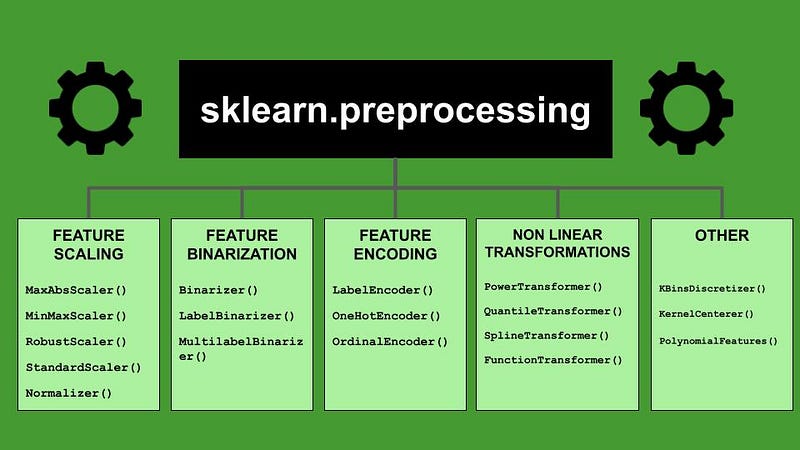
All the classes and functions devoted to Data Preprocessing are contained in the submodule sklearn.preprocessing, which provides the following operations:
- Feature Scaling
- Feature Binarization
- Feature Encoding
- Non Linear Transformations
- Other
1 Feature Scaling
Feature Scaling involves Data Normalization and Standardization. In this interesting article by Baijayanta Roy, entitled All about Feature Scaling, you can understand the difference between normalization and standardization.
Scikit-learn provides many classes for feature scaling:
MaxAbsScaler()— given a list of feature values, convert every value of the list into a number between 0 and 1. The new value is calculated as the current value divided by the max value of the column.MinMaxScaler()— the new value is calculated as the difference between the current value and the min value, divided by the range of the list of feature values.RobustScaler()— remove the median and scale the data according to the Interquartile Range. This scaler is robust to outliers.StandardScaler()— remove the mean and scale to the variance. This scaler corresponds to the classical standardization process.Normalizer()— normalize each value to the unit norm.
In order to use a whatever scaler, you should firstly instantiate an object, such as:
scaler = StandardScaler()then you must fit it with all the available data:
scaler.fit(data)finally, you can apply the scaler only to data of interest (which may include also all. the dataset):
scaled_data = scaler.transform(subset_of_data)Alternatively, you could apply fit and transform together, with a single function:
scaled_data = scaler.fit_transform(data)You can read a practical example on MinMaxScaler() and MaxAbsScaler in my previous article, entitled Data Normalization with Python scikit-learn.
In addition to the described classes, Scikit-learn provides some functions for feature scaling, which can be used directly on a fixed array, without the fitting procedure:
maxabs_scale()minmax_scale()normalize()robust_scale()scale()
2 Feature Binarization
Feature Binarization thresholds numerical features to get boolean values, stored as 0 or 1.
Scikit-learn provides many classes for binarization:
Binarizer()— set a feature value to 0 or 1, depending on a threshold. A value greater than the threshold is set to 1, a value less or equal to the threshold is set to 0.LabelBinarizer()— for each output label, build a vector, where the number of elements is equal to the number of unique labels, then assign 1 or 0 to each element of the vector depending depending on which label it is in. This class is very similar to theOneHotEncoder(), with the difference thatLabelBinarizer()is used for output classes, while OneHotEncoder is used for input features. For more details, you can read this thread on Stackoverflow.MultilabelBinarizer()—an extension of theLabelBinarizer()to support multilabels.
Similarly to scalers, also binarizers should be firstly instantiated, then fitted and, finally applied to data:
binarizer = Binarizer()
binarizer.fit(data)
binarized_data = binarizer.transform(new_data)
or alternatively:
binarizer = Binarizer()
data = binarizer.fit_transform(data)
Scikit-learn also provides useful functions for binarization, which can be used when the number of elements is fixed:
binarize()label_binarize()
As already said for Feature Scaling, please remind to save the fitted binarizer, because it will be used during model deployment.
3 Feature Encoding
Categorical features must be transformed to numbers, before a model can be fitted and evaluated. Feature encoding is just this kind of transformation.
Scikit-learn provides different classes for feature encoding:
LabelEncoder()— encode output labels with a value between 0 and the total number of classes minus one.OneHotEncoder()— for each input categorical feature, build a vector, where the number of elements is equal to the number of unique labels, then assign 1 or 0 to each element of the vector depending depending on which label it is in.OrdinalEncoder()— each unique category value is assigned an integer value. Then, each input categorical feature value is transformed to a number, corresponding to the relative category. For example, “apple” is 1, “orange” is 2, and “melon” is 3.
The use of each encode is quite similar to the previous operations. Thus it is sufficient to instantiate the selected encoder and then fit and transform it with categorical data.
4 Non Linear Transformations
Scikit-learn also provides some interesting classes for non linear transformations:
PowerTransformer()— apply a power transform to make features more Gaussian-like. This is useful for modelling situations where data normality is desired.QuantileTransformer()— transforms the features to follow a uniform or a normal distribution. This is done by exploiting quantile information.SplineTransformer()— generate a new feature matrix, based on univariate B-spline functions.FunctionTransformer()— apply a custom transformation.
Each transformer must be firstly instantiated, than fitted with data and finally used through the transform() function.
Transformations can be also done directly through the following functions, without any fitting, if the number of elements is fixed:
quantile_transform()power_transform()
5 Other
The preprocessing package also includes the following classes:
KBinsDiscretizer()— bin continuous data into intervals.KernelCenterer()— center a kernel matrix.PolynomialFeatures()— generate a new feature matrix with all polynomial combinations of the features with degree less than or equal to the specified degree.
and an interesting function:
add_dummy_feature()— augment the dataset with a dummy input feature.
Summary
In this article, I have described an overview of the Scikit-learn preprocessing package. Many operations and transformations can be applied to a dataset, both to input features and output classes, including Feature Scaling, Feature Binarization, Feature Encoding, Non Linear Transformations and other operations. For more information, you can read the official Scikit-learn Documentation on the preprocessing package.
If you want to discover other classes and functions provided by Scikit-learn, you can follow me, subscribe to my mailing list and stay tuned.
If you have come this far to read, for me it is already a lot for today. Thanks! You can read more about me in this article.
Would you like to support my research?
You could subscribe for a few dollars per month and unlock unlimited articles — click here.
Bonus
Remind to save the fitted preprocessing operation into an external file, because when you deploy the model, you need to apply to new data the same scaler used during processing:
from sklearn.externals import joblibjoblib.dump(prep, 'prep.pkl')Then, to open the scaler from a file, you can execute the following piece of code:
prep = joblib.load('prep.pkl')