avatarJessie Leung

Free AI web copilot to create summaries, insights and extended knowledge, download it at here

3684

Abstract

e ways, this is similar to reading and writing to database tables.</p><p id="54cf">A topic is then divided into <b>partitions</b>, where each contains a subset of a topic’s messages. A broker can have multiple partitions. Why are there multiple partitions for a topic? Primarily it is to increase throughput; parallel access to the topic can occur.</p><p id="bdb7">Further, the Kafka brokers also give us reliability and data protection using replication. If a broker fails, then all the partitions assigned to that broker would become unavailable.</p><p id="8e05">To resolve this issue, there is the concept of a replica, i.e. a duplicate of each partition. You can specify the number of replicas a partition has. At a given point in time, all replicas are identical to the original partition — i.e. “leader” — unless it hasn’t caught up to the most recent data in the leader.</p><figure id="cf13"><img src="https://cdn-images-1.readmedium.com/v2/resize:fit:800/0*d3tYbtfoNOl70it2"><figcaption>Anatomy of a topic; how partitions and offsets work in a topic (Source: <a href="http://kafka.apache.org/documentation.html#introduction">http://kafka.apache.org/documentation.html#introduction</a>)</figcaption></figure><p id="5835">What is unique about Kafka is that it keeps all the messages for a set amount of time (this can be indefinitely). Each message has an offset, or position, in this message log. Instead of Kafka managing which message a consumer is up to, Kafka delegates this responsibility entirely to the consumer itself. By doing this, Kafka is able to support many more consumers.</p><p id="1778">There are plenty of articles which delve in more detail into the differences between Kafka and other forms of messaging systems. Read more <a href="https://dzone.com/articles/understanding-when-to-use-rabbitmq-or-apache-kafka">here</a> and <a href="https://hackernoon.com/introduction-to-message-brokers-part-1-apache-kafka-vs-rabbitmq-8fd67bf68566">here</a>. In fact, this is just the tip of the iceberg when it comes to the small subtleties that Kafka has in its design and architecture. You can find out more at the <a href="https://kafka.apache.org/documentation.html">official Kafka documentation</a>.</p><h1 id="512a">Writing Producers and Consumers</h1><p id="7ab1">Arguably, most software developers/engineers don’t need to know how Kafka works under the hood fully. But you <i>definitely</i> need to know how to write a common producer that publishes data. It’s also good to know how to write a consumer that will consume the data from a Kafka topic.</p><p id="5f85">First, let’s install Kafka. For Mac users, you can get started on Kafka locally by running brew. This will install both <a href="https://zookeeper.apache.org/">Zookeeper</a> (a service used to enable highly coordinated distributed systems) and Kafka.</p><p id="07d7"><code>brew install kafka</code></p><p id="67ba">For others, you can also install Kafka as per the official <a href="https://kafka.apache.org/quickstart">website</a>.</p><p id="a16f">Then, let’s start ZooKeeper.</p><p id="923c"><code>zookeeper-server-start /usr/local/etc/kafka/zookeeper.properties</code></p><p id="2c19">Next, we will start our Kafka server.</p><p id="a2b8"><code>kafka-server-start /usr/local/etc/kafka/server.properties</code></p><p id="6a08">We will now create a topic for our producers to publish to.</p><p id="e04e"><code>kafka-topics --create --zookeeper localhost:2181 --replication-factor 1 --partitions 1 --topic test-topic</code></p><p id="fb4e">This creates a topic called testTopic with one partition and a replication factor of one.</p><p id="7535">We’re now ready to write a basic producer utilising

Options

the provided Kafka class <code>KafkaProducer</code>, which will publish to testTopic.</p> <figure id="4ace"> <div> <div>

            <iframe class="gist-iframe" src="/gist/jess-leung/682170a85334fc342bdd9bab014b2275.js" allowfullscreen="" frameborder="0" height="undefined" width="undefined">
          </div>
        </div>
    </figure></iframe></div></div></figure><p id="1c8c">A few important configurations here:</p><ul><li><b>Bootstrap servers config:</b> this is the list of Broker host/port pairs used to establish a connection to the cluster.</li><li><b>Key serializer:</b> a class which implements the Serializer interface and is used to serialize the key.</li><li><b>Value serializer:</b> same as key serializer, except to serialize the value.</li></ul><p id="0e2e">We can test that we have published the data by running a consumer. Here, we create a consumer on the command line, and we read the topic test-topic from the beginning.</p><p id="32c2"><code>kafka-console-consumer --bootstrap-server localhost:9092 --from-beginning --test-topic</code></p><p id="ceb7">You can use an offset instead to consume the last N messages from a partition, like so:</p><p id="edb2"><code>kafka-console-consumer --bootstrap-server localhost:9092 --offset 3 --partition 0 --test-topic</code></p><p id="a9b5">Moving onto consumers now, we do a very similar thing and use the class <code>KafkaConsumer</code>.</p>
    <figure id="73e6">
        <div>
          <div>
            
            <iframe class="gist-iframe" src="/gist/jess-leung/f9d8d41dc247e09fb1f81ef7c2884e47.js" allowfullscreen="" frameborder="0" height="undefined" width="undefined">
          </div>
        </div>
    </figure></iframe></div></div></figure><p id="3331">Again, a few important configurations here to take note of:</p><ul><li><b>Group id: </b>you can group consumers together using this id. Be careful with this if you have multiple consumers, as a message in a topic is consumed by one consumer in a group only.</li><li><b>Bootstrap servers config: </b>similar to above, it’s how we connect to the cluster.</li><li><b>Key and value deserializer: </b>this is the class used to deserialise the key and the value.</li><li><b>Enable auto commits: </b>if you set this to true, then the consumer will auto-commit the largest offset it knows of from the polling. The default interval of auto commits is five seconds.</li></ul><p id="ad6f">We can test our consumer gets the data when it is published by a producer.</p><p id="550f">Run the following to start a producer. You can then enter some data and press enter.</p><p id="bcbf"><code>kafka-console-producer --broker-list localhost:9092 --topic test-topic</code></p><p id="eff1">You should see your consumer print out the record details. As you enter and publish more data, you should see your consumer print out the details of the message also, along with the offset.</p><h1 id="4a29">Language and Framework Support</h1><p id="bb8b">Kafka APIs support Java and Scala only, but there are many <a href="https://cwiki.apache.org/confluence/display/KAFKA/Clients">open source</a> (and enterprise solutions) that cover other languages, such as C/C++, Python, .NET, Go, NodeJS, and etc.</p><p id="172a">For frameworks, I’ve personally worked with SpringBoot mostly, where there is also official <a href="https://spring.io/projects/spring-kafka">Spring support</a>.</p><p id="57ed">…And that brings this introduction to a conclusion! I will be keen to hear what your experiences working with Kafka has been like, and what use cases it was for.</p></article></body>

An Introduction to Apache Kafka

Kafka’s basic components and how to write a basic producer and consumer

Photo by Safar Safrov from Unsplash

Kafka was developed by LinkedIn in 2010, and it has been a top-level Apache project since 2012. It is a highly scalable, durable, robust, and fault-tolerant publish-subscribe event streaming platform.

I spent some time working with Kafka as a software developer on a previous project. I want to share some things I’ve found useful to know when I was working with Kafka producers and consumers for the first time. Namely, this article is an introduction to Kafka — the basic components of Kafka, how to write a producer and consumer, and also what language support there is for it. Without further ado, let’s dive into the backbone of Kafka first and discuss some Kafka basics.

Let’s explore what some of the common use cases of Kafka are:

  • Real-time processing of application activity tracking, like searches.
  • Stream processing
  • Log aggregation, where Kafka consolidates logs from multiple services (producers) and standardises the format for consumers.
  • An interesting use case that has emerged is the microservices architecture. Kafka can be a suitable choice for event sourcing microservices where a lot of events are generated and we want to keep track of the sequence of events (i.e. what has happened).

There are multiple case studies on the use of Kafka, such as from The New York Times and Netflix.

Basic Components

Let’s talk a little about the basic components that Kafka uses for its publish-subscribe messaging system. A producer is an entity/application that publishes data to a Kafka cluster, which is made up of brokers. A broker is responsible for receiving and storing the data when a producer publishes. A consumer then consumes data from a broker at a specified offset, i.e. position.

That is, it’s a multi-producer, multi-consumer structure, and it looks something like this:
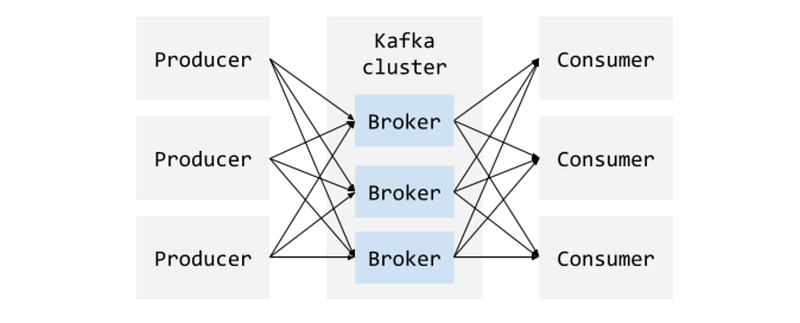
An illustration of the relationship between producers, the Kafka cluster, and consumers

What does a basic unit of data look like in Kafka? This is generally called a message or a record (interchangeably). A message contains the data and also the metadata. The metadata contains information such as the offset, a timestamp, compression type, and etc.

These messages are organised into logical groupings or categories which are called a topic, to which producers publish data. Typically, messages in a topic are spread across different partitions in different brokers. A broker manages many partitions.

A producer can publish to multiple topics. You can define what your topics are and which topics a producer publishes to. In a similar vein, consumers can choose which topics they want to subscribe to as well. In some ways, this is similar to reading and writing to database tables.

A topic is then divided into partitions, where each contains a subset of a topic’s messages. A broker can have multiple partitions. Why are there multiple partitions for a topic? Primarily it is to increase throughput; parallel access to the topic can occur.

Further, the Kafka brokers also give us reliability and data protection using replication. If a broker fails, then all the partitions assigned to that broker would become unavailable.

To resolve this issue, there is the concept of a replica, i.e. a duplicate of each partition. You can specify the number of replicas a partition has. At a given point in time, all replicas are identical to the original partition — i.e. “leader” — unless it hasn’t caught up to the most recent data in the leader.
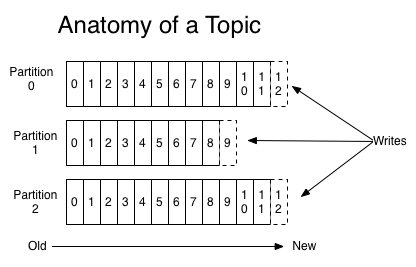
Anatomy of a topic; how partitions and offsets work in a topic (Source: http://kafka.apache.org/documentation.html#introduction)

What is unique about Kafka is that it keeps all the messages for a set amount of time (this can be indefinitely). Each message has an offset, or position, in this message log. Instead of Kafka managing which message a consumer is up to, Kafka delegates this responsibility entirely to the consumer itself. By doing this, Kafka is able to support many more consumers.

There are plenty of articles which delve in more detail into the differences between Kafka and other forms of messaging systems. Read more here and here. In fact, this is just the tip of the iceberg when it comes to the small subtleties that Kafka has in its design and architecture. You can find out more at the official Kafka documentation.

Writing Producers and Consumers

Arguably, most software developers/engineers don’t need to know how Kafka works under the hood fully. But you definitely need to know how to write a common producer that publishes data. It’s also good to know how to write a consumer that will consume the data from a Kafka topic.

First, let’s install Kafka. For Mac users, you can get started on Kafka locally by running brew. This will install both Zookeeper (a service used to enable highly coordinated distributed systems) and Kafka.

brew install kafka

For others, you can also install Kafka as per the official website.

Then, let’s start ZooKeeper.

zookeeper-server-start /usr/local/etc/kafka/zookeeper.properties

Next, we will start our Kafka server.

kafka-server-start /usr/local/etc/kafka/server.properties

We will now create a topic for our producers to publish to.

kafka-topics --create --zookeeper localhost:2181 --replication-factor 1 --partitions 1 --topic test-topic

This creates a topic called testTopic with one partition and a replication factor of one.

We’re now ready to write a basic producer utilising the provided Kafka class KafkaProducer, which will publish to testTopic.

A few important configurations here:

  • Bootstrap servers config: this is the list of Broker host/port pairs used to establish a connection to the cluster.
  • Key serializer: a class which implements the Serializer interface and is used to serialize the key.
  • Value serializer: same as key serializer, except to serialize the value.

We can test that we have published the data by running a consumer. Here, we create a consumer on the command line, and we read the topic test-topic from the beginning.

kafka-console-consumer --bootstrap-server localhost:9092 --from-beginning --test-topic

You can use an offset instead to consume the last N messages from a partition, like so:

kafka-console-consumer --bootstrap-server localhost:9092 --offset 3 --partition 0 --test-topic

Moving onto consumers now, we do a very similar thing and use the class KafkaConsumer.

Again, a few important configurations here to take note of:

  • Group id: you can group consumers together using this id. Be careful with this if you have multiple consumers, as a message in a topic is consumed by one consumer in a group only.
  • Bootstrap servers config: similar to above, it’s how we connect to the cluster.
  • Key and value deserializer: this is the class used to deserialise the key and the value.
  • Enable auto commits: if you set this to true, then the consumer will auto-commit the largest offset it knows of from the polling. The default interval of auto commits is five seconds.

We can test our consumer gets the data when it is published by a producer.

Run the following to start a producer. You can then enter some data and press enter.

kafka-console-producer --broker-list localhost:9092 --topic test-topic

You should see your consumer print out the record details. As you enter and publish more data, you should see your consumer print out the details of the message also, along with the offset.

Language and Framework Support

Kafka APIs support Java and Scala only, but there are many open source (and enterprise solutions) that cover other languages, such as C/C++, Python, .NET, Go, NodeJS, and etc.

For frameworks, I’ve personally worked with SpringBoot mostly, where there is also official Spring support.

…And that brings this introduction to a conclusion! I will be keen to hear what your experiences working with Kafka has been like, and what use cases it was for.

Big Data
Kafka
Programming
Software Development
Coding
Recommended from ReadMedium