
An Intro to Framer Motion
A critical look at the docs plus animate, transition, and gesture examples

Framer Motion is an animation and gesture library that has had an incredible growth in popularity in the last year. Take a look at these downloads — one year ago and today:
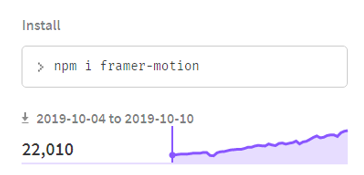
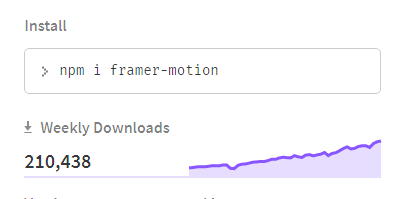
Given these numbers, familiarity with the library is a smart move. We’ll take a look at the quality of the docs, dive into some beginner and advanced examples, and finally wrap up with key points about how to use the library.
Contents
1. Diving into the docs
2. Animation stacking with the bouncy ball animation
3. Scale on drag with the grow ball animation
4. Color transition with color bouncer
5. Key takeaways
6. Resources (code and a video version of this article)
The Docs
There’s nothing more frustrating than hearing about a library that everyone’s using then feeling like you’re the only one struggling because you can’t make heads or tales of the documentation.
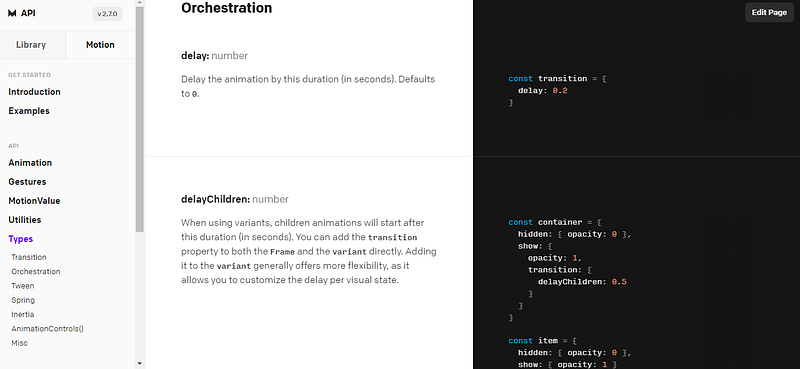
In my opinion, and for my very visual learning style, the docs quickly gave me a sense of confidence that I could accomplish basic animations with Framer Motion.
The good
- API docs are easy to follow
- The nav tree on the left was easy to search and not overwhelming
- There were copious amounts of examples on the right, plus code sandboxes. This is exactly what a visual learner, like myself, needs.
- In the center were the explanations for the declarative API. I enjoyed the fact that examples and example code had more screen real estate than the textual definitions.
- The docs got into some technical aspects of animation performance with recommendations of which animations can be hardware accelerated — I was happily surprised to see this
The bad
- Documentation seems to be missing on some of the accepted props. For example, one CodeSandbox had a
yoyoproperty in thetransitionobject. However, theyoyoproperty was nowhere to be found in the documentation (at least, I couldn’t find it). - I did, however, find plenty about the different transitions from framerbook.com (with whom I have no relationship, I’m just calling out a great resource). I shouldn’t have to go to a third-party resource to find basic info about props for an API.
I like to keep in mind that no library has perfect documentation. With that perspective, I thought the docs were overall really accessible. Highly visual documentation for a visual library was a good move by Framer Motion.
The below examples build on the documentation modestly. The only way to get comfortable with a library is to code with it.
Animation Stacking With a Bouncy Ball
The core of Framer Motion is two things: animate (the what to do) and transition (the how to do it).
You can stack animations and transitions to occur simultaneously. Alternatively, you can give the illusion of consecutive animations, like below with this bouncy ball:
(Choppiness with the animation is due to CodeSandbox overhead. Framer Motion animations are super smooth.)
The below array values are interpreted as a series of key frames by Framer Motion and will be animated in sequence.
This three-part bounce is created by animating the y, width, and height of the ball. However, the width and height don’t actually change until the final key frame. At that point, the y only changes to give the impression of the squish at the bottom of the bounce.
<motion.span
  style={ballStyle}
  transition={{
    y: transitionValues,
    width: transitionValues,
    height: transitionValues
  }}
  animate={{
    y: ["2rem", "8rem", "10rem"],
    width: ["5rem", "5rem", "6rem"],
    height: ["5rem", "5rem", "4rem"]
  }}
/>
Let’s take a look at transitionValues:
const transitionValues = {
  duration: 0.8,
  yoyo: Infinity,
  ease: "easeOut"
}
The yoyo value is a custom Framer Motion transition property that allows an animation to continue indefinitely and also reverses the animation. This is helpful for reducing the key frames required for the bounce effect.
Scale on Drag With a Grow Ball
Some animations require an SVG; otherwise, the rerender impairs the user interaction. Take a look at scaling on drag (you may need to open the CodeSandbox to drag):
In this example, the drag action is on a transparent motion.div component in the background. The drag value is run through a few Framer Motion custom hooks (useMotionValue and useTransform); then, the output is used to calculate the size of the circle SVG.
const x = useMotionValue(0);
const circleSize = useTransform(x, [-100, 100], [50, 150]);
//...skipping a few lines of code
return (
<motion.div
style={{
x: x
}}
drag="x"
dragConstraints={{ left: 0, right: 0 }}
>
<svg className="progress-icon" viewBox={`0 0 300 300`}>
<motion.circle fill={"white"} cx="50%" cy="50%" r={circleSize}/>
</svg>
</motion.div>
);useTransform takes an input, a max range of inputs, and an output range. For example, in the above code, if circle is dragged to or past -100, this is transformed to 50. With this hook, you can map values that have a cause-and-effect relationship in the UI.
Another item of note: drag is part of a built-in suite of custom event listeners in Framer Motion known as gestures. Gestures allow for the quick implementation of powerful and useful UI interactions. These interactions then tie easily into Framer Motion’s custom hooks, such as useMotionValue.
Color Transitions With Color Bouncer
The final example randomly generates xy coordinates and moves the ball to the proper location. Additionally, the background color of the ball will match the background color at the respective y-value outside the container:
This example combines some good old-fashioned React hooks (useState and useEffect) with the power of Framer Motion. Here’s the relevant code for determining the animation values:
export const ColorBouncer = () => {
  const [x, setX] = React.useState(-90);
  const [y, setY] = React.useState(-90);
  let background = transform(y, [-90, 90], ["#A0D", "#0BF"]);

  const getRandomSign = () => {
    let rand = Math.random();
    if (rand < 0.5) {
      return -1;
    }
    return 1;
};React.useEffect(() => {
setInterval(() => {
setX(Math.random() * 90 * getRandomSign());
setY(Math.random() * 90 * getRandomSign());
}, 1500);
}, []);return (
//.....JSX here
);The x- and y- values are used to animate the ball’s location every 1.5 seconds. The y-value changes are picked up by the transform function and a new background color is computed for the ball.
A challenge with the color-bouncer animation is that Framer Motion’s custom hooks don’t trigger rerenders like traditional React hooks. This was an intentional design due to performance concerns. However, I struggled some with how to properly use their hooks to get this animation working, eventually reverting to the traditional hooks seen above.
Key Takeaways
Framer Motion smoothly handles the what to do (animations), gives you expanded tools for the how to do it (transitions, including custom transitions like yoyo and spring), and provides robust custom gestures and hooks for complex animations.
The docs are approachable and the user community is expanding rapidly. Updates are released regularly (minor versions once or twice a month, major versions about once a year).
Altogether, Framer Motion is a slick and dependable library for making your UI shine.
Resources
YouTube version of this post:
CodeSandbox links:
Third-party docs (they are really thorough)
Another instance where I found Framer Motion came in handy was with animations on component render (see story here). Framer Motion seems able to hook into the React lifecycle easily and solved my problem.