avatar___

Free AI web copilot to create summaries, insights and extended knowledge, download it at here

4632

Abstract

ons of the same entity type?</p><p id="9f74">For example, the utterance “I want to transfer money from my checking account to my savings account” contains the following entities:</p><figure id="4a61"><img src="https://cdn-images-1.readmedium.com/v2/resize:fit:800/1*aatyXN9Qopq3EelDy1Vblw.png"><figcaption>Figure 9: Results that have multiple entity entities of the same type</figcaption></figure><p id="ea75">Figure 9 shows that we have two entities with the same type i.e. “account” but different values i.e. “checking_account” and “savings account”.</p><p id="ebb1">TED Policy will use this information to generate the following vector representation:</p><figure id="8429"><img src="https://cdn-images-1.readmedium.com/v2/resize:fit:800/1*HFO9TS8YuSgGJQgbn_IGtw.png"><figcaption>Figure 10: Vector representation of the entities extracted in Figure 9</figcaption></figure><p id="048a">Notice that this is identical to the vector representation in Figure 8.</p><p id="0d59">Therefore, we conclude that we cannot influence a conversation based on the number of entities mentions.</p><h2 id="fb89">Utterances With Different Entities</h2><p id="8676">The utterance “I want to open a savings account and travel to Berlin” will have the following entities extracted:</p><figure id="36b9"><img src="https://cdn-images-1.readmedium.com/v2/resize:fit:800/1*WxhTzYIppUAtOZlfxkzQQw.png"><figcaption>Figure 11: Results that have multiple entities with distinct types</figcaption></figure><p id="a13e">In this case, TED Policy will generate the following feature vector:</p><figure id="39d1"><img src="https://cdn-images-1.readmedium.com/v2/resize:fit:800/1*joQ96_ZLZGKVCGnsfF9Z5w.png"><figcaption>Figure 12: Vector representation of the results in Figure 12</figcaption></figure><p id="22ef">Therefore, we can conclude that the vector representation for extracted entities is a binary vector where a 1 indicates only the presence of the entity mapped to that position according to the internal lookup table.</p><h2 id="1356">Entities With Roles and Groups</h2><p id="8922">The case of utterances containing entities with roles and groups is interesting.</p><p id="7974">Consider the case of entities with roles such as the utterance “I want to travel from Berlin to san francisco”. These are the entities extracted by the NLU model:</p><figure id="bdd4"><img src="https://cdn-images-1.readmedium.com/v2/resize:fit:800/1*Fs8fuq1PT3atCa2xQs7KAQ.png"><figcaption>Figure 13: Results containing entities with groups</figcaption></figure><p id="ae7a">TED Policy will featurize the results in Figure 13 into the following vector:</p><figure id="a00b"><img src="https://cdn-images-1.readmedium.com/v2/resize:fit:800/1*qfQXaDoLe633OAB1RmJJuQ.png"><figcaption>Figure 14: Vector representation of the results in Figure 13</figcaption></figure><p id="47b6">As expected, we see a 1 in the 4th and 5th elements as these elements correspond to the “departure” and “destination” roles for the “city” entity type.</p><p id="b680">What may not be expected is that there is also a 1 in the 1st element as this element just corresponds to the “city” entity type without any roles.</p><p id="d2c3">The same observation applies to entities with groups and with entities with both roles and groups.</p><h1 id="cffc">Slots</h1><h2 id="8e12">Overview</h2><p id="f9e0">Slots will have their own lookup table just like the case for intents and entities.</p><p id="c14c">If we have defined the following slots in our domain.yml file:</p><figure id="d4bc"><img src="https://cdn-images-1.readmedium.com/v2/resize:fit:800/1*O8IVkNEfKtCZkB2-SNVF9A.png"><figcaption>Figure 15: Slots defined in the domain.yml</figcaption></figure><p id="76fb">Then, this is how the internal lookup table looks:</p><figure id="fcca"><img src="https://cdn-images-1.readmedium.com/v2/resize:fit:800/1*Qmrix0dm_UwGFksa_YSrfg.png"><figcaption>Figure 16: The internal lookup table used to featurize the slots defined in Figure 15</figcaption></figure><p id="67a7">Let’s look at how each slot type gets featurized.</p><h2 id="6efa">Text Slots</h2><p id="a82d">Setting the value of the “cuisine” slot to any value (except <code>None</code>) will result in the following feature vector:</p><figure id="0d36"><img src="https://cdn-images-1.readmedium.com/v2/resize:fit:800/1*lkPN1LiP9WqWfKJiulLPlQ.png"><figcaption>Figure 17: Vector representation of a filled Text slot</figcaption></figure><p id="d8a3">Therefore, although the type of the slot is Text, Rasa does not actually check that the type of value passed to the text slot is a string.</p><h2 id="07b3">Boolean Slots</h2><p id="218d">Setting the

Options

“is_authenticated” slot to False will produce the following feature vector:</p><figure id="b13d"><img src="https://cdn-images-1.readmedium.com/v2/resize:fit:800/1*P7S8wONtggVVmQnYA3qOtg.png"><figcaption>Figure 18: Feature vector when a boolean slot is set to False</figcaption></figure><p id="293f">This is what the vector representation looks like then the slot is set to True:</p><figure id="59a4"><img src="https://cdn-images-1.readmedium.com/v2/resize:fit:800/1*w23eJTY0XQODWp_hLfxb2Q.png"><figcaption>Figure 19: Feature vector when a boolean slot is set to True</figcaption></figure><p id="215e">Notice that a boolean slot is represented using a 2-dimensional vector where True and False is represented as (1, 1) and (1, 0) respectively (as opposed to (0, 1) and (1, 0)).</p><h2 id="53b5">Categorical Slots</h2><p id="8335">The “risk_level” slot is a categorical slot with 3 levels (low, medium, high).</p><p id="7d1a">Notice that the lookup table has allocated 4 positions to this slot. The first 3 corresponds to the 3 levels defined in the domain.yml and the last one is for values assigned to this slot that is outside the predefined levels.</p><p id="bf22">For example, if the slot was assigned the value “medium”, the feature vector looks like this:</p><figure id="1a6e"><img src="https://cdn-images-1.readmedium.com/v2/resize:fit:800/1*IdL6FVqSY8fCXCBO7RerRQ.png"><figcaption>Figure 20: Vector representation when the risk_level slot is set to “medium”</figcaption></figure><p id="f9c3">On the other hand, if the value is neither “low”, “medium”, or “high”, then the 4th position will be used. For example, this is the vector representation when the slot was assigned the value “super high”:</p><figure id="274c"><img src="https://cdn-images-1.readmedium.com/v2/resize:fit:800/1*RHljrqMp9VLsPlEVM8ZzXw.png"><figcaption>Figure 21: Vector representation when the risk_level slot is set to “super high” (outside the predefined values)</figcaption></figure><h2 id="0e8c">Float Slots</h2><p id="7ab2">The “temperature” slot is defined to be a float slot with a min value of -100 and max value of 100.</p><p id="6e6d">This is the feature vector when “temperature” is set to 0:</p><figure id="f90f"><img src="https://cdn-images-1.readmedium.com/v2/resize:fit:800/1*2i6z-2IbzM9aHUR1m-nc1Q.png"><figcaption>Figure 22: Vector representation when temperature slot is set to 0 (within bounds)</figcaption></figure><p id="bc95">This is the feature vector when “temperature” is set to -200:</p><figure id="6950"><img src="https://cdn-images-1.readmedium.com/v2/resize:fit:800/1*z_-7zdfgAUGCXnM7LYt06A.png"><figcaption>Figure 23: Vector representation when temperature slot is set to -200 (outside lower bound)</figcaption></figure><p id="b3cf">This is the feature vector when “temperature” is set to 200:</p><figure id="63a4"><img src="https://cdn-images-1.readmedium.com/v2/resize:fit:800/1*CXbQEg9KsI8ojXPdvO2jKA.png"><figcaption>Figure 24: Vector representation when temperature slot is set to 200 (outside upper bound)</figcaption></figure><p id="9a89">Based on the results in Figure 22, 23, and 24, it should be clear that we can use float slots to build stories that will branch differently when the assigned value is outside the max value but not when it is less than the min value, since it shares the same vector representation as when its value is within the predefined bounds.</p><h2 id="6238">List Slots</h2><p id="cc1b">List slots are similar to Text slots in that any value passed to it (except <code>None</code>) will be considered as valid input for featurization.</p><p id="bb6a">For example, assigning any of these values to the “shopping_items” slot:</p><ul><li><code>[“eggs”, “milk”]</code></li><li><code>200</code></li><li><code>“eggs”</code></li><li><code>[None]</code></li></ul><p id="4313">will give the same feature vector, namely:</p><figure id="e2c9"><img src="https://cdn-images-1.readmedium.com/v2/resize:fit:800/1*apDyK4Cf5YKLH6oig-Y5Gg.png"><figcaption>Figure 25: Vector representation when a list slot is assigned anything beside “None”</figcaption></figure><h1 id="cb58">Conclusion</h1><p id="b502">This article has explained how intents, entities, and slots get featurized when using TED Policy to do dialogue predictions. It also identified some idiosyncrasies for certain types. These idiosyncrasies may seem trivial but are worth always keeping in mind because they do influence what stories you can write e.g. you can’t write stories that will branch based on the number of entities extracted (without writing custom code).</p><p id="b3bd">I hope you have found this helpful.</p></article></body>

Natural Language Processing

An In-depth Look At How Rasa Featurizes User Input For Dialogue Prediction
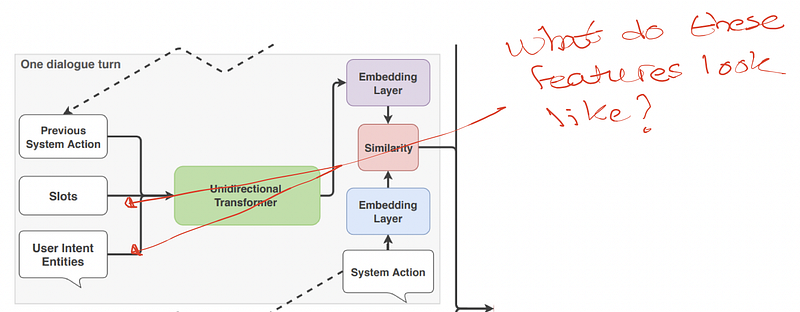
Introduction

In this article, we will look at how the extracted intent, entities, and slots get featurized by Rasa’s TED Policy to predict what the bot should do next.

The code to reproduce the results described in this article is here.

Intent

Suppose we have defined the following intents in our domain.yml:
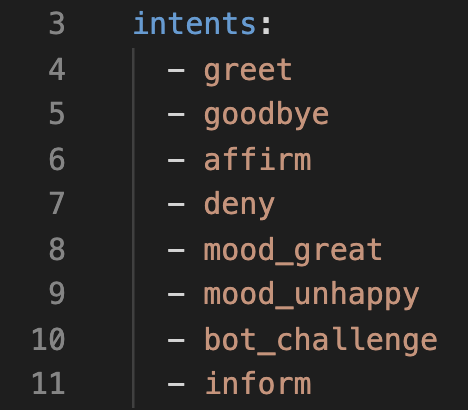
Figure 1: Intents defined in the domain.yml file

The intents defined in Figure 1 will be internally represented as a lookup table like this:
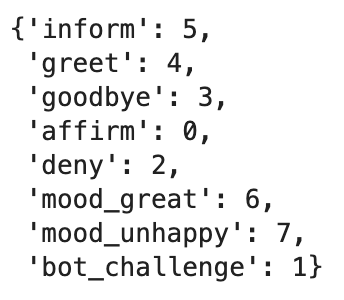
Figure 2: A lookup table for the intents defined in Figure 1

Note that we have defined 8 intents in our bot’s domain.yml.

So, given the utterance “I am feeling happy” which Rasa’s NLU model classifies as mood_great :
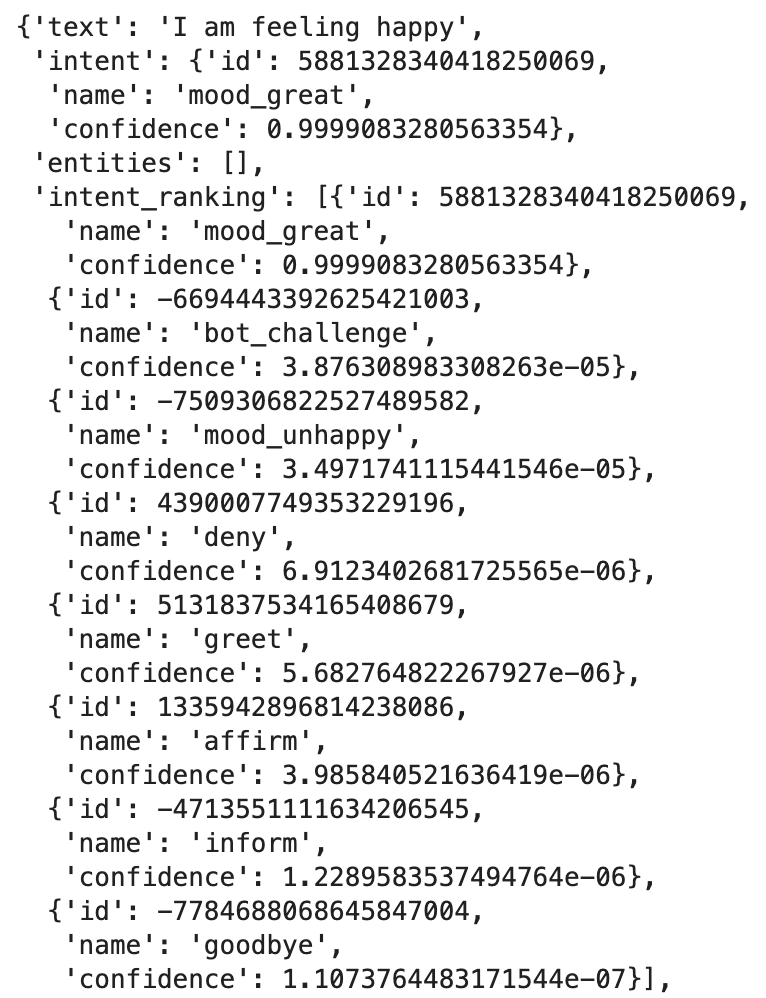
Figure 3: How Rasa’s NLU Model classifies the utterance “I am feeling happy”

The TED Policy will take the string mood_great and transform it into an 8-dimensional binary vector that looks like this:

Figure 4: Binary vector representing the intent mood_great

Notice that all elements in the binary vector in Figure 4 are 0 except for the 6th element (counting from 0). This position has the value of 1 because the 6th element corresponds to the value of the intent mood_great according to Figure 2.

Therefore, we can conclude that intents are represented as a one-hot encoded vector.

Entities

Overview

Suppose we’ve defined the following entities in our domain.yml:
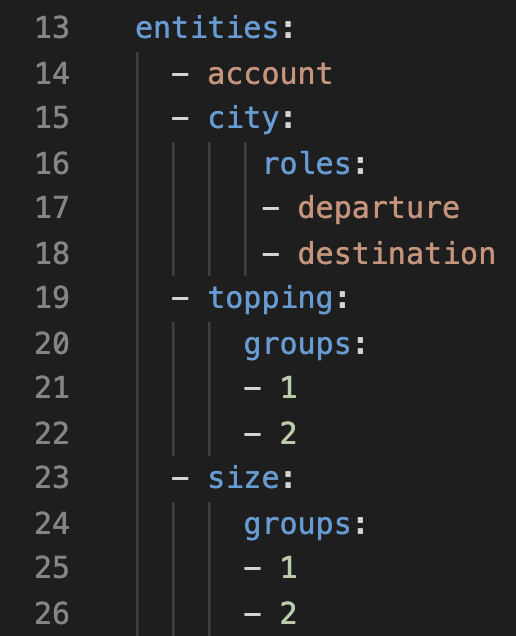
Figure 5: Entities defined in the domain.yml

This will get translated into the following internal lookup table:
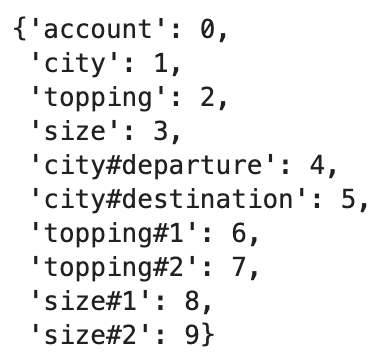
Figure 6: The internal lookup table used to featurize entities

Notice that we’ve defined only 4 entities but the lookup table has 10 entries.

The reason for this is that entities with roles and groups are considered as separate entities and so are given additional entries for each value defined in their role and group.

Utterances With Only One Entity

Given the utterance “I want to open a checking account”, the NLU model will extract the entity “account” with the value “checking account”:
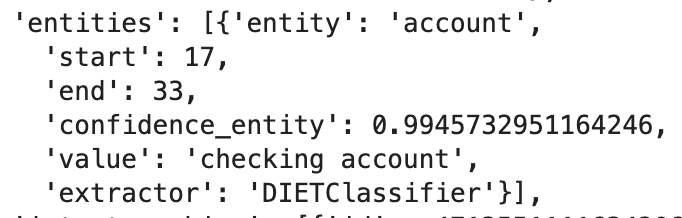
Figure 7: Entities extracted from the utterance “I want to open a checking account”

TED Policy will use this information to construct the following vector:

Figure 8: Vector representation of the entities extracted in Figure 8

It should be clear that the value 1 in Figure 8 corresponds to the entity “account” based on Figure 6.

Utterances With Repeated Entities

What happens when an utterance contains multiple mentions of the same entity type?

For example, the utterance “I want to transfer money from my checking account to my savings account” contains the following entities:
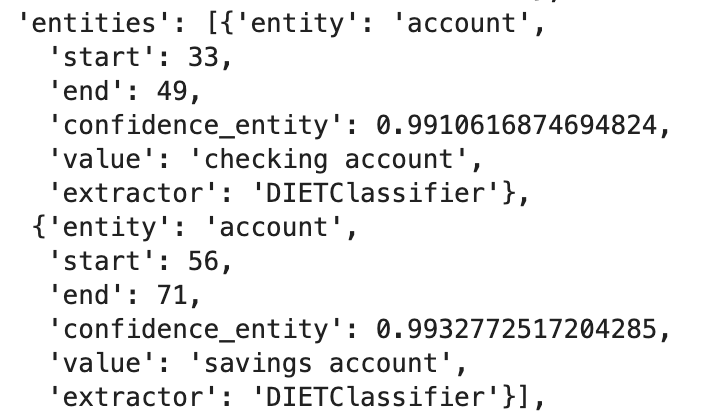
Figure 9: Results that have multiple entity entities of the same type

Figure 9 shows that we have two entities with the same type i.e. “account” but different values i.e. “checking_account” and “savings account”.

TED Policy will use this information to generate the following vector representation:

Figure 10: Vector representation of the entities extracted in Figure 9

Notice that this is identical to the vector representation in Figure 8.

Therefore, we conclude that we cannot influence a conversation based on the number of entities mentions.

Utterances With Different Entities

The utterance “I want to open a savings account and travel to Berlin” will have the following entities extracted:
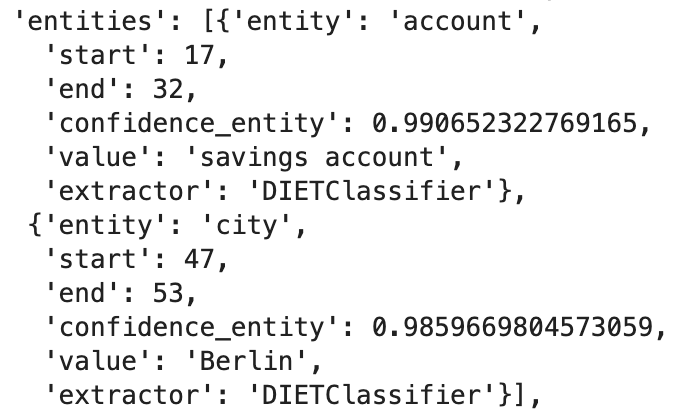
Figure 11: Results that have multiple entities with distinct types

In this case, TED Policy will generate the following feature vector:

Figure 12: Vector representation of the results in Figure 12

Therefore, we can conclude that the vector representation for extracted entities is a binary vector where a 1 indicates only the presence of the entity mapped to that position according to the internal lookup table.

Entities With Roles and Groups

The case of utterances containing entities with roles and groups is interesting.

Consider the case of entities with roles such as the utterance “I want to travel from Berlin to san francisco”. These are the entities extracted by the NLU model:
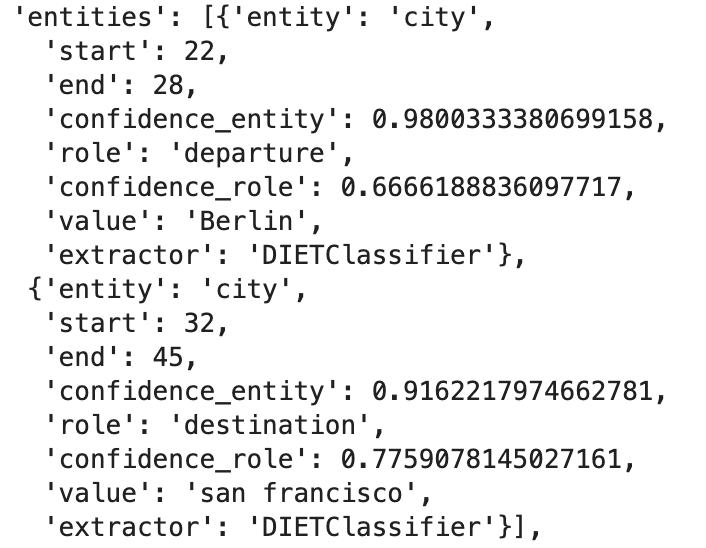
Figure 13: Results containing entities with groups

TED Policy will featurize the results in Figure 13 into the following vector:

Figure 14: Vector representation of the results in Figure 13

As expected, we see a 1 in the 4th and 5th elements as these elements correspond to the “departure” and “destination” roles for the “city” entity type.

What may not be expected is that there is also a 1 in the 1st element as this element just corresponds to the “city” entity type without any roles.

The same observation applies to entities with groups and with entities with both roles and groups.

Slots

Overview

Slots will have their own lookup table just like the case for intents and entities.

If we have defined the following slots in our domain.yml file:
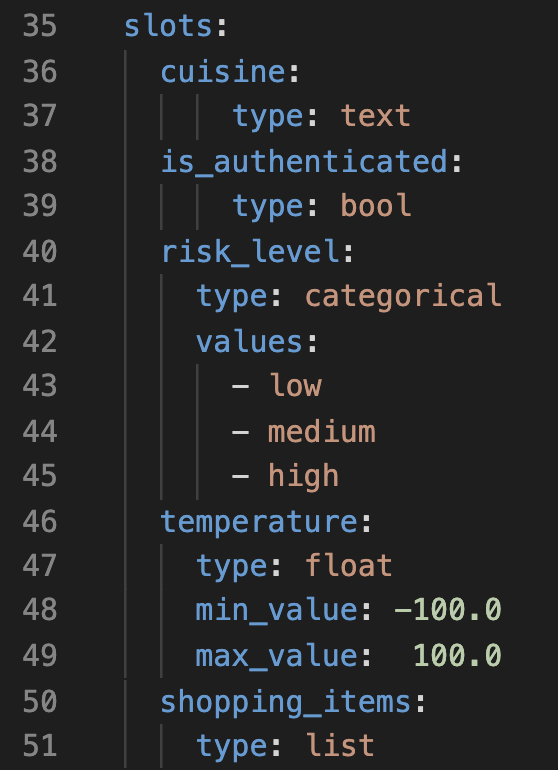
Figure 15: Slots defined in the domain.yml

Then, this is how the internal lookup table looks:
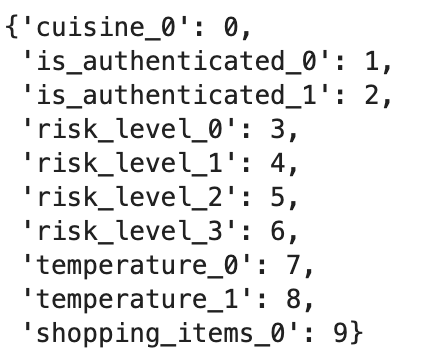
Figure 16: The internal lookup table used to featurize the slots defined in Figure 15

Let’s look at how each slot type gets featurized.

Text Slots

Setting the value of the “cuisine” slot to any value (except None) will result in the following feature vector:
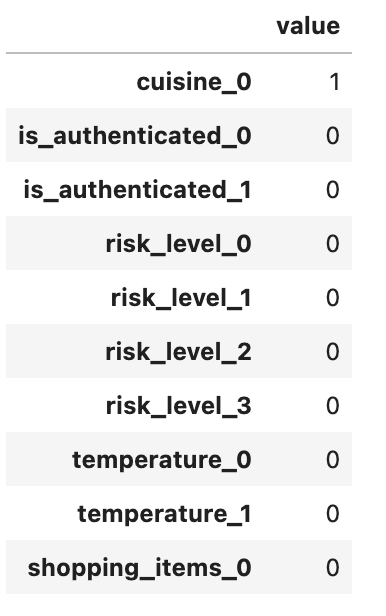
Figure 17: Vector representation of a filled Text slot

Therefore, although the type of the slot is Text, Rasa does not actually check that the type of value passed to the text slot is a string.

Boolean Slots

Setting the “is_authenticated” slot to False will produce the following feature vector:
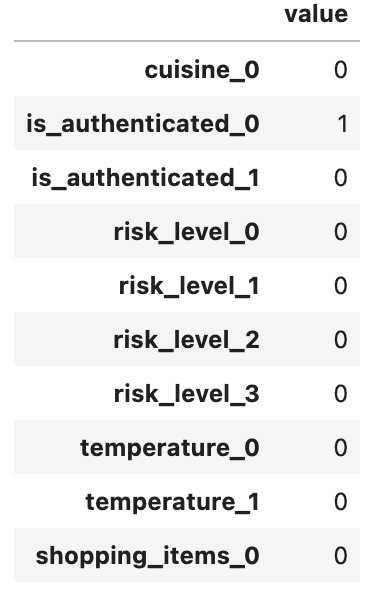
Figure 18: Feature vector when a boolean slot is set to False

This is what the vector representation looks like then the slot is set to True:
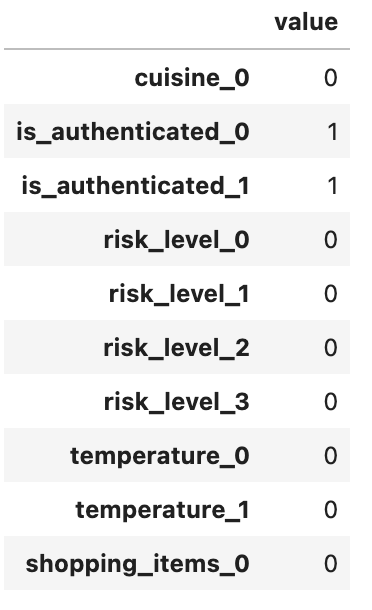
Figure 19: Feature vector when a boolean slot is set to True

Notice that a boolean slot is represented using a 2-dimensional vector where True and False is represented as (1, 1) and (1, 0) respectively (as opposed to (0, 1) and (1, 0)).

Categorical Slots

The “risk_level” slot is a categorical slot with 3 levels (low, medium, high).

Notice that the lookup table has allocated 4 positions to this slot. The first 3 corresponds to the 3 levels defined in the domain.yml and the last one is for values assigned to this slot that is outside the predefined levels.

For example, if the slot was assigned the value “medium”, the feature vector looks like this:
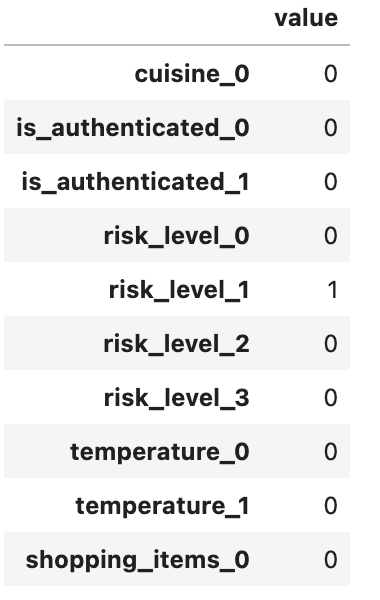
Figure 20: Vector representation when the risk_level slot is set to “medium”

On the other hand, if the value is neither “low”, “medium”, or “high”, then the 4th position will be used. For example, this is the vector representation when the slot was assigned the value “super high”:
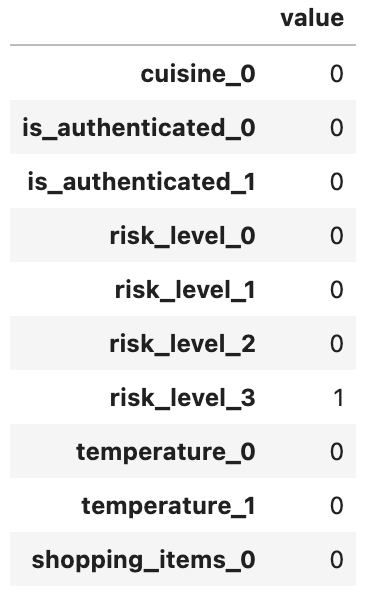
Figure 21: Vector representation when the risk_level slot is set to “super high” (outside the predefined values)

Float Slots

The “temperature” slot is defined to be a float slot with a min value of -100 and max value of 100.

This is the feature vector when “temperature” is set to 0:
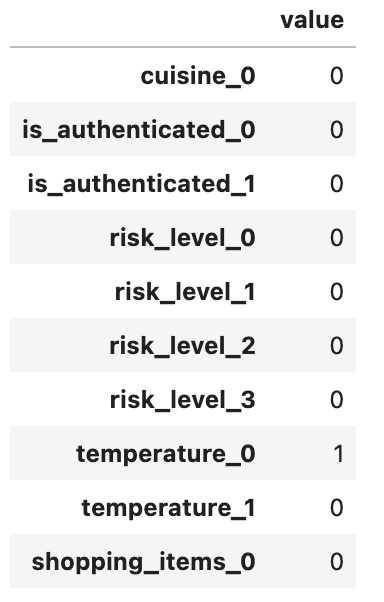
Figure 22: Vector representation when temperature slot is set to 0 (within bounds)

This is the feature vector when “temperature” is set to -200:
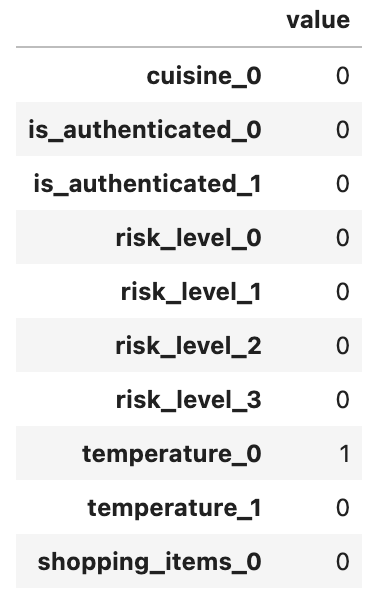
Figure 23: Vector representation when temperature slot is set to -200 (outside lower bound)

This is the feature vector when “temperature” is set to 200:
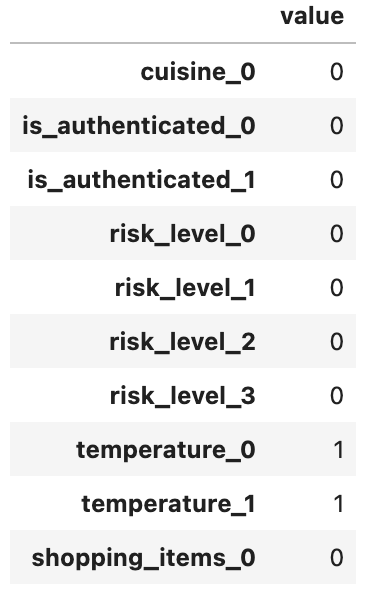
Figure 24: Vector representation when temperature slot is set to 200 (outside upper bound)

Based on the results in Figure 22, 23, and 24, it should be clear that we can use float slots to build stories that will branch differently when the assigned value is outside the max value but not when it is less than the min value, since it shares the same vector representation as when its value is within the predefined bounds.

List Slots

List slots are similar to Text slots in that any value passed to it (except None) will be considered as valid input for featurization.

For example, assigning any of these values to the “shopping_items” slot:

  • [“eggs”, “milk”]
  • 200
  • “eggs”
  • [None]

will give the same feature vector, namely:
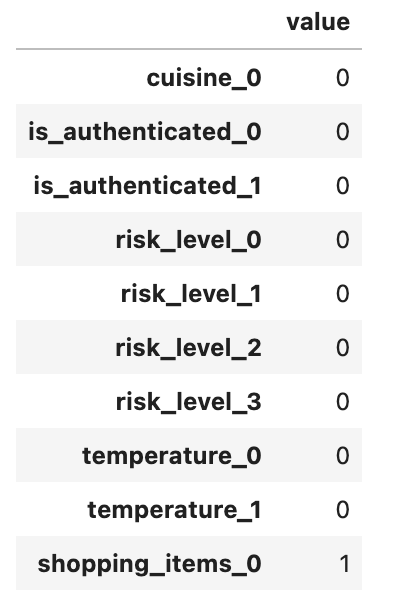
Figure 25: Vector representation when a list slot is assigned anything beside “None”

Conclusion

This article has explained how intents, entities, and slots get featurized when using TED Policy to do dialogue predictions. It also identified some idiosyncrasies for certain types. These idiosyncrasies may seem trivial but are worth always keeping in mind because they do influence what stories you can write e.g. you can’t write stories that will branch based on the number of entities extracted (without writing custom code).

I hope you have found this helpful.

Conversational AI
Rasa
Naturallanguageprocessing
Machine Learning
Recommended from ReadMedium