
An Efficient Approach to Learning a Foreign Language by Reading Books
All you need is a book, a phone, and headphones.
Do you know that books you would read for fun like Harry Potter and books that teach you something new like Rich Dad, Poor Dad can also help you learn a foreign language? That’s true! All you need to do is to read the book translated into the language you’re learning.
However, learning a foreign language isn’t as simple as sitting on the couch, pick up a book, and magically learn a language. Reading alone gives us some challenges in our native language.
Imagine how difficult it would be to read your favorite book in a foreign language!
That’s why I use something called immersion reading. This is what some book lovers use to take themselves deep into the book’s story by reading a book while listening to its audiobook. But immersion reading can also help you learn a foreign language efficiently. In fact, a study showed that language learners who read and listened to E. B. White’s novel Charlotte’s Web outscored learners who silently read the same novel on all weekly comprehension quizzes.
The Kindle app has an option called Whispersync for Voice. In the app, you can read and listen simultaneously with real-time highlighting. As they say on the Amazon website, “Immersion reading sparks an extra connection that boosts engagement, comprehension, and retention, taking you deeper into the book.” If you struggle with concentration when reading a book, this is definitely worth trying.
Unfortunately, Whispersync for Voice is only available for Kindle books and audiobooks in English. However, we can still get immersion reading on any language you study and device you use.
How to Get Immersion Reading in a Foreign Language
Step 1: Search books available in the target language
Although bestsellers like Harry Potter are translated into several languages, most books are translated into few languages. That’s why we need first to search in which languages our favorite book has been translated into.
Amazon has the biggest catalog of books on the internet, but its search engine doesn’t help us know which languages a book is available in. You can always type “The Hunger Games Book in Spanish” or search the title in the target language “Los Juegos del Hambre Libro en Español.” However, this won’t always work for all books and languages.
That’s why I use WorldCat — the world’s largest library catalog. This website contains information about printed and digital publications in over 470 languages. To find which languages a book has been translated to, follow these steps.
- Go to WorldCat.
- Select “Books” above the search bar and type the book’s name. Then click on search books.
- Instead of clicking the book’s title, click the small print “View all editions” underneath the rest of the information.
- On the left side, there should be a box titled “Refine Your Search.” “Language” is in there. Just click “Show more” to see all the languages available.
- Click on the language you’re learning and make sure that’s the book you’re looking for.
The book’s title will show up in the foreign language. If you click on it, you can find on the right side the link that will redirect you to Amazon, so you can buy the book in the target language. In case you’re in the US, you can also find near libraries that have the book available on the website.
Step 2: Search audiobooks available in the target language
Even if you find a book translated into your target language, you might still not find the audiobook version available in that language. To verify the audiobook availability, go to audible.com and search the book you’d like to read in a foreign language.
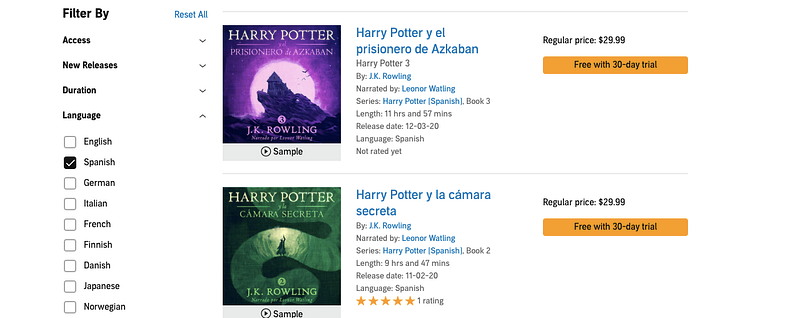
Let’s imagine you’d like to learn Spanish with Harry Potter. Then just go to Audible and search Harry Potter. On the left side, you can find all the languages available for the Harry Potter audiobook. Filter the language you want and verify that’s the book you’re looking for. You might have trouble recognizing the book’s title, so translate it and also make sure the book’s author matches the original book.
Step 3: Read and listen simultaneously to immerse yourself into the story
Now that you have the e-book and audiobook on your phone, you just need to play them together. You can also use a physical book instead of an e-book if you feel more comfortable that way.
The following are some things I do when reading and listening simultaneously in a foreign language.
- If the narrator speaks too fast, slow down the speech pace on the app that you use. Start with 0.5x and raise the narration speed until you feel comfortable with it.
- Add a bookmark on both audiobook and e-book so you can pick up where you left off. Whispersync for Voice does this automatically, but we have to take care of this manually.
- If you’re a beginner, prioritize books you read before that would gently introduce you to the foreign language.
- If you have an intermediate level, try to read books that will help you fluently speak a new language faster. Here you can find a list I made.
Although we can’t imitate the fancy real-time highlighting feature that Whispersync for Voice has, the steps above are enough to get immersion reading.
The Effects of Immersion Reading in Language Learning — My experience
Apart from what studies and the Kindle app say about immersion reading, I’d like to tell you what are their strong and weak areas.
Immersion reading boosts your listening skills and pronunciation
I used to get distracted easily by any noise in my surroundings, but I could focus more on the book thanks to immersion reading since I have both my eyes and ears busy. Also, it‘s extremely useful for remembering correct pronunciation. When we learned a new language, we tend to focus on vocabulary and grammar rules and fix our pronunciation later. Fortunately, by listening to the audiobook, we get the correct pronunciation right away— this is much better than guessing how a word sounds in a foreign language when reading alone.
You still need to work on vocabulary on your own
I have to admit, though, that I still had some trouble understanding the vocabulary used in a book — immersion reading won’t help you magically understand a word you never heard before. Usually, I don’t try to understand all the new words in a book. Instead, I look up the meaning of words that I don’t know and seem essential to understanding the story. You can easily do this with your iPhone inside the iBooks app. I wrote an article that shows how to do that and also how to use flashcards to learn new useful vocabulary from the books I read.
To sum up, I can say that my experience using immersion reading has been fantastic.
That’s it! Now you’re ready to immerse yourself into your favorite book’s story in any language.