avatarLinda Ng

Free AI web copilot to create summaries, insights and extended knowledge, download it at here

1555

Abstract

edium.com/v2/resize:fit:800/1*dTU1ggpMHWIS8lFXGBQQ5Q.jpeg"><figcaption>Photo by Lum3n: <a href="https://www.pexels.com/photo/white-ruled-book-351961/">https://www.pexels.com/photo/white-ruled-book-351961/</a></figcaption></figure><h2 id="4fdf">How do I Add a Kicker?</h2><p id="6abb">It’s easy!</p><ul><li>After you’ve given your story a Title and a Subtitle with the proper formatting, push Enter to leave a space above the Title</li><li>Type in your Kicker and format it as a Subtitle</li><li>All of the correct formatting will automatically adjust</li><li>After you’re done, you should see something like this</li></ul><figure id="842b"><img src="https://cdn-images-1.readmedium.com/v2/resize:fit:800/1*mZFibC8_shUNjwzHmOWV1A.png"><figcaption>Screenshot taken by author</figcaption></figure><h2 id="009d">How do I Format a Kicker?</h2><p id="a2e5">As far as I know, there’s no hard and fast rule. However, it helps to keep a kicker short. It’s also good to keep a consistent format.</p><p id="71b3">I stick with one to three words.</p><p id="3b99">I also keep them all in caps lock, as it looks a little cleaner to me.</p><p id="a382">Now that you know all about kickers, will you start using them?</p><p id="0818"><b>P.S. You can also add a link to your kicker! For my Travel kicker, I’ve added a link to all my Travel stories! Just highlight the kicker and use the menu bar to select the option to add a link. Easy. Wohoo!</b></p><div id="6412" class="link-block"> <a href="https://readmedium.com/about-me-linda-1319f91a340"> <d

Options

iv> <div> <h2>About Me — Linda</h2> <div><h3>Hi! I write about mental health, travel and self-improvement!</h3></div> <div><p>medium.com</p></div> </div> <div> <div style="background-image: url(https://miro.readmedium.com/v2/resize:fit:320/1*arvZSPrsfJp6qOtZ92Ovxg.jpeg)"></div> </div> </div> </a> </div><p id="01e5"><i>If you enjoyed this article and would like to support me, please consider <a href="https://ko-fi.com/hellolinda">buying me a coffee</a>. Thank you!</i></p><p id="5331"><i>Wondering how you can read unlimited Medium stories <b>AND</b> support your favourite writers? All you need to do is sign up for <b>only $5 per month! Click the link below to sign up. </b>I’ll also receive a small commission. Happy reading!</i></p><div id="98a9" class="link-block"> <a href="https://hellolinda.medium.com/membership"> <div> <div> <h2>Join Medium with my referral link — Linda Ng</h2> <div><h3>As a Medium member, a portion of your membership fee goes to writers you read, and you get full access to every story…</h3></div> <div><p>hellolinda.medium.com</p></div> </div> <div> <div style="background-image: url(https://miro.readmedium.com/v2/resize:fit:320/0*HDc9orX0S03BjCT8)"></div> </div> </div> </a> </div></article></body>

MEDIUM

An Easily Overlooked Formatting Feature That Will Blow Your Mind

Give your story a professional look

Photo by Andrea Piacquadio: https://www.pexels.com/photo/angry-woman-is-screaming-3775123/

I’m in my 5th month of writing on Medium and I’ve just discovered this cool new formatting feature. I suppose it’s better late than never.

It’s called a kicker!

What is a Kicker?

A kicker is a small heading that goes above your title and subtitle.

In essence, you can think of it as a label for your story.

It’s almost like naming a file folder. If my story is about travel, it makes sense to have “TRAVEL” as a kicker.

It serves to classify your stories for ease of reference. All of my Travel stories have the same kicker.

Why Do I Need a Kicker?

For the most part, kickers are not required for your stories to be published.

Since I discovered them, I’ve chosen to use them for all my stories.

I feel that it gives a more professional and streamlined look to my catalog of stories. It’s entirely up to the writer.
Photo by Lum3n: https://www.pexels.com/photo/white-ruled-book-351961/

How do I Add a Kicker?

It’s easy!

  • After you’ve given your story a Title and a Subtitle with the proper formatting, push Enter to leave a space above the Title
  • Type in your Kicker and format it as a Subtitle
  • All of the correct formatting will automatically adjust
  • After you’re done, you should see something like this
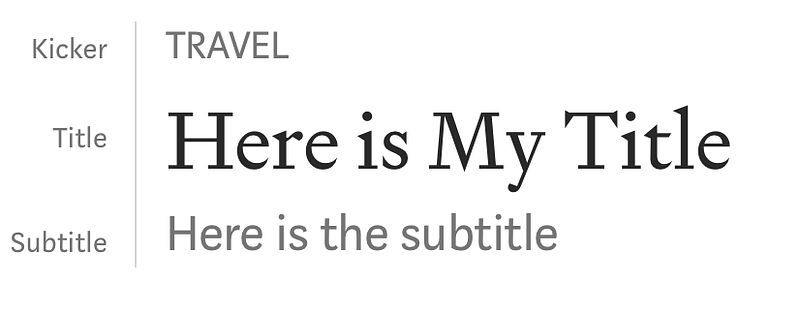
Screenshot taken by author

How do I Format a Kicker?

As far as I know, there’s no hard and fast rule. However, it helps to keep a kicker short. It’s also good to keep a consistent format.

I stick with one to three words.

I also keep them all in caps lock, as it looks a little cleaner to me.

Now that you know all about kickers, will you start using them?

P.S. You can also add a link to your kicker! For my Travel kicker, I’ve added a link to all my Travel stories! Just highlight the kicker and use the menu bar to select the option to add a link. Easy. Wohoo!

If you enjoyed this article and would like to support me, please consider buying me a coffee. Thank you!

Wondering how you can read unlimited Medium stories AND support your favourite writers? All you need to do is sign up for only $5 per month! Click the link below to sign up. I’ll also receive a small commission. Happy reading!

Writing
Ideas
Medium
Inspiration
New Writers Welcome
Recommended from ReadMedium