
Amazing Animated Text Effects from Terminal
CSS and JavaScript text effects from the command line

Text Effects from Terminal Series
- Best CSS Text Animations from Terminal- 5 Animated CSS Text Effects from Command Line- Another Three CSS Text Effects from Command-Line- 5 More Unique Text Effects from Command-Line- 5 Command-Line Text Effects for Your Programming Article- Bash Script to Clip an Image to TextIntroduction
This is the seventh article in the Text Effects from Terminal series. In this article, I will show you amazing text animations and effects you can create from your terminal.
Table of Contents
· Text Effects from Terminal Series
· Introduction
· Teffects
  ∘ Installation
  ∘ Common parameters
· New-neon
  ∘ Example
· Animate
  ∘ Example
· Dashed-shadow
  ∘ Example
· Transmission
  ∘ Example
· Type
  ∘ Example
· Shadow2
  ∘ Example
· Conclusion
Teffects
Teffects has more than 30 sub-commands to create various text effects.
Installation
For Homebrew users:
$ brew tap shinokada/teffects
$ brew install teffects
Awesome package manager users:
$ awesome install shinokada/teffectsApt users:
Download my latest Debian package release and run:
$ sudo apt install /path/to/teffects_XXXXX-X_all.debCommon parameters
Some styles have a background image. Change it by using the -m URL parameter. Change the background opacity using the -y 0.5 parameter.
Change the padding by using the -p 150px parameter.
Use the -t "New text" parameter to change the text.
Use the -c "#eee" and -b “#93d2e9 parameters to change the font color and background color.
Use the -w 1200 and -e 800 parameters to change the image width and height.
An animation text opens a browser. Use the +o flag to not open the browser and use the -i flag to open an image instead.
Use the -h option to see more details.
$ teffects new-neon -hNew-neon
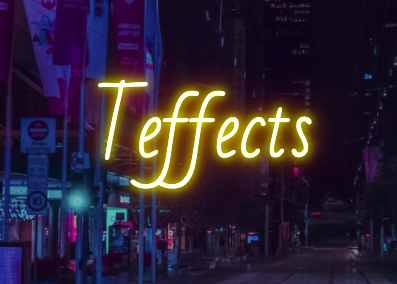
New-neon is inspired by Erik Jung’s Neon text-shadow effect. It has nine styles you can choose from. It animates like a neon sign on a browser.
To change the neon style, use the -n parameter with a number from 1 to 9.
Example
The following command will change the text, font size to 8vw, the background color to #eee , and neon style to 9.
$ teffects new-neon -t "Your Heading Title" -s 8 -b "#eee" -n 4
$ teffects new-neon -n 6 -m "https://source.unsplash.com/LmGT_iY-ykc" -s 10


Animate
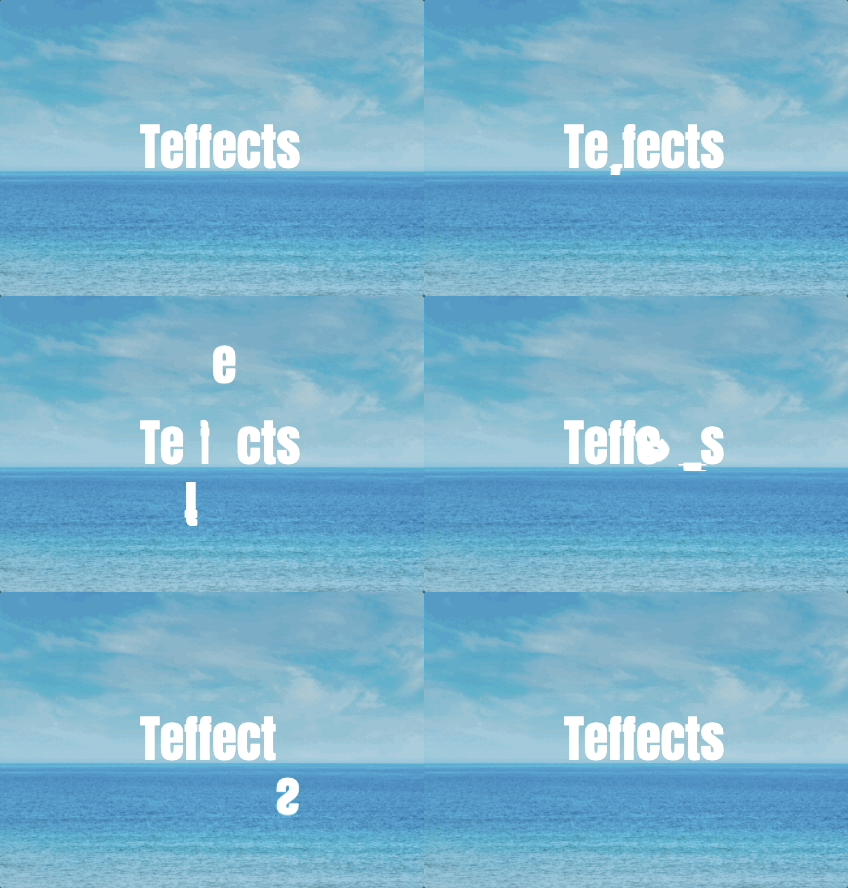
Animate is inspired by Florin Pop’s Letter Animation. It has five animations: balance, shrink, fall, rotate, and expand. The animation sequence is fixed.
Example
The following command will change the text, font size, background image and background image opacity.
$ teffects animate -t "Your Heading Title" -s 8 -m "https://source.unsplash.com/lNxMcE8mvIM" -y 0.8Dashed-shadow
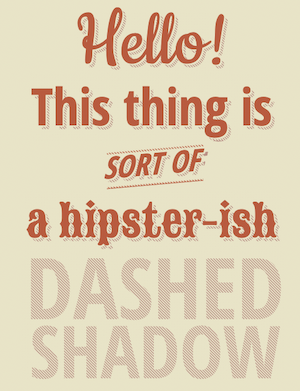
Dashed-shadow is inspired by Lucas Bebber’s CSS Dashed Shadow. It has a subtle moving shadow behind letters. It has five styles: default, h, s, i, and d.

Example
The following example uses the dashed style of s and changes the text.
$ teffects dashed-shadow -y s -t "Lorem ipsum dolor sit amet"Transmission
Transmission is inspired by Stephen Scaff’s Transmission: Glowing Text Animation. It types letters like a type-writer.

Example
You can change the background image using the -m URL option. Use the -t and -x options for the header text and sub-texts. To add a line break in the sub-texts, see the example below.
$ teffects transmission -t "Lorem ipsum" -x "Dolor sit amet, consectetur adipiscing elit.
Praesent placerat feugiat nulla,
vel blandit tortor dignissim vel." -m "https://source.unsplash.com/trYl7JYATH0"
Type
Type is inspired by Jack Armley’s Text typing thingamy. It types letters forward and erase them backward.

Example
Add text arguments using quotes as seen in the following example. Use the -m URL to change the background image.
$ teffects type -m "https://source.unsplash.com/wKTF65TcReY" "Amazing" "Text Effects" "from Terminal"Shadow2
Shadow2 is inspired by Jorge Epuñan’s CSS3 text-shadow effects and roikles’s Long Shadow Gradient Mixin. Shadow2 is not animation but it has five shadow options: elegant (default), deep, inset, retro, and long. Use the -y deep parameter to change the shadow style.





Example
The following will change the text, shadow style, background color, and font color.
$ teffects shadow2 -t "Your Heading" -y long -b "#045bce" -c "#eae8e9"Conclusion
By setting the -w and -e options with 1200px and 675px, you can use these images for Twitter. Use 1200px and 630px for Facebook images. For Medium articles, use 1400 px wide for Full column-width images, 2040 px wide for Out-set images, 2500 px wide for Screen-width images. A Medium article requires a minimum of 1060 px wide.
Get full access to every story on Medium by becoming a member.


