avatarJoan Indiana Lyness

Free AI web copilot to create summaries, insights and extended knowledge, download it at here

2683

Abstract

v><p id="5b75">Here’s the basic pattern for iteration in JavaScript:</p><div id="7043"><pre>for (<span class="hljs-name">let</span> i = <span class="hljs-number">0</span><span class="hljs-comment">; i < S.length; i++) {</span> if(<span class="hljs-name">J</span>.indexOf(<span class="hljs-name">S</span>.charAt(<span class="hljs-name">i</span>)) !== <span class="hljs-number">-1</span>) counter++<span class="hljs-comment">;</span> }</pre></div><p id="147c">let’s unpack that.</p><ul><li>In the first line, we set up a value ‘i’ so we can iterate through every character of the S string.</li><li>In the second line, we are checking to see if the character from S has an index in J (i.e. is it included in the J string). If it does, we increment our counter.</li><li>NOTE: if J does not include the character we’re looking for, the charAt() method will return <code>-1</code>. By saying if the character’s index is not equal to negative one, we are really saying, if the character is found. Sometimes this is also written as: <code>if(J.indexOf(S.charAt(i)) ≥ 0 )</code>. That is just a cleaner looking way of saying <code>!= -1</code> .</li></ul><p id="5841">All together:</p><div id="3668"><pre><span class="hljs-keyword">var</span> numJewelsInStones = <span class="hljs-keyword">function</span>(<span class="hljs-params">J, S</span>) { let counter = <span class="hljs-number">0</span>; <span class="hljs-keyword">for</span> (let i = <span class="hljs-number">0</span>; i < S.<span class="hljs-built_in">length</span>; i++) { <span class="hljs-keyword">if</span>(J.<span class="hljs-built_in">indexOf</span>(S.charAt(i)) !== <span class="hljs-number">-1</span>) counter++; } <span class="hljs-keyword">return</span> counter; };</pre></div><p id="0ce7">Not too shabby:</p><figure id="8f68"><img src="https://cdn-images-1.readmedium.com/v2/resize:fit:800/1*qS7sI23h2r97PnMGj7gVIA.png"><figcaption></figcaption></figure><h1 id="a465">Cleaning it up with forEach()</h1><p id="fd44">javaScript has a forEach() method which lets you skip the</p><p id="2e33"><code>for(let i= 0; i < array.length; i++)</code> syntax.</p><p id="754f">The syntax is:</p><div id="91b8"><pre><span class="hljs-built_in">array</span>.forEach(<span class="hljs-function"><span class="hljs-params">element</span> =></span> { <span class="hljs-comment">// do something with element</span> });</pre></div><p id="745d">You cannot use it on strings, but you can split your string into an array and use it like so:</p><div id="f3c1"><pre><span class="hljs-keyword">var</span> numJewelsInStones = <span class="hljs-keyword">function</span>(<span cla

Options

ss="hljs-params">J, S</span>) { let counter = <span class="hljs-number">0</span>; S.<span class="hljs-built_in">split</span>(<span class="hljs-string">''</span>).forEach(<span class="hljs-function"><span class="hljs-params">element</span> =></span> { J.<span class="hljs-built_in">indexOf</span>(element) >= <span class="hljs-number">0</span> ? counter ++ : counter });</pre></div><div id="b107"><pre>return counter<span class="hljs-comment">;</span> }<span class="hljs-comment">;</span></pre></div><p id="86c4">Notice that on line 4, we are using a ternary operator: <code>:</code></p><p id="b7b4">it works like this:</p><p id="12e9"><code>condition met ? do this : otherwise do that</code></p><p id="fd5c">This last function looks slightly cleaner, and has the same stats as the one before.</p><h1 id="39b4">Speedy</h1><p id="37dc">If you really want to speed things up, you can try this one-liner from <a href="https://leetcode.com/jsscripter/">jssScripter</a>:</p><div id="f8f6"><pre>const numJewelsInStones = <span class="hljs-function">(<span class="hljs-params">J, S</span>) =></span> S.<span class="hljs-built_in">split</span>(<span class="hljs-string">''</span>).<span class="hljs-built_in">filter</span>(<span class="hljs-function"><span class="hljs-params">char</span> =></span> J.<span class="hljs-built_in">indexOf</span>(char) !== <span class="hljs-number">-1</span>).<span class="hljs-built_in">length</span>;</pre></div><p id="8910">Let’s unpack that.</p><p id="ad75">We’re still splitting the S string into an array. Only this time, we’re filtering it — for each character of S, we want to return that character if it is found in J (again, if its indexOf is not equal to -1). Once we’ve collected those characters, we count them with .length.</p><p id="b395">It’s a bit faster:</p><figure id="aac7"><img src="https://cdn-images-1.readmedium.com/v2/resize:fit:800/1*PPXU---Zwlf2rHkb3YRvqg.png"><figcaption></figcaption></figure><h1 id="5a09">but notice, Ruby is way faster.</h1><p id="ddfb">Ruby solution stats again:</p><figure id="eaf3"><img src="https://cdn-images-1.readmedium.com/v2/resize:fit:800/1*L1cQpij3zC5hYW5B4LaSBQ.png"><figcaption></figcaption></figure><p id="d2b2"><i>next: <a href="https://readmedium.com/algorithms-101-birthday-chocolate-in-javascript-f5fcbd639bf3">Algorithms 101 #10, Birthday Chocolate in JavaScript</a></i></p><p id="a07d"><i>in case you missed it: <a href="https://readmedium.com/algorithms-101-best-time-to-buy-and-sell-stock-in-javascript-7a2249b29495">Algorithms 101 #8, Best Time to Buy and Sell Stock in JavaScript</a></i></p><p id="3150">Copyright © Joan Indiana Lyness 2019</p></article></body>

Algorithms 101: Jewels and Stones in Ruby and JavaScript

Noob v. LeetCode, episode 9, counting characters in strings

For my next easy LeetCode challenge, I found this one, which involves finding occurrences of letters in a string:
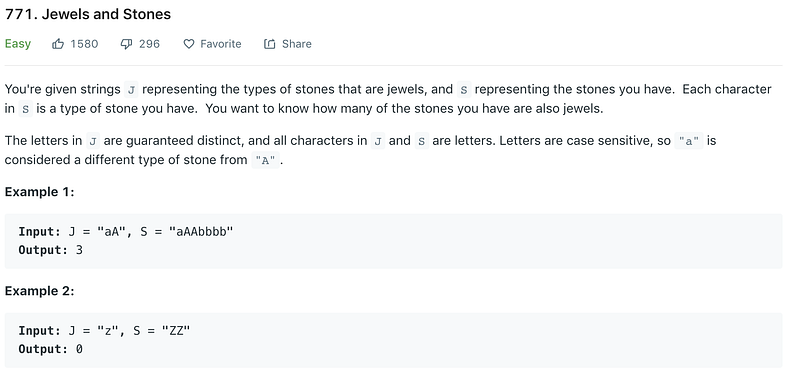
Since I am trying to increase my JavaScript skills, I wanted to start there, but I could not resist Ruby, which really is way more intuitive for simple tasks like this.

We are trying to count how many times our S, or stones, string includes letters from J, our jewels string.

In Ruby:

Let’s set a counter: counter = 0

then split our J string into an array so we can iterate over the elements of the array easily:

array = j.split(‘’)

Next, we increment our counter each time it finds any of the array elements in our ‘s’ string:

array.each do |el|
  counter += s.count(el) 
end

Then we return the counter. All together:

def num_jewels_in_stones(j, s)
    counter = 0
    array = j.split('')
    
    array.each do |el|
        counter += s.count(el) 
    end
    counter
end

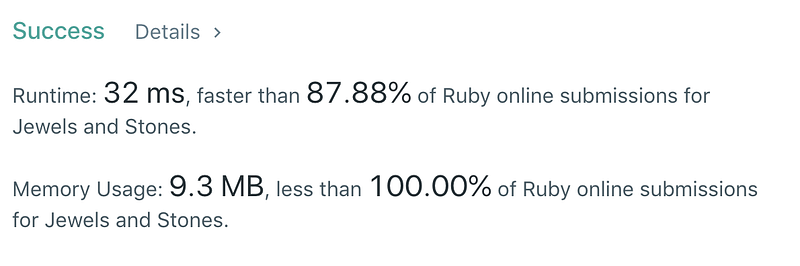
Not bad! It’s quite fast and has super low memory usage:
If only javaScript were that easy …

Not going to lie. Using the same logic in js is a pain in the tush.

You still set a counter, and you still search for how many times S contains a character from J — but the syntax is clunkier.

var numJewelsInStones = function(J, S) {
    let counter = 0;
   // iterate here
    return counter;
};

Here’s the basic pattern for iteration in JavaScript:

for (let i = 0; i < S.length; i++) {
     if(J.indexOf(S.charAt(i)) !== -1)
         counter++;
    }

let’s unpack that.

  • In the first line, we set up a value ‘i’ so we can iterate through every character of the S string.
  • In the second line, we are checking to see if the character from S has an index in J (i.e. is it included in the J string). If it does, we increment our counter.
  • NOTE: if J does *not* include the character we’re looking for, the charAt() method will return -1. By saying if the character’s index is *not* equal to negative one, we are really saying, if the character is found. Sometimes this is also written as: if(J.indexOf(S.charAt(i)) ≥ 0 ). That is just a cleaner looking way of saying != -1 .

All together:

var numJewelsInStones = function(J, S) {
    let counter = 0;
    for (let i = 0; i < S.length; i++) {
        if(J.indexOf(S.charAt(i)) !== -1)
            counter++;
    }
    return counter;
};

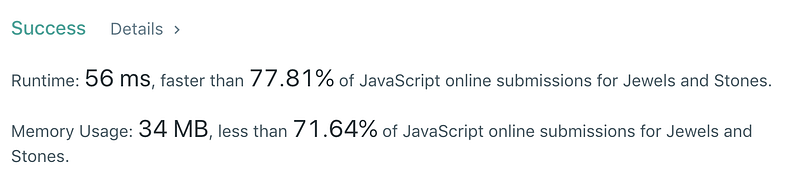
Not too shabby:
Cleaning it up with forEach()

javaScript has a forEach() method which lets you skip the

for(let i= 0; i < array.length; i++) syntax.

The syntax is:

array.forEach(element => {
 // do something with element
});

You cannot use it on strings, but you can split your string into an array and use it like so:

var numJewelsInStones = function(J, S) {
    let counter = 0;
    S.split('').forEach(element => {
        J.indexOf(element) >= 0 ? counter ++ : counter 
});
return counter;
};

Notice that on line 4, we are using a ternary operator: :

it works like this:

condition met ? do this : otherwise do that

This last function looks slightly cleaner, and has the same stats as the one before.

Speedy

If you really want to speed things up, you can try this one-liner from jssScripter:

const numJewelsInStones = (J, S) => S.split('').filter(char => J.indexOf(char) !== -1).length;

Let’s unpack that.

We’re still splitting the S string into an array. Only this time, we’re filtering it — for each character of S, we want to return that character if it is found in J (again, if its indexOf is not equal to -1). Once we’ve collected those characters, we count them with .length.

It’s a bit faster:
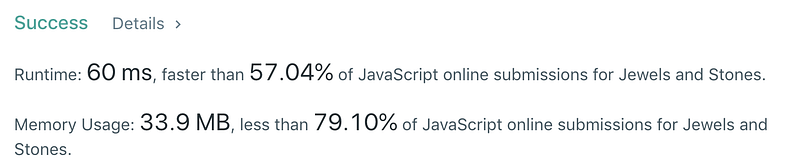
but notice, Ruby is way faster.

Ruby solution stats again:

next: Algorithms 101 #10, Birthday Chocolate in JavaScript

in case you missed it: Algorithms 101 #8, Best Time to Buy and Sell Stock in JavaScript

Copyright © Joan Indiana Lyness 2019

JavaScript
Ruby
Algorithms
Leetcode
Web Development
Recommended from ReadMedium