
Algorithmic Trading System Development

Quantitative Development
Often a Quantitative Researcher will develop trading models in Python or R. These models are then passed off to Quantitative Developers, who implement them in trading systems with Java or C++. Usually, a Quantitative Trader will then execute trades with the help of these systems. I have had the opportunity to work with the Interactive Brokers Java API for years as a researcher, developer, and trader. In this article we will be building an algorithmic trading system, for model based automatic trade execution. There are conceptually infinite design patterns to follow when developing trading systems. However, the purpose of this article is to offer simple solutions to the most common development stages. I will break this article up into three sections:
- Connecting to Interactive Broker’s Trader Work Station (TWS)
- Creating a Live Market Data Stream
- Implementing Models for Automatic Trade Execution
To install Interactive Brokers TWS visit: Interactive Brokers TWS Download
To install the API you will need to visit: Interactive Brokers API Download
If you wish to view the documentation of the API it can be found here: Interactive Brokers API Documentation
Important Notes:
- The project that I walk you through can be found on GitHub here, and at the bottom of this article
- If you do not have an account with Interactive Brokers, you can use the demo account [Username: edemo Password: demouser] to follow along and build a trading system for free
- I assume you have intermediate Java programming experience
- I assume you have some knowledge of working with APIs, and are capable of the installation process and setup within your IDE
- When trading on a live account, live market data streams for certain securities will require a Level I Market Data Subscription, more information can be found here: Market Data Subscriptions
Connection
In this section we will look at connecting to TWS through Java, and several idiosyncrasies of the process.
Configuring TWS
The first step is to configure your TWS. Start by logging in either with the demo account above, or a personal account, and do the following:
Select “Classic TWS” → Select “Configure”
Select “API” → Enable ActiveX and Client Sockets
Disable Read Only API → Apply → Ok
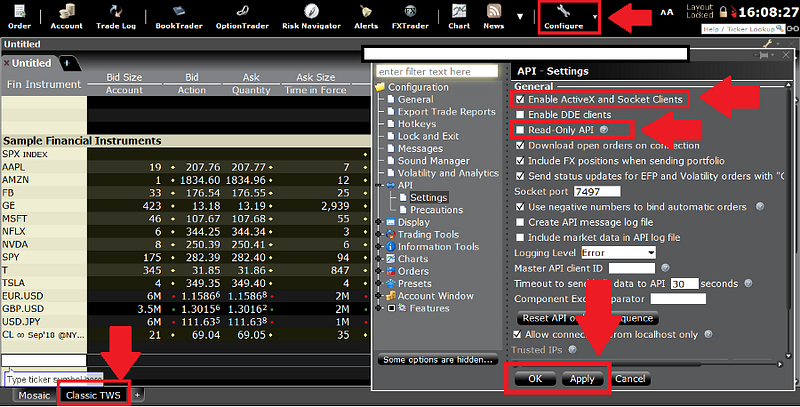
We have now allowed for an API connection from 127.0.0.1:7497
We have also allowed Java to execute trades by disabling Read Only API
If your connection is not successful, you may have to forward a port. For more information on ports, see: Interactive Brokers Host and Port Documentation
Connection Handling
By now I assume you have installed the API from Interactive Brokers, and have set up a work space containing it in your preferred IDE. To establish a connection between Java and TWS, we need a way to handle connection events between the server and client. To handle connection events we will create an implementation of the IConnectionHandler interface:
package demo;import ib.controller.ApiController;import java.util.ArrayList;public class ConnectionHandlerImplementation implements ApiController.IConnectionHandler {
@Override
public void connected() {
//Do something when connected
System.out.println("Connected");
} @Override
public void disconnected() {
//Do something when disconnected
} @Override
public void accountList(ArrayList<String> list) {
//Do something with the account list
} @Override
public void error(Exception e) {
//Do something on error
} @Override
public void message(int id, int errorCode, String errorMsg) {
//Do something with server messages
} @Override
public void show(String string) {
//Do something with parameter
}
}Next we need to create an implementation of the ILogger interface:
package demo;import ib.controller.ApiConnection;public class LoggerImplementation implements ApiConnection.ILogger {
@Override
public void log(String valueOf) {
//Do something
}
}Now that we know how we are going to handle connections, and how we are going to log information (with our implementations of the interfaces), we can establish a connection to TWS. I will connect to TWS in my project’s main class Demo:
package demo;import ib.controller.ApiController;public class Demo {//We need instances of our logger implementation
static LoggerImplementation inLogger = new LoggerImplementation();
static LoggerImplementation outLogger = new LoggerImplementation();//We need an instance of our connection handler implementation
static ConnectionHandlerImplementation connectionHandler = new ConnectionHandlerImplementation();//We need an instance of the ApiController
static ApiController apiController = new ApiController(connectionHandler, inLogger, outLogger); public static void main(String _[]){
apiController.connect("localhost", 7497, 0);
}}
The primary controller is the ApiController, through which we send our requests and receive our responses from TWS.
If the connection is successful you should see this in your terminal:
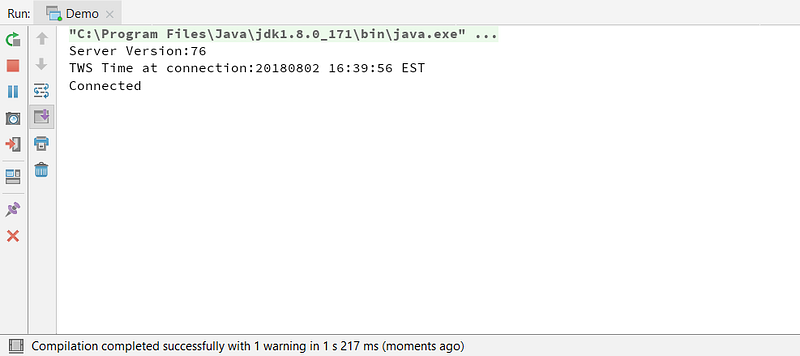
Now that we have successfully connected to TWS, we will look to create a live market data stream to handle real time data.
Live Market Data Streams
In this section we will look at the process of setting up a market data stream.
Market Data Handler
Similar to our connection handler, we have to create an instance of the ITopMktDataHandler interface so we can handle data the server responds with. We will receive data from the server through methods in the instance of the implementation we pass as a parameter. The server will respond with data as it changes, so changes in features such as Price, Volume, Bid_Size, Ask_Size, will be sent to their respective methods in the ITopMktDataHandler implementation. To implement any sort of trading model in the next section, we will need a way to capture this data. For now let’s store the last price as it changes at the top of an ArrayList:
package demo;import ib.controller.ApiController;
import ib.controller.NewTickType;
import ib.controller.Types;import java.util.ArrayList;public class TopMktDataHandlerImplementation implements ApiController.ITopMktDataHandler { ArrayList<Double> prices = new ArrayList<>(); @Override
public void tickPrice(NewTickType tickType, double price, int canAutoExecute) {
//Do something with the price response
if(tickType.equals(NewTickType.LAST)) {
prices.add(0, price);
System.out.println("Current Price: "+price);
}
} @Override
public void tickSize(NewTickType tickType, int size) {
//Do something with the volume response
} @Override
public void tickString(NewTickType tickType, String value) {
//Do something with a specific tickType
} @Override
public void tickSnapshotEnd() {
//Do something on the end of the snapshot
} @Override
public void marketDataType(Types.MktDataType marketDataType) {
//Do something with the type of market data
}
}In short, we are implementing the ITopMktDataHandler interface in a new class called TopMktDataHandlerImplementation to handle the data the server responds with. The method tickPrice will receive data from the server as it changes. When the server responds with a change in the last price, we add it to the ArrayList prices.
Visualizing the Price ArrayList’s Behavior
There is a reason we are changing the way new items are added to the ArrayList. Here is a graphical representation of how this works:
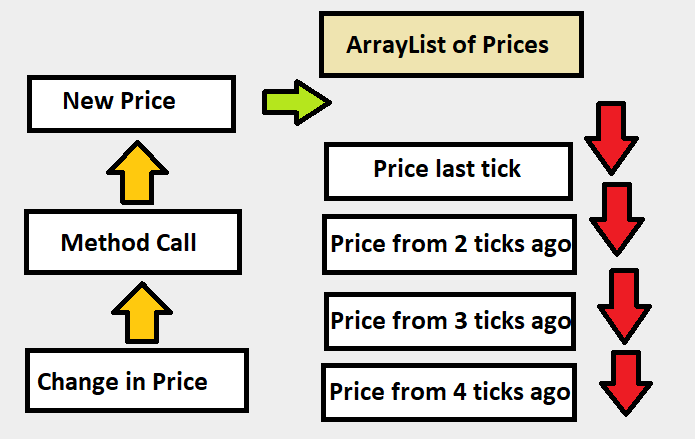
As a new price arrives, we insert it into the top of the ArrayList, this allows us to get the most recent price by the statement prices.get(0). This will be more relevant in the modeling and trade execution section.
Creating a Contract Object
The most important part of this process is establishing a NewContract object to pass as a parameter in our request. To do this we will need to initialize a NewContract object with parameters about the security we wish to stream. I will be using the a futures contract as an example:
static NewContract initializeContract(){
    NewContract nq = new NewContract();
    nq.localSymbol("NQU8");
    nq.secType(Types.SecType.FUT);
    nq.exchange("GLOBEX");
    nq.symbol("NQ");
    nq.currency("USD");
    nq.multiplier("20");
    return nq;
}
Requesting the Live Market Data Stream
Now that we have a way to handle the data stream, and have defined a security to stream, let’s take a look at and breakdown the request method:
apiController.reqTopMktData(initializeContract(), "", false, topMktDataHandlerImplementation);The first parameter is the contract, so I will simply pass the method we initialized our contract in.
The second parameter can be left as an empty string.
The third parameter determines whether or not we are requesting a snapshot, and we obviously want to establish this request as a stream.
The last parameter is our ITopMktDataHandler implementation. This allows us to do things with the data the server responds with.
Here is how the main class Demo looks updated for establishing a data stream:
package demo;import ib.controller.ApiController;public class Demo {//We need instances of our logger implementation
static LoggerImplementation inLogger = new LoggerImplementation();
static LoggerImplementation outLogger = new LoggerImplementation();//We need an instance of our connection handler implementation
static ConnectionHandlerImplementation connectionHandler = new ConnectionHandlerImplementation();//We need an instance of the ApiController
static ApiController apiController = new ApiController(connectionHandler, inLogger, outLogger);//We need an instance of the mkt data handler implemnetation
static TopMktDataHandlerImplementation mktDataHandler = new TopMktDataHandlerImplementation();//We also need to initialize our contract
static NewContract initializeContract(){
NewContract nq = new NewContract();
nq.localSymbol("NQU8");
nq.secType(Types.SecType.FUT);
nq.exchange("GLOBEX");
nq.symbol("NQ");
nq.currency("USD");
nq.multiplier("20");
return nq;
}public static void main(String _[]){
apiController.connect("localhost", 7497, 0);
apiController.reqTopMktData(initializeContract(), "221",false,topMktDataHandlerImplementation);
}}
Upon running this we should get the following output in the terminal:
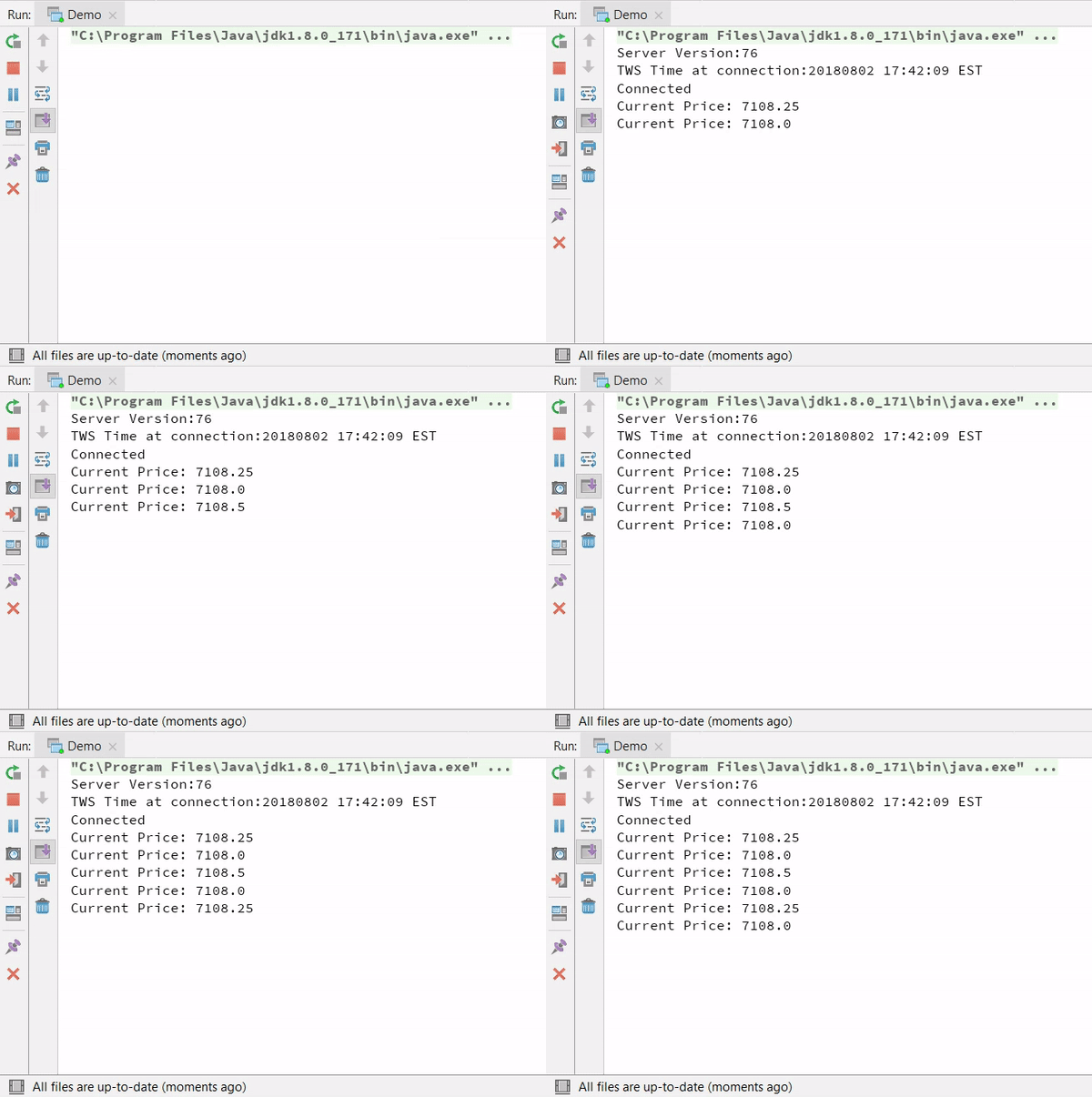
We have successfully created a market data stream for our specified contract.
Models for Automatic Trade Execution
This is probably the most glamorous section of algorithmic trading system development. This section is all about implementing models, and automatic order execution.
Model Development
This is the most important part of our trading system. If our model is not profitable, we will not make any money. Though we will not talk much about the model development process too much in this article, I wanted to touch on it slightly. (I will dedicate an entire article to model development.) For more detailed discussion, checkout posts by Auquan on building simple strategies.
As I mentioned briefly in the introduction, usually model development is a different role falling under the responsibilities of a Quantitative Researcher. The researcher develops a model in Python or R, the developer implements it in Java or C++, and the trader is responsible for trade execution. Most researchers use some form of machine learning to assist in developing their models. This means having knowledge of data science libraries in Python such as Pandas, Scikit-Learn, Numpy, and packages in R such as quantmod. If you wish to learn more about machine learning applications in model development, this article from Auquan gives great insight to the process. Though there are several ways to develop trading models, it should be obvious that it is by no means an exact science. Some models are designed with genetic capabilities, to continuously adapt to market conditions, and others are set with loss limits, so when they stop performing they get scrapped. For Quantitative Research, advanced financial, mathematical, and statistics knowledge are a must-have. These skills are on par with creativity and perseverance, which drive the modeling process.
The general model design process can be seen as the following:
Read a PhD’s Paper or Other Relevant Information→ Sketch Out Model Ideas → Backtest Models (With some critical metrics to evaluate performance) → Scrap Non-Performing Models (Usually about 70%-90% of all model ideas) → Continue to Develop and Scrutinize Remaining Models → Look at Production Potential → Repeat Process.
You can read more on this process here.
Arbitrary Model for Implementation
For the purpose of this article, I will be using a simple strategy, based on a price change threshold, for a Futures Contract. Here is a visual representation of the entry strategy:
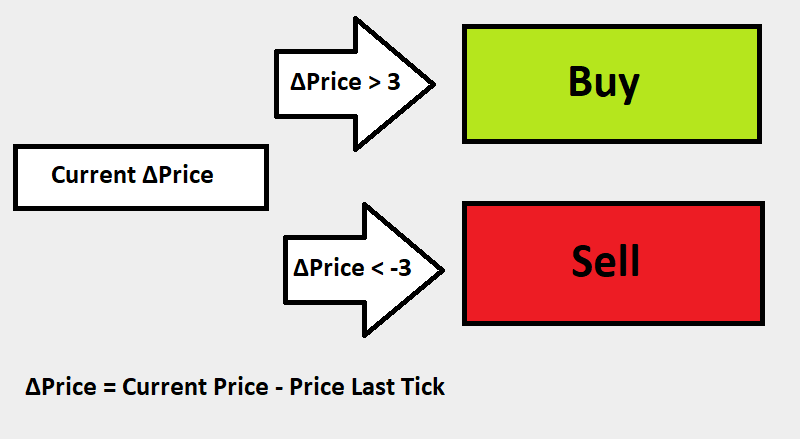
The next step is developing an exit strategy. For simplicity sake, my exit strategy is simply a limit and stop placed 1 point up and .5 point down respectively. (To keep costs equivalent after fees.)
The purpose of this model is to show a simple solution for model based automatic order execution. I do NOT advise implementing this strategy on a live account.
Model Development
We will be getting the information from the price ArrayList in the TopMktDataHandlerImplementation. After getting the prices, we will want to develop a class to handle the (Model based) entry signal, and then a class to handle sending orders. I am going to use the class EntrySignalA as my main signal:
package demo;import java.util.ArrayList;public class EntrySignalA { private ArrayList<Double> prices; public EntrySignalA(ArrayList<Double> prices){
this.prices = prices;
if(prices.size()>1) {
if (prices.get(0) - prices.get(1) > 3);
//Buy
if(prices.get(0) - prices.get(1) < -3);
//Sell
}
}}
Now that we have a way to get the price to our signal, to determine if we should buy or sell, we need to create a class to handle orders. We will create a class to both implement custom orders and handle active orders.
package demo;import ib.controller.*;import java.util.ArrayList;
import java.util.List;public class OrderHandler implements ApiController.ILiveOrderHandler, ApiController.IOrderHandler { //This is taken straight from the API Documentation, with some minor modifications
private static List<NewOrder> BracketOrder(int parentOrderId, Types.Action action, int quantity, double limitPrice, double takeProfitLimitPrice, double stopLossPrice) {
//This will be our main or "parent" order
NewOrder parent = new NewOrder();
parent.orderId(parentOrderId);
parent.action(action);
parent.orderType(OrderType.LMT);
parent.totalQuantity(quantity);
parent.lmtPrice(limitPrice);
//The parent and children orders will need this attribute set to false to prevent accidental executions.
//The LAST CHILD will have it set to true.
parent.transmit(false); NewOrder takeProfit = new NewOrder();
takeProfit.orderId(parent.orderId() + 1);
takeProfit.action(action.equals(Types.Action.BUY) ? Types.Action.SELL : Types.Action.BUY);
takeProfit.orderType(OrderType.LMT);
takeProfit.totalQuantity(quantity);
takeProfit.lmtPrice(takeProfitLimitPrice);
takeProfit.parentId(parentOrderId);
takeProfit.transmit(false); NewOrder stopLoss = new NewOrder();
stopLoss.orderId(parent.orderId() + 2);
stopLoss.action(action.equals(Types.Action.BUY) ? Types.Action.SELL : Types.Action.BUY);
stopLoss.orderType(OrderType.STP);
//Stop trigger price
stopLoss.auxPrice(stopLossPrice);
stopLoss.totalQuantity(quantity);
stopLoss.parentId(parentOrderId);
//In this case, the low side order will be the last child being sent. Therefore, it needs to set this attribute to true
//to activate all its predecessors
stopLoss.transmit(true); List<NewOrder> bracketOrder = new ArrayList<>();
bracketOrder.add(parent);
bracketOrder.add(takeProfit);
bracketOrder.add(stopLoss); return bracketOrder;
}
//Contract initializer for simplicity
static NewContract initializeContract(){
NewContract nq = new NewContract();
nq.localSymbol("NQU8");
nq.secType(Types.SecType.FUT);
nq.exchange("GLOBEX");
nq.symbol("NQ");
nq.currency("USD");
nq.multiplier("20");
return nq;
}
//Implementation of the method to create bracket orders
public void placeBracketOrder(int parentOrderId, Types.Action action, int quantity, double limitPrice, double takeProfitLimitPrice, double stopLossPrice){
List<NewOrder> bracketOrder = BracketOrder(parentOrderId,action,quantity,limitPrice,takeProfitLimitPrice,stopLossPrice);
for(NewOrder o : bracketOrder) {
Demo.apiController.placeOrModifyOrder(initializeContract(), o,this);
}
} @Override
public void orderState(NewOrderState orderState) {}
    @Override
    public void orderStatus(OrderStatus status, int filled, int remaining, double avgFillPrice, long permId, int parentId, double lastFillPrice, int clientId, String whyHeld) {
}
    @Override
    public void handle(int errorCode, String errorMsg) {
}
    @Override
    public void openOrder(NewContract contract, NewOrder order, NewOrderState orderState) {
}
    @Override
    public void openOrderEnd() {
}
    @Override
    public void orderStatus(int orderId, OrderStatus status, int filled, int remaining, double avgFillPrice, long permId, int parentId, double lastFillPrice, int clientId, String whyHeld) {
}
    @Override
    public void handle(int orderId, int errorCode, String errorMsg) {
} }
Now we can use the placeBracketOrder method in our signal class as such:
package demo;import ib.controller.Types;import java.util.ArrayList;public class EntrySignalA { private ArrayList<Double> prices;
private OrderHandler orderHandler; public EntrySignalA(ArrayList<Double> prices){
this.prices = prices;
this.orderHandler = new OrderHandler();
if(prices.size()>1) {
if (prices.get(0) - prices.get(1) > 3) {
orderHandler.placeBracketOrder(1000, Types.Action.BUY, 1, 1, 1, .5);
}
if(prices.get(0) - prices.get(1) < -3) {
orderHandler.placeBracketOrder(2000, Types.Action.BUY, 1, 1, 1, .5);
    }
}
}
}Important Note: In this example I use 1000 and 2000 as the parentOrderId. A trade will not be sent if it does not have a unique Order Id. However, if you reset the Order Id API Sequence in TWS, all existing Order Ids will be reset, and may be reused. There are many ways to generate unique order Ids, for example converting the current date/time to an integer.
Putting it All Together
If we think about this logically, there is a very simple way to implement this into our system. Just add an instance of the signal class at the bottom of the method the server responds to for every change in price:
package demo;import ib.controller.ApiController;
import ib.controller.NewTickType;
import ib.controller.Types;import java.util.ArrayList;public class TopMktDataHandlerImplementation implements ApiController.ITopMktDataHandler { ArrayList<Double> prices = new ArrayList<>(); @Override
public void tickPrice(NewTickType tickType, double price, int canAutoExecute) {
//Do something with the price response
if(tickType.equals(NewTickType.LAST)) {
prices.add(0, price);
System.out.println("Current Price: "+price);
new EntrySignalA(prices); //Check for signal
}
} @Override
public void tickSize(NewTickType tickType, int size) {
//Do something with the volume response
} @Override
public void tickString(NewTickType tickType, String value) {
//Do something with a specific tickType
} @Override
public void tickSnapshotEnd() {
//Do something on the end of the snapshot
} @Override
public void marketDataType(Types.MktDataType marketDataType) {
//Do something with the type of market data
}
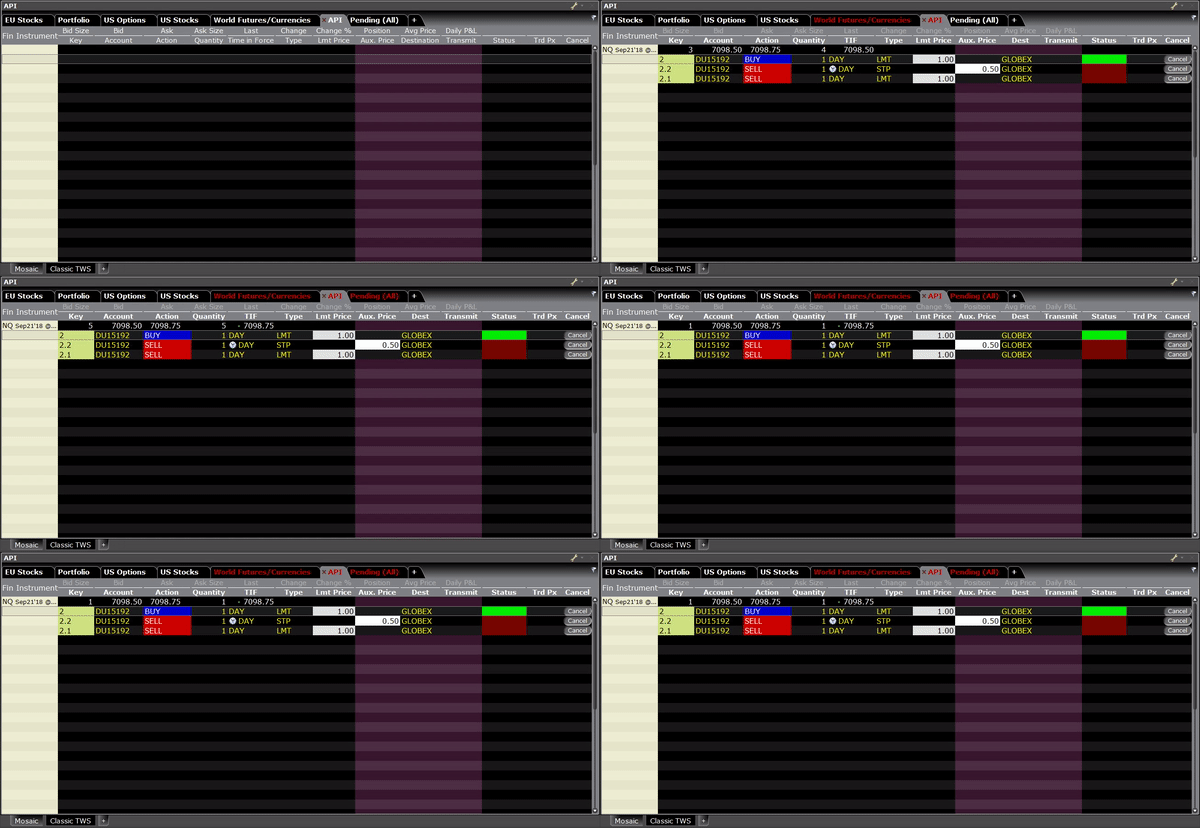
}We now have a simple system that automatically executes trades based on our model. This is what it will look like when our model executes a Buy order:
Quantitative Developer — System Development
As a Quantitative Developer, often your job is to create trading systems based off models that have been rigorously backtested. In this example, I walked you through the development of an algorithmic trading system, and gave simple solutions to critical development stages. There are infinite ways to improve this system (and obviously the model) such as:
- Adding Security Flags in the Trade Execution System
- Fail to Execute Orders at Non-Optimal Prices
- Analysis Libraries for Current Model Performance
- Etc…
All of the code in this article can be found on GitHub: Quant_Dev_System


