

AI Chatbot with NLP: Speech Recognition + Transformers
Build a talking ChatBot with Python and have a conversation with your AI
Summary
In this article, I will show how to leverage pre-trained tools to build a Chatbot that uses Artificial Intelligence and Speech Recognition, so a talking AI.
NLP (Natural Language Processing) is the field of artificial intelligence that studies the interactions between computers and human languages, in particular how to program computers to process and analyze large amounts of natural language data. NLP research has always been focused on making chatbots smarter and smarter.
Chatbots are software applications used to conduct automatic chat conversations via text or text-to-speech, imitating the interaction with a human agent. The very first one was ELIZA (1966) that used pattern matching and substitution methodology to simulate a textual conversation (it couldn’t either listen or speak). Currently the most advanced on the market is Amazon ALEXA, an intelligent personal assistant that understands the user’s voice and talks back.
In this tutorial, I will show how to build a conversational Chatbot using Speech Recognition APIs and pre-trained Transformer models. I will present some useful Python code that can be easily applied in other similar cases (just copy, paste, run) and walk through every line of code with comments so that you can replicate this example.
In particular, I will go through:
- Setup the environment
- Speech Recognition with Google APIs
- Language model with Transformers
Setup
First of all, we need to install the following libraries:
# for speech to text
pip install SpeechRecognition  #(3.8.1)
# for text to speech
pip install gTTS #(2.2.3)# for language model
pip install transformers #(4.11.3)
pip install tensorflow #(2.6.0, or pytorch)We are going to need also some other common packages like:
import numpy as npLet’s start by creating an empty class that we will enrich step by step. In order to test the Chatbot we need to initialize it and run the whole script, I’ll name my bot “Maya”:
# Build the AI
class ChatBot():
    def __init__(self, name):
        print("--- starting up", name, "---")
        self.name = name
# Run the AI
if __name__ == "__main__": ai = ChatBot(name="maya")
Speech Recognition
Speech recognition is an interdisciplinary subfield of NLP that develops methodologies and technologies to enable the recognition and translation of spoken language into text by computers. The first speech recognition systems (1950) could understand numbers but not words, IBM Shoebox (1960) was the first one to understand and respond to few English words.
Today, the most used systems are Google’s APIs and an easy way to use them is through the SpeechRecognition library:
import speech_recognition as srdef speech_to_text(self):
recognizer = sr.Recognizer()
with sr.Microphone() as mic:
recognizer.adjust_for_ambient_noise(mic, duration=1)
print("listening...")
audio = recognizer.listen(mic)
try:
self.text = recognizer.recognize_google(audio)
print("me --> ", self.text)
except:
print("me --> ERROR")That is the first NLP function of our Chatbot class performing the speech-to-text task. Basically, it gives the ability to listen and understand your voice by transforming the audio signal into text. You can test it by running and trying to say something:
# Run the AI
if __name__ == "__main__":
ai = ChatBot(name="maya") while True:
ai.speech_to_text()
Now we need to give the AI the ability to respond back. To put it in another way, we want the Chatbot to understand the input, produce an output, and speak it up. Let’s add a new function to the class:
def wake_up(self, text):
return True if self.name in text.lower() else FalseThe wake_up method makes sure the AI responds when you say its name. For example, I shall activate my Chatbot by saying “Hey Maya”.
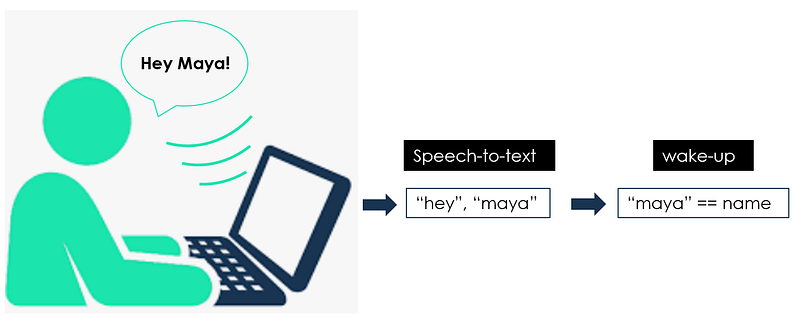
Once the Chatbot hears its name it will say something back, therefore it needs to perform a text-to-speech task. I’m going to use the Google Text-to-Speech library (gtts) to save an mp3 file on the file system which can be easily played with the library OS.
from gtts import gTTS
import os@staticmethod
def text_to_speech(text):
print("ai --> ", text)
speaker = gTTS(text=text, lang="en", slow=False)
speaker.save("res.mp3")
os.system("afplay res.mp3") #macbook->afplay | windows->start
os.remove("res.mp3")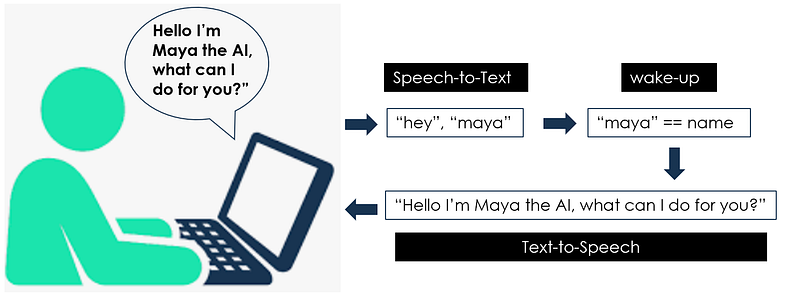
You can test those two new functions like this:
# Run the AI
if __name__ == "__main__":
ai = ChatBot(name="maya") while True:
ai.speech_to_text()
## wake up
if ai.wake_up(ai.text) is True:
res = "Hello I am Maya the AI, what can I do for you?"
ai.text_to_speech(res)
We can also program the bot to react to some specific commands, just like any other virtual assistant (Siri, Alexa, Cortana, …). For example, I want my AI to tell me the time when I ask for it and to respond nicely when I thank her (“her”, yes I already love her). So I’m going to add this function to the Chatbot class:
import datetime@staticmethod
def action_time():
return datetime.datetime.now().time().strftime('%H:%M')and run the script:
# Run the AI
if __name__ == "__main__":
ai = ChatBot(name="maya")while True:
ai.speech_to_text()
## wake up
if ai.wake_up(ai.text) is True:
res = "Hello I am Maya the AI, what can I do for you?" ## action time
elif "time" in ai.text:
res = ai.action_time()
## respond politely
elif any(i in ai.text for i in ["thank","thanks"]):
res = np.random.choice(
["you're welcome!","anytime!",
"no problem!","cool!",
"I'm here if you need me!","peace out!"])
ai.text_to_speech(res)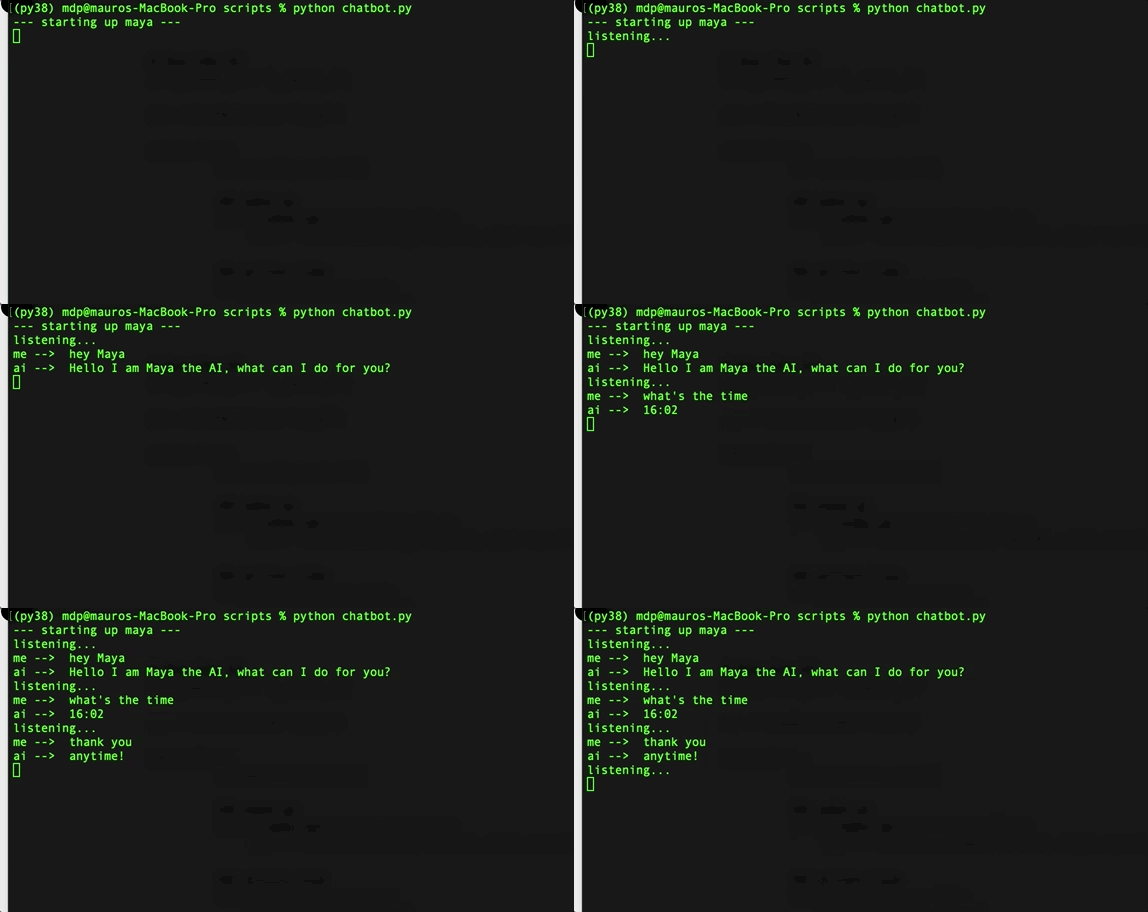
So far we’ve used Speech Recognition techniques to talk to our Chatbot, but the bot is still pretty dummy as it can’t respond to anything that is not predetermined. It’s time to put real Artificial Intelligence inside our Chatbot, i.e. a machine learning model trained for NLP.
Language Model
I will use a Transformer Language Model, a new modeling technique presented by Google (2017) that replaces traditional sequence-to-sequence models (like LSTM) with Attention mechanisms. These language models can perform any NLP task because they dynamically understand contexts. The most famous models are Google’s BERT and OpenAI’s GPT, with billions of parameters.
The main package for these models is transformers by HuggingFace. It’s a popular tool that provides pre-trained models useful for a variety of NLP tasks. Specifically, the one I’m going to use is DialogGPT, a GPT model trained by Microsoft on millions of conversations extracted from Reddit.
import transformersnlp = transformers.pipeline("conversational",
model="microsoft/DialoGPT-medium")Let’s try it out:
input_text = "hello!"
nlp(transformers.Conversation(input_text))
Please note that the current version of the library gives a warning when you don’t specify the pad_token_id (as you can see from the image above). In order to avoid this, you can just add it as a parameter:
nlp(transformers.Conversation(input_text), pad_token_id=50256)Moreover, the pipeline outputs the whole conversation (as you can see from the image above), so I’m gonna turn the whole output into a string and extract the chatbot’s response only.
chat = nlp(transformers.Conversation(ai.text), pad_token_id=50256)
res = str(chat)
res = res[res.find("bot >> ")+6:].strip()
Finally, we’re ready to run the Chatbot and have a fun conversation with our AI. Here’s the full code:
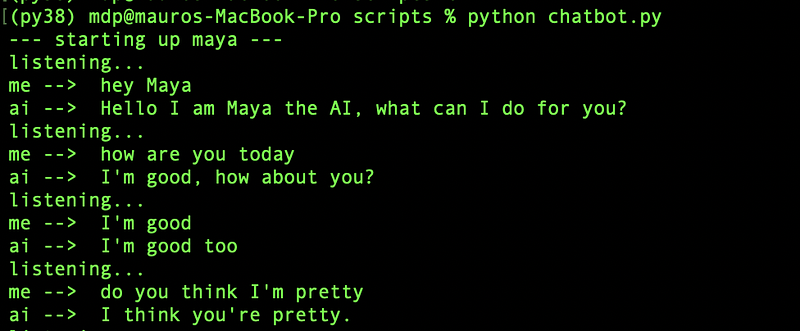
Great! The bot can both perform some specific tasks like a virtual assistant (i.e. saying the time when asked) and have casual conversations. And if you think that Artificial Intelligence is here to stay, she agrees:

Conclusion
This article has been a tutorial to demonstrate how to build a conversational Chatbot that listens and replies like a human. I used Speech Recognition tools to perform speech-to-text and text-to-speech tasks, and I leveraged pre-trained Transformers language models to give the bot some Artificial Intelligence. Now you can build your own Chatbot, maybe including more virtual assistant tasks like searching things on Wikipedia or playing videos on Youtube.
I hope you enjoyed it! Feel free to contact me for questions and feedback or just to share your interesting projects.
👉 Let’s Connect 👈
This article is part of the series NLP with Python, see also:


