
After years of separation between the front-end and back-end, why has Server-Side Rendering (SSR) returned to the forefront?
### What is Server-Side Rendering?
First, let’s understand what Server-Side Rendering is. The full name of Server-Side Rendering is SSR.
In simple terms, it means generating the webpage on the server, creating the entire HTML page with all the necessary data and structural information, and then sending it directly to the browser for display.
This is significantly different from the current popular design of front-end and back-end separation. In the separation model, the browser initially loads a basic framework or a shell page. Subsequently, the front-end retrieves data from the back-end API through asynchronous requests and dynamically constructs HTML before gradually presenting it to the browser.
### Evolution of the Web
To grasp why Server-Side Rendering has become a hot topic again, let’s review the history of the web.
**Early Web Development (1990s to early 2000s):** In the early days of the web, besides static pages, most web pages’ HTML was generated through server-side rendering. Scripting languages like ASP, JSP, PHP were prevalent, combining business logic and HTML templates to process requests and generate complete HTML pages for clients. During this stage, developers often needed skills in both front-end and back-end technologies.
**Rise of AJAX (Around 2005):** The development of Ajax technology and the widespread use of jQuery enabled web pages to dynamically load data, achieving partial content updates without refreshing the entire page. Despite this change enhancing front-end interaction, server-side rendering remained mainstream, and the clear separation of front-end and back-end responsibilities was not evident.
**Birth of Front-End Frameworks (After 2009):** With the emergence of front-end frameworks like AngularJS, Ember.js, front-end engineers could create more complex Single Page Applications (SPAs). These applications fetched data through APIs and rendered pages on the client-side, significantly improving user experience.
**Modern Front-End Frameworks Driving Front-End/Back-End Separation (2013 to Present):** Modern front-end frameworks such as React and Vue.js, leveraging features like componentization and virtual DOM, significantly increased development efficiency and user experience. Simultaneously, the widespread adoption of RESTful API design principles allowed the back-end to focus on providing stable and efficient data interfaces, while the front-end specialized in user interfaces and interaction logic. In this model, front-end and back-end responsibilities became more explicit, and code reusability and project maintainability improved.
Given this trend of front-end evolving towards greater independence, why has Server-Side Rendering (SSR) regained attention? The primary reasons lie in the two major challenges faced by Single Page Applications (SPAs):
1. **SEO Unfriendly:** Search engine crawlers may struggle to correctly crawl and parse dynamically loaded content. While this might not be an issue for internal management systems, many websites on the internet depend on search engine traffic.
2. **Long Initial Load Times:** Users must wait for the entire JavaScript application to download and execute before seeing page content. This delay can compromise user experience, especially in weak network conditions. Why has this become a problem? Perhaps it’s because front-end applications are becoming more complex and larger, and network transmission speeds and front-end rendering speeds are struggling to keep up with this development.
To overcome these challenges while retaining SPA advantages, modern front-end frameworks introduced Server-Side Rendering capabilities. This way, front-end and back-end can collaborate in certain scenarios to accomplish rendering tasks. This model effectively balances initial page load speed, SEO optimization, and maintaining SPA interactive experiences.
It’s noteworthy that although it still involves server-side rendering from a technical perspective, the driving force behind this has shifted to front-end engineers. After the architectural innovation of front-end and back-end separation, front-end development technologies have rapidly advanced. Nowadays, front-end has the capability to efficiently address issues such as SEO optimization and improving page loading performance — essential tasks closely related to user experience.
### SSR in Vue.js
To better understand front-end-driven Server-Side Rendering, let’s look at two examples.
**Simple Example**
First, let’s examine a straightforward example using native Node.js and Vue for SSR.
You need to install several dependencies:
npm init -y
npm install vue@2.7.16 vue-server-renderer@2.7.16 express@4.18.2 --save
Next, create a file named `server.js` with the following content:
const Vue = require('vue');
const server = require('express')();
const renderer = require('vue-server-renderer').createRenderer();

const app = new Vue({
  data: {
    message: 'Hello Vue SSR!'
  },
  template: `<div>{{ message }}</div>`
});

server.get('*', (req, res) => {
  renderer.renderToString(app, (err, html) => {
    if (err) {
      res.status(500).end('Internal Server Error');
      return;
    }
    res.end(`
      <!DOCTYPE html>
      <html lang="en">
        <head><title>Hello Vue SSR</title></head>
        <body>${html}</body>
      </html>
    `);
  });
});

server.listen(8080, () => {
  console.log('Server running at http://localhost:8080/');
});
In this example, we first import Vue, Express, and vue-server-renderer. Then, we create a simple Vue instance and define a basic template. In the `server.get` callback, we use the `renderToString` method to render the Vue instance as an HTML string.
After starting with `node server.js`, you can access http://localhost:8080/ and see the message “Hello Vue SSR!”
**Nuxt.js Example**
The above example is basic, primarily for demonstrating how to use Vue for server-side rendering. In a production environment, various other factors need consideration, such as routing, state management, API interaction, build configuration, and security. For complex applications, advanced frameworks like Nuxt are necessary, allowing developers to focus on writing business logic while leaving the framework to handle the basics.
First, use `npx` (a package executor included with Node.js) to create a Nuxt project, where `ssr-nuxt-demo` is the project’s name:
npx nuxi@latest init ssr-nuxt-demoThis command creates a folder named `ssr-nuxt-demo` in the current directory, automatically setting up the basic project structure.
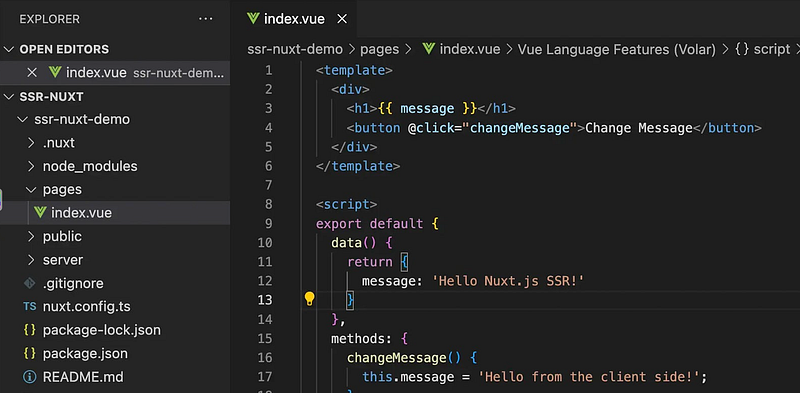
Next, create a `pages` folder in the project and write an `index.vue` file. Nuxt will automatically create a route for this file.
The file content is as follows:
<template>
  <div>
    <h1>{{ message }}</h1>
    <button @click="changeMessage">Change Message</button>
  </div>
</template>

<script lang="ts">
  export default {
    data() {
      return {
        message: 'Hello Nuxt.js SSR!'
      }
    },
    methods: {
      changeMessage() {
        this.message = 'Hello from the client side!';
      }
    }
  }
</script>
Run `npm run dev`, then visit http://localhost:3000 in the browser. You will see the initial message, “Hello Nuxt.js SSR!”, which is rendered on the server. Clicking the “Change Message” button will update the message to “Hello from the client side!”, showing the handling performed by Vue in the browser.
In this example, we demonstrate a form of isomorphic capability, where components are used both in the front-end and back-end — a concept mentioned earlier as front-end-driven server-side rendering.
While this is a simple example, it allows us to experience the powerful capabilities of Nuxt. Interested individuals can explore the robust features of Nuxt.
This concludes the main content of the article.
The cyclical nature of server-side rendering seems to hint at a certain fate. However, history tends to ascend in a winding spiral, and perhaps one day we may no longer need server-side rendering. This could be due to a substantial improvement in communication capabilities, a shift in traffic patterns, or the advent of some unknown change…