
MY FAVOURITE BIT OF MARKETING ADVICE

After recently taking on a couple of new projects and getting the opportunity to also work with ‘The Mouse and his Pals’ I got thinking about my favourite little marketing secret *cough* link sharing *cough* that literally nobody I know does.
A couple of years ago we had the whole ‘dark social’ and link sharing boom that hit us digital marketers (for those that don’t know it’s simply a term which refers to social link sharing that can’t be tracked via web analytics).
Along with the issue came solutions in the form of goo.gle, bit.ly, Tinyurl.com and ow.ly to name a few. Essentially, these services (in most cases for free) provided custom links which could be tracked to reveal further depth of detail into consumer habits.
Personally, I rock with bit.ly, I find it’s interface solid, quick and easy to use design, especially effective across multiple projects at once. It’s completely free although they do offer a premium version of the service although if you’re only managing 1 company, project, etc. then honestly this amazing little platform is the only little link sharing platform you’ll ever need.
Okay, ‘so back to my favourite little marketing secret that literally nobody I know does’. This tip can be used across various different platforms but I’ve got experience with Bit.ly so I’m using it in this case.
*Note, we have a 500 URL limit via this method.
So if you’re like me and hate manually adding links, web pages, etc. when posting links across different types of social media, landing pages and so on then you’ll probably find this a lifesaver.
The obvious idea is to create a Bit.ly account:
- Create account
- Once created, click the settings icon (top-right)
- Find the advanced settings option
- Find API support
- Copy and make a separate note of the Login and API Key
- Paste both to linked download spreadsheet (in the marked area).
*CLICK TO DOWNLOAD
* = Google Sheet Download
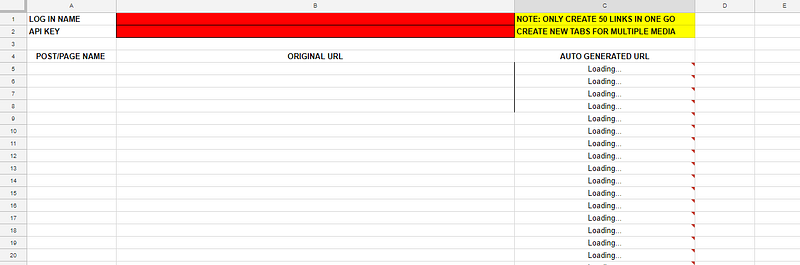
For obvious reasons, I can’t make the download available for public editing so in order to make this work for yourself please go to file and make a copy, name it and then your copy will be saved to your drive.
Once you’ve opened the spreadsheet copy you’ll need to copy and paste both your Bitly LOGIN and your API KEY (as identified in step 5) into the required cells.
From here it’s pretty self-explanatory; Post your original URL, name it for future use and your Bit.ly link will be auto-generated right in front of you.
I’d like to remind you all that the maximum links that can be produced are 500.
All of the data for clicks, shares, etc. from the spreadsheet can be found on your Bitly dashboard which saves you a bit of time.
Thanks for reading guys, this was written on Medium.com & JordanLombard.co.uk.
I’m currently working on a FREE guide to help you improve your Instagram performance enormously. It’s real, genuine advice that does work right now. If you’re interested in that simply follow me on Twitter and I’ll let you know when it’s ready.
If you found this bit of useful advice handy then please feel free to share it with others comment!