
Advanced Swift: Lazy keyword
Learn about lazy in the Swift Programming Language

Imagine you’re a cat lounging around on a warm, sunny windowsill. You’re comfortable and content, but you know that eventually you’ll need to get up and do something. Maybe you’ll play with a toy, or maybe you’ll go hunt for some food. But for now, you’re just enjoying the laziness of the moment.
Now imagine that you have a little mouse friend who lives with you. This mouse is always busy, running around and doing things. You love your mouse friend, but sometimes you just wish they would slow down and take it easy like you do.
One day, your mouse friend comes to you with a problem. They’ve been working on building a new toy for themselves, but it’s taking a long time to put together. They’re getting tired and they’re not sure they have the energy to finish it.
You have an idea. You tell your mouse friend about the “lazy” keyword in Swift, and how it can help them save energy. You explain that the lazy keyword allows them to delay the creation of something until it’s actually needed.
For example, let’s say your mouse friend is building a toy that requires a lot of pieces. They can use the lazy keyword to delay putting those pieces together until the very moment they’re ready to play with the toy. This way, they don’t have to expend all of their energy upfront, and they can save it for when it’s needed.
Here’s how it would look in Swift:
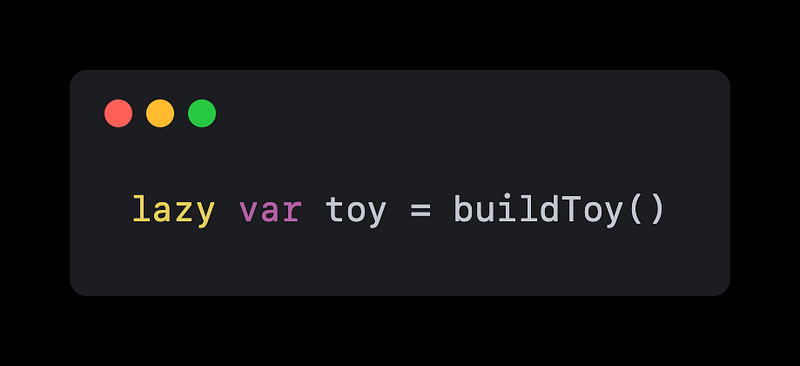
Instead of building the toy right away, the mouse can use the lazy keyword to delay the creation of the toy until it’s actually needed. When the mouse is ready to play with the toy, they can simply call the toy variable and it will be created on the spot.
This is a great way for your mouse friend to conserve energy and only do the work when it’s necessary. And just like how you enjoy a leisurely nap on the windowsill, your mouse friend can enjoy a little bit of laziness in their own way too.
Let’s dive a bit further.
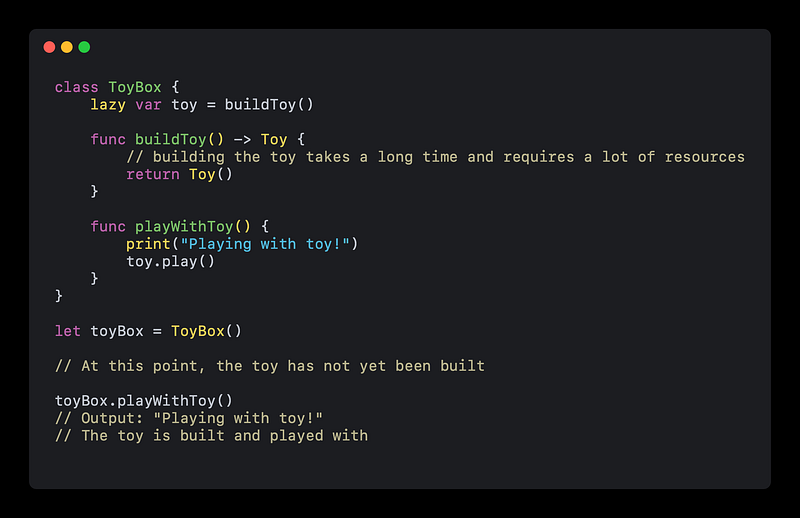
In the example above, we have a ToyBox class with a toy variable that is marked as lazy. This means that the toy variable will not be created until it is actually accessed for the first time.
We also have a playWithToy method that uses the toy variable. When we call this method, the toy variable is accessed for the first time, so it is created using the buildToy method. After the toy is created, it is played with.
If we never called the playWithToy method, the toy variable would never be created and the resources used to build it would be saved.
Here’s another example:
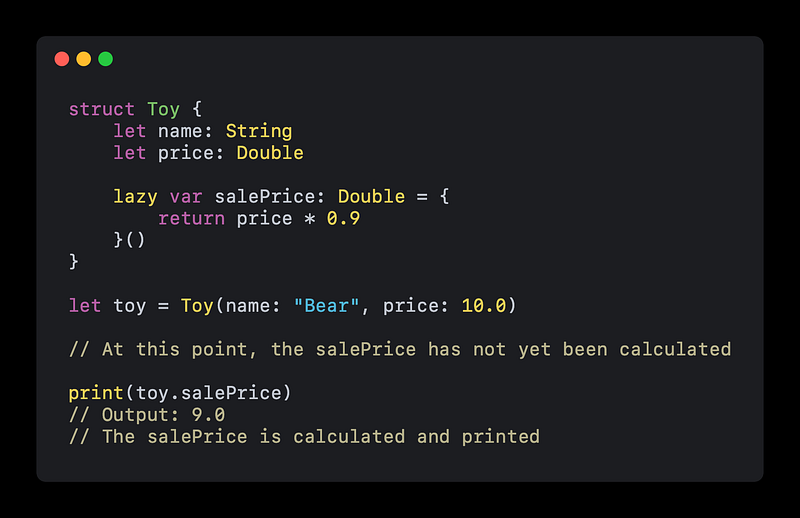
In this example, we have a Toy struct with a salePrice variable that is marked as lazy. This means that the salePrice variable will not be calculated until it is actually accessed for the first time.
We also have a closure assigned to the salePrice variable that calculates the sale price by applying a 10% discount to the regular price of the toy.
When we try to access the salePrice variable and print it, it is calculated for the first time using the closure. If we never accessed the salePrice variable, it would never be calculated and the resources used to calculate it would be saved.
I hope this give you a better understanding of how the lazy keyword can be used in Swift to delay the creation or calculation of something until it is actually needed.
🤟 If this article helps you, help someone else and share it.
🌮 BuyMeATaco if you’re in a generous mood.


