
Adobe Fresco: A Review on a Free App for Digital Artists
As someone who always did art in the traditional manner, the digital world is a daring and unknown place. With hundreds of brushes and pixels and hues to choose from the possibilities are infinite. Before, I was limited to the art supplies I could afford, deciding whether or not I should invest in higher quality acrylic paint while sacrificing my canvas to a smaller size since canvases alone are so expensive. I felt somewhat limited to experimenting with new mediums due to the high cost and my own mind figuring out if my idea is the “perfect piece” that was worth the money spent on supplies.
That being said, after graduating college and starting a new job, I decided to invest in an iPad and explore the world of digital art so I could explore new mediums and test new ideas. I still am overwhelmed by the possibility of ideas and learning is an ongoing process here is my first thoughts on Adobe Fresco: A free and great app to explore vector illustration and the free brushes closely resemble oil and watercolor painting.
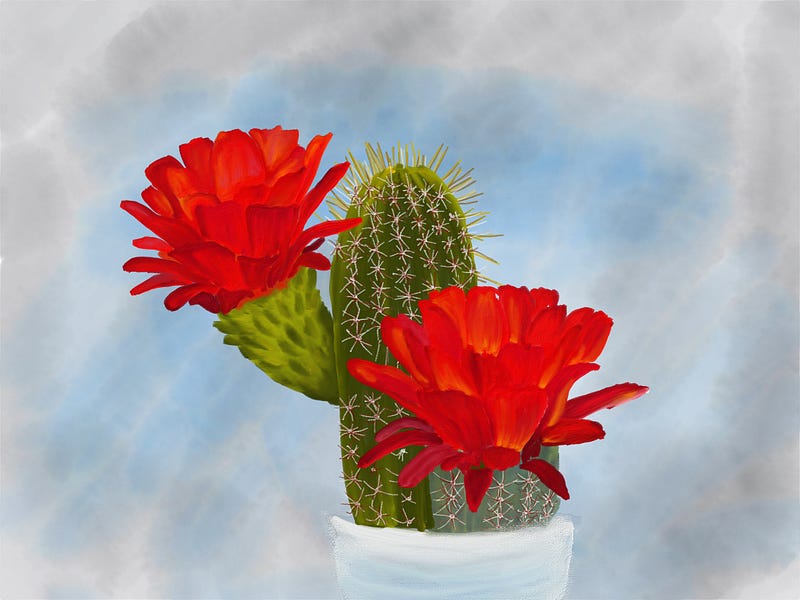
Outside of the brushes given in the app, the user can adjust the tapering, opacity, paint mixing, even the flow of ink/paint whatever medium you choose.
Above is the first digital art painting I did on the app. One thing I have noticed and must still practice is the effective use of layers. When we are painting on a canvas with real art supplies, we have to preplan what we are going to paint and often make mistakes and have to redo or improvise with our mistakes. The advantage of digital art aside from being able to immediately undo our mistakes, is that you can also isolate and layer each piece. However, learning this is a skill and for a beginner, a way to navigate this and use one layer is the ease of blend ability in the digital brush strokes themselves. This is where Adobe fresco shines. In the above painting, I used an oil paint brush and was able to use one layer and paint stroke by stroke to build dimension because it blended as if I was painting in real life. In the similar way, the water color brushes also work to do this and disperse in a way water does. So far Adobe fresco is the closest to real life painting and emulates similar behavior and flow of paint in real life.
The Verdict:
As someone who has never done digital art before, out of the many apps I downloaded, I found this one to be the easiest to learn and use. Of course there is the most popular app: Procreate, but that costs $10 and I think for a free app, Adobe Fresco is a winner. This app is the best app that is closest to real life painting as one can get digitally. One will not lose the skills through the convenience of auto shaping and can still maintain a traditional art feel without the cost of buying paint and art supplies. This is the first of many mini reviews on digital art apps.