
Adobe Experience Manager(AEM): Implementing Custom Redirect/Vanity URLs Manager
One of the major concern with the AEM setup is managing the redirects and vanities without the involvement of the Development team, AEM supports multiple options to enable the URL redirects & vanity paths for the website pages.
Let us see some of the standard options to manage the redirects and vanity paths in AEM, also a custom solution to manage the site-specific redirects (301 and 302) by site admins through management UI and configuring the Apache server to auto pull the redirects without the deployment/development team involvement.
sling:vanityPath
This property when set on any resource defines an alternative path to address the resource.
sling:redirect — This property when set on a resource with a vanity path causes a redirect response to be sent to the client, which causes the client to send in a new request with the modified location. The value of this property is applied to the actual request and sent back as the value of the Location response header.
sling:redirectStatus — This property defines the HTTP status code sent to the client with the sling:redirect response. If this property is not set, it defaults to 302 (Found). Other status codes supported are 300 (Multiple Choices), 301 (Moved Permanently), 303 (See Other), and 307 (Temporary Redirect).
sling:vanityOrder — It might happen that several resources in the resource tree specify the same vanity path. In that case, the one with the highest order is used. This property can be used to set such an order.
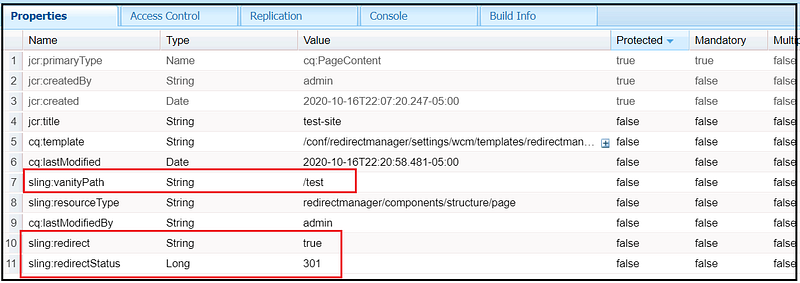
The value of the sling:vanityPath property is global across the website, the vanity configuration is managed through individual pages. The vanity URL/redirect is handled by publishers so additional traffic to publisher servers.
sling:internalRedirect
This property when set on a resource in the /etc/map tree causes the current path to be modified internally to continue with resource resolution to a different path
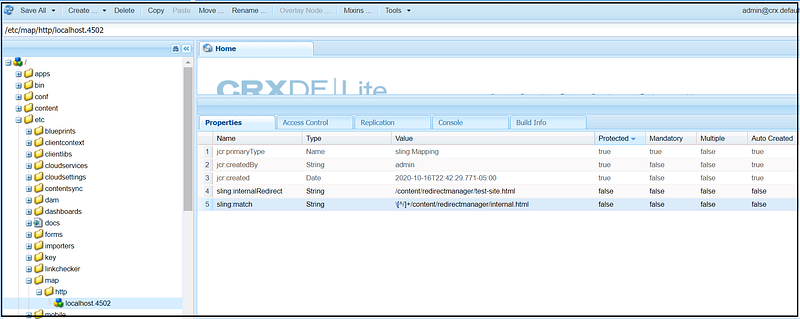
The authors will not be able to manage the sling:redirect properties without engaging the Development team. The browser receives the autual page content with 200 status while accessing the vanity URL.
sling:alias
The property sling:alias maybe set on any resource to indicate an alias name for the resource. For example the resource /content/redirectmanager/test-site.html may have the sling:alias property set to test-site1 allowing the resource to be addressed in an URL as /content/redirectmanager/test-site1.html well as the original path /content/redirectmanager/test-site.html
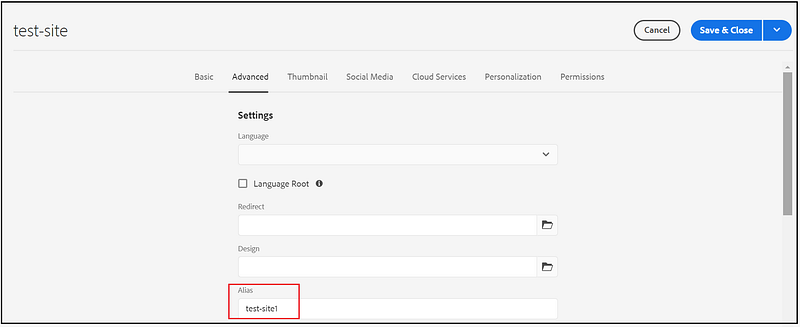
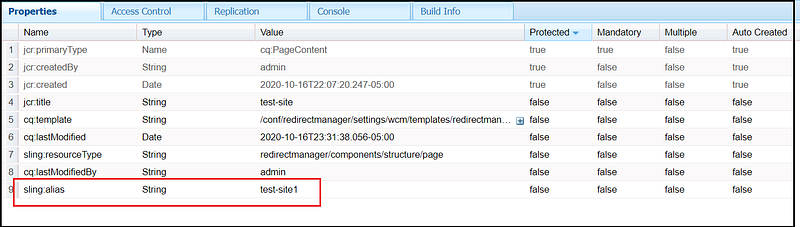
Here we are defining the alternate name to the resource, not the path, the browser receives the actual page content with 200 status while accessing the alias.
sling:redirect
This property when set on a resource in the /etc/map tree causes a redirect response to be sent to the client, which causes the client to send in a new request with the modified location. The value of this property is applied to the actual request and sent back as the value of Location in the response header.
sling:status — This property defines the HTTP status code sent to the client with the sling:redirect response. If this property is not set, it defaults to 302 (Found). Other status codes supported are 300 (Multiple Choices), 301 (Moved Permanently), 303 (See Other), and 307 (Temporary Redirect).
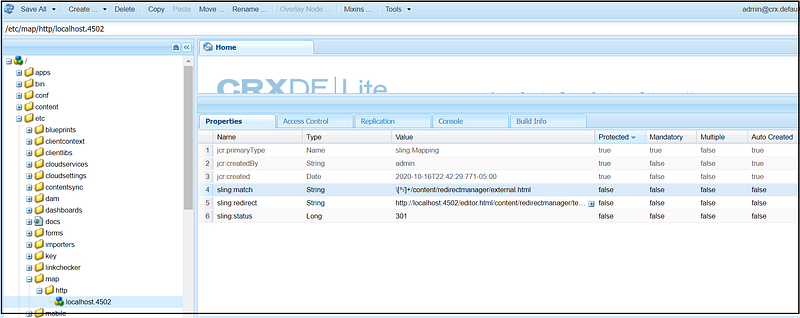
The redirect is handled by publishers so additional traffic to publisher servers. The authors will not be able to manage the sling:redirect properties without engaging the Development team.
cq:redirectTarget
The core page component supports the redirect through the cq:redirectTarget, the redirects can be enabled through page dialog Advanced tab
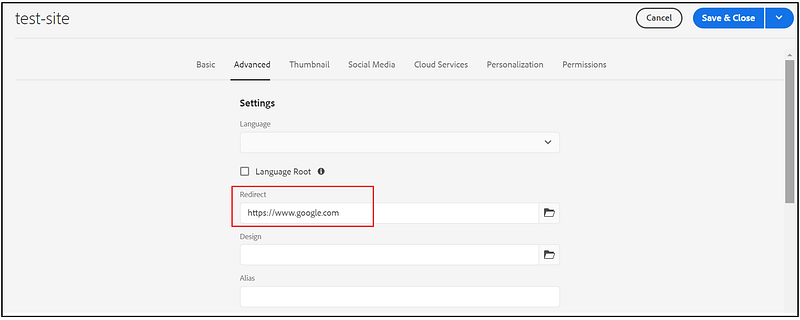
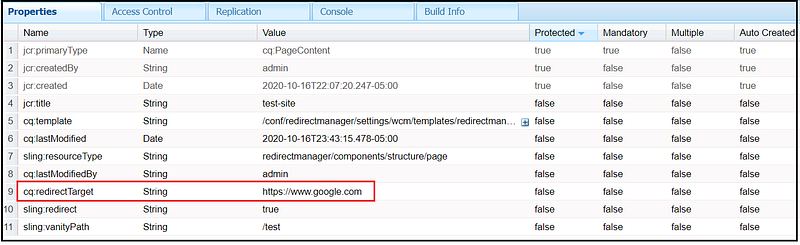
The redirect only works in publishers, the wcmmode=disabled can be used to test the redirects in the author.
The redirect is handled by publishers so this enables additional traffic to publisher servers. The default behavior only supports 302 status, the redirects can be managed by site admins through individual page dialogs.
foundation/components/redirect
The redirects can be enabled by adding the below properties on jcr:content node of the page on which redirect to happen
sling:redirect - true
sling:resourceType - foundation/components/redirect
redirectTarget - https://www.google.com
sling:redirectStatus - 301 or 302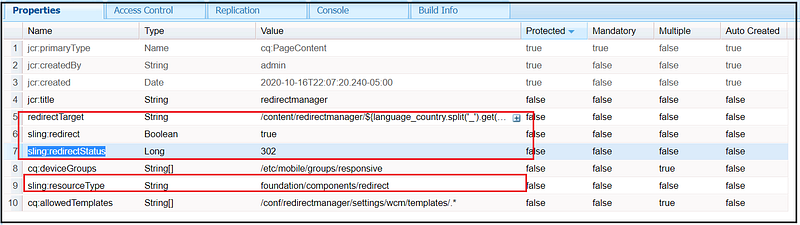
The redirect only works in publishers, the wcmmode=disabled can be used to test the redirects in the author.
The redirect is handled by publishers so this enables additional traffic to publisher servers.
Custom Sling Filter
Other option is , enabling the custom sling filters to redirect the specific URL’s to the target URL.
The redirect is handled by publishers so this enables additional traffic to publisher servers. The Authors will not have the capabilty to manage the redirects.
Redirect from apache
The Apache module mod_rewrite is a very powerful and sophisticated module which provides a way to do URL manipulations. With it, you can do nearly all types of URL rewriting that you may need.
RewriteRule ^/test/(.+)$ http://www.example.com/test1.html [L,R=301,NE]The RewriteMap directive enable the support to confiure and manage the bulk redirects in external text file or DBM Hash File, this will provide better performance for bulk redirects.
RewriteMap examplemap "txt:/path/to/file/map.txt"
RewriteRule "^/ex/(.*)" "${examplemap:$1}"
The redirects can be managed only by Development team, the author will not have the option to manage the redirects. The redirects are handled through Apache layer infront of the AEM server so that traffice to the publishers will be reduced.
Redirect Map Manager — Adobe Consulting Services
This tool allows content administrators to easily maintain and publish the redirects through Authoring UI.The tool publishes the Apache RedirectMap files that can be configured in Apache virtualhosts to enable the redirects in realtime without the Apache server restart.
Refer https://adobe-consulting-services.github.io/acs-aem-commons/features/redirect-map-manager/index.html for more details.
This will enable the capabilty manage the redirects through Authoring UI, the redirects are enabled at realtime without restarting with the Apache RewriteMap directive.
As the redirects are enabled through Apache the traffic to the publishers will be reduced. This tool by default only supports the 302 redirect status.
Let us now see how to implement a custom solution that enables redirect management through custom UI for both 301 and 302 status and use the Apache RedirectMap capabilty to support the realtime redirect changes without the Apache Server restart.
Custom Admin UI with Apache Redirect Map
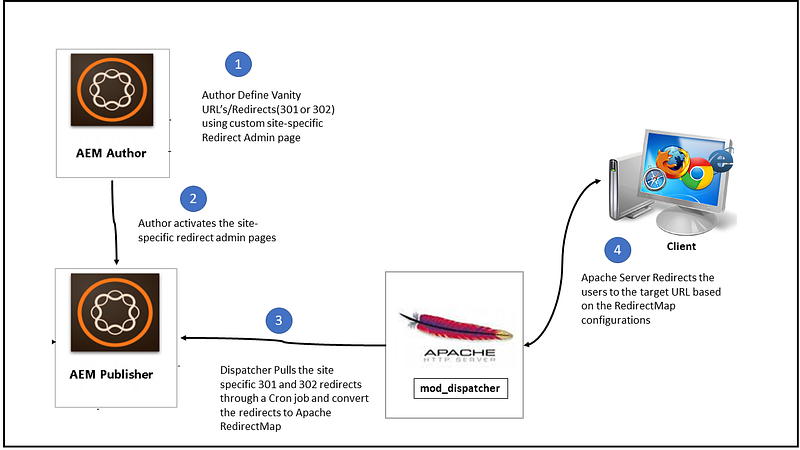
We are going to build the below modules
Custom templates and components — enable the Authoring capability to define the site-specific 301 and 302 redirects, also provides a minimal validation to ensure the added redirects are valid in syntax.
The site specific redirect pages can be created under /content/redirectmanager by using the “redirectmanager-template”
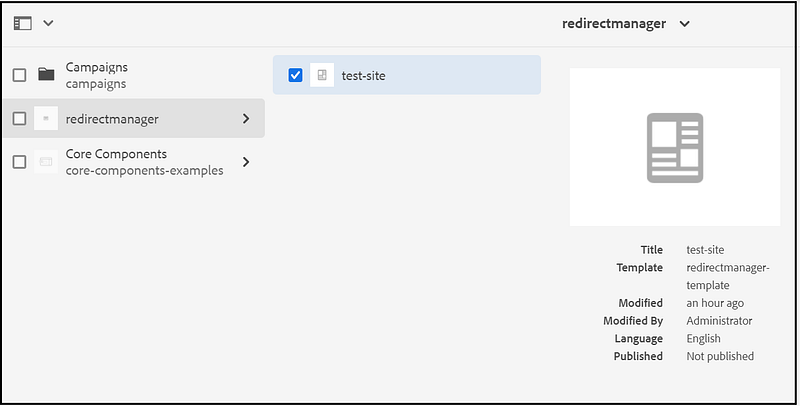
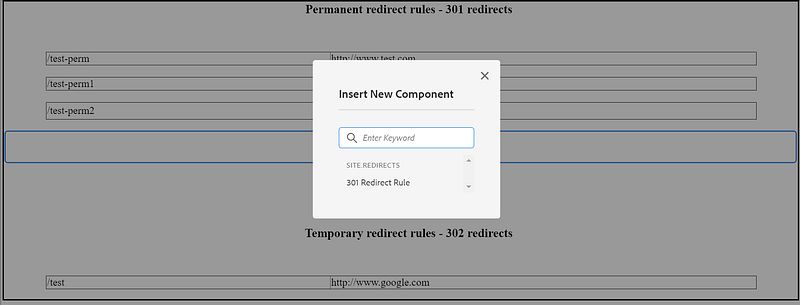
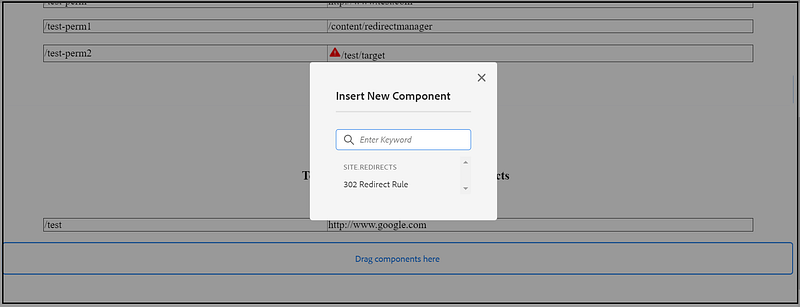
The 301 or 302 redirects can be configured by adding the corresponding component, the redirect source and targets are validated for syntax errors, the invalid redirects are displayed with warning and ignored from the final redirect list. The redirect can be a valid internal resource path or an external website URL.
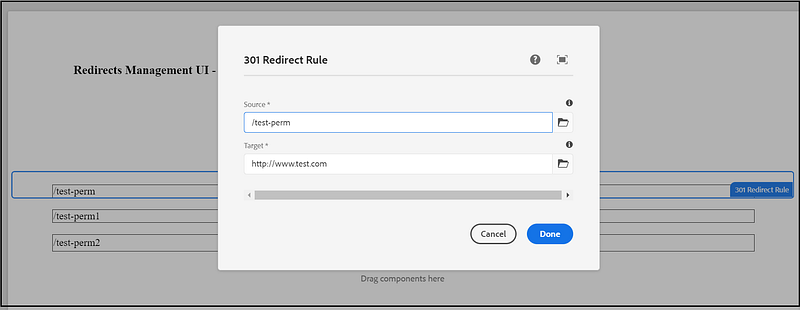
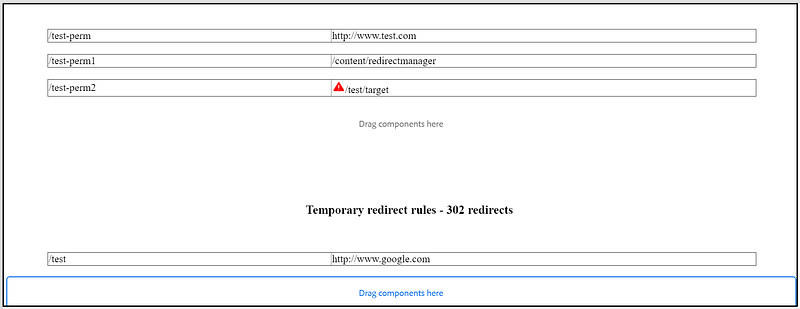
Custom Servlet — the custom servlet exposes the site-specific 301 and 302 redirects as text content.
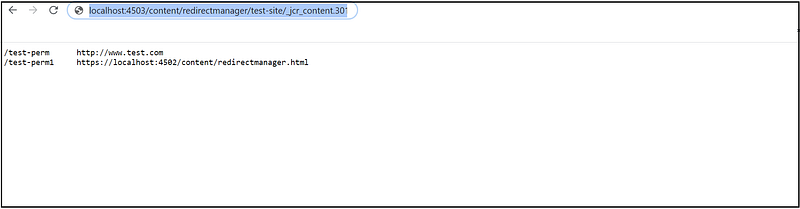
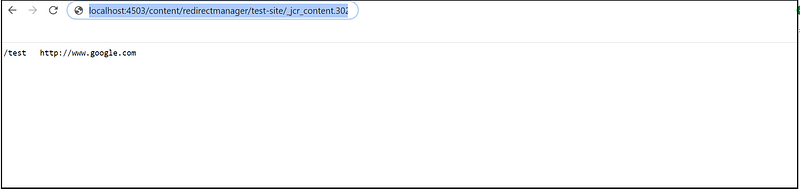
The site specific 301 and 302 redirect details can be accessed as below
http://localhost:4503/content/redirectmanager/test-site/_jcr_content.301.txt
http://localhost:4503/content/redirectmanager/test-site/_jcr_content.302.txt
Refer the below URL for the code package
Custom Bash Script — enable a custom bash script in Dispatcher machine to pull the updated site-specific 301 and 302 redirects from publishers and converts the text data into Apache RewriteMap format (dbm) using httxt2dbm.
Change the scripit with the IP address of connected publisher, also change the path as required.
Enable the required permissions for the script — sudo chmod -R 0755 /etc/httpd/conf/redirectmaps/redirect_map_converter.sh (this step is required whenever the file is modified or new file copied)
The redirectmap backup files can be used incase of any issues, also recommended to create a new version in AEM for the site specific redirect admin page on every change.
RedirectMap configuration for Virtualhost — configure the Apache virtual hosts to use the site-specific RedirectMaps to redirect the users to the target URLs based on the configuration.
####Test Site1 Virtualhost or Rewrite file ###
RewriteMap redirects_302 dbm=db:/etc/httpd/conf.dispatcher.d/redirectmaps/redirectmap-testsite1-302.db
RewriteCond ${redirects_302:$1} !=""
RewriteRule ^(.*)$ ${redirects_302:$1} [R=302,L]
RewriteMap redirects_301 dbm=db:/etc/httpd/conf.dispatcher.d/redirectmaps/redirectmap-testsite1-301.db
RewriteCond ${redirects_301:$1} !=""
RewriteRule ^(.*)$ ${redirects_301:$1} [R=301,L]####Test Site2 Virtualhost or Rewrite file ###
RewriteMap redirects_302 dbm=db:/etc/httpd/conf.dispatcher.d/redirectmaps/redirectmap-testsite2-302.db
RewriteCond ${redirects_302:$1} !=""
RewriteRule ^(.*)$ ${redirects_302:$1} [R=302,L]
RewriteMap redirects_301 dbm=db:/etc/httpd/conf.dispatcher.d/redirectmaps/redirectmap-testsite2-301.db
RewriteCond ${redirects_301:$1} !=""
RewriteRule ^(.*)$ ${redirects_301:$1} [R=301,L]Cron Job Configuration — Enable the Cron Job to pull the updated site-specific 301 and 302 redirects on specific intervals, the new redirects will be live realtime without the Apache server redirect
sudo crontab -e*/30 * * * * /etc/httpd/conf/redirectmaps/redirect_map_converter.sh > /var/log/redirect_map_converter_job.log 2>&1Change the time interval based on your requirement, the default shown here is on every 30 seconds the updated redirects will be fetched from AEM publishers.
The required authoring permissions can be enabled to manage the site-specific redirect admin pages.
This approach enables the custom UI to manage both 301 and 302 redirects by site Admins, the redirect updates are auto polled and made live by dispatchers without the engagement of the Development team and Apache server restart. The Apache RedirectMap simplifies the management of bulk redirects through external redirect map files. This resolves the two major concerns on redirects — enabling bulk redirects and managing the redirects(301 and 302) by the site admins.
Feel free to provide your comments.


