
ADF-What are Global Parameters & How to Use Them?
Create global parameters in ADF to prevent hard coding values in your pipeline.
The data teams I have worked with so far have one thing in common — use of reusable values in Azure Data Factory. ADF calls them global parameters.
Simply put, global parameters can be used across multiple pipelines, activities or datasets without having the need to redefine those values over and over again.
Navigate to the manage section of any ADF of your choice and click global parameters.

If you don’t see any values here, let’s start to understand why you should look at creating global parameters and what purpose do they serve.
Example 1
Imagine you have an ADF solution that involves loading data into multiple tables in an Azure SQL Database. The 2 tables are customers and orders tables. We can create 2 global parameters like below-
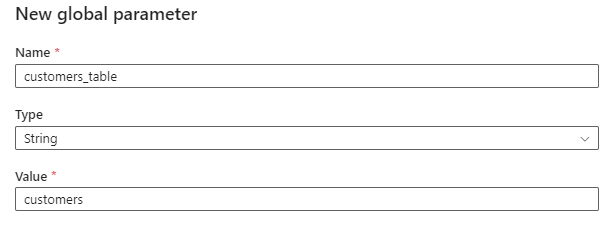
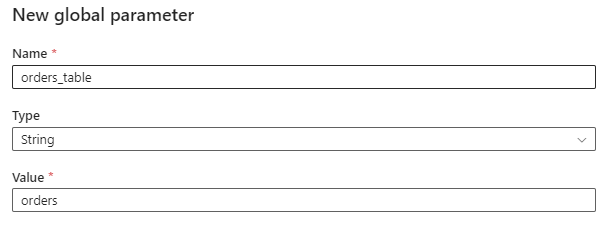
We can now use these parameters in our ADF solution as shown below-

So, what’s the benefit in the above scenario?
Well there are several benefits-
- By using global parameters to define table names, you can reuse the same pipeline for loading data into different tables. Instead of creating separate pipelines for each table, you can dynamically configure the table names based on the global parameters.
- By parameterizing table names, we prevent the need to hardcode the table names at various locations in our pipelines. This obviously reduces the time to update table names should there be a need in the future. Instead of locating the table name in different pipelines and updating them one-by-one, global parameters provide a centralized location to do those updates once.
- Another benefit is that the global parameters can now be used by other data engineers on the team without them needing to hardcode values in their pipelines.
Example 2
Imagine you have an ADF solution that involves processing data files from different folders in an Azure Data Lake Storage Gen2 account. You can use global parameters to define and maintain those storage paths.
From a personal experience, data engineering teams like to split their ADLSG2 into 2 containers- development and production. This means a dataset’s location on ADLSG2 looks like below-
In development environment

development/project1/2024-01-13/dataset.json
development/project2/2024-01-13/dataset.csv

In production environment

production/project1/2024-01-13/dataset.json
production/project2/2024-01-13/dataset.csv
The above serves as an excellent use case to create 2 global parameters for our containers — development and production.
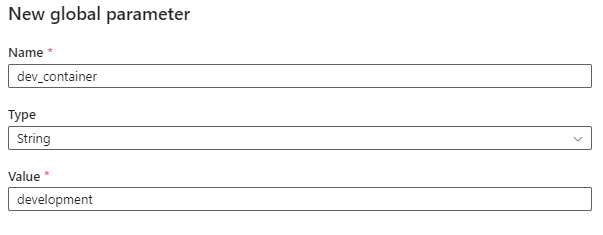
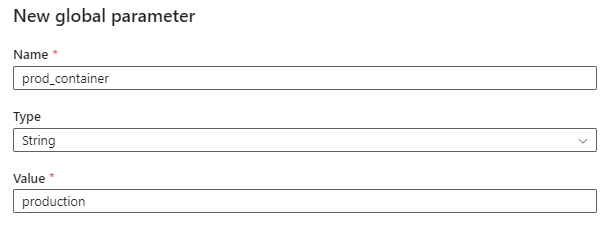
Let’s assume that there are a couple of csv datasets in a dev container but at different folder locations that look like this-
First dataset
development/mypath/dataset1.csv

Second dataset
development/anotherpath/dataset2.csv
The copy actions in ADF now look like below with the use of global parameters.
For dataset1.csv

For dataset2.csv

Notice that in both of the above snapshots, the main container has been parameterized and reused while still providing a data engineer the flexibility to customize the folder path.
What’s the benefit in this scenario?
- By creating the global environment parameters, you can define environment-specific configurations for your ADF solution. This allows your team to easily switch between the development and production environments by simply reusing one of the global parameters.
- Global parameters prevent hardcoding environment names in multiple places within your ADF solution. It makes it easier to update the environment in a single place as opposed to updating it in multiple places.
- Due to 2 separate global parameters, you can ensure isolation of your environments and if needed, apply access control to the production environment.
Summary
In the context of ADF, global parameters play a crucial role in streamlining the development and management of data integration workflows. As we noticed above, global parameters can provide a data engineering team the benefit of reusability, centralizing management and enhancing security in their data integration workflows. By leveraging global parameters, developers can ensure consistency, reduce duplication of effort, and easily adapt their workflows to changing requirements or different environments.


