
Add Some Variety to your Morning Alarm — Recursive Automation

Recently I discovered that I was sleeping through my morning alarm and set out to suggest the sound on my Google Home. The idea was that I had become familiar with my current tone. Unfortunately, my partner didn’t like the sound I chose. Frustrated with the limited selection of alarm sounds, I set out to create a random playlist.
Since I have Home Assistant running my smart home, I figured a smart place to start was there.
Helpers and Sensors in Home Assistant

- A DateTime Helper to set the alarm
- A Toggle so that I could turn the alarm off if I didn’t want it.
I also needed to add a Time Sensor to my core configuration so that I can track the time. I used the File Editor and in my /config/configuration.yaml added the following sensor.
sensor:
  - platform: time_date
    display_options:
      - 'time'
      - 'date'
      - 'date_time'
Lovelace Panel
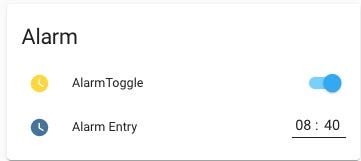
I also set up an entity stack on my Lovelace dashboard so that I could set my alarm as I want:
Automation
Now time to automate. Navigating to my Automations, I created a new Automation.
Trigger
Set up a timer to run based on my input:
platform: template
value_template: >- {{ states('sensor.time') == ( states.input_datetime.alarm_entry.attributes.timestamp | int - 120 ) | timestamp_custom('%H:%M', False) }}
Note that I’m using a value_template here to trigger the alarm for two minutes less than what I set it for. Later I can add my bedroom lights to fade up during this time. I also am going to use Google Home to play the alarm, so I want a little bit of cushion for communication speed.
Conditions
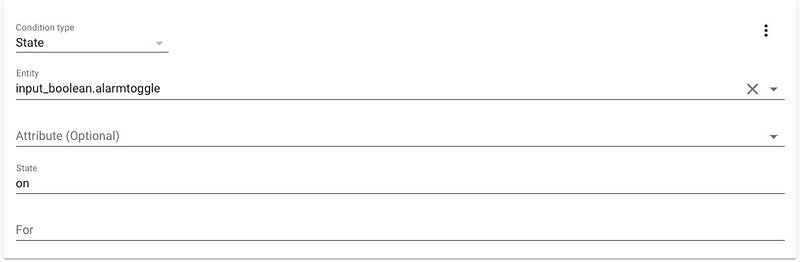
Let’s set up a condition to listen for my toggle:
And let there be Music — Morning Alarm Set
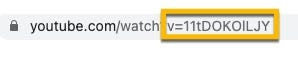
I’m using a Google Home and Home Assistant’s Cloud, so I can cast YouTube Videos directly to my Google Home! I found a playlist on YouTube and extracted out the Video IDs.
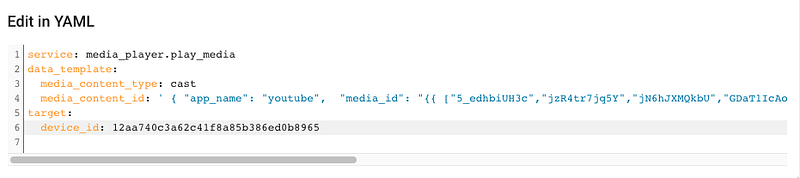
You can find more information about the setup in Home Assistant here.
# Copy and Paste this to start your list!
{{ ["5_edhbiUH3c","jzR4tr7jq5Y","jN6hJXMQkbU","GDaT1IcAokc","VOgupr6Q2v0","XGRiv9itLQ0","JPvkrkNQB7E","jzR4tr7jq5Y","jN6hJXMQkbU","GDaT1IcAokc","VOgupr6Q2v0","XGRiv9itLQ0","JPvkrkNQB7E"] | random }}
A couple of notes here.
- You’ll notice repeated video ids. When using random in your data_template, there is no real way to weigh one list item so that it occurs more often. An artificial way of doing this is to simply add the same value multiple times.
- There is one item here that only appears once, it’s this video (which is the original inspiration for this post).
- You can use this methodology to enhance your other Home Automations like your presence detector, your Pomodoro Timer, or to help set the mood for your next game night.
- The YouTube Videos I’m using are by Steven Cravis, and they are nice and soothing.
There you have it! A custom Alarm Clock with Home Assistant and Google Home. Go forth and start your day!
Originally published at https://recursiveautomation.com on April 3, 2021.