
Add new nodes to your ElasticSearch cluster through Ansible playbook

In this article, I will demonstrate how to add a new node to elasticsearch cluster using Ansible playbook.
Prerequisites for the tutorial: - OS version should be Redhat or CentOS 7+ - The target machine with sudo user should be ready - Basic knowledge of ansible
For more info about elasticsearch, Thanks to visit https://www.elastic.co/what-is/elasticsearch
Ansible files for this tutorial can be found in my github repo here
Main structure:
Roles structure will be used with tasks, handlers, templates and vars if needed
├───hosts
└───playbooks
 ├───roles
 │ └───elastic
 │ ├───handlers
 │ ├───tasks
 │ ├───templates
 │ └───vars
 └───src
 └───cert
Let’s start with hosts file which will contain the target host/s (that needs to be added to the cluster) as IP or DNS, Also the vars section to define the needed variables:
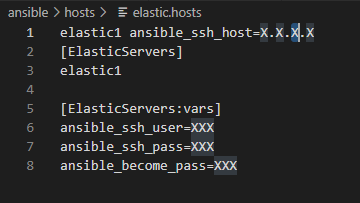
ansible_ssh_user — -> The user that will be used to connect to the target machine ansible_ssh_pass — -> The password that will be used to connect to the target machine ansible_become_pass — -> The password that will be used to escalate the privilidges while running certain tasks
ansible_ssh_pass & ansible_become_pass can be replaced by passing “-- ask-pass --ask-become-pass” from the terminal as a better practice than hardcoding them in a file
Then let’s review src Directory ‘./playbooks/src’ : Should contain the src file of elasticsearch that will be used This script has been tested against elasticsearch version 7.6.2 Also if the communication between elsticsearch nodes is secured through a certificate, it should be placed inside cert directory ‘./playbooks/src/cert’
Inside elastic role, we have handlers, tasks and templates
Let’s start with the main task, the below modules will be used:
debug: to log the IP of the target machine that script is running on copy: to copy elasticsearch src file and certificate file yum: to install elsticsearch package file: to create the needed paths with the needed permissions blockinfile: to edit configuration files service: to restart elasticsearch and firewalld services replace: to disable SWAP in fstab template: to define jvm.options and elastisearch.yml
Then a handler is used to enable and restart elasticsearch service

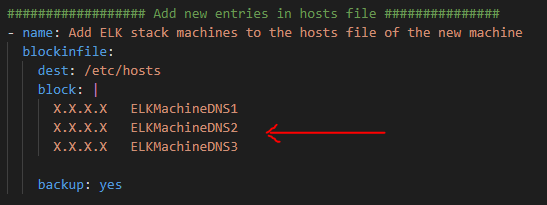
To use the playbook: Edit elastic.hosts file to add the target machines, usernames and passwords then if all of your servers are configured with name-based resolution: edit main.yaml file under elastic role/elastic/tasks:
- Go to “Add ELK stack machines” task.
- Add elasticsearch stack machines here.
Then run the below command:
$ansible-playbook -i ./hosts/elastic.hosts ./playbooks/elastic-setup.ymlConclusion:
This script has been tested against redhat OS 7.3 and elasticsearch version 7.6.2 so you may run into simple issues related to the environment.
I hope this could help in adding new nodes to elasticsearch clusters, and you enjoyed reading this. Feel free to add your comments, thoughts or feedback and don’t forget to get in touch on linkedin.