
Ad Spend Optimization Tutorial using Gurobi

This tutorial illustrates crafting an optimal ad spending allocation, maximizing Revenue to enhance ROAS (Return on Ad Spend) across advertising channels. Employing Gurobi for optimization, we construct a solution. By providing the essential toolkit, this tutorial enhances decision-making, elevating marketing efforts towards amplified profitability.
Note that this tutorial provides a simplified example for educational purposes. In real-world scenarios, you may need to consider additional factors and constraints to accurately model your optimization problem.
Case Study
Imagine you’re working for an e-commerce business that wants to allocate its marketing budget across three different advertising channels with unique characteristics for each. The goal is to maximize revenue by optimizing the ad spend for each channel, taking into account the conversion rates, average ticket size, and costs-per-click (CPC) associated with each channel.
To provide a more explicit context, here’s a breakdown of essential details about the business:
- Business Type: Online Retail
- Product Segments (3): Clothing, Beauty Products, Home Decor
- Marketing Channels (3): Channel 1, Channel 2, Channel 3
Optimization Problem Formulation with Gurobi
Step 1: Create a model and define decision variables
Create a Gurobi model instance and add decision variables to represent the placeholder for the ad spend budget for each marketing channel. Set the lower bound to 0 (lb=0.0) and specify the variable type as continuous (vtype=GRB.CONTINOUS).
# Import libraries
import gurobipy as gp
from gurobipy import GRB
import numpy as np

# Create model
model = gp.Model()

# Add decision variables for budget allocation per channel
num_channels = 3
num_products = 3
budget_vars = model.addVars(num_channels, lb=0.0, vtype=GRB.CONTINUOUS, name='budget')
Step 2: Defining coefficients
The next step is to analyze the coefficients for each marketing channel which are,
- Conversion Rate: Measures the post-advertisement purchase probability. Multiplying this rate by clicks yields total transactions.
- Average Ticket Size: Reflects average revenue per successful conversion.
- Cost per Click: Represents expenses per click for each associated marketing channel.
We are currently having 3 channels and each channel showcases a distinct set of attributes as follows,
- Channel 1: Offers affordable CPC and strong clothing conversion, but low basket size; Audience has no interest in beauty products.
- Channel 2: Provides moderate CPC and ticket size, strong beauty product conversion.
- Channel 3: Expensive CPC, low conversion overall, balanced by high revenue per transaction.
Translating the above traits into Python code, we can create 2-dimensional arrays where the column represents the channel, and the row represents the value of the coefficients.
# Define coefficients
conversion_rates = [
    [0.04, 0.01, 0.015],  # Clothing
    [0, 0.03, 0.015],  # Beauty Products
    [0.01, 0, 0.015],  # Home Decor
]

avg_ticket_size = [
    [25, 55, 55],   # Clothing
    [0, 60, 70 ],   # Beauty Products
    [40, 0,80],   # Home Decor
]

cost_per_click = [1.1, 1.6, 1.9]  # Cost per view per channel
One example of translating the above, we can observe that Channel 1 costs $1.1 per click, with conversion rates of 0.04 for clothing, 0 for beauty, and 0.01 for home, along with respective average ticket sizes of $25, 0, and $40.
Step 3: Objective Function
Next, we formulate our optimization goal: maximize total revenue. This involves multiplying clicks, conversion rates, and sales per transaction for each channel-product pair. Total clicks are calculated by dividing the budget by the cost per click. Here’s the formula and corresponding Python code,

# Set the objective function (maximize revenue)
model.setObjective(gp.quicksum((
    (avg_ticket_size[p][i] * conversion_rates[p][i] * budget_vars[i] / cost_per_click[i]) for p in range(num_products) for i in range(num_channels))) , GRB.MAXIMIZE)
Step 4: Adding constraints
In practical scenarios, various additional constraints contribute to the complexity of the model. These constraints span from basic budget limits for advertising to ensuring a specific number of impressions or transactions based on estimated conversion rates. Below are illustrative examples of constraints that we will incorporate into the model for a more comprehensive optimization process.
Total budget constraint: Add a constraint to ensure that the total ad spend budget does not exceed a specific limit (e.g., $10,000).

# Set the total budget constraint
total_budget = 10000  # Total available budget
model.addConstr(gp.quicksum(budget_vars[i] for i in range(num_channels)) <= total_budget, name='total_budget')
Minimum budget allocation per channel: Include constraints to allocate at least 15% of the budget to each marketing channel to ensure a diversified presence.

# Add constraint for at least 15% budget per channel
min_budget_percent = 0.15
for i in range(num_channels):
    model.addConstr(budget_vars[i] >= min_budget_percent * total_budget, name=f'min_budget_channel_{i + 1}')
Number of estimated transactions per product: Add constraints to ensure a minimum number of transactions for each product.

# Add constraint for total transactions per product
min_transactions_per_product = [50, 55, 60]
for p in range(num_products):  # Products
    model.addConstr(gp.quicksum(conversion_rates[p][i] * budget_vars[i] for i in range(num_channels)) >= min_transactions_per_product[p], name=f'min_conversions_product_{p + 1}')
Total audience reach: Constraint Ensure that the combined audience reaches across all channels meets a minimum requirement (e.g., 7000 people).

# Add constraint for total clicks
min_clicks = 7000
model.addConstr(gp.quicksum(budget_vars[i] / cost_per_click[i] for i in range(num_channels)) >= min_clicks, name='min_clicks')
Maximum cost constraint: Add a constraint to manage cost control. The constraint restricts cumulative costs to 80% of scaled potential revenue, promoting prudent budget allocation while aiming to maximize overall revenue.

# Add constraint for maximum cost
max_cost_percent = 0.80
model.addConstr(gp.quicksum(cost_per_view[i] * budget_vars[i] for i in range(num_channels)) <= max_cost_percent * gp.quicksum(avg_ticket_size[p][i] * budget_vars[i] * conversion_rates[p][i] for p in range(num_products) for i in range(num_channels)), name='max_cost')
Step 5: Solve the model and print the solution
The last step is to run the model and find out the solution.
# Optimize the model
model.optimize()

# Print the results
if model.status == GRB.OPTIMAL:
    print("Optimal budget allocation per channel:")
    for i in range(num_channels):
        print(f"Budget for channel {i + 1}: {budget_vars[i].x}")

    print("Total revenue:", model.objVal)
else:
    print("No solution found.")
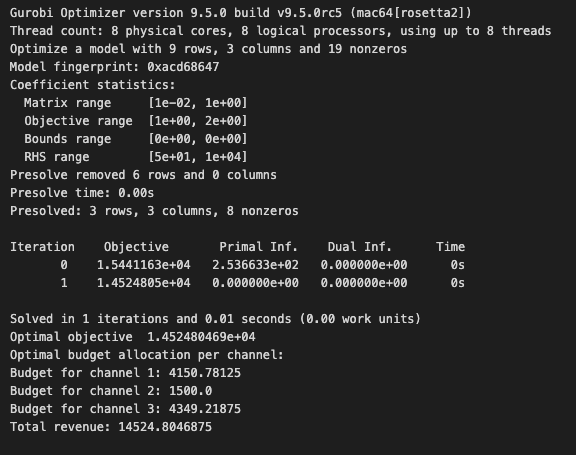
The solved model indicates a total optimized revenue of $14,525 from a $10,000 marketing spend, resulting in a ROAS of 1.4. In terms of allocation, Channel 1, 2, and 3 are assigned $4,151, $1,500, and $4,349 respectively.
Conclusion
We have now translated the problem and its constraints into an optimization model, successfully resolved using Gurobi. By orchestrating these tools, we’ve unravelled the art of maximizing revenue and enhancing the Return on Ad Spend (ROAS) across distinct advertising channels. This tutorial is your stepping stone towards creating tailor-made solutions for optimizing ad spending allocation, catalyzing your journey to effective marketing strategies with a data-driven edge.
Thank you for reading! You can find the complete code on my GitHub.
Subscribe to DDIntel Here.
DDIntel captures the more notable pieces from our main site and our popular DDI Medium publication. Check us out for more insightful work from our community.
Register on AItoolverse (alpha) to get 50 DDINs
Join our network here: https://datadriveninvestor.com/collaborate
DDI Official Telegram Channel: https://t.me/+tafUp6ecEys4YjQ1


