
Act like a Machine Learning Pro in Simple Way (PyCaret + mlflow)
Build your own ML lab and become a ML Professional to your boss in a simple way.
Machine learning (ML) has been well known for a while, since a massive amount of companies want to merge their business with AI or Data Science related. Along with the data project, analysis, the funniest part would be the machine learning model.
This article introduces a concept to you of Machine Learning Training (ML) & Monitoring (MLOps). Also a practical code for you to Build your own Machine Learning Lab. Like a scientist.
If you want to do it in an Light Way, without configuring your computer, you can reference my another article — Easily Build A Machine Learning Lab in Cloud.
**In this article, code example is running with Jupyter Notebook**
Pre-Setup
1. Install necessary libraries:
2. Retrive sample data:
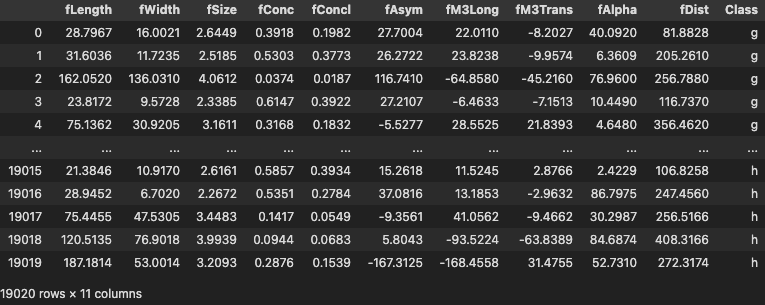
You can use any dataset, alternatively, you can also use the following code to quickly retrieve sample data:
PyCaret
A powerful machine learning tool to help you handle the complicated procedures: (reference here)
- Data Preprocessing & Handling
- ML Model Selection
- ML Model Optimization
- Model Deployment
Setup an ML experiment
Model Selection & Optimisation
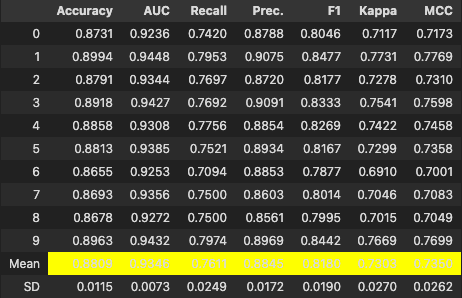
After running the above block, you should be expected to see the following result in Jupyter Notebook, which is the trained model performance summary after a complicated ML procedure.
MLFlow + PyCaret:
MLFlow is a comprehensive library to help you monitor the ML model information: (reference here)
- Performance (Accuracy, ROC)
- Feature Importance
- Other Details Result
Preview
Setup an ML experiment with Logging
Similar to the code above, but with more statements in the setup.
Activate mlflow
After the model is optimized, we can just simply type the follow command to activate the mlflow
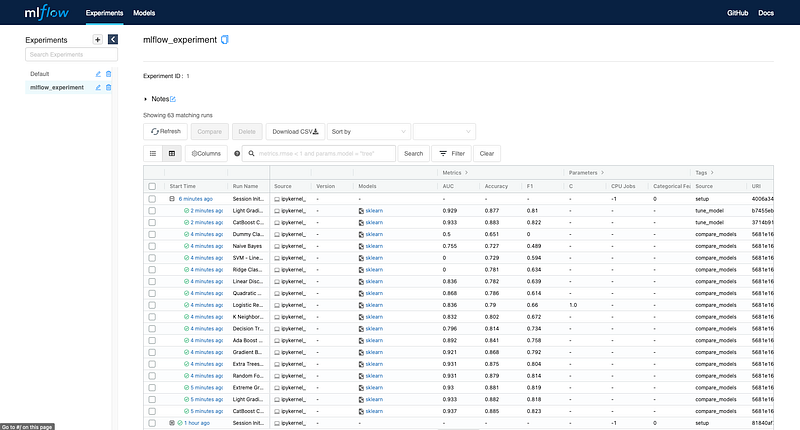
After running the command, you should be able to go to the url with default: http://127.0.0.1:5000 or http://localhost:5000
Then you will go to your own Machine Learning Laboratory!
Conclusion
BAM!!! Your ML laboratory is constructed. Next step I will also share other information in other articles with talking the details of PyCaret, mlflow and how do we make a end-to-end process.
If you have some ideas or questions, you are welcome to contact me via LinkedIn or email: [email protected], then say hello!


