
Absolute Beginners Guide For Finding P4 Bugs (With Real Example!)-Part 2
Hey guys! I’m back with some easy bugs to catch for beginners and I hope you’ll implemented if you’re starting out. So lets get into it.
DMARC… What exactly is it?
DMARC stands for Domain-based Message Authentication, Reporting, and Conformance. Quite mouthful; it is basically an email authentication protocol that helps organizations protect their domains from email spoofing, phishing attacks, and other email-based threats.
How does it work?
DMARC relies on two authentication mechanisms: SPF (Sender Policy Framework) and DKIM (Domain Keys Identified Mail).
SPF (Sender Policy Framework)
SPF is an email authentication protocol that allows domain owners to define which mail servers are authorized to send emails on behalf of their domain. When an email is received, the recipient’s mail server checks the SPF record of the sender’s domain to verify if the sending mail server is listed as an authorized sender. If the sending mail server is not listed in the SPF record, the email may be flagged as potentially spoofed or unauthorized. SPF helps prevent email spoofing and unauthorized use of domain names in email headers, thereby reducing the risk of phishing attacks and email fraud.
DKIM (Domain Keys Identified Mail)
DKIM is another email authentication mechanism that uses cryptographic signatures to verify the authenticity and integrity of email messages. DKIM signatures include a cryptographic hash of the email message’s content, which allows the recipient’s mail server to verify that the message has not been altered in transit. DKIM helps prevent email tampering, forgery, and modification during transit, ensuring that the content of the email remains intact and trustworthy. With DKIM, the sender’s mail server signs outgoing emails with a private key, and the recipient’s mail server can then verify the signature using the corresponding public key published in the sender’s DNS records.
How does DMARC Record look like?
It looks something like this —

Now you might be wondering, what the heck are all these and what am I going to do about it? Don’t worry, I will be explaining all these. As you can see there are many parameters like v , p , fo , rua and ruf; these have special meanings as follows:
v — stands for Version. It identifies the record as DMARC record.
p — stands for Policy. It determines what policy to apply if the record matches. There are three valid cases which would be ‘none’, ‘quarantine’, or ‘reject’.
P could contain three values as:
1. P=none (Only monitors, no actions are taken)
2. P=quarantine (Delivers to spam folder)
3. P=reject (discards the email)
fo — stands for Forensic Reporting. It provides requested options for generation of failed reports.
rua — stands for receivers. It is the address which the feedback is to be sent.
ruf — stands for Forensic Receivers. It is the address where the message specific failure information is to be reported.
How to check DMARC issue?
You can check DMARC issues of any website using www.mxtoolbox.com. You can go there and look for the domain to verify if the DMARC policy is enabled or not.
Real Example
I have taken this domain from Mastercard Bug Bounty platform from Bugcrowd.
NOTE: DMARC is out of scope in the program, and as I’ve mentioned earlier, you should always check if the vulnerability is in-scope. This is the reason I thought of working with this example. This would categorise in P4 bug if it was in-scope.

I’ve used the domain: demo.priceless.com for this example
- Go to www.mxtoolbox.com.
- Type demo.priceless.com and search enter.
It will show you something like this:
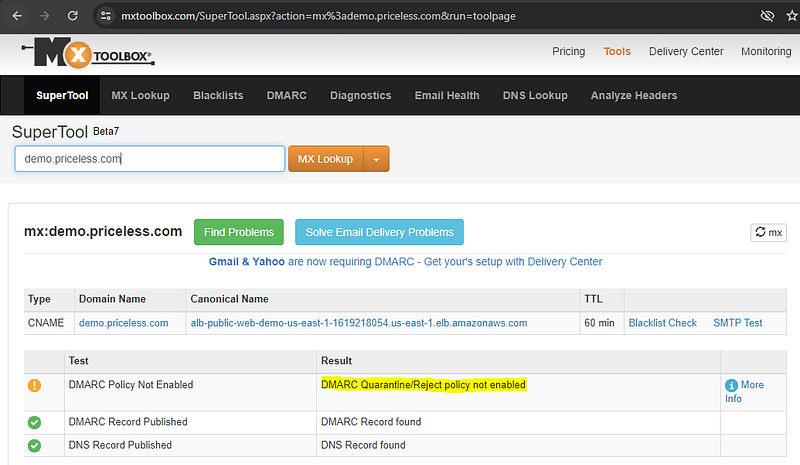
Here you can see that DMARC is not enabled, you can go ahead to test it if it really works.
3. Go to www.emkei.cz . Put on the details and put the from email to [email protected], put the sender’s email and click send.
4. I have used my own Bugcrowd email for this. Everyone can use it. You can create your own profile at Bugcrowd and can get your test email too.
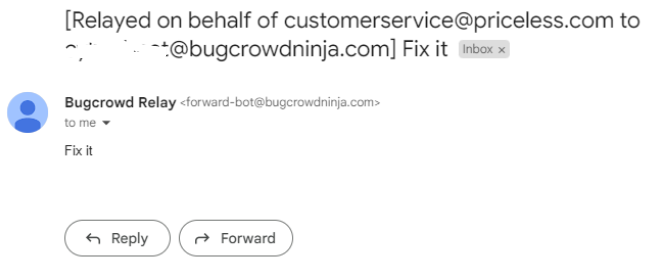
You’ve successfully mailed from customer service to the victim! This is what this vulnerability does.
I hope you liked reading this article. You can go ahead, try on your own and understand how it works. Until next time!


