
About Ordinals, BRC-20, Inscription
My thoughts
The ORC, BRC, or SRC represents an entirely experimental approach, characterized by high-risk assets and limited supporting tools, contributing to an uncertain future. These platforms are built upon the Bitcoin network, known for its drawbacks such as slowness and high costs, leading to the emergence of alternatives like Ethereum, TRON, EOS, Solana, and subsequent blockchain versions (v3, v4, etc.). These advancements aim to overcome the limitations of Bitcoin’s original v1.0.
However, it’s crucial to note that the inscription, driven by short-term FOMO trends, contradicts the progressive development within the blockchain and decentralized finance (DeFi) space. Anchored in an outdated protocol, it lacks the potential for long-term viability and may hinder rather than contribute to the evolution of blockchain technology.
Getting Started
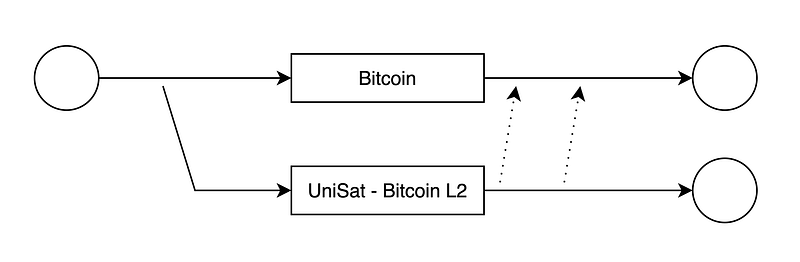
UniSat runs its Layer 2 for the Inscriptions management. We need to use their API for custom applications or use their Wallet.
With UniSat Wallet
- Install Wallet: https://unisat.io/
- Config Testnet & Faucet: https://docs.unisat.io/brc20-swap/introduction-to-brc20-swap/testnet-guide
- Try to inscribe things, or deploy/mint/transfer brc-20 in testnet: https://testnet.unisat.io/inscribe
- Docs: https://docs.unisat.io/brc-20/transfer-brc-20-in-unisat-wallet
- BRC-20 Spec: https://domo-2.gitbook.io/brc-20-experiment/
With your own Bitcoin wallet Keypair
You can export private key (WIF) from UniSat Wallet
OpenAPI: https://open-api-testnet.unisat.io/swagger.html
The flow for UniSat Inscribe:
- Getting an API Key: To use the UniSat’s OpenAPI, send them ([email protected]) an email, and you will get an free-plan API KEY. The process time ~ 3 days
- Explore: https://docs.unisat.io/dev/unisat-developer-service/unisat-inscribe
- Call UniSat API to create an Inscribe order => Unisat will create an inscription on Layer 2 which is mapped with Layer 1’s tx
- Pay the order by sending the BTC amount to UniSat’s payer address which is in order response
- We do an extra step for transfer: use UniSat inscription UTXO as input to the next transfer transaction to the receiver.
How to send Bitcoin with keypair:
NOTE: We can send multiple inscription, but total amount must be a sum of inscription value
- Inputs must be ordered (inscription first, the last one is normal for spending): [inscription tx (546 sats) + unspent non-inscription type for pay fee]
- Output: [receiver with same inscription amount 546 sats + sender to receive the remaining unspent]
- Get NON Inscription UTXO: https://docs.unisat.io/dev/unisat-developer-service/general/addresses/get-btc-utxo
- Get Inscription UTXO: https://docs.unisat.io/dev/unisat-developer-service/general/addresses/get-inscription-utxo
  // View UTXO: https://blockstream.info/testnet/api/address/${address}/utxo
  // View UTXO: https://mempool.space/testnet/api/address/${address}/utxo
  await sendBitcoin(
    'tb1q2fzh9f7ss8eu56fnv2zhr56a0wd3g64xp7d4xk',
    'tb1pmamsssqlv0j7dda8g04phcsn0qzndy6kff4hq293e85drju0f7sq5uzedx',
    1092,
    1,
    100,
    [
      { txid: '21dbc1b32965dbb5f403d68acf245de4d513101a31bf3f56ae9e6d1622a8300a', vout: 1, value: 546 },
      { txid: '3175fa879465675825e3bae87effb26bcd1b8420fae2aa7a8ab07d730057a384', vout: 0, value: 546 },
      { txid: 'f3408ca6eb853e0ed2ec0cdacdb5a3946c4dc022a1db2e91dab767e32c5ad854', vout: 1, value: 3979192 },
    ],
  );
Single transfer inscription:
- https://mempool.space/testnet/tx/3175fa879465675825e3bae87effb26bcd1b8420fae2aa7a8ab07d730057a384
- https://mempool.space/testnet/tx/f3408ca6eb853e0ed2ec0cdacdb5a3946c4dc022a1db2e91dab767e32c5ad854
Multi transfer inscriptions:


