
Apple’s Freeform App Is Dangerously Good
Watch out Gliffy, Figma, Whimsical and all ye others, Apple is coming for ya…
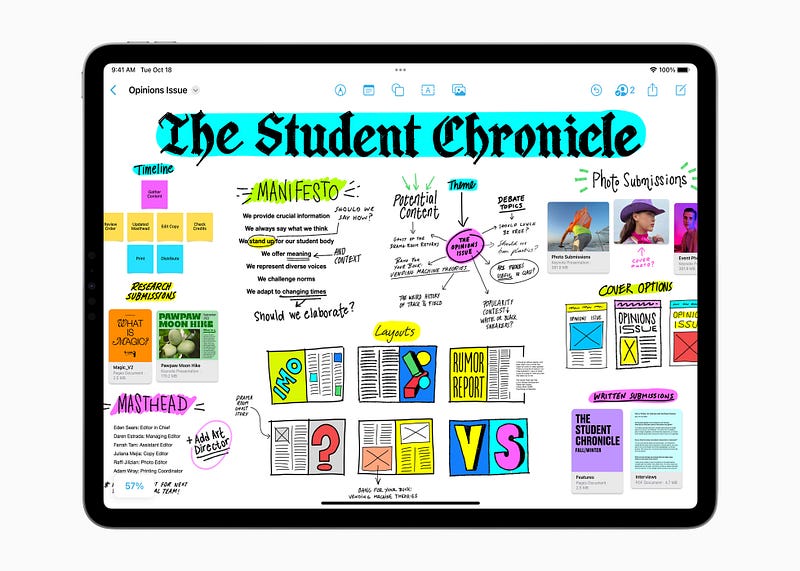
The week before going on my very well-deserved three week time off from work, one of the very last things I worked on were some software architecture diagrams. In terms of tools, I had three fairly obvious choices: Gliffy Diagrams, Figma and Whimsical. Of course there are plenty more others out there, but these are the ones I have used the most in the past. Gliffy, because it was free and easy to use, Figma, because the company had a license, and Whimsical, because the company had a license and it is also straightforward to use, while offering a somewhat more polished result than Gliffy. I’m sure most of ye know at least one or two of these tools and have used them at some point or another, so when claiming that Apple’s new Freeform app is dangerously good, you’re either intrigued or defensive. Either reaction is valid.
Apple’s Freeform came a bit out of nowhere when it was first announced earlier in 2022. If you think of it, in a very limited form, we already had some functionality in Apple’s Notes app. I use Notes quite extensively for literally just that — quick notes and scanning documents. It’s a quite capable app and syncs pretty well across devices, so it’s not entirely surprising that Apple realised it has a lot of the tools already built to create another built-in solution within its ecosystem. Does it do everything? No, but it also doesn’t have to. Within the app’s simplicity and straightforwardness lies a lot of dangerous (for the competition) potential.
While Freeform might not immediately make Gliffy, Whimsical or Figma irrelevant, the first two of the three should definitely worry about a future, where Apple’s alternative is popular.
Because it really is an alternative. I fired up the app with mixed feelings. In some ways, I like knowing there are third-party tools out there that do a good job at helping me do my job well, but I also can’t deny that when I have a native app within the operating system that delivers enough for me to feel happy about the result, I will go with the native app. Every time. Think video screen recordings. Sure, there are other tools out there, but QuickTime does a good enough job, so I never really felt the need to purchase a third-party tool.
So, I gave it a proper try…
What I didn’t want to do, was yet another SCRUM board that probably half the internet will try to create with it. It took me less than 5 minutes of looking at the features to realise, that’s going to be a child’s game to do with Freeform. I needed a more exotic challenge, so I chose something from my good ol’ Cisco days, and drew a networking architecture diagram. The one I used as reference, can be found at the following link.
You see, as a senior, staff, or principal software engineer you’ll find yourself plenty of times having to quickly throw together something to illustrate how the software is built, what the key pieces are, how they interact with each other, the data flow, etc. Very similarly network professionals would need to do the same, and while there are in Cisco’s case for instance, simulators that can also be used for creating such diagrams, you might not want to bother with that. Furthermore, I thought this was a good enough attempt to get familiarised with a lot of the features and capabilities of Freeform while also demonstrating its viability. After about 30 minutes, this is what I came up with:
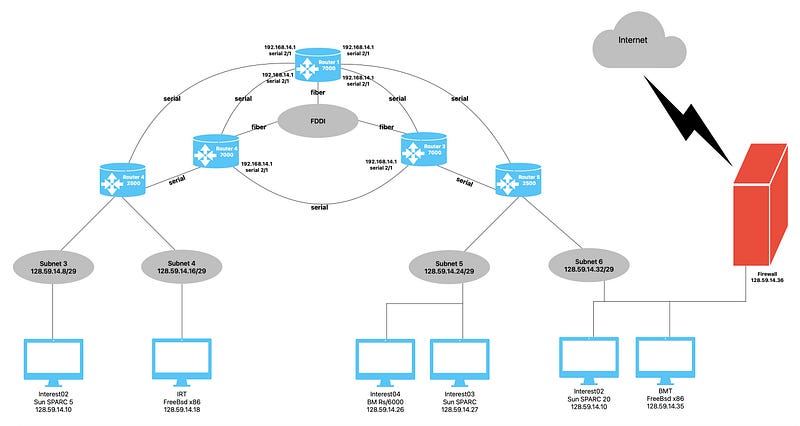
I used a number of shapes, lines and text together with some icons. Nothing fancy, but it allowed me to learn quite a few tricks about using the software:
- The official user guide to Freeform is available on the Apple site. I only needed it once, though, when I wanted to find out how to rotate an element. Turns out, the command button will give you that option on any element, including text.
- There is an expansive array of searchable elements, from basic shapes to icons.
- Editing each of those, resizing them, making connection points to them is all very self-explanatory.
- Selecting multiple elements at the same time is possible. Half of the work I did was copy-pasting element groups.
- You can also describe every element for accessibility purposes. Nice touch, Apple. Very nice touch!
- The general UX is very smooth. It’s so obvious that it’s a native app, that coming from Figma for instance that runs in the browser (the way most people use it), Freeform was a joy to use.
- The resulting diagrams look good enough to use at a board-room presentation.
- The learning-curve for most tasks is virtually zero.
And that last point is essential. While I am not claiming that Figma for instance will suddenly lose all of its customers, its learning-curve is not something I’d ever mention as a positive. In fact, it’s one of the tools I actively avoid using. To create a board, a diagram, or anything that I might use with my team in a SCRUM retro or presentation, I should not need to waste hours learning how to use. I just wanna drag stuff, type stuff, connect stuff and call it a day.
If you know how to use a computer, you know how to use Freeform.
Your counterargument sucks. Maybe…
I can already hear from the back of the internet voices claiming that all the other tools were created with mass business adoption in mind. Those voices aren’t wrong. Many tools are built with businesses in mind. Multi-user licences, seats, corporate deals and all that, are very real and often lucrative, but there are a couple of other aspects to consider.
First of all, we’re looking at an economic downturn. This frequently means that businesses will review their costs, and they very well might just decide that paying for Whimsical, Figma or whatever else, is kind of a waste of money when there is a native tool that does a good enough job already and costs nothing. You might say, it only applies to Apple customers, and that’s also true, but given how plenty of companies use Apple devices — because Freeform works on mobile, tablet, and desktop — and Apple had the best sales in 2022 — up by 40% — in personal computers, there is a good chunk of marketshare they can influence.
Single licence users frequently translate to business licence users. Companies often forget that.
The second aspect worth considering is single user licences. What often companies forget, is that ultimately every user, regardless of what licensing package they are part of, ultimately likes using the tools they like using, and that can make a dent in 3rd party software licences. If suddenly half your employees say they’re happy with Freeform, as a company, you’ll either be reducing the number of 3rd party app seats you subscribe to, or you just push the rest of the company to adopt the built-in app too. Microsoft Teams is a good example. Companies in droves left Slack, even when Teams to this day is a lesser offering.
Is Freeform the killer app, then?
Killer? For small 3rd party apps, potentially yes. I do worry about the likes of Gliffy, Whimsical and many other diagram apps. While Freeform isn’t perfect and has plenty of space to grow, as currently it’s visibly a bunch of existing Apple iOS and macOS features bundled into one app, it is a quite capable app, and starting today, I don’t quite see why I would go back to say, Whimsical.
When it comes to large products like Figma, or Miro (would love your thoughts on this, Henrik Ståhl) it’s a bit of a different conversation. It won’t dethrone the alternatives, and frankly, I’m not even sure if it wants to, however Freeform will definitely make a dent in their business and popularity. Freeform offers more than enough for everyone to reconsider where their hard-earned cash is being spent, and having the benefit of the Apple ecosystem built into the app, you’ve got to admit, it’s a compelling option.
What do you think? Will you give Freeform a try, or do you prefer your other 3rd party premium options?
Attila Vago — Software Engineer improving the world one line of code at a time. Cool nerd since forever, writer of codes and blogs. Web accessibility advocate, LEGO fan, vinyl record collector. Loves craft beer! Read my Hello story here! Subscribe and/or become a member for more stories about LEGO, tech, coding and accessibility! For my less regular readers, I also write about random bits and writing.


