avatarCarla Martins

Free AI web copilot to create summaries, insights and extended knowledge, download it at here

8757

Abstract

ss="hljs-number">4</span>.<span class="hljs-number">50</span>, <span class="hljs-number">1</span>, <span class="hljs-number">100</span>) <span class="hljs-attribute">FEV1_1</span> = np.random.uniform(<span class="hljs-number">3</span>.<span class="hljs-number">75</span>, <span class="hljs-number">1</span>.<span class="hljs-number">2</span>, <span class="hljs-number">100</span>) <span class="hljs-attribute">FEV1_2</span> = np.random.uniform(<span class="hljs-number">2</span>.<span class="hljs-number">35</span>, <span class="hljs-number">1</span>.<span class="hljs-number">2</span>, <span class="hljs-number">100</span>)</pre></div><div id="fc90"><pre><span class="hljs-comment">#Creating values for Broncho Dilation with 3 classes:</span> <span class="hljs-attribute">BD_0</span> = np.random.normal(<span class="hljs-number">150</span>,<span class="hljs-number">49</span>, <span class="hljs-number">100</span>) <span class="hljs-attribute">BD_1</span> = np.random.uniform(<span class="hljs-number">250</span>,<span class="hljs-number">50</span>,<span class="hljs-number">100</span>) <span class="hljs-attribute">BD_2</span> = np.random.uniform(<span class="hljs-number">350</span>, <span class="hljs-number">50</span>, <span class="hljs-number">100</span>)</pre></div><div id="75b8"><pre><span class="hljs-comment">#Creating labels variable with two classes (1)Disease (0)No disease:</span> <span class="hljs-attr">not_asthma</span> = np.zeros((<span class="hljs-number">150</span>,), dtype=int) <span class="hljs-attr">asthma</span> = np.<span class="hljs-literal">on</span>es((<span class="hljs-number">150</span>,), dtype=int</pre></div><p id="d40e">Now we will concatenate the previous created values into three predictive variables and one outcome variable:</p><div id="eeda"><pre>#Concatenate classes <span class="hljs-keyword">into</span> one <span class="hljs-built_in">variable</span>:</pre></div><div id="220b"><pre><span class="hljs-attr">FeNO</span> = np.concatenate([FeNO_0, FeNO_1, FeNO_2]) <span class="hljs-attr">FEV1</span> = np.concatenate([FEV<span class="hljs-number">1_0</span>, FEV<span class="hljs-number">1_1</span>, FEV<span class="hljs-number">1_2</span>]) <span class="hljs-attr">BD</span> = np.concatenate([BD_0, BD_1, BD_2]) <span class="hljs-attr">dx</span> = np.concatenate([not_asthma, asthma])</pre></div><p id="2d01">The next step is to create a DataFrame and add the variables to the DataFrame:</p><div id="d8b6"><pre><span class="hljs-comment">#Create DataFrame:</span> <span class="hljs-attr">df</span> = pd.DataFrame()</pre></div><div id="d8e6"><pre><span class="hljs-number">#Add</span> variables to DataFrame: df<span class="hljs-selector-attr">[<span class="hljs-string">'FeNO'</span>]</span> = FeNO<span class="hljs-selector-class">.tolist</span>() df<span class="hljs-selector-attr">[<span class="hljs-string">'FEV1'</span>]</span> = FEV1<span class="hljs-selector-class">.tolist</span>() df<span class="hljs-selector-attr">[<span class="hljs-string">'BD'</span>]</span> = BD<span class="hljs-selector-class">.tolist</span>() df<span class="hljs-selector-attr">[<span class="hljs-string">'dx'</span>]</span> = dx<span class="hljs-selector-class">.tolist</span>()</pre></div><p id="d3c6">We can take a look of our DataFrame by simply typing “<b>df</b>” to check if everything is OK. It is possible to see that our DataFrame has 4 columns (three predictive variables and one outcome variable), and 300 rows.</p><figure id="85b3"><img src="https://cdn-images-1.readmedium.com/v2/resize:fit:800/1*r8k-f0fNuUiy2XQttg9XDw.png"><figcaption></figcaption></figure><p id="7609"><b>Exploratory Data Analysis:</b></p><p id="0119">This is a simple Exploratory Data Analysis (EDA) just to understand how our variables behave and how they relate with each other and with the outcome (disease presence or absence). First we will see how our variables are distributed according to the disease presence or not:</p><div id="aede"><pre><span class="hljs-meta">#Exploring dataset:</span></pre></div><div id="2fb3"><pre>sns.pairplot(df, <span class="hljs-attribute">kind</span>=<span class="hljs-string">"scatter"</span>, <span class="hljs-attribute">hue</span>=<span class="hljs-string">"dx"</span>) plt.show()</pre></div><figure id="aa22"><img src="https://cdn-images-1.readmedium.com/v2/resize:fit:800/1*cSIRa2rjEBwkvhJfjymKrQ.png"><figcaption></figcaption></figure><p id="2a83">We can check the ability of the different parameters to distinguish between disease presence/absence. The parameter “BD” showed the worst power to distinguish between the two classes, has we can see higher overlap of values.</p><div id="7cb7"><pre>sns.boxplot( <span class="hljs-attribute">x</span>=df[<span class="hljs-string">"dx"</span>], <span class="hljs-attribute">y</span>=df[<span class="hljs-string">"FEV1"</span>] )</pre></div><figure id="9ce8"><img src="https://cdn-images-1.readmedium.com/v2/resize:fit:800/1*oJPdqXlM_D7HjsoX_KO55Q.png"><figcaption></figcaption></figure><div id="fb61"><pre>sns.boxplot( <span class="hljs-attribute">x</span>=df[<span class="hljs-string">"dx"</span>], <span class="hljs-attribute">y</span>=df[<span class="hljs-string">"FeNO"</span>] )</pre></div><figure id="e203"><img src="https://cdn-images-1.readmedium.com/v2/resize:fit:800/1*37nBUAJeKvKnoUQ9-lH-zw.png"><figcaption></figcaption></figure><div id="f539"><pre>sns.boxplot( <span class="hljs-attribute">x</span>=df[<span class="hljs-string">"dx"</span>], <span class="hljs-attribute">y</span>=df[<span class="hljs-string">"BD"</span>] )</pre></div><figure id="76c9"><img src="https://cdn-images-1.readmedium.com/v2/resize:fit:800/1*uzQD2iHIDuY6YlobdFWMcw.png"><figcaption></figcaption></figure><p id="b358">And then we can check correlations between the difference parameters. Are correlations are always stronger for the cases when asthma is present, and less significant when disease is absent.</p><div id="5d9f"><pre>sns.lmplot(<span class="hljs-attribute">x</span>=<span class="hljs-string">"FEV1"</span>, <span class="hljs-attribute">y</span>=<span class="hljs-string">"FeNO"</span>, <span class="hljs-attribute">data</span>=df, <span class="hljs-attribute">fit_reg</span>=<span class="hljs-literal">True</span>, <span class="hljs-attribute">hue</span>=<span class="hljs-string">'dx'</span>, <span class="hljs-attribute">legend</span>=<span class="hljs-literal">True</span>)</pre></div><figure id="16d4"><img src="https://cdn-images-1.readmedium.com/v2/resize:fit:800/1*9qVlPkCojojcQY8nUZq9Qg.png"><figcaption></figcaption></figure><p id="29b0">We see a stronger correlation between FEV1 and FeNO when disease is presence, and this correlation is negative (seen by the negative slope), which means that for higher values of FeNO we will find lower values of FEV1.</p><div id="0f57"><pre>sns.lmplot(<span class="hljs-attribute">x</span>=<span class="hljs-string">"FEV1"</span>, <span class="hljs-attribute">y</span>=<span class="hljs-string">"BD"</span>, <span class="hljs-attribute">data</span>=df, <span class="hljs-attribute">fit_reg</span>=<span class="hljs-literal">True</span>, <span class="hljs-attribute">hue</span>=<span class="hljs-string">'dx'</span>, <span class="hljs-attribute">legend</span>=<span class="hljs-literal">True</span>)</pre></div><figure id="c458"><img src="https://cdn-images-1.readmedium.com/v2/resize:fit:800/1*za9FAf5RG4CDeREV2DzMuQ.png"><figcaption></figcaption></figure><p id="db93">When checking the correlation between FEV1 and BD, we found that a negative correlation is seen when asthma diagnosis is presence. This way, lower values of FEV1 are associated with higher broncho dilation values.</p><div id="2a06"><pre>sns.lmplot(<span class="hljs-attribute">x</span>=<span class="hljs-string">"FeNO"</span>, <span class="hljs-attribute">y</span>=<span class="hljs-string">"BD"</span>, <span class="hljs-attribute">data</span>=df, <span class="hljs-attribute">fit_reg</span>=<span class="hljs-literal">True</span>, <span class="hljs-attribute">hue</span>=<span class="hljs-string">'dx'</span>, <span class="hljs-attribute">legend</span>=<span class="hljs-literal">True</span>)</pre></div><figure id="8717"><img src="https://cdn-images-1.readmedium.com/v2/resize:fit:800/1*0VESoy7lUVlmfgIIPGrjfw.png"><figcaption></figcaption></figure><p id="c9ad">Lastly, the correlation between FeNO and BD shows that higher values of FeNO are associated with higher values of BD when asthma is present (positive correlation).</p><p id="7b1c"><b>Splitting data into train and test Data sets:</b></p><p id="a333">We will use 80% of our data to build the model, and the remaining 20% to test the model. But first, we will create our <b><i>X</i></b> and <b><i>y</i></b> variables, where <b><i>X</i></b> represents the dataset with th

Options

e predictors, and <b><i>y</i></b> an array of values with the outcome.</p><div id="135b"><pre><span class="hljs-comment">#Creating X and y:</span> <span class="hljs-attr">X</span> = df.drop(<span class="hljs-string">'dx'</span>, axis=<span class="hljs-number">1</span>) <span class="hljs-attr">y</span> = df[<span class="hljs-string">'dx'</span>]</pre></div><div id="ccd2"><pre><span class="hljs-comment">#Data split into train and test:</span> <span class="hljs-attribute">X_train</span>, X_test, y_train, y_test = train_test_split(X, y, test_size=<span class="hljs-number">0</span>.<span class="hljs-number">20</span>)</pre></div><p id="e75a"><b>Build and evaluate the model:</b></p><div id="b8ed"><pre><span class="hljs-comment">#Fit the model:</span> <span class="hljs-attr">logisticregression</span> = LogisticRegression().fit(X_train, y_train)</pre></div><div id="5399"><pre><span class="hljs-comment">#Evaluate the model:</span> <span class="hljs-keyword">print</span>(<span class="hljs-string">"training set score: %f"</span> % logisticregression.score(X_train, y_train))<span class="hljs-keyword">print</span>(<span class="hljs-string">"test set score: %f"</span> % logisticregression.score(X_test, y_test))</pre></div><figure id="1905"><img src="https://cdn-images-1.readmedium.com/v2/resize:fit:800/1*wvfwXvkNd5deQHflOG8szg.png"><figcaption></figcaption></figure><p id="c60f">As we can see, our model performed slightly better on the training set, which may indicate we are over-fitting. Fortunately, we can use the <b><i>C</i></b> value to adjust the model and try to find a best model that weights the compromise between model complexity, over-fitting and under-fitting.</p><p id="05ec">Lets see what happens if we set <b><i>C=100</i></b>:</p><div id="7eff"><pre><span class="hljs-comment">#C=100</span> <span class="hljs-attr">logisticregression100</span> = LogisticRegression(C=<span class="hljs-number">100</span>).fit(X_train, y_train)</pre></div><div id="7d6e"><pre>print(<span class="hljs-string">"training set score: %f"</span> % logisticregression100.score(<span class="hljs-name">X_train</span>, y_train)) print(<span class="hljs-string">"test set score: %f"</span> % logisticregression100.score(<span class="hljs-name">X_test</span>, y_test))</pre></div><figure id="2ded"><img src="https://cdn-images-1.readmedium.com/v2/resize:fit:800/1*wpqSqr9k2JoouJVKUX8lRw.png"><figcaption></figcaption></figure><p id="154a">Setting <b><i>C=100</i></b> has a small effect on training set score, with no effect on test set score, which means that it does not improve the model.</p><p id="c3a4">Setting <b><i>C=0.01</i></b>:</p><div id="57e0"><pre><span class="hljs-comment">#C=0.01</span> <span class="hljs-attribute">logisticregression001</span> = LogisticRegression(C=<span class="hljs-number">0</span>.<span class="hljs-number">01</span>).fit(X_train, y_train)</pre></div><div id="d459"><pre>print(<span class="hljs-string">"training set score: %f"</span> % logisticregression001.score(<span class="hljs-name">X_train</span>, y_train)) print(<span class="hljs-string">"test set score: %f"</span> % logisticregression001.score(<span class="hljs-name">X_test</span>, y_test))</pre></div><figure id="1363"><img src="https://cdn-images-1.readmedium.com/v2/resize:fit:800/1*u0C0LVN8imVLf88AH9cHwA.png"><figcaption></figcaption></figure><p id="0f60">Setting <b><i>C=0.01</i></b> decreases both training set score and test set score, which means that it is not a good value for this parameter.</p><p id="c08c"><b>Finding the best <i>C</i> value:</b></p><p id="cdb6">To find the best <b><i>C</i></b> value we should use a more sophisticated approach than trial and error. One way to do it is by plotting several accuracy score at different <b><i>C</i></b> values for both training and test sets.</p><div id="6931"><pre><span class="hljs-attr">training_accuracy</span> = [] <span class="hljs-attr">test_accuracy</span> = []</pre></div><div id="676d"><pre><span class="hljs-comment"># try c values from 0.001 to 100:</span> <span class="hljs-attribute">c_settings</span> = np.arange(<span class="hljs-number">0</span>.<span class="hljs-number">001</span>, <span class="hljs-number">100</span>, <span class="hljs-number">0</span>.<span class="hljs-number">1</span>)</pre></div><div id="372b"><pre>for <span class="hljs-selector-tag">i</span> in c_settings: # build the model clf = <span class="hljs-built_in">LogisticRegression</span>(C=i) clf.<span class="hljs-built_in">fit</span>(X_train, y_train) # record training set accuracy training_accuracy.<span class="hljs-built_in">append</span>(clf.<span class="hljs-built_in">score</span>(X_train, y_train)) # record generalization accuracy test_accuracy.<span class="hljs-built_in">append</span>(clf.<span class="hljs-built_in">score</span>(X_test, y_test))</pre></div><div id="f3f0"><pre>plt.plot(c_settings, training_accuracy, <span class="hljs-attribute">label</span>=<span class="hljs-string">"training accuracy"</span>) plt.plot(c_settings, test_accuracy, <span class="hljs-attribute">label</span>=<span class="hljs-string">"test accuracy"</span>) plt.legend()</pre></div><figure id="0dbc"><img src="https://cdn-images-1.readmedium.com/v2/resize:fit:800/1*rcymtSRoTiqyh_RJBKaSaQ.png"><figcaption></figcaption></figure><p id="3ea8">In the plot we can see that training and test accuracy values come closer after approximately a <b><i>C</i></b> value of 10. It is not entirely clear in this plot, so we can plot a smaller interval:</p><figure id="a94f"><img src="https://cdn-images-1.readmedium.com/v2/resize:fit:800/1*qMyFDWkxMqywiiOtAMgihw.png"><figcaption></figcaption></figure><p id="4567">Now it is easy to see that at <b><i>C=12 </i></b>training and test accuracy values are closer, which means this is our optimal <b><i>C </i></b>value. We can check it:</p><figure id="3179"><img src="https://cdn-images-1.readmedium.com/v2/resize:fit:800/1*1ANb4utXMj5itQIRHAlA9w.png"><figcaption></figcaption></figure><p id="d640"><b>Build a visualisation for the model:</b></p><p id="3022">Lastly, we can visualise our model performance by build a graph with the decision regions. For doing that, we need our DataFrame to be in csv format:</p><div id="f380"><pre><span class="hljs-title">df</span>.to_csv('<span class="hljs-class"><span class="hljs-keyword">data</span>.csv', index = <span class="hljs-type">False</span>)</span> <span class="hljs-class"><span class="hljs-keyword">data</span> = pd.read_csv('<span class="hljs-title">data</span>.<span class="hljs-title">csv'</span>)</span></pre></div><p id="cf2d">Then we build a function for the graph using two main variables (we know we will use FEV1 and FeNO, once BD has greater class overlap):</p><div id="a64c"><pre>def <span class="hljs-built_in">logisticReg_comparison</span>(data,c): x = data[[<span class="hljs-string">'FEV1'</span>,<span class="hljs-string">'FeNO'</span>,]].values y = data[<span class="hljs-string">'dx'</span>].<span class="hljs-built_in">astype</span>(int).values LogReg = <span class="hljs-built_in">LogisticRegression</span>(C=c) LogReg.<span class="hljs-built_in">fit</span>(x,y) <span class="hljs-built_in">print</span>(LogReg.<span class="hljs-built_in">score</span>(x,y)) #Plot decision region: <span class="hljs-built_in">plot_decision_regions</span>(x,y, clf=LogReg, legend=<span class="hljs-number">2</span>) #Adding axes annotations: plt.<span class="hljs-built_in">xlabel</span>(<span class="hljs-string">'X_train'</span>) plt.<span class="hljs-built_in">ylabel</span>(<span class="hljs-string">'y_train'</span>) plt.<span class="hljs-built_in">title</span>(<span class="hljs-string">'LogReg with C='</span>+<span class="hljs-built_in">str</span>(c)) plt.<span class="hljs-built_in">show</span>()</pre></div><div id="a7e5"><pre><span class="hljs-function"><span class="hljs-title">logisticReg_comparison</span><span class="hljs-params">(data,<span class="hljs-number">12</span>)</span></span></pre></div><figure id="569a"><img src="https://cdn-images-1.readmedium.com/v2/resize:fit:800/1*TC6vUpCD3wwnFdIg707IeA.png"><figcaption></figcaption></figure><p id="4105">Thank you for reading! Let me know if you have corrections or suggestions and don’t forget to subscribe to receive notifications about my future publications.</p><p id="6253"><b>If:</b> you liked this article, don’t forget to follow me and thus receive all updates about new publications.</p><p id="81d2"><b>Else If:</b> you want to read more, you can subscribe to Medium membership with <a href="https://cdanielaam.medium.com/membership">my referral link</a>. It will not cost you more but will pay me for a coffee.</p><p id="a24d"><b>Else:</b> Thank you!</p></article></body>

Logistic Regression for Binary Classification: Hands-On with SciKit-Learn

Using Python and Google Colab
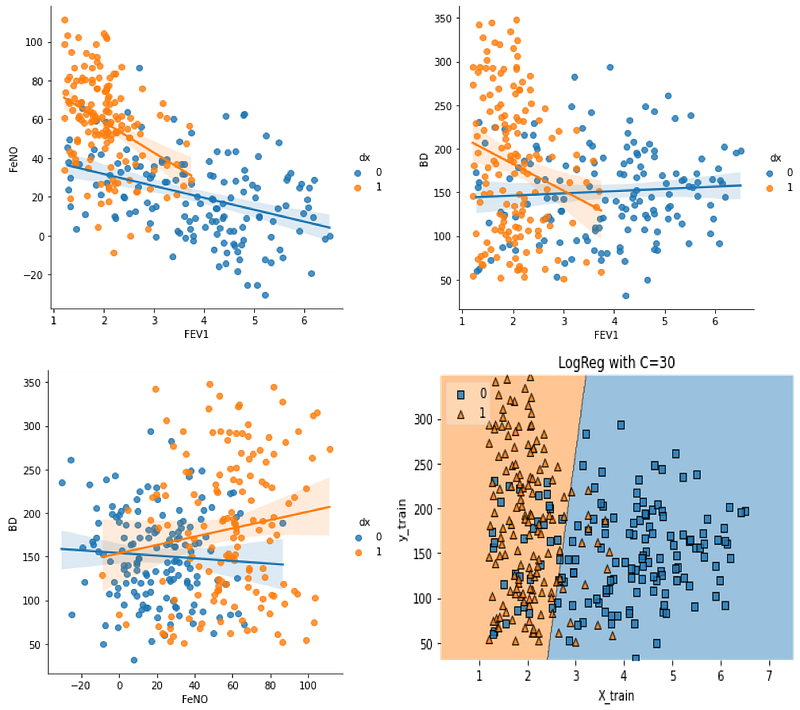
Table of contents:
1. Introduction
2. What type of problems can be solved with Logistic Regression
3. Mathematical Interpretation
4. The C parameter
5. Hands-On:
   -Import Libraries
   -Create Data
   -Exploratory data analysis
   -Splitting data into train and test data sets
   -Build and evaluate the model
   -Finding the best C value
   -Build a visualisation for the model

Logistic Regression is one of the first algorithms you will read, speak and listen about when the topic is Machine Learning. Logistic Regression is similar to multiple regression, but with a binary (dependent) output variable and continuous or categorical predictive variables. When the dependent variable is binary (1 or 0), we cannot use linear regression.

The output in logistic regression is expressed through a probability of occurrence, while in simple regression, a numerical value is obtained. Therefore, logistic regression presents itself as a method of determining the probability of occurrence of the predicted values ​​of a binary variable.

What type of problems can be solved with Logistic Regression?

Logistic Regression is used to solve binary or multi-class classification tasks. In this article we will only discuss binary classification. One good example of Logistic Regression use for classification purposes is for detecting disease, where several variables are used to predict a binary outcome (presence or absence of disease). The predictive variables can be either categorical, continuous or ordinal.

Mathematical interpretation

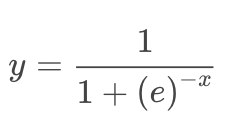
The general expression for Logistic Regression is:
And the graphical representation is:
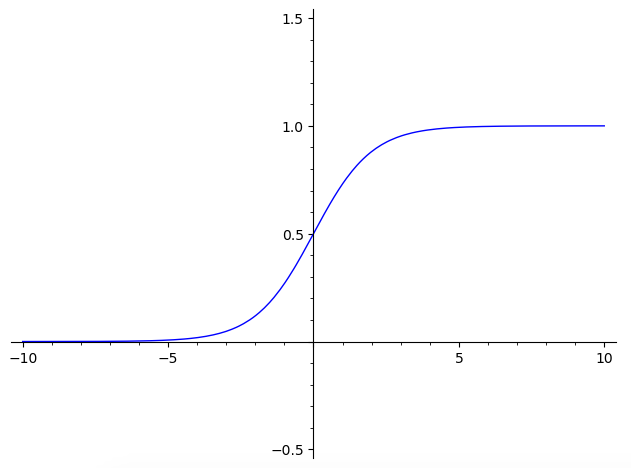
As you can see, the function range is between 0 and 1. When we fit the model to the logistic function we will change the x value with the coefficients of our data parameters and get a probability of our outcome being closer to 1, or closer to 0. You can also notice by graphical inspection that for x<0, the y value will be closer to 0, and for x>0, y value will be closer to 1. So, basically if you know if x is a positive or negative value, you will know which class the object belongs without needing to calculate y. However, you still need to know the value of y if you want know how strong is the prediction.

For example:

With x = 3:
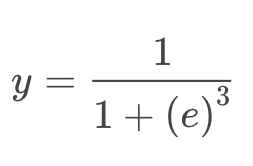
We will get:

Which means a great probability of the object to be in class 1. In contrast, if x= -4, then it has a great probability of being in class 0.

But how is x calculated in the model?

To fit our model, which means to calculate x value for the model, it is assumed a linear relationship between the predictive variables, and the probability of the outcome (y=1 or y=0). This way, x will be fitted using a linear regression technique, with an interception m, and coefficient values for predictive variables B1, B2, B3...

I have explained linear regression in previous publications, and you can find it here and here.

The C parameter:

The C value in Logistic Regression is an user adjustable parameter that controls regularisation. In simple terms, higher values of C will instruct our model to fit the training set as best as possible, while lower C values will favour a simple models with coefficients closer to zero.

Hands-on:

Now we will fully implement and evaluate a Logistic Regression model using SciKit-Learn and Python. We will also learn how to adjust model parameters to control model for complexity, over-fitting and/or under-fitting.

Import the necessary libraries:

#Import Libraries:
from random import random
from random import randint
import numpy as np
import pandas as pd
import matplotlib.pyplot as plt
import seaborn as sns
from sklearn.model_selection import train_test_split
from sklearn.linear_model import LogisticRegression
from mlxtend.plotting import plot_decision_regions

Create Data:

We will create data for this case study by building a dataset to be used as example. I will name the variables as a parameters of lung function (FEV1 and BD) and lung inflammation (FeNO), and the outcome variable as disease presence or not, in this case for asthma. But please remember, this is not real data, is data artificially created for this example, and based on my expert knowledge in this field. If you are using your own data, you can jump directly to step “Exploratory Data Analysis”.

#Fabricating variables:
#Creating values for FeNO with 3 classes:
FeNO_0 = np.random.normal(15,20, 100)
FeNO_1 = np.random.normal(35,20, 100)
FeNO_2 = np.random.normal(65, 20, 100)
#Creating values for FEV1 with 3 classes:
FEV1_0 = np.random.normal(4.50, 1, 100)
FEV1_1 = np.random.uniform(3.75, 1.2, 100)
FEV1_2 = np.random.uniform(2.35, 1.2, 100)
#Creating values for Broncho Dilation with 3 classes:
BD_0 = np.random.normal(150,49, 100)
BD_1 = np.random.uniform(250,50,100)
BD_2 = np.random.uniform(350, 50, 100)
#Creating labels variable with two classes (1)Disease (0)No disease:
not_asthma = np.zeros((150,), dtype=int)
asthma = np.ones((150,), dtype=int

Now we will concatenate the previous created values into three predictive variables and one outcome variable:

#Concatenate classes into one variable:
FeNO = np.concatenate([FeNO_0, FeNO_1, FeNO_2])
FEV1 = np.concatenate([FEV1_0, FEV1_1, FEV1_2])
BD = np.concatenate([BD_0, BD_1, BD_2])
dx = np.concatenate([not_asthma, asthma])

The next step is to create a DataFrame and add the variables to the DataFrame:

#Create DataFrame:
df = pd.DataFrame()
#Add variables to DataFrame:
df['FeNO'] = FeNO.tolist()
df['FEV1'] = FEV1.tolist()
df['BD'] = BD.tolist()
df['dx'] = dx.tolist()

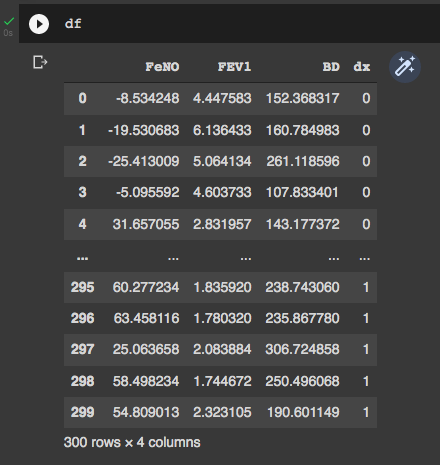
We can take a look of our DataFrame by simply typing “df” to check if everything is OK. It is possible to see that our DataFrame has 4 columns (three predictive variables and one outcome variable), and 300 rows.
Exploratory Data Analysis:

This is a simple Exploratory Data Analysis (EDA) just to understand how our variables behave and how they relate with each other and with the outcome (disease presence or absence). First we will see how our variables are distributed according to the disease presence or not:

#Exploring dataset:
sns.pairplot(df, kind="scatter", hue="dx")
plt.show()
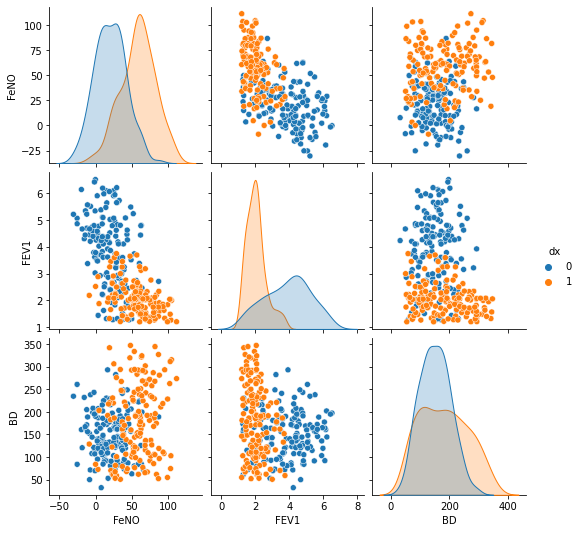
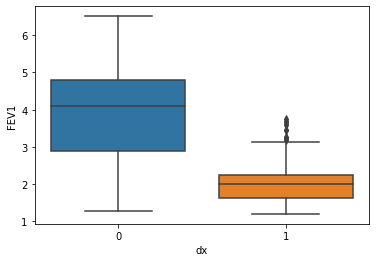
We can check the ability of the different parameters to distinguish between disease presence/absence. The parameter “BD” showed the worst power to distinguish between the two classes, has we can see higher overlap of values.

sns.boxplot( x=df["dx"], y=df["FEV1"] )
sns.boxplot( x=df["dx"], y=df["FeNO"] )
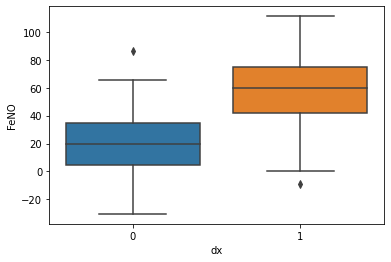
sns.boxplot( x=df["dx"], y=df["BD"] )
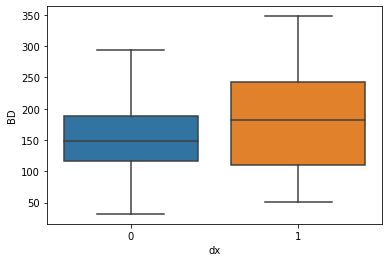
And then we can check correlations between the difference parameters. Are correlations are always stronger for the cases when asthma is present, and less significant when disease is absent.

sns.lmplot(x="FEV1", y="FeNO", data=df, fit_reg=True, hue='dx', legend=True)
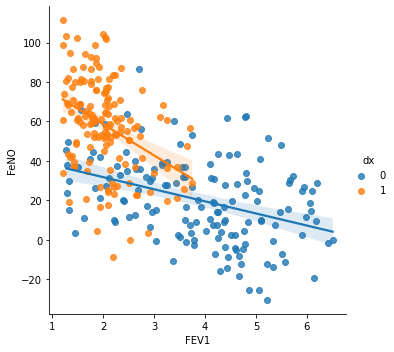
We see a stronger correlation between FEV1 and FeNO when disease is presence, and this correlation is negative (seen by the negative slope), which means that for higher values of FeNO we will find lower values of FEV1.

sns.lmplot(x="FEV1", y="BD", data=df, fit_reg=True, hue='dx', legend=True)
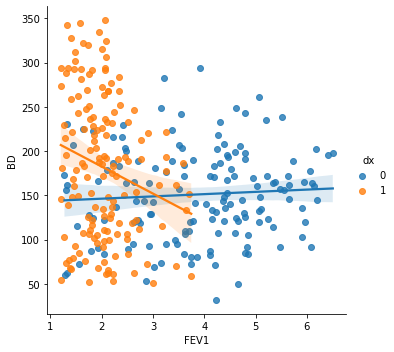
When checking the correlation between FEV1 and BD, we found that a negative correlation is seen when asthma diagnosis is presence. This way, lower values of FEV1 are associated with higher broncho dilation values.

sns.lmplot(x="FeNO", y="BD", data=df, fit_reg=True, hue='dx', legend=True)
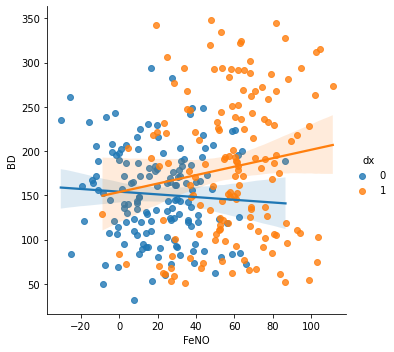
Lastly, the correlation between FeNO and BD shows that higher values of FeNO are associated with higher values of BD when asthma is present (positive correlation).

Splitting data into train and test Data sets:

We will use 80% of our data to build the model, and the remaining 20% to test the model. But first, we will create our X and y variables, where X represents the dataset with the predictors, and y an array of values with the outcome.

#Creating X and y:
X = df.drop('dx', axis=1)
y = df['dx']
#Data split into train and test:
X_train, X_test, y_train, y_test = train_test_split(X, y, test_size=0.20)

Build and evaluate the model:

#Fit the model:
logisticregression = LogisticRegression().fit(X_train, y_train)
#Evaluate the model:
print("training set score: %f" % logisticregression.score(X_train, y_train))print("test set score: %f" % logisticregression.score(X_test, y_test))

As we can see, our model performed slightly better on the training set, which may indicate we are over-fitting. Fortunately, we can use the C value to adjust the model and try to find a best model that weights the compromise between model complexity, over-fitting and under-fitting.

Lets see what happens if we set C=100:

#C=100
logisticregression100 = LogisticRegression(C=100).fit(X_train, y_train)
print("training set score: %f" % logisticregression100.score(X_train, y_train))
print("test set score: %f" % 
logisticregression100.score(X_test, y_test))
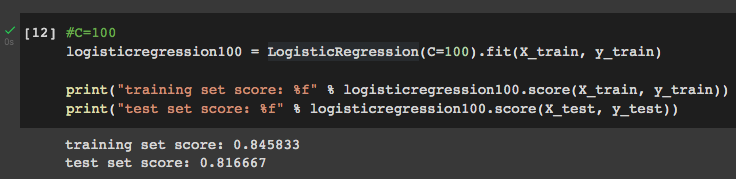
Setting C=100 has a small effect on training set score, with no effect on test set score, which means that it does not improve the model.

Setting C=0.01:

#C=0.01
logisticregression001 = LogisticRegression(C=0.01).fit(X_train, y_train)
print("training set score: %f" % logisticregression001.score(X_train, y_train))
print("test set score: %f" % 
logisticregression001.score(X_test, y_test))
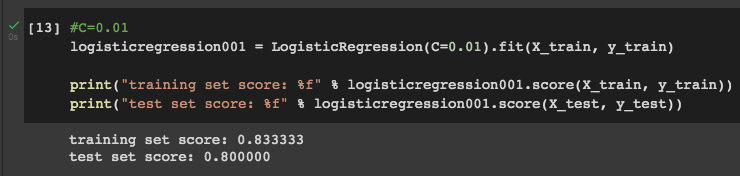
Setting C=0.01 decreases both training set score and test set score, which means that it is not a good value for this parameter.

Finding the best C value:

To find the best C value we should use a more sophisticated approach than trial and error. One way to do it is by plotting several accuracy score at different C values for both training and test sets.

training_accuracy = []
test_accuracy = []
# try c values from 0.001 to 100:
c_settings = np.arange(0.001, 100, 0.1)
for i in c_settings:
    # build the model
    clf = LogisticRegression(C=i)
    clf.fit(X_train, y_train)
    # record training set accuracy
    training_accuracy.append(clf.score(X_train, y_train))
    # record generalization accuracy
    test_accuracy.append(clf.score(X_test, y_test))
plt.plot(c_settings, training_accuracy, label="training accuracy")
plt.plot(c_settings, test_accuracy, label="test accuracy")
plt.legend()
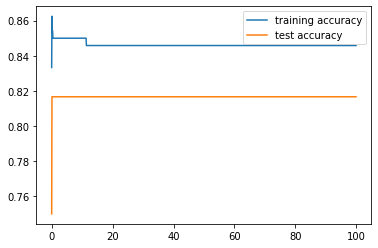
In the plot we can see that training and test accuracy values come closer after approximately a C value of 10. It is not entirely clear in this plot, so we can plot a smaller interval:
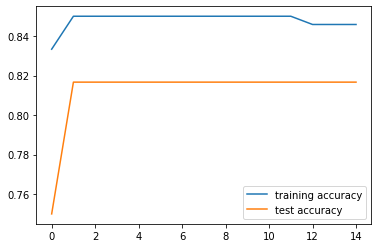
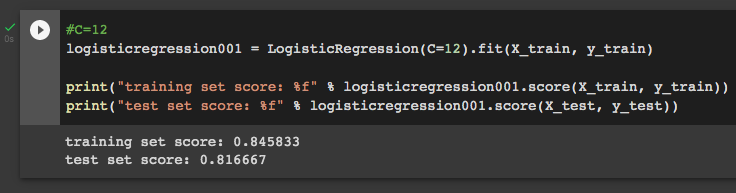
Now it is easy to see that at C=12 training and test accuracy values are closer, which means this is our optimal C value. We can check it:
Build a visualisation for the model:

Lastly, we can visualise our model performance by build a graph with the decision regions. For doing that, we need our DataFrame to be in csv format:

df.to_csv('data.csv', index = False)
data = pd.read_csv('data.csv')

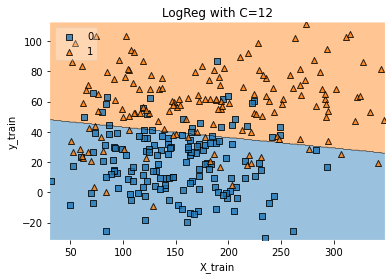
Then we build a function for the graph using two main variables (we know we will use FEV1 and FeNO, once BD has greater class overlap):

def logisticReg_comparison(data,c):
    x = data[['FEV1','FeNO',]].values
    y = data['dx'].astype(int).values
    LogReg = LogisticRegression(C=c)
    LogReg.fit(x,y)
    print(LogReg.score(x,y))
    #Plot decision region:
    plot_decision_regions(x,y, clf=LogReg, legend=2)
    #Adding axes annotations:
    plt.xlabel('X_train')
    plt.ylabel('y_train')
    plt.title('LogReg with C='+str(c))
    plt.show()
logisticReg_comparison(data,12)

Thank you for reading! Let me know if you have corrections or suggestions and don’t forget to subscribe to receive notifications about my future publications.

If: you liked this article, don’t forget to follow me and thus receive all updates about new publications.

Else If: you want to read more, you can subscribe to Medium membership with my referral link. It will not cost you more but will pay me for a coffee.

Else: Thank you!

Machine Learning
Data Science
Artificial Intelligence
Data Analysis
Programming
Recommended from ReadMedium