
A useful guide to API testing using Insomnia
A handy testing tool for API development with auto random test data, request chaining and test automation

The use of REST APIs is ubiquitous. Most mobile apps and web portals interact with backend services by REST APIs nowadays. As a software engineer, using the right tool to test APIs is vital to high productivity. While Postman has been a popular tool for many years, Insomnia is an emerging popular alternative if you are looking for a lightweight and fast tool.
Insomnia is a free tool available for Windows, MacOS as well as Linux. It comes with a simple user interface for you to send API requests and examine responses. In spite of being a lightweight tool, it provides fancy features such as fake data generation, request chaining and test automation that is not only developer friendly but also massively boost the productivity.
In this article, let me show you how to use Insomnia to speed up your development with REST APIs. I will demonstrate the usage using Platzi Fake Store API.
A Quick Demo
Insomnia is easy to install. Either visit this link to download the installer, or install it via package manager such as brew on MacOS.
Let me show you a quick demo by sending an API request to get all users on a fake store API.
Once you have launched insomnia, you will see a landing page similar to the screenshot below. Create a new API document by clicking “+” icon next to “Documents”

The idea is to have API contract prior to the testing but we can still go straight to the testing without API doc by selecting “DEBUG” on the screen.

Create a new API request with this URL. Click “Send”, response will be displayed on the right panel.
[GET] https://api.escuelajs.co/api/v1/users

The GUI design is intuitive and easy to use. Information is well organized into 3 main panels — API list, Request and Response:

Construct requests using environment variables
Software development is normally done in isolated environments. For example, development environment, environment for integration test and production environment. Using environment variables allows us to define a single API request for the testing on different environments.
Click on the gear icon next to “Base Environment”, you can define a new sub environment say “Dev” and create variables in JSON format. The example below defines the base url.
Variables can be defined in Base Environment as well in case you have any variables that are commonly shared by all sub environments.

Then, apply the variable to the URL. Double parentheses {{<variable name>}} tells Insomnia that it is the value from an environment variable.
[GET] {{baseUrl}}/api/v1/usersAlternatively, shortcut key Control + Space will shows you a list of variables

What’s more, variables can refer to other variables. userEndpoint variable is based on another variable baseUrl

Now, adopt userEndpoint variable for the API request

Generate random values using faker plugin
The magical shortcut key Control + Space is not just for getting environment variables. It can be a function call such as getting the current timestamp and even generation of random test data.
The function call can be supported by plugins which are built by developers in the community.
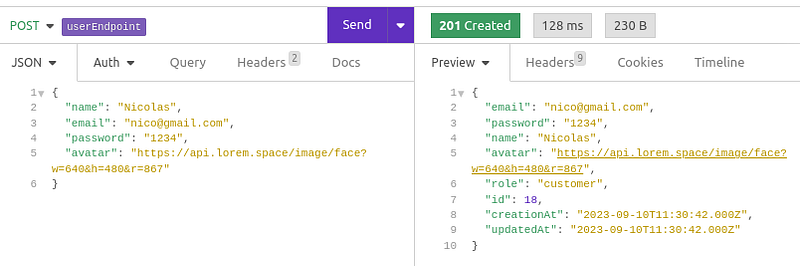
For instance, the same user endpoint supports user creation using the POST method. The request body is a JSON with name, email, password, etc.
[POST] {{baseUrl}}/api/v1/users
{
  … user info …
}
It is better if we can generate fake testing data automatically instead of hardcoding the values or spending time to come up with fake data manually.
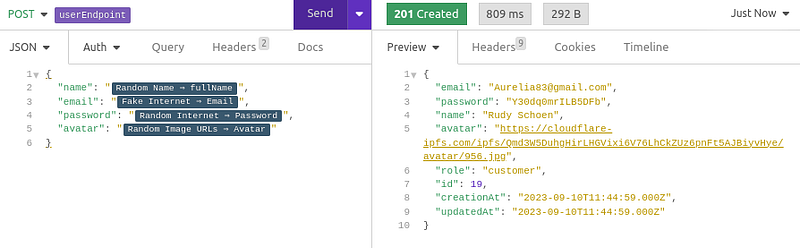
Random data generation plugin perfectly fits the requirement. Go to Preferences → Plugins and install a plugin called insomnia-plugin-fake

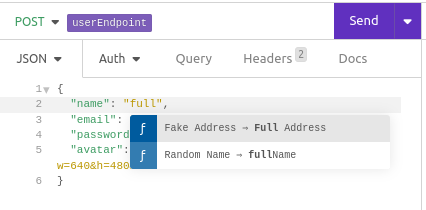
Press Control + Space shortcut and a list of available variables and functions is displayed. It automatically filters the list as you type.
Replace the rest fields with the functions for the fake data generation.
Chain up API requests
For some use cases, API request is constructed based on data from another API request.
When we create a new user and email & password are randomly generated, we need to store the data in order to test the authenticate endpoint.
To do so, let’s define a variable email and press Control + Space to get a function called “Response → Body Attribute”. It is to extract a data field from a response body.

After selecting the function, you will see something like this:
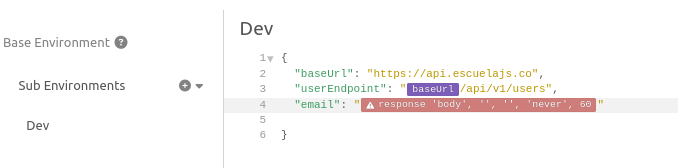
Click on it and a popup dialogue will be displayed for you to select the corresponding request. Use JSON path selector $.email to extract email from the JSON response body of new user creation.
Insomnia will then get the data field from the most recent response from response history.

Put the variables into the JSON body and submit for authentication. The API will return access token and refresh token if authentication is successful.
[POST] {{baseUrl}}/api/v1/auth/login
The request chaining can be applied to authenticate requests prior to requests to protected APIs. In other words, Insomnia is able to automatically obtain an access token for you behind the scene.
Define a new environment variable accessToken which extracts value from the response of authenticate request. Say, the access token expires in 10 minutes. We set the trigger behavior with 10 minute expiration such that authenticate request is sent again if the response is expired.

Assign the access token to the bearer token of the user profile retrieval API request. A positive response is received with user profile information.
[GET] {{baseUrl}}/api/v1/auth/profile
Header:
  Authorization: Bearer <access token>
Automate testing for multiple APIs
Whenever a new feature is released, a set of API requests are tested repeatedly as the regression. Insomnia supports semi-automation by running a set of pre-defined API requests and asserting the responses.
Let’s define a test suite for user creation with the following 3 APIs:
- Create new user
- Authenticate (require email and password from the new user creation API)
- Retrieve user profile (require access token from the authenticate API)
First of all, switch mode from “DEBUG” to “TEST”

Create a new test suite with all the 3 APIs. As you can see in the screenshot, the test is actually implemented using javascript and the assertion relies on chaijs library. So far, the assertion simply verifies the response status.
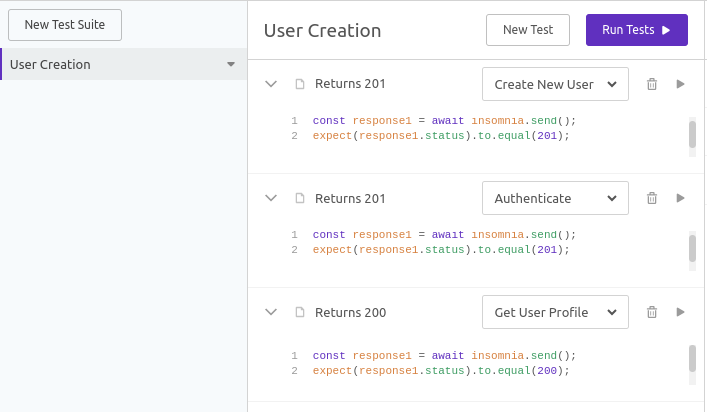
Tests can be executed individually for each API by pressing the arrow button or run all the tests in sequence by pressing the “Run Tests” button. A simple test result will be shown with response time.

Final Thoughts
Insomnia is a handy tool for API testing, supporting simple API requests, environment variables, request chaining and powerful plugins like random fake test data generation.
Honestly, it is not better than Postman in terms of functionality. Postman supports more features such as response data visualization and automation with test data from CSV files. However, Insomnia is a good choice as it provides most common functions good enough for software engineer’s day-to-day development work.
Also, it is definitely your favourite tool if you are looking for a simple and lightweight tool in a minimalist style.


