

A Simple Way to Download Financial Data from Investing.com in Python
Using the investpy library
I have recently come across another interesting source of financial data — Investing.com. In short, it is a financial platform and news website. Actually, Wikipedia names it as “one of the top three global financial websites in the world”. After poking around for a bit, I found that there is a handy Python library — investpy — which allows us to easily download most of the information available there.
In the library’s GitHub repository, we can read that the website offers an impressive trove of recent and historical data about various asset classes. We can access information about:
- 39952 stocks,
- 82221 funds,
- 11403 ETFs,
- 2029 currency crosses,
- 7797 indices,
- 688 bonds,
- 66 commodities,
- 250 certificates,
- 4697 cryptocurrencies.
Wow, that is quite a lot. And all of that is available for free. In this article, I will briefly describe what kind of data we can download and how to do it.
Setup
For this article, we just need to import a single library —investpy.
import investpy as invDownloading data using investpy
To provide an overview of the library’s capabilities, we will download data about different asset classes.
Stocks data
We begin by downloading an overview of stocks from the United States.
The overview contains all the (close to) real-time data available for the main stocks from a given country.
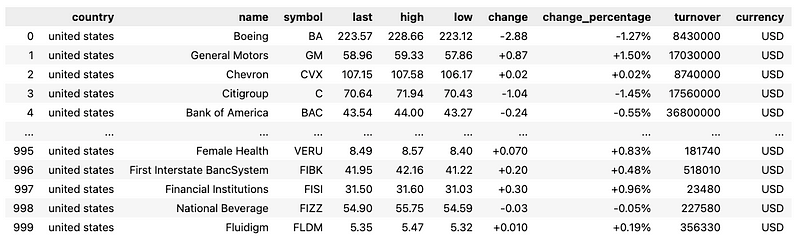
Now, let’s proceed to downloading information about a specific stock. We will use Apple as an example. First, we download information about the company’s profile.
In return, we obtain a link to the company’s profile on Investing.com and a description of what the company does.
{'url': 'https://www.investing.com/equities/apple-computer-inc-company-profile', 'desc': 'Apple Inc. designs, manufactures and markets smartphones, personal computers, tablets, wearables and accessories, and sells a variety of related services. The Company’s products include iPhone, Mac, iPad, and Wearables, Home and Accessories. iPhone is the Company’s line of smartphones based on its iOS operating system. Mac is the Company’s line of personal computers based on its macOS operating system. iPad is the Company’s line of multi-purpose tablets based on its iPadOS operating system. Wearables, Home and Accessories includes AirPods, Apple TV, Apple Watch, Beats products, HomePod, iPod touch and other Apple-branded and third-party accessories. AirPods are the Company’s wireless headphones that interact with Siri. Apple Watch is the Company’s line of smart watches. Its services include Advertising, AppleCare, Cloud Services, Digital Content and Payment Services. Its customers are primarily in the consumer, small and mid-sized business, education, enterprise and government markets.'}We can also quite easily obtain information about financial summaries, for example, income statements. Below, we download the last four quarterly income statements.
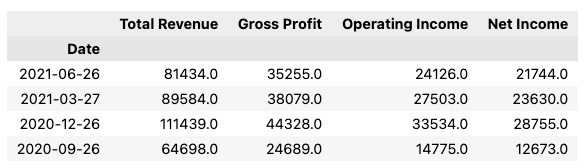
We can also use the same function to download cash flow statements and balance sheets. We just need to provide a different summary_type argument.
The next piece of information we can get is general stock information, which contains a summary with useful data such as today’s and last year’s price range, earnings per share, market cap, dividend, P/E ratio, 1-year percentage change and the date of the next earnings publication.
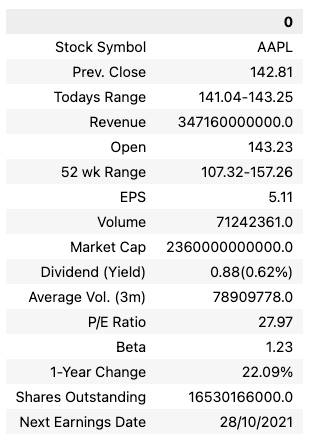
Now it is time to proceed to the part that is most probably most interesting for people searching for financial data, that is, the prices. The easiest way to get the prices is to use the get_stock_historical_data. We can use it as follows.
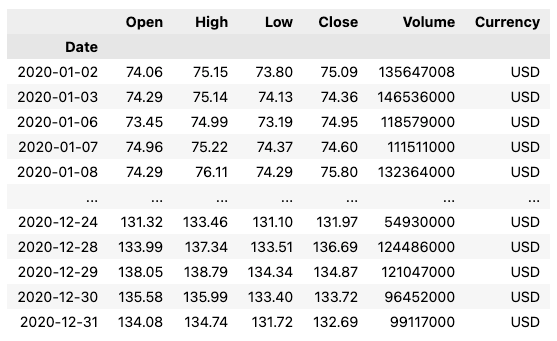
It is quite important to point out that the author of the library states that only by using the search_quotes function we will have a 1:1 alignment with the data presented on Investing.com. To do so, we have to first use the search_quotes to find the asset we are interested in.
The returned object is of class SearchObj. By printing it, we can see the following information.
{"id_": 6408, "name": "Apple Inc", "symbol": "AAPL", "country": "united states", "tag": "/equities/apple-computer-inc", "pair_type": "stocks", "exchange": "NASDAQ"}You can inspect the Notebook on GitHub to see an example of browsing through more objects of SearchObj class while working with crypto data. For brevity’s sake, we do not include that example in the article.
Then, we can use the object’s retrieve_historical_data method to download the same data as requested before.
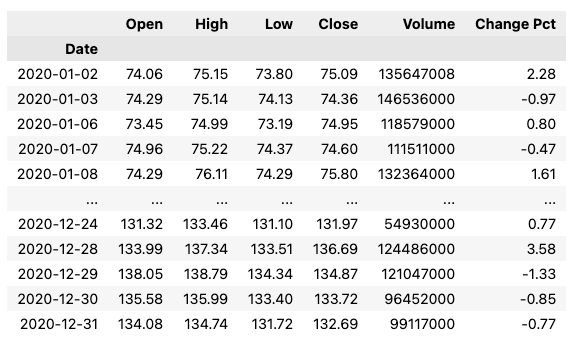
The data we obtained using both approaches align nicely. We can also use the retrieve_recent_data method to download last month’s prices.
Lastly, while we have our SearchObj object, we can use it to get some more data. We can quickly recover a predefined set of most popular technical indicators, together with their buy/sell/neutral recommendation. Please bear in mind that this information is by no means financial advice!
aapl.retrieve_technical_indicators(interval="daily")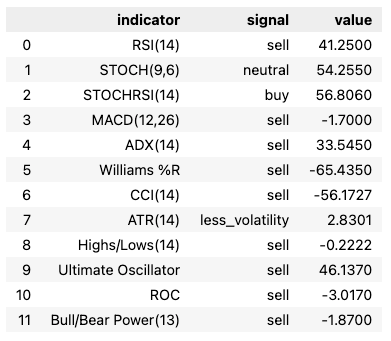
We can also download the same indicators on different granularity, for example, weekly. We just need to change the interval argument accordingly.
Bond data
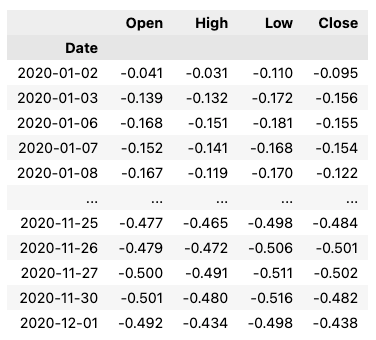
Below you can find a quick example of how to download historical price data of a Dutch 10-year bond.
Economic calendar
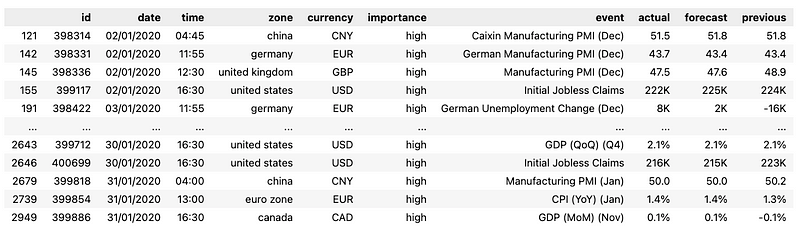
Lastly, we can use investpy to download Investing.com’s economic calendar, containing the most important events happening in various countries, together with some additional information such as the event’s exact time, location, expected importance.
inv.economic_calendar()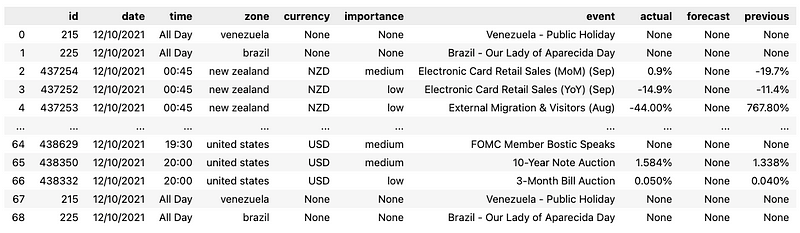
Using the default settings, we downloaded the calendar for the current date. In the downloaded calendar, we can see some public holidays, information about bond auctions, etc.
We can also download the information from any range. Below, we download the calendar for 2020 and filter out only events with high importance.
Takeaways
- Investing.com offers a treasure trove of financial data, available for free,
investpyis a handy library allowing us to download most of the data available on the website,- aside from prices, we can download information about listed companies, their financial statements, short summaries of their business, the global economic calendar, and much more.
You can find the code used for this article on my GitHub. Also, any constructive feedback is welcome. You can reach out to me on Twitter or in the comments.
Liked the article? Become a Medium member to continue learning by reading without limits. If you use this link to become a member, you will support me at no extra cost to you. Thanks in advance and see you around!
You might also be interested in one of the following:
References
- investpy — Financial Data Extraction from Investing.com with Python developed by Alvaro Bartolome del Canto
- https://github.com/alvarobartt/investpy
- https://investpy.readthedocs.io/
- data used for this tutorial article was obtained from Investing.com


