
A Simple Fix Enhances Security on Your Telegram App
A simple tip that beefs up security on my favorite social media app
There will always be war, and there will always be a need for defense. Societies that don’t prepare for war don’t exist for long.
Dylan Combellick
Social media apps like WhatsApp, Telegram, and others are indispensable for private and business communications.
They have become so embedded as parts of our daily lives that the present generation can’t comprehend how their ancestors managed to carry on with life in past pre-social media days.
Every gadget and app has its pluses and minuses.
Improperly used, social media apps can become double-edged swords.
Paying attention to security issues as they affect social media and other apps is one measure that comes foremost.
Malevolent actors are forever designing new ways to steal your online identity and cyber assets to defraud or harm you. Your best modus operandi is to stay one step ahead of them as best as possible.
Security starts with taking the basic first security precautions.
Online technology magazine, Techcrunch+, reported that the popular messaging app Telegram can leak your IP address if you simply (unknowingly) add a hacker to your contacts and accept their Telegram voice calls.
Leakage of your IP address can compromise your digital security and identity in several ways.
- Once a hacker gets hold of your IP address, he can compromise your device and gain unauthorized access to your network.
- Also, with knowledge of your IP address, a hacker can take over your device and steal your invaluable data.
As explained in the TechCrunch+ article, “Telegram focuses on security and privacy, however, in order to stay safe you need to be aware of the nuances of how the messenger’s voice calls work.”
“An unprepared person can easily reveal his IP address to his interlocutor if he does not know about them,” Simonov said.
By default, Telegram leaks a user’s IP address during a call. This default setting uses a peer-to-peer connection between callers “for better quality and reduced latency,”
To be forewarned is to be forearmed.
Telegram is my favorite social media messaging app. So, I immediately proceeded to correct its potential hacking loophole on my new and old Android devices
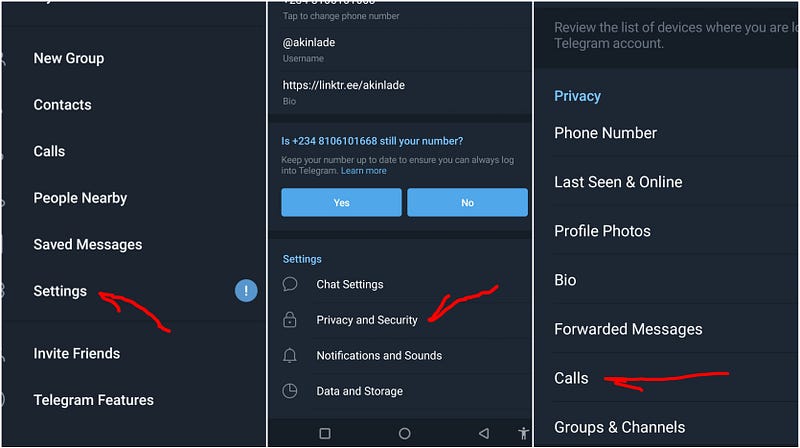
The aforementioned article explained how to block this security and potential hacking loophole. Sparing you with the details, these are the steps I took to correct this loophole on my Android devices.
1. Start the Telegram app and click on Settings.
2. Click on Privacy and Security,
3. Click on Calls.
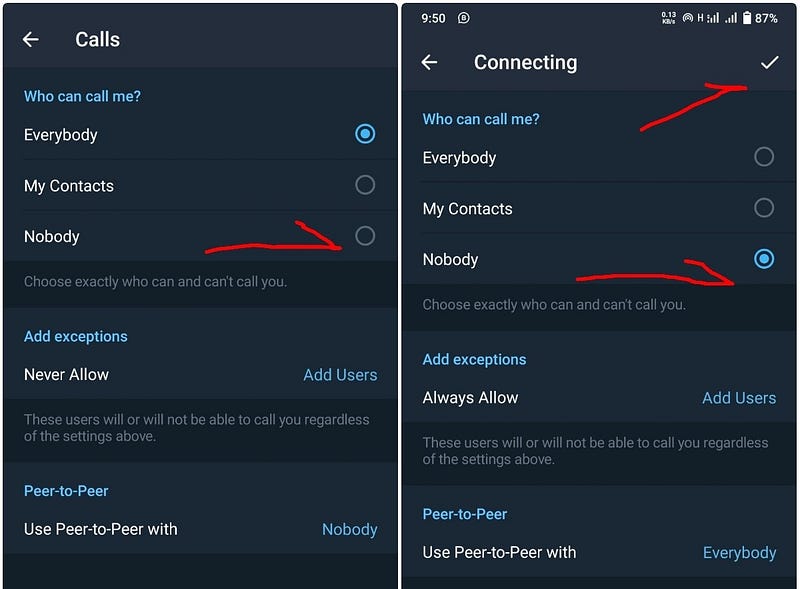
4. Click on Peer to peer
5. Check the Nobody option box
6. Click on the check mark at the top right-hand side of the box to apply your new settings.
7. Done
Staying one move ahead of sinister cyber actors helps to guarantee your privacy and security online and on your social media apps.
Follow the steps above to further hack-proof your Telegram app.
Thanks for reading.
As par Medium’s algorithm, less than 1% of my followers see my stories. If you enjoy this piece, support my writing by chipping in to buy me a Medium subscription. Click here.

Subscribe to Muses2Muse for my weekly free Substacks.