avatarHardFreedomCom

Free AI web copilot to create summaries, insights and extended knowledge, download it at here

1524

Abstract

6AkL-iXGRWfwL6LJ6LQ.png"><figcaption>author’s photo</figcaption></figure><p id="fd2b">It is so easy to see today’s stats (I especially like the possibility to see day’s stats):</p><figure id="bc66"><img src="https://cdn-images-1.readmedium.com/v2/resize:fit:800/1*vN5peVI6mDp_7TmJTrOdlQ.png"><figcaption>author’s photo</figcaption></figure><p id="95b9">You can check how many people started to follow you every day:</p><figure id="da29"><img src="https://cdn-images-1.readmedium.com/v2/resize:fit:800/1*2HufRh54FqvOlJdT-0g3Qw.png"><figcaption>author’s photo</figcaption></figure><h2 id="f9f7">Darker Medium</h2><p id="7e01">I know many people who prefer black background and this free extension can change the background of Medium webpages to black in just one click (and reset white color whenever you wish):</p><figure id="b4fa"><img src="https://cdn-images-1.readmedium.com/v2/resize:fit:800/1*GzrszCGoa3Oz4EPrcoWSGA.png"><figcaption>author’s photo</figcaption></figure><h2 id="065f">Medium Enhanced Stats</h2><p id="f790"><a href="https://chrome.google.com/webstore/detail/medium-enhanced-stats/jnomnfoenpdinfkpaaigokicgcfkomjo/related?hl=en">Another stats related plugin</a> can make a photo of your stats, download it to a csv file:</p><figure id="3539"><img src="https://cdn-images-1.readmedium.com/v2/resize:fit:800/1*R7562wiTCIaiyWN4L_Spyw.png"><figcaption>author’s photo</figcaption></figure><p id="7500">Black dots show the dates when articles were published. Also, a column with a count of claps appears:</p><fig

Options

ure id="2ed8"><img src="https://cdn-images-1.readmedium.com/v2/resize:fit:800/1*70oSbvtalHojF8D-fxRTkQ.png"><figcaption>author’s photo</figcaption></figure><p id="c712">Download your stats to a csv file if you like to analyze:</p><figure id="04d8"><img src="https://cdn-images-1.readmedium.com/v2/resize:fit:800/1*aWo2PQpWJ0ZaaI9cxxNGSg.png"><figcaption></figcaption></figure><h2 id="51ad">Medium Code Highlighter</h2><p id="0617">Tutorial writers will find this one useful. Code in Medium looks quite boring with its grey coloring. If you are a professional programmer who is used to good IDEs, you will understand me. Medium Code Highlighter allows you to change the color of your code:</p><div id="3dec"><pre><span class="hljs-function"><span class="hljs-keyword">public</span> <span class="hljs-keyword">static</span> <span class="hljs-keyword">void</span> <span class="hljs-title">goodBoi</span>()</span>{ System.<span class="hljs-keyword">out</span>.println(<span class="hljs-string">"Hi, I em a big dog, I em a gud boi"</span>); }</pre></div><p id="b7cf">Choose from different themes:</p><figure id="032c"><img src="https://cdn-images-1.readmedium.com/v2/resize:fit:800/1*YhId6TlNHTnaBfwmlYzJtg.png"><figcaption>author’s photo</figcaption></figure><p id="218c">The links I provided will not work for Firefox users. If you prefer the Firefox browser, feel free to find cool extensions for Medium <a href="https://addons.mozilla.org/en-US/firefox/search/?platform=windows&amp;q=medium">here</a>.</p></article></body>

A Review of Different Chrome Plugins for Medium

Useful information for the Medium writers

Photo by Aziz Acharki on Unsplash

I must admit, Medium has a pleasant design, but being an active user I noticed a few things that could be improved. Instead of waiting for possible updates from the Medium team, I decided to browse the Chrome Web Store and test a few Chrome plugins that are valuable for Medium users.

I have downloaded and tested many different Chrome plugins that were developed for the Medium website. Here is a list of my favorites that might be useful to you too.

Better Medium Stats

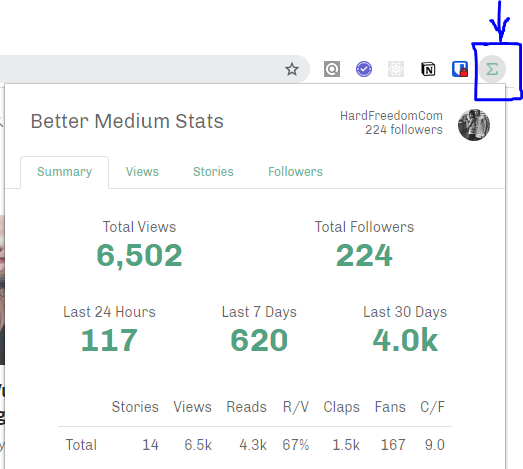
This plugin is free to use and provides stats in a very convenient manner. In just one click you can see: counts, views, reads, views/reads, claps, fans, claps/fans in 4 different timespans: year, month, week, date, hour, and so on:
author’s photo

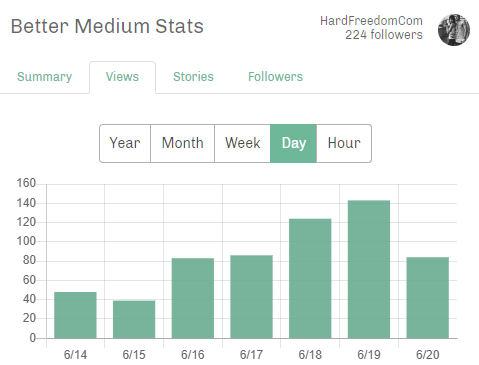
It is so easy to see today’s stats (I especially like the possibility to see day’s stats):
author’s photo

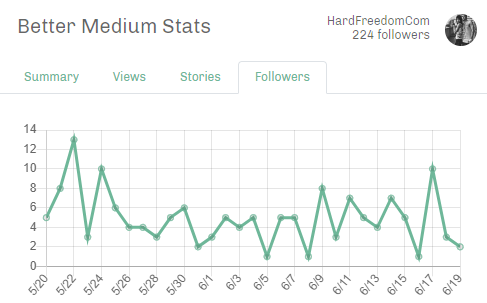
You can check how many people started to follow you every day:
author’s photo

Darker Medium

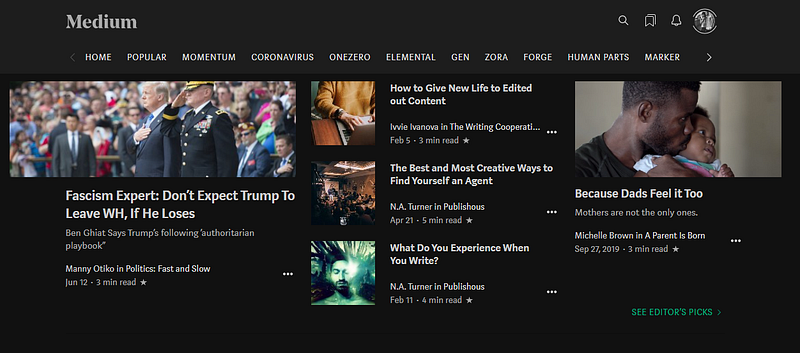
I know many people who prefer black background and this free extension can change the background of Medium webpages to black in just one click (and reset white color whenever you wish):
author’s photo

Medium Enhanced Stats

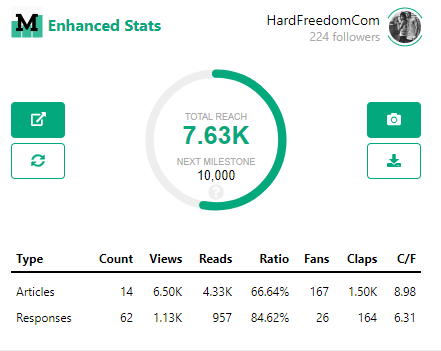
Another stats related plugin can make a photo of your stats, download it to a csv file:
author’s photo

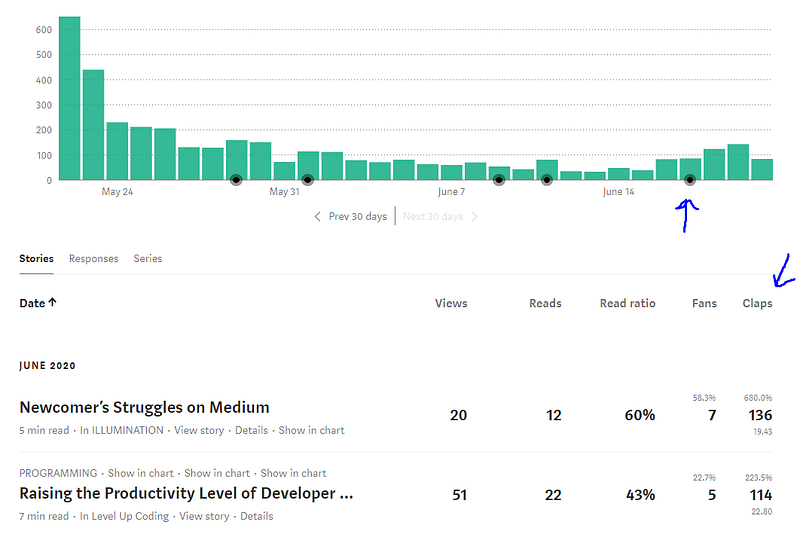
Black dots show the dates when articles were published. Also, a column with a count of claps appears:
author’s photo

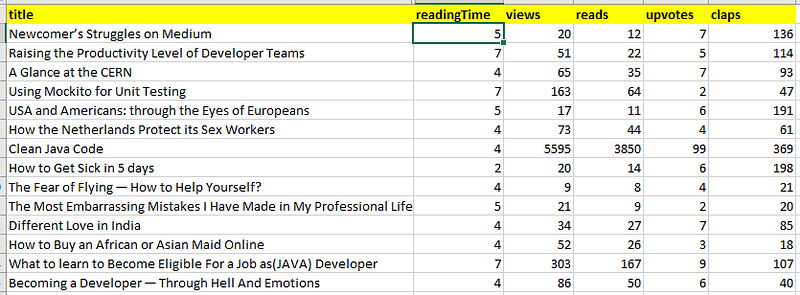
Download your stats to a csv file if you like to analyze:
Medium Code Highlighter

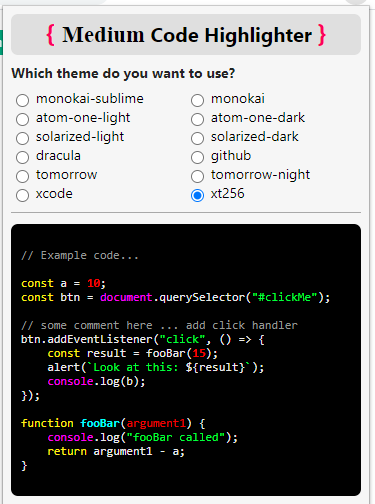
Tutorial writers will find this one useful. Code in Medium looks quite boring with its grey coloring. If you are a professional programmer who is used to good IDEs, you will understand me. Medium Code Highlighter allows you to change the color of your code:

public static void goodBoi(){
    System.out.println("Hi, I em a big dog, I em a gud boi");
}

Choose from different themes:
author’s photo

The links I provided will not work for Firefox users. If you prefer the Firefox browser, feel free to find cool extensions for Medium here.

Medium
Stats
Writing
Writer
Plugins
Recommended from ReadMedium