
A Quick Tutorial on Multi-Agent Workflows with AutoGen
Developing a Multi-Agent RAG for Open-Domain QA on Wikipedia

Multi-Agent Workflows Showing Promise
A growing number of projects have demonstrated the benefits of breaking down complex tasks into discrete, manageable units, each entrusted to a specialised agent. Having multiple specialist agents working together has delivered some (seemingly) impressive results.
One such project is ChatDev — a fully autonomous software development enterprise. Each agent assumes a role, ranging from high level positions such as CEO and CTO to lower level roles like that of a Programmer. For further details, you can read the paper and examine the GitHub repo.
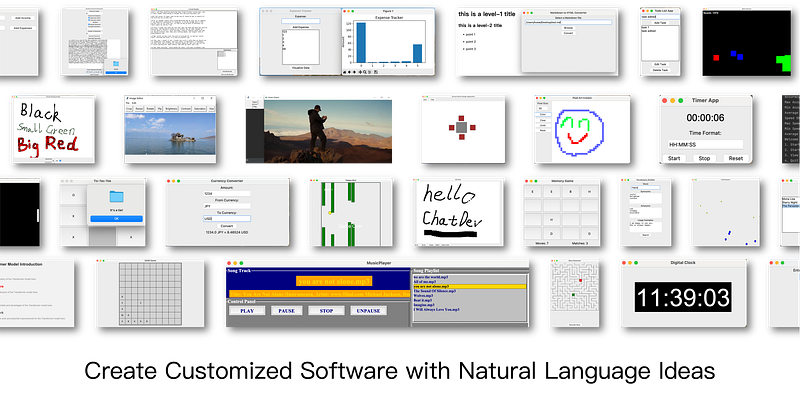
Microsoft have also been active in this area releasing AutoGen, an open-source framework for building multi-agent workflows. I put it to the test by building a multi-agent RAG workflow for open domain question answering across Wikipedia.
If you’re not familiar with RAG and wish to learn more, I have written an article on this topic.
Let’s dive in.
I have created an AI assistant specifically to help you digest this content, give it a try:
Orchestrating Multi-Agent Workflows
The AutoGen framework enables us to orchestrate multi-agent workflows. It provides some generic agent classes, and also a “Group Chat” context which facilitates cross-agent collaboration. Let’s briefly touch on the agent classes we will be using.
- User Proxy Agent: The user proxy agent can execute functions that we have defined in the python script.
- Assistant Agent: The assistant agents are powered by large language models giving them the ability to complete natural language tasks.
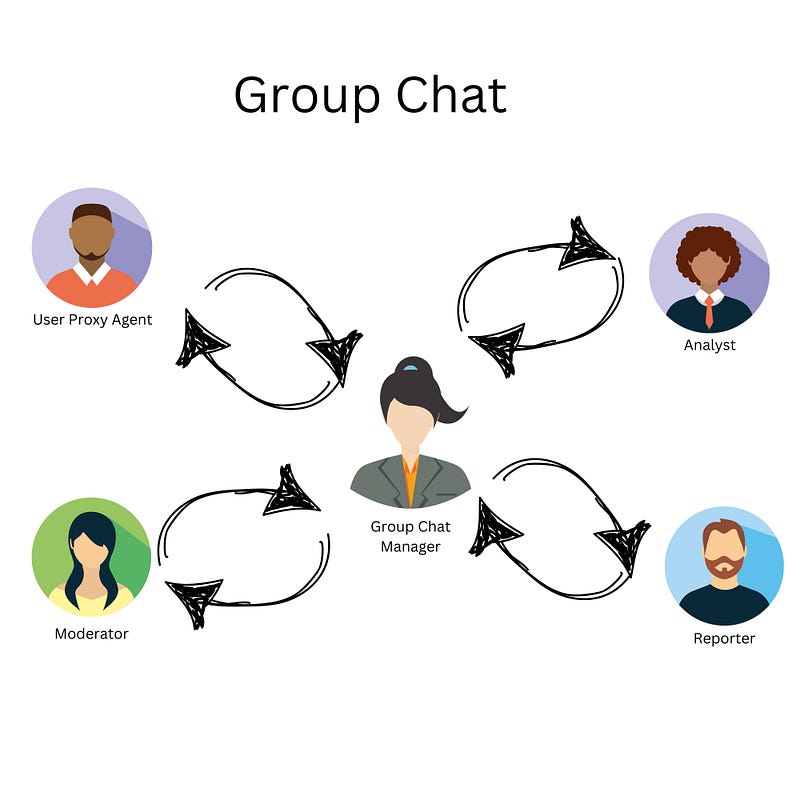
- Group Chat Manager: Delivers the initial query to the group chat and manages the interactions between all the agents. This is also powered by a large language model.
Note that this is just a brief explanation of these agent classes, they can do so much more than what I have covered. Read the AutoGen docs for more detail.
Defining Specialist Roles for the Agents
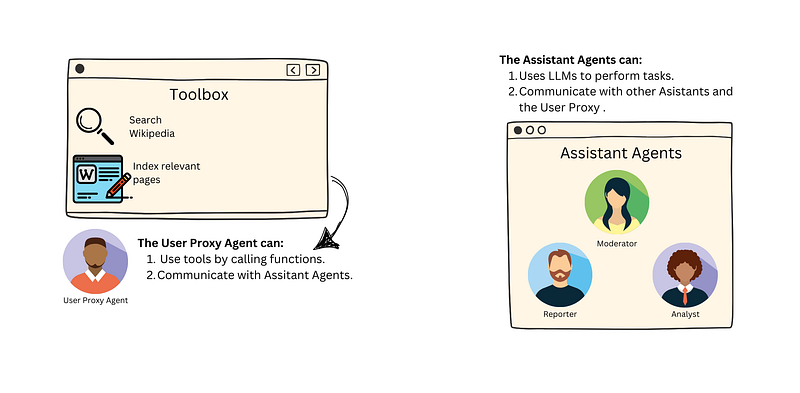
The beauty of these generic agent classes is that we can adjust their behaviour through prompting and/or setting parameters. We build the specialist agents using the generic classes as a base.
Let’s briefly cover the role of each specialist.
User Proxy
The user proxy is assigned a set of tools (which are just python functions I have defined). One for indexing relevant Wikipedia pages, and the other for performing semantic search across the index. I will provide more detail on these tools in the next section. The role of the user proxy agent is to execute the functions.
Analyst
The analyst’s role is to provide the user proxy with precise search term recommendations, facilitating effective tool use for task completion. These suggestions are aligned with the specific task requirements — based on the LLM’s interpretation of the task!
Reporter
The reporter generates a reply to the query, drawing from the context acquired through the execution of a semantic search across the index.
Moderator
The moderator performs a quality check on the reporter’s output. It issues feedback if the output fails to meet the standard set, otherwise it approves the output.
The agents collaborate within the Context of a group chat.
Defining the Tool Box
Tools are a key part of the workflow. They are simply python functions we define to perform tasks programmatically. In this case we have two tools:
1. Search & Index Wikipedia
This is used to search for relevant Wikipedia pages and index those that are found.
2. Query the Wikipedia Index
This tool performs a semantic search against the indexed Wikipedia pages.
Tackling Multi-Hop Questions
Both tools are (naively) adapted for multi-hop question answering. Essentially, they can answer questions that may require information from disparate (Wikipedia) sources.
For example:
“What is the capital of the country where the company that created the first commercially successful smartphone is headquartered?”
To answer this, one would need to:
Identify the company that created the first commercially successful smartphone (Apple Inc.).
Determine the country where this company is headquartered (United States).
Find the capital of that country (Washington, D.C.).
Function Calling
We define the agent toolbox via function calling. If you’re not familiar with this concept, I have covered it in detail in this article. It’s essential that the descriptions provided in the function calls are clear and concise, giving the agent the ability to understand when and how the tool should be used.
Please note, for conciseness, the tools’ code isn’t detailed within this article. You can find the complete source code in the linked GitHub repository at the article’s conclusion.
Putting it all Together
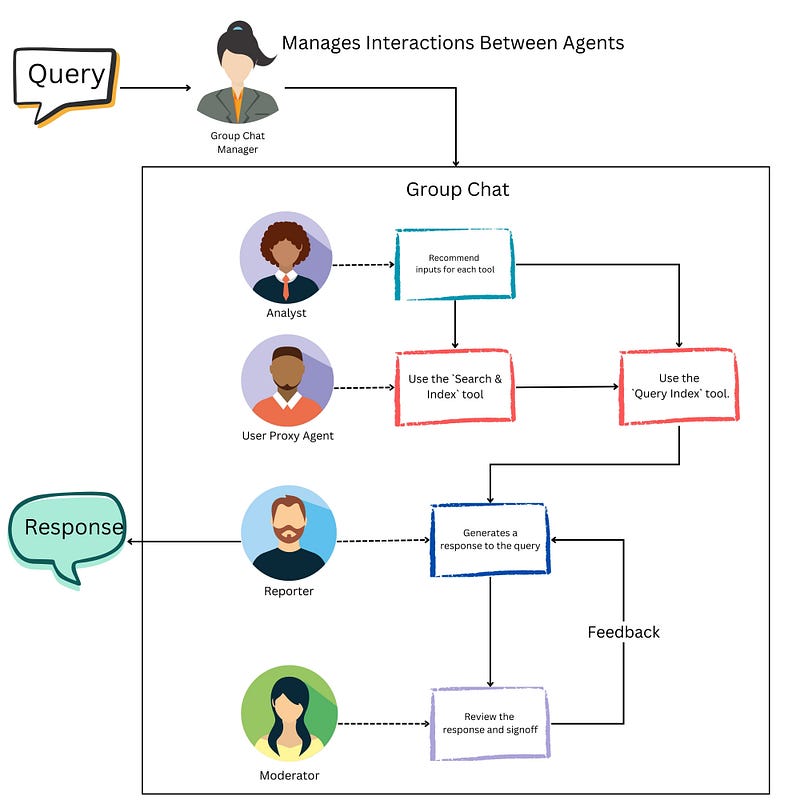
Now that all the components of the multi-agent workflow have been defined, we should allocate the tools to the user proxy agent, and then encorporate all our agents into the group chat with a defined manager.
Testing the Workflow
Let’s put the workflow to the test by asking some questions.
What were the key points raised in the 2023 AI safety Summit?
Have a look at the agent trace to see how they work together to answer the question. It seems like a reasonable response on the surface, and we are even provided with citations to check for ourselves!
It’s important that these open domain question answering workflows are able to tell you when they are unsure of an answer. Let’s look at how the agents handle a challenging four-hop question that they can not answer.
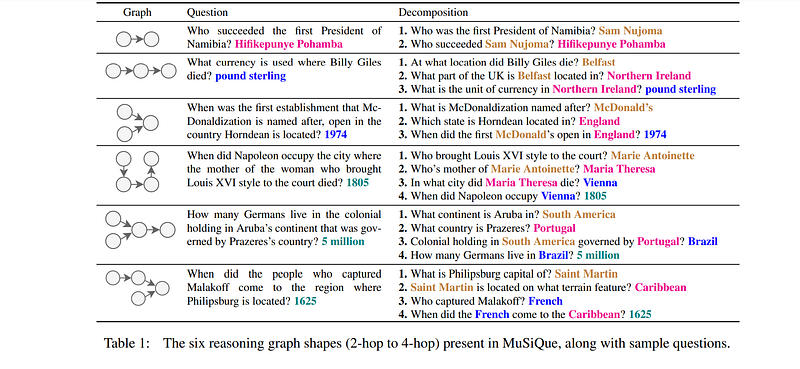
How many Germans live in the colonial holding in Aruba’s continent that was governed by Prazeres’s country?
Notice that in the agent trace for this question, the agents were not able to source the answer from Wikipedia. Instead of hallucinating, they provided a response stating why they couldn’t deliver an answer.
That’s pretty much it for the multi-agent workflow. I have linked to the GitHub repo containing the source code for the project for you to play with. You will require an open AI access token to use this.
For a live demonstration of the workflow with additional multi-hop questions, you can view my YouTube video.
My Honest Thoughts on AutoGen
The framework is exciting, and I found experimenting with it enjoyable. What it does differently is provide a way for agents to communicate with each other — something not easily available within other LLM frameworks like Langchain, Haystack, or even Llama Index — yet.
A word of caution, if you’re a newbie choosing to experiment with AutoGen, it will eat up OpenAI credits. To keep costs to a minimum, experiment with gpt-3.5-turbo and then switch over to gpt-4-turbo once you’re satisfied things are working as they should.
The framework doesn’t really work well with the open-source models. Not only is it a hassle to get them up and running locally, but they are not easy to prompt in the right direction. Even with the OpenAI models, getting the agents to execute tasks exactly how you specify requires a lot of prompt engineering. Honestly, I could only get the thing to work with gpt-4-turbo. Having said that, it appears to work ok for the Wikipedia search task at least.
There is a lot more to this framework that I haven’t discussed here and a lot of room for optimisation beyond what I have demonstrated in this quick tutorial.
To wrap up, my explorations with AutoGen have been a blend of success and learning curves. It’s a potent tool with much potential for growth, and I remain keenly interested in its future developments.
If you’re keen to enhance your skills in artificial intelligence, join the waiting list for my course, where I will guide you through the process of developing large language model powered applications.
If you’re seeking AI-transformation for your business, book a discovery call today.
For more insights on artificial intelligence, data science, and large language models you can subscribe to the YouTube channel.
A Message from AI Mind

Thanks for being a part of our community! Before you go:
- 👏 Clap for the story and follow the author 👉
- 📰 View more content in the AI Mind Publication
- 🧠 Improve your AI prompts effortlessly and FREE
- 🧰 Discover Intuitive AI Tools


