avatarAbdurrahim Yıldırım

Free AI web copilot to create summaries, insights and extended knowledge, download it at here

1116

Abstract

inux Containers LXC are steadily growing to become a key player.</p><figure id="86e2"><img src="https://cdn-images-1.readmedium.com/v2/resize:fit:800/1*EzKUtooN7bMnUl6HrAvNRQ.png"><figcaption></figcaption></figure><p id="336f">A Pod is a smallest and simplest unit in the Kubernetes that you create or deploy. Pod operates one level higher than the container. For example; an application pod contains separated containers like application containers, logging containers, monitoring containers. Each container has its standards and processes but all of them are working in a box called application Pod. You can read more information from <a href="https://kubernetes.io/docs/concepts/workloads/pods/pod-overview/">Kubernetes Documentation.</a></p><figure id="30fd"><img src="https://cdn-images-1.readmedium.com/v2/resize:fit:800/1*LiS6nvbWrAnOifX-RrEOyA.png"><figcaption></figcaption></figure><p id="4a41"><b>Pod Templates</b></p><p id="608c">Pod template is a definition file contains pod specifications that can be part of other objects like deployment, replicaset, daemonset, etc. Controller uses pod templates to cr

Options

eate an application pod. Pod template has four main objects that <a href="https://kubernetes.io/docs/reference/using-api/api-overview/#api-versioning">apiVersion</a>, kind, metadata, spec. I added a basic pod template that uses busybox image and runs the command “echo Hello Kubernetes!” then sleeps 3600 seconds.</p><p id="860c">Please check my personal blog to read more and question types.</p><div id="bd7a" class="link-block"> <a href="https://casesup.com/category/blog/kubernetes/certified-kubernetes-administrator-overview-of-pods"> <div> <div> <h2>Certified Kubernetes Administrator - Overview of Pods</h2> <div><h3>A pod is a group of one or more containers with shared resources that run on the same host. To accurately understand…</h3></div> <div><p>casesup.com</p></div> </div> <div> <div style="background-image: url(https://miro.readmedium.com/v2/resize:fit:320/0*aqlgL7JwEkHwQA1D)"></div> </div> </div> </a> </div></article></body>

Overview of Pods

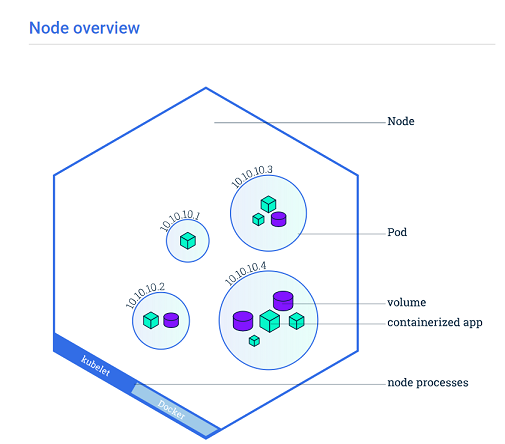
A pod is a group of one or more containers with shared resources that run on the same host. To accurately understand the concept, we need to talk about what is the container and how it works.

Containers are another form of virtualization. Virtualization solutions like Citrix XenServer, VMware vSphere, Microsoft Hyper-V, Red Hat KVM, etc. allow sharing a piece of hardware to multiple systems by a custom defined process named hypervisor. Containers aim to virtualize the Operating System to run the application by standardizing the process, keeping all dependencies together. Basically, container is a method to package an application that runs any platform.
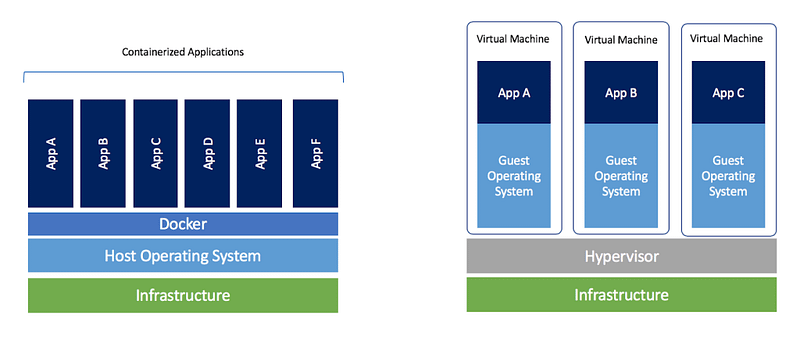
Docker still reigns with %83 of the container according to sysdig.com. But it was %99 in 2017. It seems that Apache Mesos, CoreOs RKT, Linux Containers LXC are steadily growing to become a key player.

A Pod is a smallest and simplest unit in the Kubernetes that you create or deploy. Pod operates one level higher than the container. For example; an application pod contains separated containers like application containers, logging containers, monitoring containers. Each container has its standards and processes but all of them are working in a box called application Pod. You can read more information from Kubernetes Documentation.
Pod Templates

Pod template is a definition file contains pod specifications that can be part of other objects like deployment, replicaset, daemonset, etc. Controller uses pod templates to create an application pod. Pod template has four main objects that apiVersion, kind, metadata, spec. I added a basic pod template that uses busybox image and runs the command “echo Hello Kubernetes!” then sleeps 3600 seconds.

Please check my personal blog to read more and question types.

Kubernetes
DevOps
Containers
Docker
Linux
Recommended from ReadMedium